MATLAB——patch绘制长方体(cuboid)+长方体平移+长方体旋转
文章目录围绕着中心点旋转代码效果围绕原点旋转代码效果区别其他方法围绕着中心点旋转代码新建一个脚本命名为:drawCuboid.mfunction [CuboidHandle, verts, facs] = drawCuboid(varargin)% Draw Cuboid% Draw a Cuboid using 8 rectangular faces. Places Cuboid...
·
围绕着中心点旋转
代码
-
新建一个脚本命名为:drawCuboid.m
function [CuboidHandle, verts, facs] = drawCuboid(varargin) % Draw Cuboid % Draw a Cuboid using 8 rectangular faces. Places Cuboid Into Current Figure % % Inputs (SL, CV, EA, colr, alph) % ---------------- % SL - [X;Y;Z] Length of Cuboid Side (SL - SideLength) % CV - [X;Y;Z] Center of volume % EA - [Yaw(Z-axis);Pitch(y-axis);Roll(x-axis)] Euler/Rotation angles [radians] % colr - Color of cuboid; string (ex. 'r','b','g') or vector [R G B] % alph - Alpha transparency value of cuboid % % Outputs (CuboidHandle, verts, facs) % ---------------- % CuboidHandle = Handle for Patch Object % verts = 3x8 XYZ Vertices % facs = 6x4 Order of faces % %% Number of inputs and assign defaults if not specified % Define Default Values SL = [1;1;1]; CV = [0;0;0]; EA = [0;0;0]; colr = [0.5 0.5 0.5]; alph = 0.5; switch nargin case 0 % All Inputs Empty Using Default Values case 1 SL = varargin{1}; case 2 SL = varargin{1}; CV = varargin{2}; case 3 SL = varargin{1}; CV = varargin{2}; EA = varargin{3}; case 4 SL = varargin{1}; CV = varargin{2}; EA = varargin{3}; colr = varargin{4}; case 5 SL = varargin{1}; CV = varargin{2}; EA = varargin{3}; colr = varargin{4}; alph = varargin{5}; otherwise error('Invalid number of inputs') end %% Form ZYX Rotation Matrix % Calculate Sines and Cosines c1 = cos(EA(1)); s1 = sin(EA(1)); c2 = cos(EA(2)); s2 = sin(EA(2)); c3 = cos(EA(3)); s3 = sin(EA(3)); % Calculate Matrix R = [c1*c2 -c2*s1 s2 c3*s1+c1*s2*s3 c1*c3-s1*s2*s3 -c2*s3 s1*s3-c1*c3*s2 c3*s1*s2+c1*s3 c2*c3]'; %% Create Vertices x = 0.5*SL(1)*[-1 1 1 -1 -1 1 1 -1]'; y = 0.5*SL(2)*[1 1 1 1 -1 -1 -1 -1]'; z = 0.5*SL(3)*[-1 -1 1 1 1 1 -1 -1]'; %% Create Faces facs = [1 2 3 4 5 6 7 8 4 3 6 5 3 2 7 6 2 1 8 7 1 4 5 8]; %% Rotate and Translate Vertices verts = zeros(3,8); for i = 1:8 verts(1:3,i) = R*[x(i);y(i);z(i)]+CV; end %% Draw Patch Object CuboidHandle = patch('Faces',facs,'Vertices',verts','FaceColor',colr,'FaceAlpha',alph); end -
新建另外一个脚本,输入:
drawCuboid([2;2;2],[2;2;2],[30/180*pi;0;0],'g',0.1)
drawCuboid([2;2;2],[2;2;2],[0;0;0],'b',0.1)
效果
下面两幅图中绿色立方体为原始立方体,紫色立方体为绕立方体中心顺时针旋转30°后的立方体。
图1 俯视图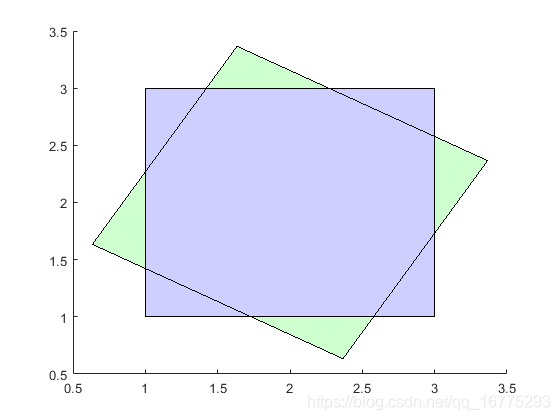
图2 旋转图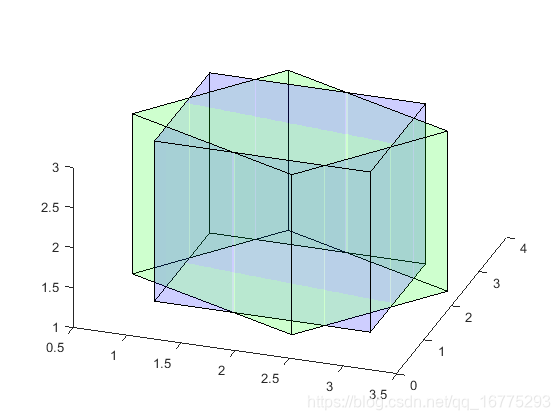
围绕原点旋转
代码
- 新建一个脚本命名为:drawCuboid.m
function [CuboidHandle, verts, facs] = drawCuboid(varargin) % Draw Cuboid % Draw a Cuboid using 8 rectangular faces. Places Cuboid Into Current Figure % % Inputs (SL, CV, EA, colr, alph) % ---------------- % SL - [X;Y;Z] Length of Cuboid Side (SL - SideLength) % CV - [X;Y;Z] Center of volume % EA - [Yaw(Z-axis);Pitch(y-axis);Roll(x-axis)] Euler/Rotation angles [radians] % colr - Color of cuboid; string (ex. 'r','b','g') or vector [R G B] % alph - Alpha transparency value of cuboid % % Outputs (CuboidHandle, verts, facs) % ---------------- % CuboidHandle = Handle for Patch Object % verts = 3x8 XYZ Vertices % facs = 6x4 Order of faces % %% Number of inputs and assign defaults if not specified % Define Default Values SL = [1;1;1]; CV = [0;0;0]; EA = [0;0;0]; colr = [0.5 0.5 0.5]; alph = 0.5; switch nargin case 0 % All Inputs Empty Using Default Values case 1 SL = varargin{1}; case 2 SL = varargin{1}; CV = varargin{2}; case 3 SL = varargin{1}; CV = varargin{2}; EA = varargin{3}; case 4 SL = varargin{1}; CV = varargin{2}; EA = varargin{3}; colr = varargin{4}; case 5 SL = varargin{1}; CV = varargin{2}; EA = varargin{3}; colr = varargin{4}; alph = varargin{5}; otherwise error('Invalid number of inputs') end %% Form ZYX Rotation Matrix % Calculate Sines and Cosines c1 = cos(EA(1)); s1 = sin(EA(1)); c2 = cos(EA(2)); s2 = sin(EA(2)); c3 = cos(EA(3)); s3 = sin(EA(3)); % Calculate Matrix R = [c1*c2 -c2*s1 s2 c3*s1+c1*s2*s3 c1*c3-s1*s2*s3 -c2*s3 s1*s3-c1*c3*s2 c3*s1*s2+c1*s3 c2*c3]'; %% Create Vertices x = 0.5*SL(1)*[-1 1 1 -1 -1 1 1 -1]'; y = 0.5*SL(2)*[1 1 1 1 -1 -1 -1 -1]'; z = 0.5*SL(3)*[-1 -1 1 1 1 1 -1 -1]'; %% Create Faces facs = [1 2 3 4 5 6 7 8 4 3 6 5 3 2 7 6 2 1 8 7 1 4 5 8]; %% Rotate and Translate Vertices verts = zeros(3,8); for i = 1:8 verts(1:3,i) = R*[x(i);y(i);z(i)]+R*CV; end %% Draw Patch Object CuboidHandle = patch('Faces',facs,'Vertices',verts','FaceColor',colr,'FaceAlpha',alph); end- 新建另外一个脚本,输入:
drawCuboid([2;2;2],[2;2;2],[30/180*pi;0;0],'g',0.1)
drawCuboid([2;2;2],[2;2;2],[0;0;0],'b',0.1)
效果
下面两幅图中绿色立方体为原始立方体,紫色立方体为原点(0,0,0),顺时针旋转30°后的立方体。
图1 俯视图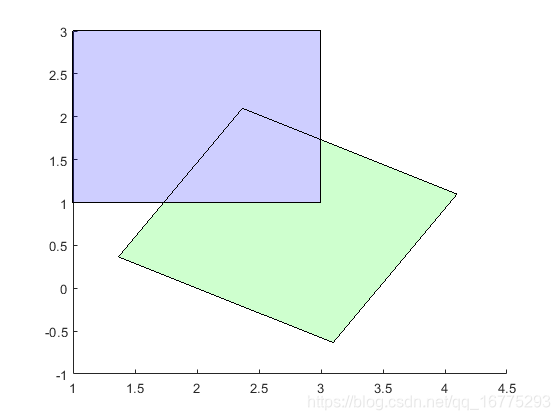
图2 旋转图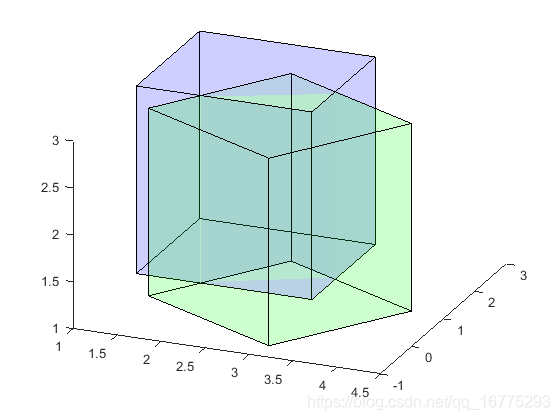
区别
绕立方体中心旋转时计算公式如下,其中R是旋转矩阵
	for i = 1:8
	    verts(1:3,i) = R*[x(i);y(i);z(i)]+CV;
	end
绕原点旋转时计算公式如下,其中R是旋转矩阵
	for i = 1:8
	    verts(1:3,i) = R*[x(i);y(i);z(i)]+R*CV;
	end
其他方法
还可以使用MATLAB提供的multicuboid函数画立方体,但是不太清楚如何实现平移、旋转等变换。详情请看资料multicuboid函数。

有“AI”的1024 = 2048,欢迎大家加入2048 AI社区
更多推荐

 15
15 0
0- 0


 已为社区贡献23条内容

所有评论(0)