列表table,将合计行进行单元格合并,element-ui
·
列表table,将合计行进行单元格合并
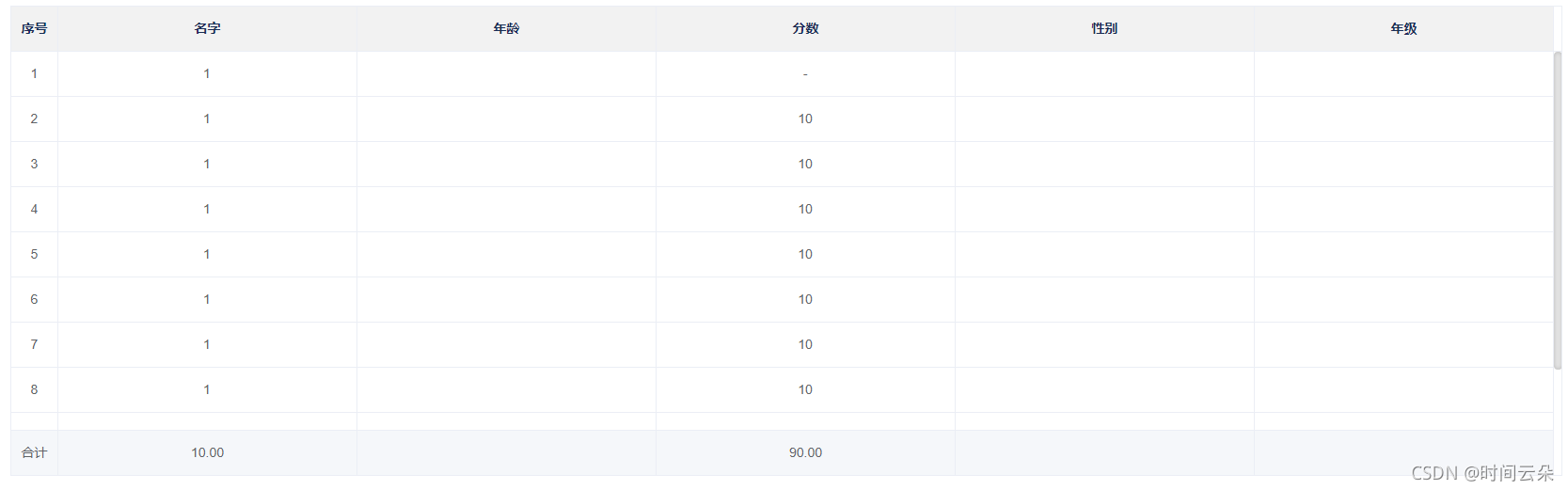
1.将列表进行合计操作
<el-table id="editAbleTrends" :data="tableData" ref="tableData" height="height" style="width: 100%;" :header-cell-style="{background:'rgb(242, 242, 242)'}" center border highlight-current-row  show-summary :summary-method="getSummaries" :key="'p'+pindex">
        <el-table-column type="index" label="序号" width="50">
        </el-table-column>
        <el-table-column prop="date1" label="名字" :show-overflow-tooltip="true">
        </el-table-column>
        <el-table-column prop="date2" label="年龄" :show-overflow-tooltip="true">
        </el-table-column>
        <el-table-column prop="address" label="分数" :show-overflow-tooltip="true">
        </el-table-column>
        <el-table-column prop="name1" label="性别" :show-overflow-tooltip="true">
        </el-table-column>
        <el-table-column prop="name2" label="年级" :show-overflow-tooltip="true">
</el-table>
  tableData:[
        {date1:1,address:"-"},
        {date1:1,address:10},
        {date1:1,address:10},
        {date1:1,address:10},
        {date1:1,address:10},
        {date1:1,address:10},
        {date1:1,address:10},
        {date1:1,address:10},
        {date1:1,address:10},
        {date1:1,address:10},
      ],
      height:500,//查询到的数据,通过改变这个值 解决elementUI table合计行初始页面不显示问题
      pindex:0,//保存编辑每条数据的时候,通过改变此值使表格数据更改
 methods: {
     // 自定义合计规则
    getSummaries(param) {
        const { columns, data } = param;
        const sums = [];
        columns.forEach((column, index) => {
          if (index === 0) {
            sums[index] = '合计';
            return;
          }
          console.log('index',index);
          const values = data.map(item => Number(item[column.property]));
          if (!values.every(value => isNaN(value))) {
            sums[index] = values.reduce((prev, curr) => {
              const value = Number(curr);
              if (!isNaN(value)) {
                return (Number(prev) + Number(curr) ).toFixed(2);
              } else {
                return Number(prev).toFixed(2);
              }
            }, 0);
            sums[index] += '';
          } else {
            sums[index] = '';
          }
        });
        //此处自定义合计分数更改,通过下面的getTableDataScore()方法
       if (
        this.activetabPaneName == "preliminary"
      ) {
        sums[3] = this.finalScore;
      } else {
        sums[3] = this.finalScore;
      }
        return sums;
      },
  },
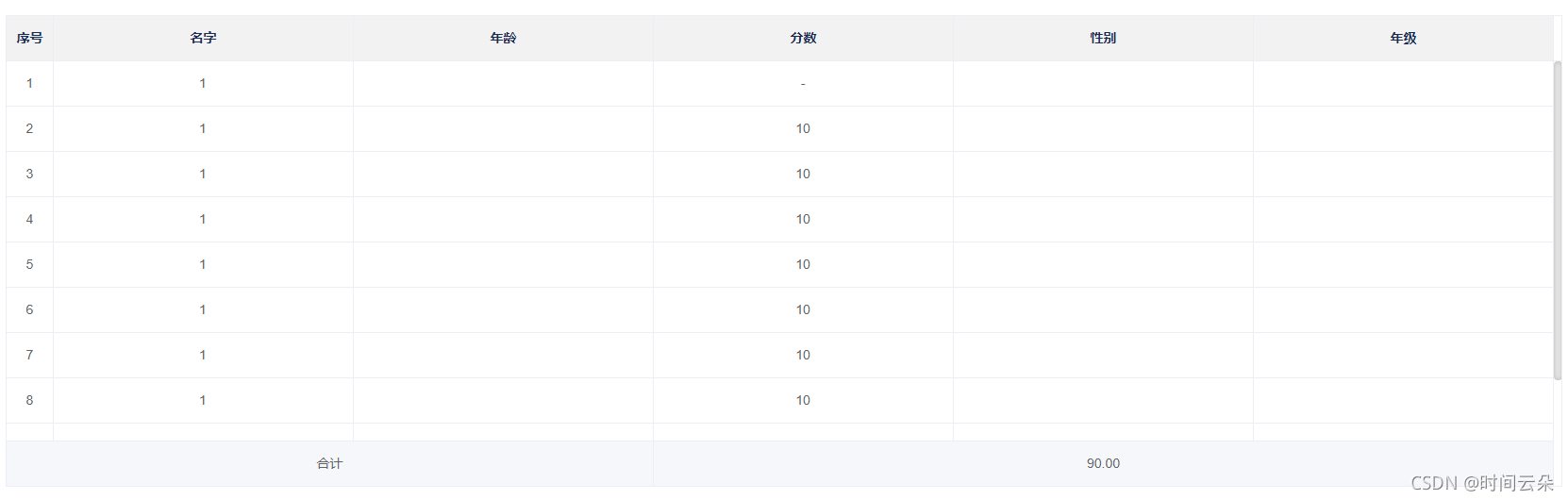
2.进行合计行-------单元格合并
 // 监控data中的数据变化
  watch: {
    tableDataList:{
        immediate:true,
        async handler(){
          //await this.$nextTick(); 根据实际选择延迟调用
          await this.$nextTick();
          const tables = document.querySelectorAll('#editAbleTrends .el-table__footer-wrapper tr>td');
          console.log('tables',tables);
          tables[0].colSpan=3;
          tables[0].style.textAlign='center'
          tables[1].style.display='none'
          tables[2].style.display='none'
          tables[3].colSpan=3;
          tables[3].style.textAlign='center'
          tables[4].style.display='none'
          tables[5].style.display='none'
       }
    }
 },
也可以写在方法里面
 async tableDataList() {
      await this.$nextTick();
        const tables = document.querySelectorAll(
          "#editAbleTrends .el-table__footer-wrapper tr>td"
        );
        console.log("tables", tables);
        tables[0].colSpan = 3;
        tables[0].style.textAlign = "center";
        tables[1].style.display = "none";
        tables[2].style.display = "none";
        tables[3].colSpan = 3;
        tables[3].style.textAlign = "center";
        tables[4].style.display = "none";
        tables[5].style.display = "none";

    },
3.获取平均数
    // 获取最后的平均分数
    getTableDataScore() {
      // 将列表里面的分数字段重新放在一个数组里面
      //
      const values = this.tableDataChange.map((item) =>Number(item.score));
      //  过滤掉NAN和0,重新赋值到另一个数组
      let value = values.filter((item) => !isNaN(item) && item);
      if (value.length > 0) {
        // 将数组里面的值全部相加,获得
        let data = value.reduce((prev, curr) => {
          return (Number(prev) + Number(curr)).toFixed(2);
        });
        this.finalScore = (data / value.length).toFixed(2);
      } else {
        this.finalScore = 0;
      }
      this.tableDataList();
    },
4.如果想要对分数进行编辑
// res.data代表接口返回的列表
this.tableData= res.data;
 this.tableData.forEach((item) => {
  item.state = "0";
});
//
let newV = { ...this.tableData};
let para2 = JSON.parse(JSON.stringify({ newV }));
var arr2 = Object.keys(para2.newV).map(function (i) {
  return para2.newV[i];
});
//para2就是一个全新的数组和this.tableData的数据一致
 //  解决elementUI table合计行初始页面不显示问题
this.height = 501;
<el-table-column v-else prop="score" label="分数" :show-overflow-tooltip="true">
        <template slot-scope="scope">
          <el-input v-if="status=='scope.row.state == '1'" v-model="scope.row.score"></el-input>
          <span v-else >{{scope.row.score}}</span>
        </template>
 </el-table-column>
<el-table-column label="操作" align="center" >
        <template slot-scope="scope">
          <el-button size="mini" type="text" v-if="scope.row.state == '1'" @click="handleReportingSave(scope.$index, scope.row)" icon="el-icon-check">保存
          </el-button>
          <el-button size="mini" type="text" v-if="scope.row.state != '1'" @click="handleReportingEdit(scope.$index, scope.row)" icon="el-icon-edit">编辑
          </el-button>
        </template>
</el-table-column>
// 项目上报对话框编辑
    handleReportingEdit(index) {
      this.pindex++;
      this.tableData[index].state = "1"; //点击之后显示保存按钮
    },
//项目上报对话框保存
handleReportingSave(index) {
  // let reg = /^\+?[1-9][0-9]*$/;
  let reg = /(^(\d|[1-9]\d)(\.\d{1,2})?$)|(^100$)/;
  let b =
    this.tableDataChange[index].score == "-"
      ? true
      : reg.test(this.tableDataChange[index].score);
  if (b == false) {
    this.$message({
      type: "error",
      message: "请输入一百以内的数字,可保留两位小数",
    });
  } else {
    this.tableDataChange[index].state = "0"; //点击之后显示编辑按钮
    console.log("dfksnzbvf", this.tableDataChange[index].state);
  }
  this.getTableDataScore();//分数改变,调次方法
  this.tableDataList();//这个是合并单元格的方法
  this.pindex++;//将表格刷新
},
// 保存
determinePreservation() {
  var num = this.tableDataChange.findIndex((n) => n.state == "1");
  if (num == -1) {
    // 这里添加保存接口
    console.log("啦啦我已经进行保存钱钱钱了");
    saveScore(this.tableData)
      .then((res) => {
        this.$message.success("保存成功");
      })
      .catch((err) => {});
    // 保存完对话框消失
  } else {
    this.$message({
      type: "error",
      message: "请将每条数据进行保存",
    });

有“AI”的1024 = 2048,欢迎大家加入2048 AI社区
更多推荐


 3
3 0
0- 0


 已为社区贡献2条内容

所有评论(0)