相机和雷达外参联合标定
内容: 关于雷达和相机外参联合标定的踩坑纪录。Author: 吴 坷。
内容: 关于雷达和相机外参联合标定的踩坑纪录。
Date: 2023/03/19
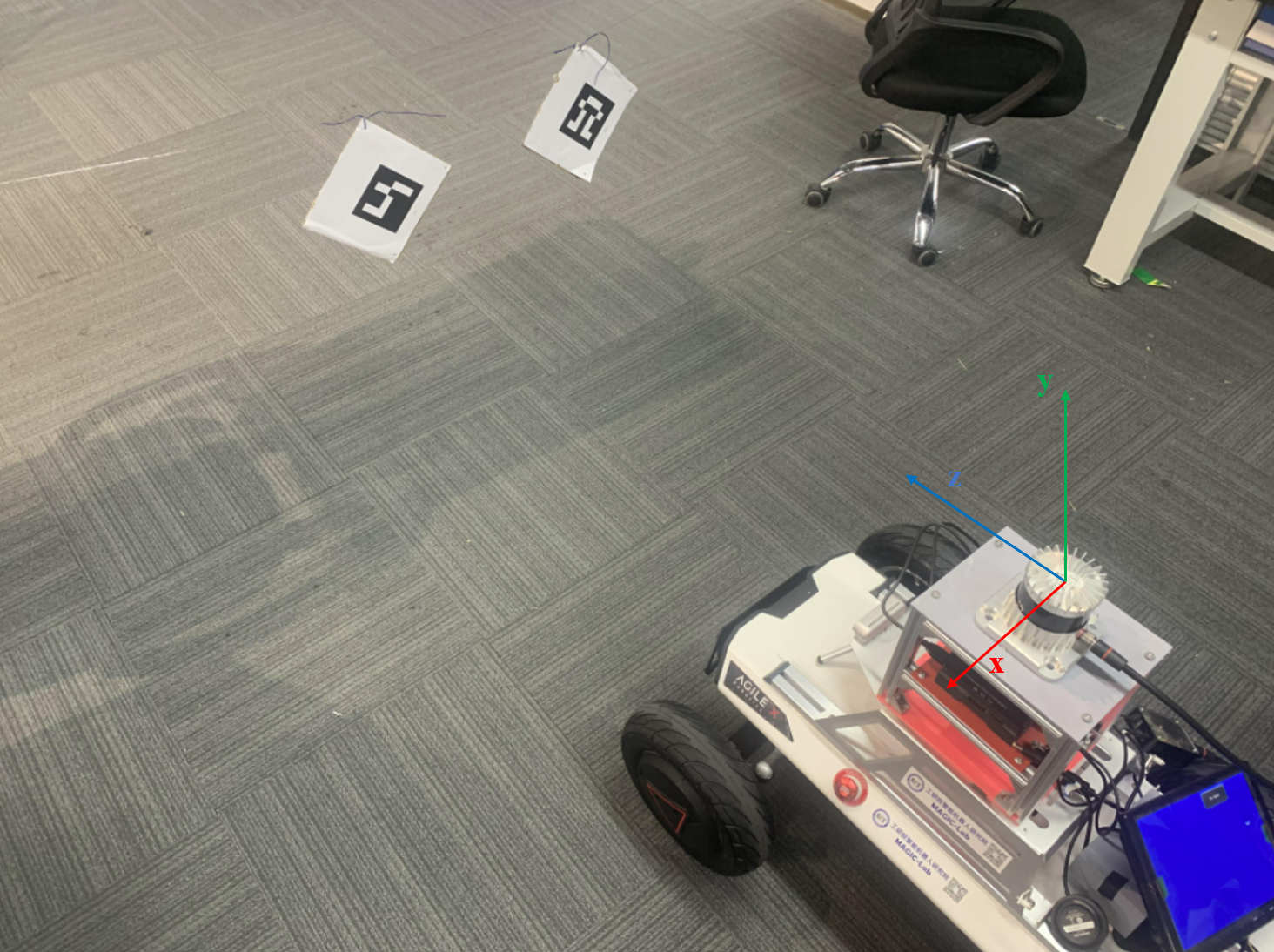
硬件:
- 上位机: Jetson ORIN (Ubuntu 20.04, ROS noetic)
- 雷达: Ouster 32线
- 相机: Intel D435
一、 标定方案
目前流行的 雷达+相机 标定方案有五种:Autoware, apollo, lidar_camera_calibration, but_velodyne。
Ubuntu20.04安装autoware我看bug比较多,因此我follow的是: https://github.com/ankitdhall/lidar_camera_calibration
1.1 opencv
这一步花了我一天时间,坑比较多,需要安装opencv_contrib才能进行进一步的操作,仅仅安装opencv是不行的!
我安的版本是3.4.10。
参考:
- https://blog.csdn.net/m0_73694897/article/details/129175515?spm=1001.2014.3001.5506
- https://blog.csdn.net/weixin_34910922/article/details/125248118?spm=1001.2014.3001.5506
二、 时间强行同步
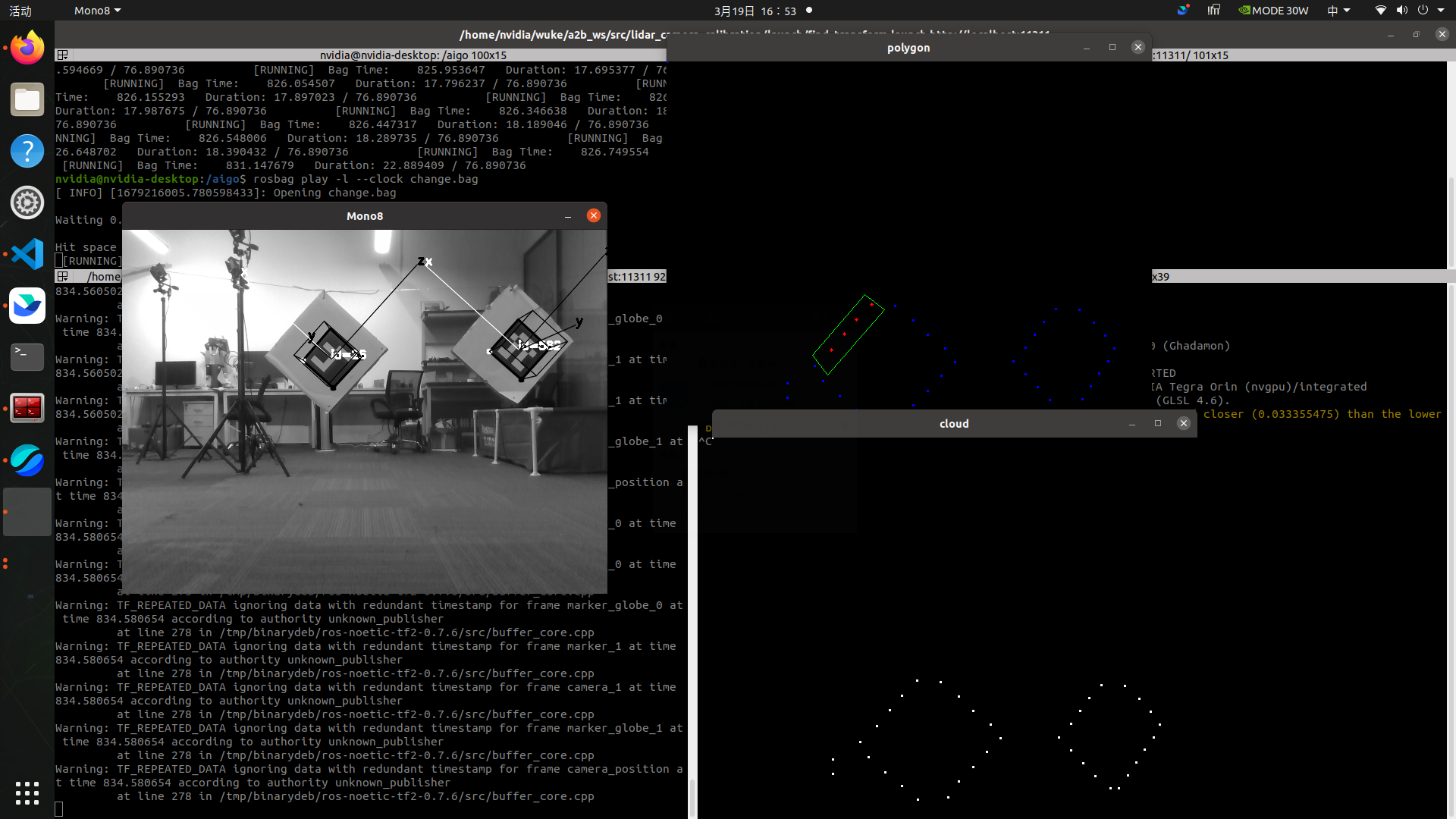
直接实时或者直接播包的话就会发生: 只有mono8这一个窗口,没有其他窗口弹出!
- Only Mono8 window visible · Issue #94 · ankitdhall/lidar_camera_calibration
- https://github.com/ankitdhall/lidar_camera_calibration/issues/65
- https://github.com/ankitdhall/lidar_camera_calibration/issues/53
因为车是静止的,如果时间戳不完全一致,标定的程序是无法弹出点云窗口的,这个bug困扰了我很久,在issues中也没找到也没有人能给出解决方案,于是我把时间戳都强行设置到1970年,解决。
#!/usr/bin/env python3

import rospy
import rosbag
import sys

if sys.getdefaultencoding() != 'utf-8':
    reload(sys)
    sys.setdefaultencoding('utf-8')
bag_name = 'subset_2023-03-19-15-52-03.bag' #被修改的bag名
out_bag_name = 'change.bag' #修改后的bag名
dst_dir = '/aigo/' #使用路径

with rosbag.Bag(dst_dir+out_bag_name, 'w') as outbag:
    stamp = None
    #topic:就是发布的topic msg:该topic在当前时间点下的message t:消息记录时间(非header)
    ##read_messages内可以指定的某个topic
    for topic, msg, t in rosbag.Bag(dst_dir+bag_name).read_messages():


        if topic == '/ouster/points':
            stamp = msg.header.stamp
           # print("imu")
            #print(stamp)
            outbag.write(topic, msg, stamp)
        #针对没有header的文件,使用上面帧数最高的topic(即:/gps)的时间戳
        ##因为read_messages是逐时间读取,所以该方法可以使用
        elif topic == '/camera/color/image_raw' and stamp is not None:
            #print("lidar")
            #print(msg.header.stamp)
            outbag.write(topic, msg, stamp)
        #    continue
        # #针对格式为Header的topic
        elif topic == '/camera/depth/image_rect_raw' and stamp is not None:
            #print("image")
            #print(msg.header.stamp)
            outbag.write(topic, msg, stamp)

        #     outbag.write(topic, msg, msg.stamp)
        #     continue
        # #针对一般topic
        #outbag.write(topic, msg, msg.header.stamp)

print("finished")
- 前:

- 后:

三、 标定
我用的雷达是32线的,我修改了/home/nvidia/wuke/a2b_ws/src/lidar_camera_calibration/include/lidar_camera_calibration/PreprocessUtils.h:
// line 200
// std::vector <std::vector<myPointXYZRID *>> rings(16);
std::vector <std::vector<myPointXYZRID *>> rings(32);
- 播包:
roscore

cd /aigo/
rosbag play -l --clock change.bag
- 标定:
cd ~/wuke/a2b_ws
source devel/setup.bash

roslaunch lidar_camera_calibration find_transform.launch
四、 标定结果
--------------------------------------------------------------------
After 40 iterations
--------------------------------------------------------------------
Average translation is:
0.00659326
 -0.241034
 -0.113246
Average rotation is:
  0.901867 0.00575031   0.431975
-0.0142371   0.999764  0.0164154
 -0.431778 -0.0209546   0.901736
Average transformation is:
  0.901867 0.00575031   0.431975 0.00659326
-0.0142371   0.999764  0.0164154  -0.241034
 -0.431778 -0.0209546   0.901736  -0.113246
         0          0          0          1
Final rotation is:
  0.0174841   -0.999826 -0.00654644
  0.0208512  0.00691063   -0.999759
    0.99963   0.0173434   0.0209684
Final ypr is:
0.873007
-1.54358
 0.69106
Average RMSE is: 0.0291125
RMSE on average transformation is: 0.0298826
4.1 将雷达点云投影到相机坐标系
上面的位姿变换是从雷达坐标系到相机坐标系的变换。
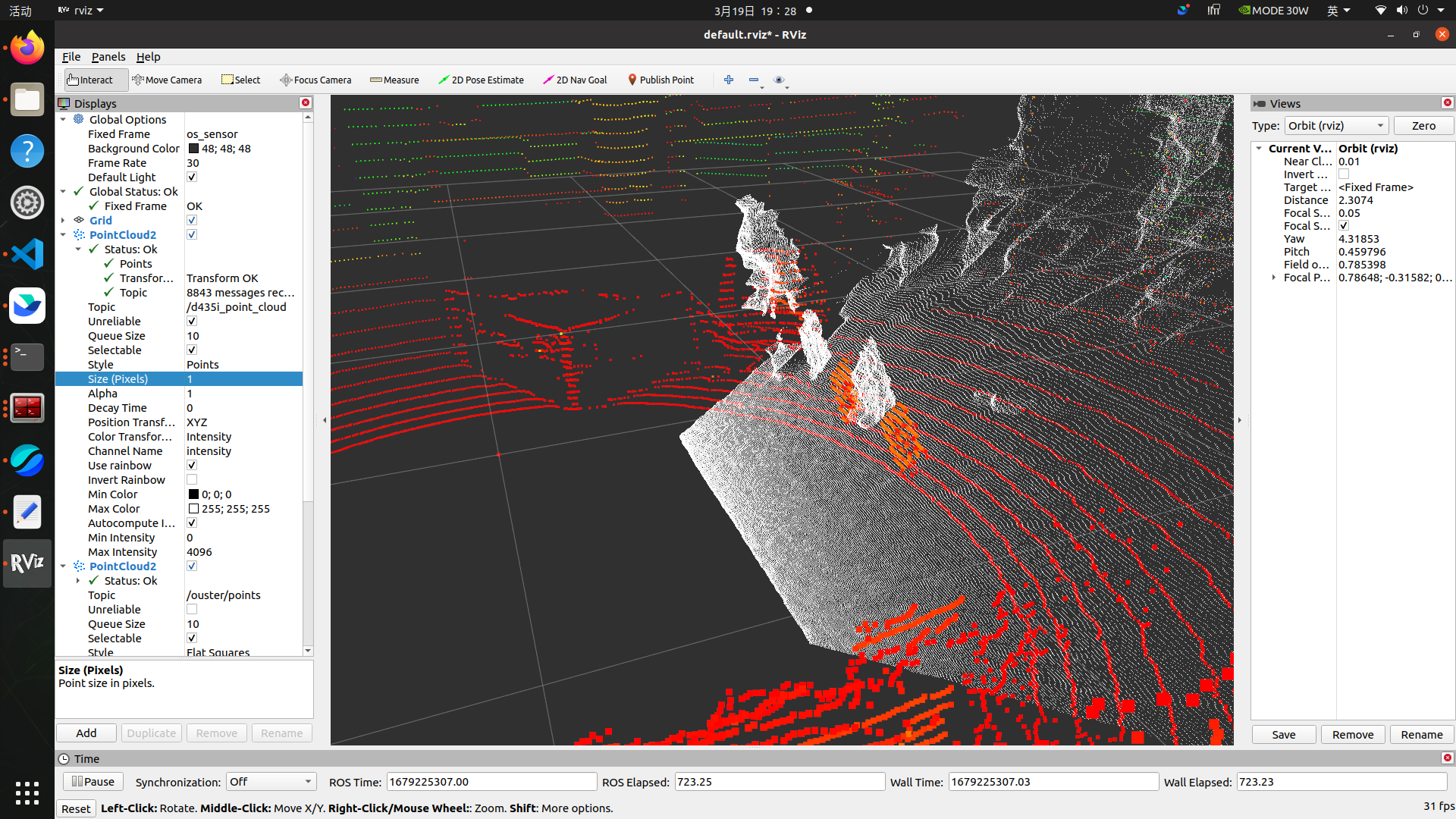
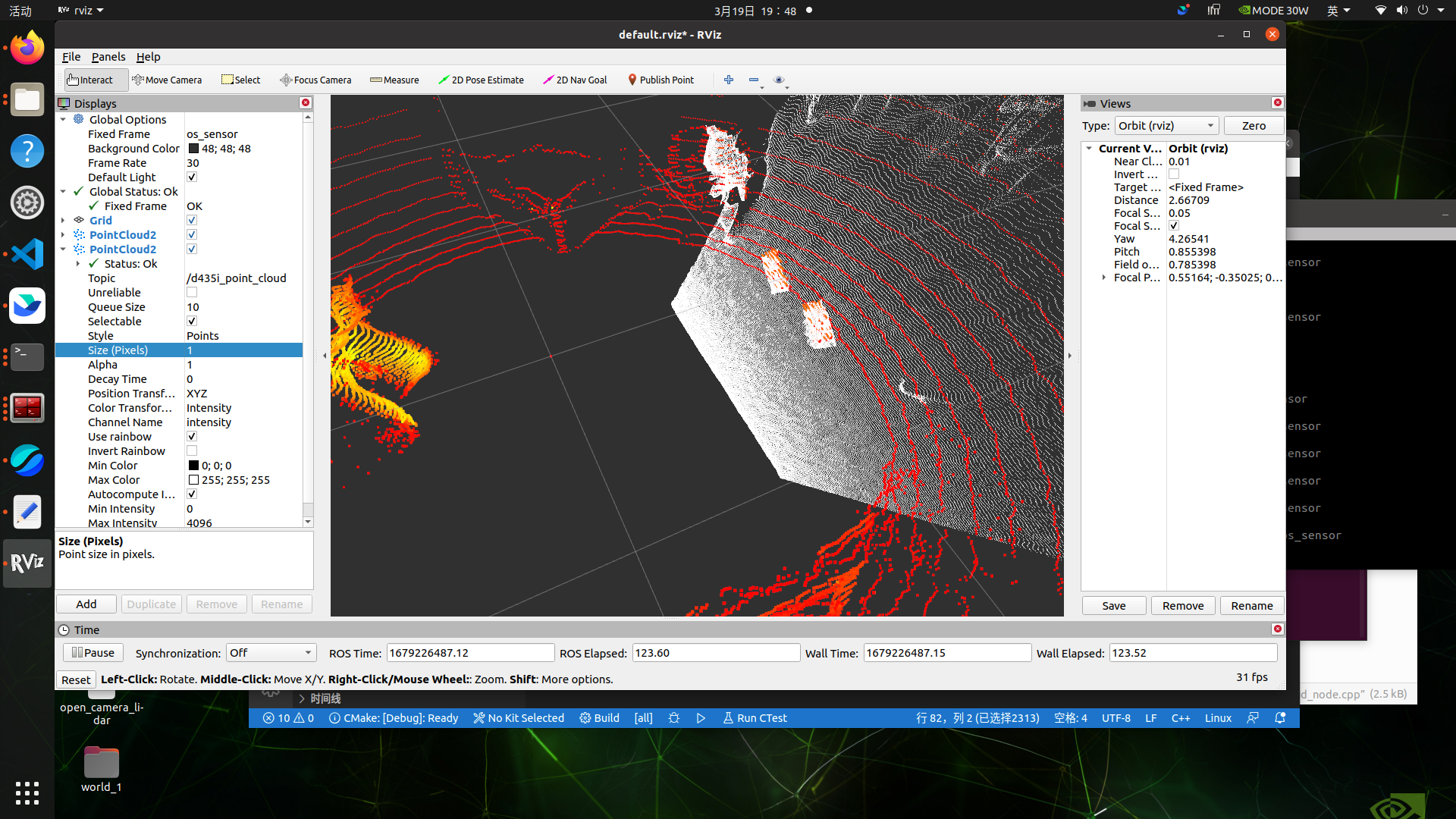
我打算把雷达点云变换到相机坐标系下然后和深度图对比,看重叠效果咋样:
-
将D435的深度图变成点云:
#include <ros/ros.h> #include <cv_bridge/cv_bridge.h> #include <sensor_msgs/Image.h> #include <sensor_msgs/CameraInfo.h> #include <sensor_msgs/PointCloud2.h> #include <pcl_conversions/pcl_conversions.h> #include <pcl/point_types.h> #include <pcl/PCLPointCloud2.h> #include <pcl/conversions.h> #include <iostream> using namespace std; ros::Publisher pub_point_cloud2; bool is_K_empty = 1; double K[9]; // [fx 0 cx] // K = [ 0 fy cy] // [ 0 0 1] void img_callback(const sensor_msgs::ImageConstPtr &img_msg) { // Step1: 读取深度图 //ROS_INFO("image format: %s %dx%d", img_msg->encoding.c_str(), img_msg->height, img_msg->width); int height = img_msg->height; int width = img_msg->width; // 通过指针强制转换,读取为16UC1数据,单位是mm unsigned short *depth_data = (unsigned short*)&img_msg->data[0]; // Step2: 深度图转点云 sensor_msgs::PointCloud2 point_cloud2; pcl::PointCloud<pcl::PointXYZ>::Ptr cloud(new pcl::PointCloud<pcl::PointXYZ>); for(int uy=0; uy<height; uy++) { for(int ux=0; ux<width; ux++) { float x, y, z; z = *(depth_data + uy*width + ux) / 1000.0; if(z!=0) { x = z * (ux - K[2]) / K[0]; y = z * (uy - K[5]) / K[4]; pcl::PointXYZ p(x, y, z); cloud->push_back(p); } } } // Step3: 发布点云 pcl::toROSMsg(*cloud, point_cloud2); point_cloud2.header.frame_id = "world"; pub_point_cloud2.publish(point_cloud2); } void camera_info_callback(const sensor_msgs::CameraInfoConstPtr &camera_info_msg) { // 读取相机参数 if(is_K_empty) { for(int i=0; i<9; i++) { K[i] = camera_info_msg->K[i]; } is_K_empty = 0; } } int main(int argc, char **argv) { ros::init(argc, argv, "ros_tutorial_node"); ros::NodeHandle n; // 订阅D435i的深度图,在其回调函数中把深度图转化为点云,并发布出来 ros::Subscriber sub_img = n.subscribe("/camera/depth/image_rect_raw", 100, img_callback); // 订阅D435i的深度相机参数 ros::Subscriber sub_cmara_info = n.subscribe("/camera/depth/camera_info", 1, camera_info_callback); pub_point_cloud2 = n.advertise<sensor_msgs::PointCloud2>("/d435i_point_cloud", 1000); ROS_INFO("Runing ..."); ros::spin(); return 0; } -
发布tf变换消息:
rosrun tf2_ros static_transform_publisher 0 0 0 1.57 -1.57 0 world os_sensor -
result:
-
raw
-
after (红色是雷达点云,白色是深度相机的投影)
-
Reference
[1] https://github.com/ankitdhall/lidar_camera_calibration/wiki/Welcome-to-%60lidar_camera_calibration%60-Wiki!
[2] 3D雷达与相机的标定方法详细教程_lidar_camera_calibration_敢敢のwings的博客-CSDN博客
[3] https://blog.csdn.net/m0_73694897/article/details/129175515?spm=1001.2014.3001.5506
[4] https://blog.csdn.net/weixin_34910922/article/details/125248118?spm=1001.2014.3001.5506
[5] https://blog.csdn.net/weixin_42840360/article/details/119844648?spm=1001.2014.3001.5506
[6] https://blog.csdn.net/Jeff_zjf/article/details/124255916?ops_request_misc=%257B%2522request%255Fid%2522%253A%2522167922032616800213053412%2522%252C%2522scm%2522%253A%252220140713.130102334.pc%255Fall.%2522%257D&request_id=167922032616800213053412&biz_id=0&utm_medium=distribute.pc_search_result.none-task-blog-2allfirst_rank_ecpm_v1~pc_rank_34-1-124255916-null-null.142

有“AI”的1024 = 2048,欢迎大家加入2048 AI社区
更多推荐
 7
7 0
0- 0


 已为社区贡献5条内容

所有评论(0)