以DETR为例的代码复现环境配置
在这里找到对应的版本安装,选择与CUDA版本相同及以下版本的cudatoolkit都可以。在根目录下创建一个文件夹来放源码。尝试cuda是否可用。
·
1.查看当前有什么环境
root@autodl-container-caf44cbe32-aa993c0b:~# conda env list
运行结果:
# conda environments:
#
base                  *  /root/miniconda3
2.查看conda版本
root@autodl-container-caf44cbe32-aa993c0b:~# conda -V
运行结果:
conda 4.10.3
3.新建一个环境
conda create -n env_name python=3.8 #env_name改成根据环境的名字修改,后面是python版本
运行结果:
Collecting package metadata (current_repodata.json): done
Solving environment: failed with repodata from current_repodata.json, will retry with next repodata source.
Collecting package metadata (repodata.json): done
Solving environment: done


==> WARNING: A newer version of conda exists. <==
  current version: 4.10.3
  latest version: 25.1.1

Please update conda by running

    $ conda update -n base -c defaults conda


## Package Plan ##

  environment location: /root/miniconda3/envs/detr

  added / updated specs:
    - python=3.7


The following packages will be downloaded:

    package                    |            build
    ---------------------------|-----------------
    _libgcc_mutex-0.1          |             main           3 KB  https://mirrors.tuna.tsinghua.edu.cn/anaconda/pkgs/main
    _openmp_mutex-5.1          |            1_gnu          21 KB  https://mirrors.tuna.tsinghua.edu.cn/anaconda/pkgs/main
    ca-certificates-2025.2.25  |       h06a4308_0         129 KB  https://mirrors.tuna.tsinghua.edu.cn/anaconda/pkgs/main
    certifi-2022.12.7          |   py37h06a4308_0         150 KB  https://mirrors.tuna.tsinghua.edu.cn/anaconda/pkgs/main
    ld_impl_linux-64-2.40      |       h12ee557_0         710 KB  https://mirrors.tuna.tsinghua.edu.cn/anaconda/pkgs/main
    libffi-3.4.4               |       h6a678d5_1         141 KB  https://mirrors.tuna.tsinghua.edu.cn/anaconda/pkgs/main
    libgcc-ng-11.2.0           |       h1234567_1         5.3 MB  https://mirrors.tuna.tsinghua.edu.cn/anaconda/pkgs/main
    libgomp-11.2.0             |       h1234567_1         474 KB  https://mirrors.tuna.tsinghua.edu.cn/anaconda/pkgs/main
    libstdcxx-ng-11.2.0        |       h1234567_1         4.7 MB  https://mirrors.tuna.tsinghua.edu.cn/anaconda/pkgs/main
    ncurses-6.4                |       h6a678d5_0         914 KB  https://mirrors.tuna.tsinghua.edu.cn/anaconda/pkgs/main
    openssl-1.1.1w             |       h7f8727e_0         3.7 MB  https://mirrors.tuna.tsinghua.edu.cn/anaconda/pkgs/main
    pip-22.3.1                 |   py37h06a4308_0         2.7 MB  https://mirrors.tuna.tsinghua.edu.cn/anaconda/pkgs/main
    python-3.7.16              |       h7a1cb2a_0        44.8 MB  https://mirrors.tuna.tsinghua.edu.cn/anaconda/pkgs/main
    readline-8.2               |       h5eee18b_0         357 KB  https://mirrors.tuna.tsinghua.edu.cn/anaconda/pkgs/main
    setuptools-65.6.3          |   py37h06a4308_0         1.1 MB  https://mirrors.tuna.tsinghua.edu.cn/anaconda/pkgs/main
    sqlite-3.45.3              |       h5eee18b_0         1.2 MB  https://mirrors.tuna.tsinghua.edu.cn/anaconda/pkgs/main
    tk-8.6.14                  |       h39e8969_0         3.4 MB  https://mirrors.tuna.tsinghua.edu.cn/anaconda/pkgs/main
    wheel-0.38.4               |   py37h06a4308_0          63 KB  https://mirrors.tuna.tsinghua.edu.cn/anaconda/pkgs/main
    xz-5.6.4                   |       h5eee18b_1         567 KB  https://mirrors.tuna.tsinghua.edu.cn/anaconda/pkgs/main
    zlib-1.2.13                |       h5eee18b_1         111 KB  https://mirrors.tuna.tsinghua.edu.cn/anaconda/pkgs/main
    ------------------------------------------------------------
                                           Total:        70.6 MB

The following NEW packages will be INSTALLED:

  _libgcc_mutex      anaconda/pkgs/main/linux-64::_libgcc_mutex-0.1-main
  _openmp_mutex      anaconda/pkgs/main/linux-64::_openmp_mutex-5.1-1_gnu
  ca-certificates    anaconda/pkgs/main/linux-64::ca-certificates-2025.2.25-h06a4308_0
  certifi            anaconda/pkgs/main/linux-64::certifi-2022.12.7-py37h06a4308_0
  ld_impl_linux-64   anaconda/pkgs/main/linux-64::ld_impl_linux-64-2.40-h12ee557_0
  libffi             anaconda/pkgs/main/linux-64::libffi-3.4.4-h6a678d5_1
  libgcc-ng          anaconda/pkgs/main/linux-64::libgcc-ng-11.2.0-h1234567_1
  libgomp            anaconda/pkgs/main/linux-64::libgomp-11.2.0-h1234567_1
  libstdcxx-ng       anaconda/pkgs/main/linux-64::libstdcxx-ng-11.2.0-h1234567_1
  ncurses            anaconda/pkgs/main/linux-64::ncurses-6.4-h6a678d5_0
  openssl            anaconda/pkgs/main/linux-64::openssl-1.1.1w-h7f8727e_0
  pip                anaconda/pkgs/main/linux-64::pip-22.3.1-py37h06a4308_0
  python             anaconda/pkgs/main/linux-64::python-3.7.16-h7a1cb2a_0
  readline           anaconda/pkgs/main/linux-64::readline-8.2-h5eee18b_0
  setuptools         anaconda/pkgs/main/linux-64::setuptools-65.6.3-py37h06a4308_0
  sqlite             anaconda/pkgs/main/linux-64::sqlite-3.45.3-h5eee18b_0
  tk                 anaconda/pkgs/main/linux-64::tk-8.6.14-h39e8969_0
  wheel              anaconda/pkgs/main/linux-64::wheel-0.38.4-py37h06a4308_0
  xz                 anaconda/pkgs/main/linux-64::xz-5.6.4-h5eee18b_1
  zlib               anaconda/pkgs/main/linux-64::zlib-1.2.13-h5eee18b_1


Proceed ([y]/n)? y


Downloading and Extracting Packages
zlib-1.2.13          | 111 KB    | #################################################################################################### | 100%
openssl-1.1.1w       | 3.7 MB    | #################################################################################################### | 100%
ncurses-6.4          | 914 KB    | #################################################################################################### | 100%
python-3.7.16        | 44.8 MB   | #################################################################################################### | 100%
tk-8.6.14            | 3.4 MB    | #################################################################################################### | 100%
libgcc-ng-11.2.0     | 5.3 MB    | #################################################################################################### | 100%
libffi-3.4.4         | 141 KB    | #################################################################################################### | 100%
certifi-2022.12.7    | 150 KB    | #################################################################################################### | 100%
_libgcc_mutex-0.1    | 3 KB      | #################################################################################################### | 100%
wheel-0.38.4         | 63 KB     | #################################################################################################### | 100%
libstdcxx-ng-11.2.0  | 4.7 MB    | #################################################################################################### | 100%
setuptools-65.6.3    | 1.1 MB    | #################################################################################################### | 100%
_openmp_mutex-5.1    | 21 KB     | #################################################################################################### | 100%
xz-5.6.4             | 567 KB    | #################################################################################################### | 100%
ca-certificates-2025 | 129 KB    | #################################################################################################### | 100%
sqlite-3.45.3        | 1.2 MB    | #################################################################################################### | 100%
readline-8.2         | 357 KB    | #################################################################################################### | 100%
libgomp-11.2.0       | 474 KB    | #################################################################################################### | 100%
pip-22.3.1           | 2.7 MB    | #################################################################################################### | 100%
ld_impl_linux-64-2.4 | 710 KB    | #################################################################################################### | 100%
Preparing transaction: done
Verifying transaction: done
Executing transaction: done
#
# To activate this environment, use
#
#     $ conda activate detr
#
# To deactivate an active environment, use
#
#     $ conda deactivate
4.激活此环境
root@autodl-container-caf44cbe32-aa993c0b:~# conda activate detr
#运行结果:
(base) root@autodl-container-caf44cbe32-aa993c0b:~# conda activate detr
(detr) root@autodl-container-caf44cbe32-aa993c0b:~#          #由base变成detr,代表detr环境
#若运行结果是这样:
CommandNotFoundError: Your shell has not been properly configured to use 'conda activate'.
To initialize your shell, run

    $ conda init <SHELL_NAME>

Currently supported shells are:
  - bash
  - fish
  - tcsh
  - xonsh
  - zsh
  - powershell

See 'conda init --help' for more information and options.

IMPORTANT: You may need to close and restart your shell after running 'conda init'.
#说明你的shell 没有正确配置,你需要进行以下操作:
 root@autodl-container-caf44cbe32-aa993c0b:~# echo $SHELL
#echo 是一个常用的命令行工具,用于在终端或脚本中输出文本或变量的值。它的作用是将指定的内容显示在屏幕上。
运行结果:
/bin/bash
#这说明你现在环境中的shell是bash,所以你需要初始化conda以配置shell为bash
root@autodl-container-caf44cbe32-aa993c0b:~# conda init bash
输出结果:
no change     /root/miniconda3/condabin/conda
no change     /root/miniconda3/bin/conda
no change     /root/miniconda3/bin/conda-env
no change     /root/miniconda3/bin/activate
no change     /root/miniconda3/bin/deactivate
no change     /root/miniconda3/etc/profile.d/conda.sh
no change     /root/miniconda3/etc/fish/conf.d/conda.fish
no change     /root/miniconda3/shell/condabin/Conda.psm1
no change     /root/miniconda3/shell/condabin/conda-hook.ps1
no change     /root/miniconda3/lib/python3.8/site-packages/xontrib/conda.xsh
no change     /root/miniconda3/etc/profile.d/conda.csh
modified      /root/.bashrc
然后重启shell或者重新加载配置
重启shell:关闭终端并重新打开
手动加载配置(如果不重启):
root@autodl-container-caf44cbe32-aa993c0b:~# source ~/.bashrc
输出结果就是命令行提示符
最后再重新运行激活命令就可以了,如下:
(base) root@autodl-container-caf44cbe32-aa993c0b:~# conda activate detr
(detr) root@autodl-container-caf44cbe32-aa993c0b:~#
5.下载源码文件:(默认已到根目录下)
即:
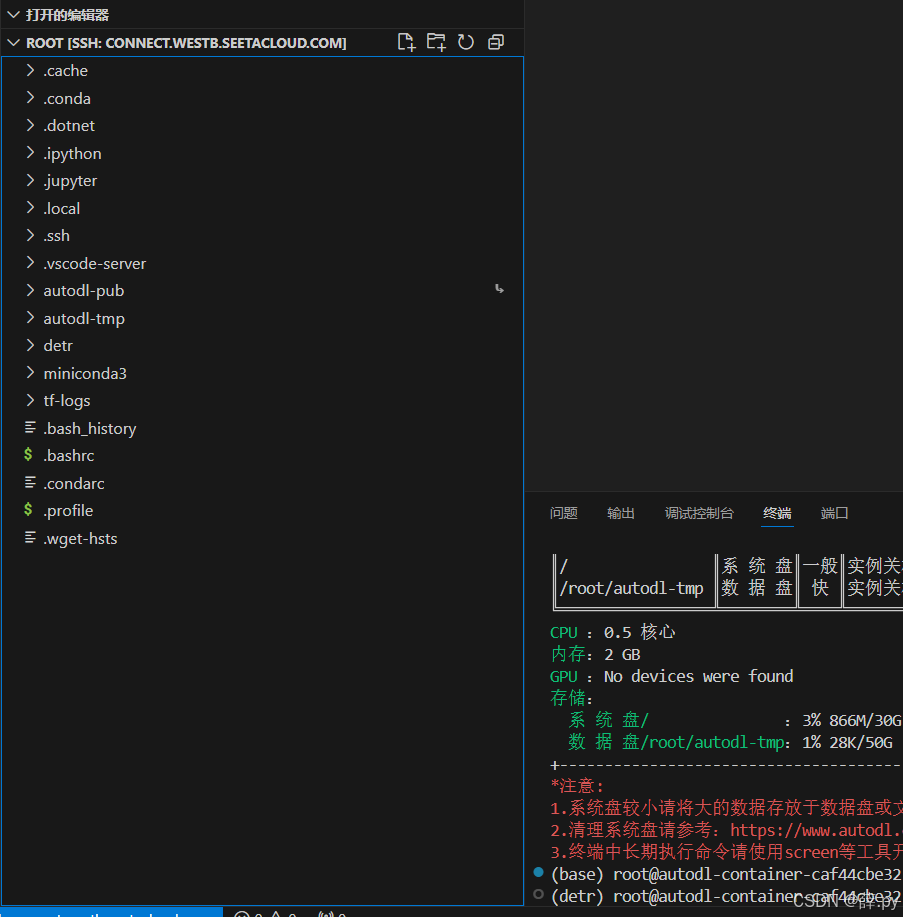
在根目录下创建一个文件夹来放源码
(detr) root@autodl-container-caf44cbe32-aa993c0b:~# cd detr  #进入源码所要存放的文件
(detr) root@autodl-container-caf44cbe32-aa993c0b:~/detr# git clone https://github.com/facebookresearch/detr.git     #克隆项目
运行结果:
Cloning into 'detr'...
remote: Enumerating objects: 265, done.
remote: Total 265 (delta 0), reused 0 (delta 0), pack-reused 265 (from 1)
Receiving objects: 100% (265/265), 21.19 MiB | 11.04 MiB/s, done.
Resolving deltas: 100% (120/120), done.
(detr) root@autodl-container-caf44cbe32-aa993c0b:~/detr# cd ~   #返回根目录
(detr) root@autodl-container-caf44cbe32-aa993c0b:~#
6.安装pytorch
nvidia-smi #查看版本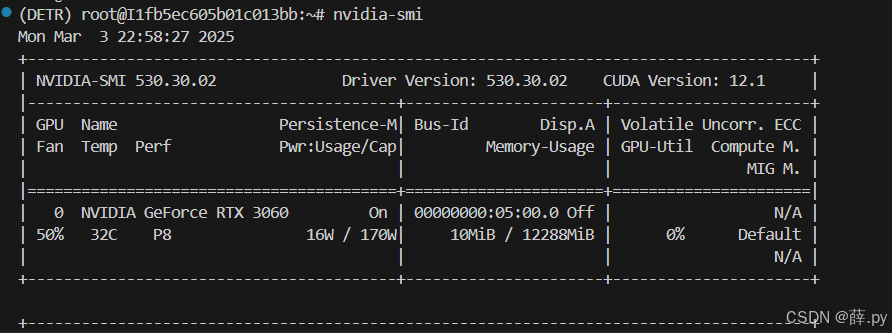
Previous PyTorch Versions | PyTorch 在这里找到对应的版本安装,选择与CUDA版本相同及以下版本的cudatoolkit都可以。
#安装
conda install pytorch==1.7.0 torchvision==0.8.0 torchaudio==0.7.0 cudatoolkit=11.0 -c pytorch
尝试cuda是否可用
python                   #打开python编辑器,ctrl+D  ,退出
import torch
torch.cuda.is_available()         #若输出ture,则可用
7.安装其他依赖库:(接下来就是下载自己的数据集进行训练)
#(训练)安装pycocotools 和 scipy
conda install cython scipy
pip install -U 'git+https://github.com/cocodataset/cocoapi.git#subdirectory=PythonAPI'

有“AI”的1024 = 2048,欢迎大家加入2048 AI社区
更多推荐
 6
6 0
0- 0


 已为社区贡献1条内容

所有评论(0)