Opencv无法写入:img marked as output argument, but provided NumPy array marked as readonly(Opencv操作只读内存)
问题
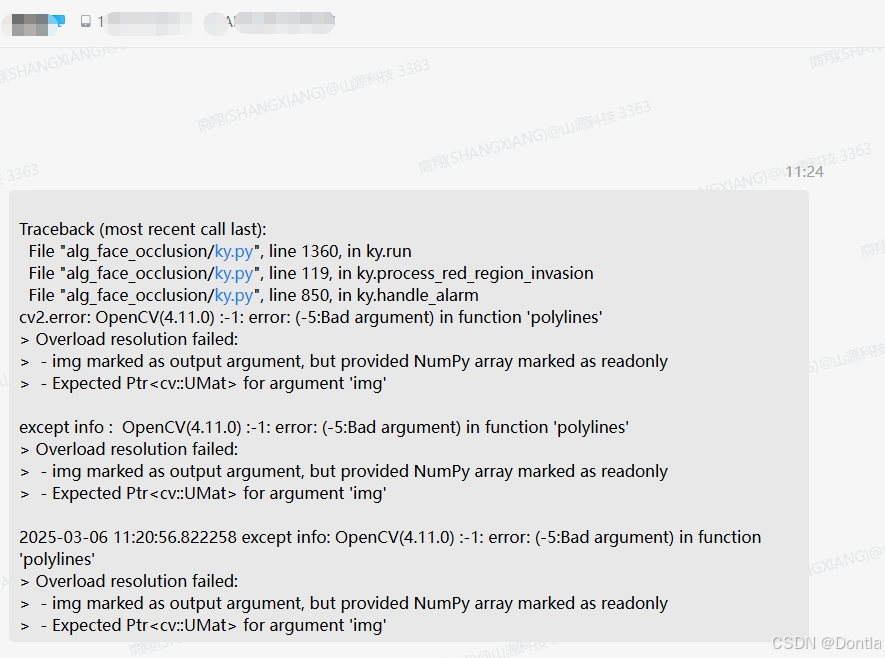
Traceback (most recent call last): File “alg_face_occlusion/ky.py”,
line 1360, in ky.run File “alg_face_occlusion/ky.py”, line 119, in
ky.process_red_region_invasion File “alg_face_occlusion/ky.py”, line
850, in ky.handle_alarm cv2.error: OpenCV(4.11.0) 👎 error: (-5:Bad
argument) in function ‘polylines’Overload resolution failed:
- img marked as output argument, but provided NumPy array marked as readonly
- Expected Ptrcv::UMat for argument ‘img’
except info : OpenCV(4.11.0) 👎 error: (-5:Bad argument) in
function ‘polylines’Overload resolution failed:
- img marked as output argument, but provided NumPy array marked as readonly
- Expected Ptrcv::UMat for argument ‘img’
2025-03-06 11:20:56.822258 except info: OpenCV(4.11.0) 👎 error:
(-5:Bad argument) in function ‘polylines’Overload resolution failed:
- img marked as output argument, but provided NumPy array marked as readonly
- Expected Ptrcv::UMat for argument ‘img’
Traceback (most recent call last):
  File "alg_face_occlusion/ky.py", line 1360, in ky.run
  File "alg_face_occlusion/ky.py", line 119, in ky.process_red_region_invasion
  File "alg_face_occlusion/ky.py", line 850, in ky.handle_alarm
cv2.error: OpenCV(4.11.0) :-1: error: (-5:Bad argument) in function 'polylines'
> Overload resolution failed:
>  - img marked as output argument, but provided NumPy array marked as readonly
>  - Expected Ptr<cv::UMat> for argument 'img'

except info :  OpenCV(4.11.0) :-1: error: (-5:Bad argument) in function 'polylines'
> Overload resolution failed:
>  - img marked as output argument, but provided NumPy array marked as readonly
>  - Expected Ptr<cv::UMat> for argument 'img'

2025-03-06 11:20:56.822258 except info: OpenCV(4.11.0) :-1: error: (-5:Bad argument) in function 'polylines'
> Overload resolution failed:
>  - img marked as output argument, but provided NumPy array marked as readonly
>  - Expected Ptr<cv::UMat> for argument 'img'
分析&解决方案
这是什么问题?怎么解决?
这个OpenCV的polylines函数错误通常发生在以下情况:
问题原因:
当尝试在只读的NumPy数组上使用绘图函数时(比如从某些不可变数据源加载的图像),而OpenCV需要可写缓冲区来绘制图形。常见于:
- 使用
cv2.imread()加载图像时设置了cv2.IMREAD_UNCHANGED等只读标志 - 图像数据来自不可修改的缓存区
- 数组被显式设置为
flags.writeable = False
解决方案:
# ... existing code ...
# 在调用polylines之前确保图像可写
if not img.flags.writeable:
    img = np.copy(img)  # 创建可写副本

# 确保使用正确的数据类型
img = img.astype(np.uint8)

# 现在可以安全调用polylines
cv2.polylines(img, [pts], isClosed, color, thickness)
# ... existing code ...
关键修改点:
- 检查并确保图像数组的
flags.writeable属性为True - 必要时使用
np.copy()创建可写副本 - 显式指定图像数据类型为
np.uint8
这是文件目录无法写入图片吗,还是什么原因?
这不是文件目录写入权限问题,而是内存中的图像数据不可修改导致的。具体来说:
根本原因在于:
- 你正在操作的图像数组被OpenCV识别为"只读内存"
- 常见于以下场景:
- 从视频流或网络摄像头获取的原始帧数据
- 使用
cv2.imread()时未正确设置读取模式 - 图像数据来自不可变的缓存区(如某些深度学习框架的预处理输出)
典型错误代码示例:
# 错误方式:可能返回只读数组
img = cv2.imread('image.jpg', cv2.IMREAD_UNCHANGED)

# 直接在此img上绘图会报错
cv2.polylines(img, ...)  # ❌ 触发只读错误
正确修复方式:
# ... existing code ...
# 读取时强制可写
img = cv2.imread('image.jpg', cv2.IMREAD_COLOR)  # ✅ 使用标准读取模式

# 或者在处理前显式创建副本
working_img = np.ascontiguousarray(img)  # ✅ 创建连续可写副本
cv2.polylines(working_img, ...)  # ✅ 现在可安全操作
# ... existing code ...
建议在调用polylines前添加数组验证:
assert img.flags.writeable, "图像数组不可写!"
assert img.dtype == np.uint8, "需要uint8数据类型!"

有“AI”的1024 = 2048,欢迎大家加入2048 AI社区
更多推荐

 14
14 0
0- 0


 已为社区贡献457条内容

所有评论(0)