知识图谱实战:阿里云API快速部署GraphRAG 2.0.0教程
微软近期重磅发布,全面升级知识图谱构建与问答能力。相比传统RAG,GraphRAG通过结构化知识推理大幅提升答案准确性。本文手把手教你调用阿里云百炼大模型API,无需本地算力,10分钟快速部署知识图谱系统!🔗相关资源Microsoft/GraphRAG GitHub仓库Ollama+GraphRAG实战指南通过阿里云API部署GraphRAG 2.0.0,可大幅降低本地算力需求,适合中小企业快速
一、前言
微软近期重磅发布GraphRAG 2.0.0,全面升级知识图谱构建与问答能力。相比传统RAG,GraphRAG通过结构化知识推理大幅提升答案准确性。本文手把手教你调用阿里云百炼大模型API,无需本地算力,10分钟快速部署知识图谱系统!
🔗 相关资源
本地部署教程:Ollama+GraphRAG实战指南
二、环境准备
1. 创建Python虚拟环境
推荐Python 3.12.4(亲测兼容性最佳):
conda create -n graphrag200 python=3.12.4
conda activate graphrag200
2. 拉取源码与安装依赖
git clone https://github.com/microsoft/graphrag.git
cd graphrag
pip install -e .
3. 目录结构与初始化
mkdir -p ./graphrag_aliyun/input  # 数据集存放目录
python -m graphrag init --root ./graphrag_aliyun
三、阿里云API配置
1. 注册阿里云百炼
-
(tip:新用户赠送100万Token免费额度,点击链接即可注册,无邀请码) 👉 点击注册
-
创建应用后获取
API Key,保存至后续配置中。
关键配置详解
修改settings.yaml文件,重点关注以下模块:
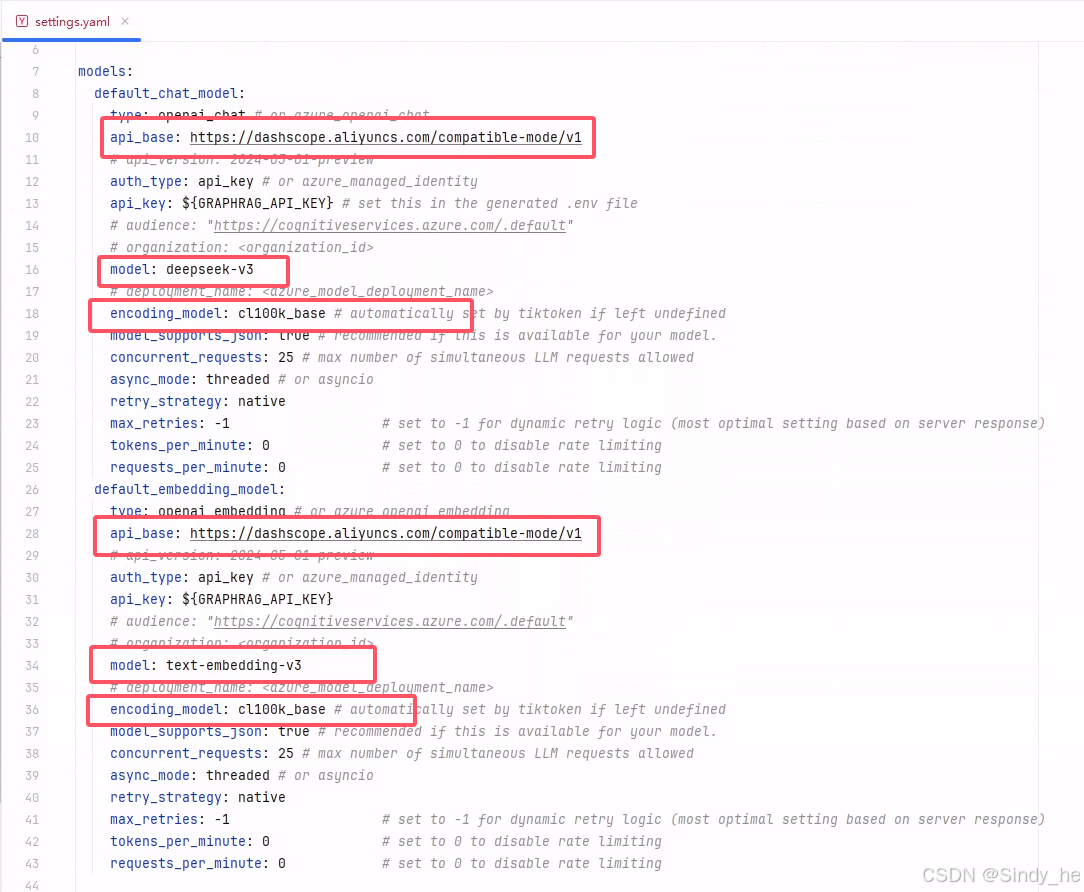
1. 模型配置
chat模型和embedding模型可根据实际情况进行选择。
我使用的chat模型为deepseek-v3、embedding模型为text-embedding-v3
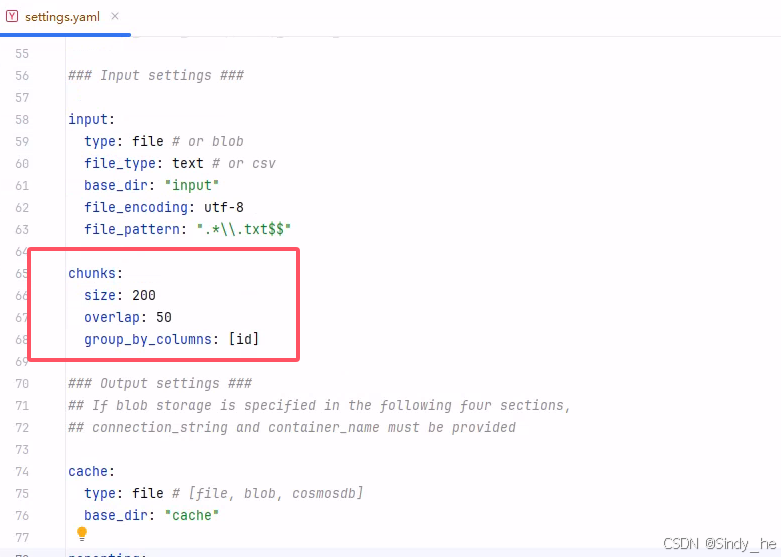
测试小文件时建议把chunks改小:
2. 批处理限制(必改项!)
⚠️ 阿里云API限制:单次请求文本数≤10,需添加batch_size参数:
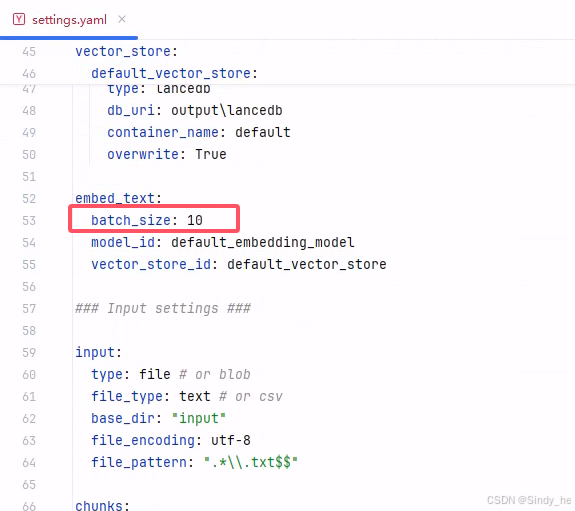
修改结果如下:
models:
  default_chat_model:
    type: openai_chat # or azure_openai_chat
    api_base: https://dashscope.aliyuncs.com/compatible-mode/v1
    # api_version: 2024-05-01-preview
    auth_type: api_key # or azure_managed_identity
    api_key: ${GRAPHRAG_API_KEY} # set this in the generated .env file
    # audience: "https://cognitiveservices.azure.com/.default"
    # organization: <organization_id>
    model: deepseek-v3
    # deployment_name: <azure_model_deployment_name>
    encoding_model: cl100k_base # automatically set by tiktoken if left undefined
    model_supports_json: true # recommended if this is available for your model.
    concurrent_requests: 25 # max number of simultaneous LLM requests allowed
    async_mode: threaded # or asyncio
    retry_strategy: native
    max_retries: -1                   # set to -1 for dynamic retry logic (most optimal setting based on server response)
    tokens_per_minute: 0              # set to 0 to disable rate limiting
    requests_per_minute: 0            # set to 0 to disable rate limiting
  default_embedding_model:
    type: openai_embedding # or azure_openai_embedding
    api_base: https://dashscope.aliyuncs.com/compatible-mode/v1
    # api_version: 2024-05-01-preview
    auth_type: api_key # or azure_managed_identity
    api_key: ${GRAPHRAG_API_KEY}
    # audience: "https://cognitiveservices.azure.com/.default"
    # organization: <organization_id>
    model: text-embedding-v3
    # deployment_name: <azure_model_deployment_name>
    encoding_model: cl100k_base # automatically set by tiktoken if left undefined
    model_supports_json: true # recommended if this is available for your model.
    concurrent_requests: 25 # max number of simultaneous LLM requests allowed
    async_mode: threaded # or asyncio
    retry_strategy: native
    max_retries: -1                   # set to -1 for dynamic retry logic (most optimal setting based on server response)
    tokens_per_minute: 0              # set to 0 to disable rate limiting
    requests_per_minute: 0            # set to 0 to disable rate limiting

vector_store:
  default_vector_store:
    type: lancedb
    db_uri: output\lancedb
    container_name: default
    overwrite: True

embed_text:
  batch_size: 10
  model_id: default_embedding_model
  vector_store_id: default_vector_store

### Input settings ###

input:
  type: file # or blob
  file_type: text # or csv
  base_dir: "input"
  file_encoding: utf-8
  file_pattern: ".*\\.txt$$"

chunks:
  size: 200
  overlap: 50
  group_by_columns: [id]

### Output settings ###
## If blob storage is specified in the following four sections,
## connection_string and container_name must be provided

cache:
  type: file # [file, blob, cosmosdb]
  base_dir: "cache"

reporting:
  type: file # [file, blob, cosmosdb]
  base_dir: "logs"

output:
  type: file # [file, blob, cosmosdb]
  base_dir: "output"

### Workflow settings ###

extract_graph:
  model_id: default_chat_model
  prompt: "prompts/extract_graph.txt"
  entity_types: [organization,person,geo,event]
  max_gleanings: 1

summarize_descriptions:
  model_id: default_chat_model
  prompt: "prompts/summarize_descriptions.txt"
  max_length: 500

extract_graph_nlp:
  text_analyzer:
    extractor_type: regex_english # [regex_english, syntactic_parser, cfg]

extract_claims:
  enabled: false
  model_id: default_chat_model
  prompt: "prompts/extract_claims.txt"
  description: "Any claims or facts that could be relevant to information discovery."
  max_gleanings: 1

community_reports:
  model_id: default_chat_model
  graph_prompt: "prompts/community_report_graph.txt"
  text_prompt: "prompts/community_report_text.txt"
  max_length: 2000
  max_input_length: 8000

cluster_graph:
  max_cluster_size: 10

embed_graph:
  enabled: false # if true, will generate node2vec embeddings for nodes

umap:
  enabled: false # if true, will generate UMAP embeddings for nodes (embed_graph must also be enabled)

snapshots:
  graphml: false
  embeddings: false

### Query settings ###
## The prompt locations are required here, but each search method has a number of optional knobs that can be tuned.
## See the config docs: https://microsoft.github.io/graphrag/config/yaml/#query

local_search:
  chat_model_id: default_chat_model
  embedding_model_id: default_embedding_model
  prompt: "prompts/local_search_system_prompt.txt"

global_search:
  chat_model_id: default_chat_model
  map_prompt: "prompts/global_search_map_system_prompt.txt"
  reduce_prompt: "prompts/global_search_reduce_system_prompt.txt"
  knowledge_prompt: "prompts/global_search_knowledge_system_prompt.txt"

drift_search:
  chat_model_id: default_chat_model
  embedding_model_id: default_embedding_model
  prompt: "prompts/drift_search_system_prompt.txt"
  reduce_prompt: "prompts/drift_search_reduce_prompt.txt"

basic_search:
  chat_model_id: default_chat_model
  embedding_model_id: default_embedding_model
  prompt: "prompts/basic_search_system_prompt.txt"
3. 放入API_KEY
在 .env 文件中放入百炼大模型的api_key

四、知识图谱构建与查询
1. 数据准备
-
将文本数据集(如
.txt文件)放入./graphrag_aliyun/input目录
2. 一键构建图谱
python -m graphrag index --root ./graphrag_aliyun📊 性能参考:5000字文档耗时约10分钟,消耗40万Token。
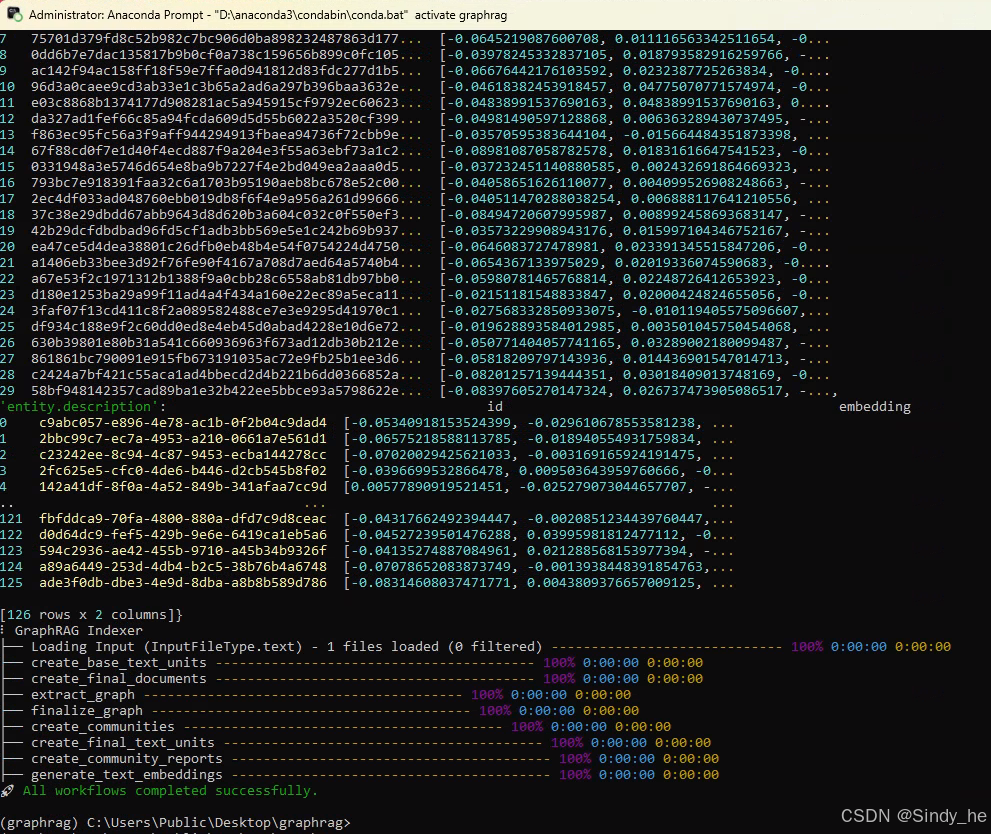
效果展示:
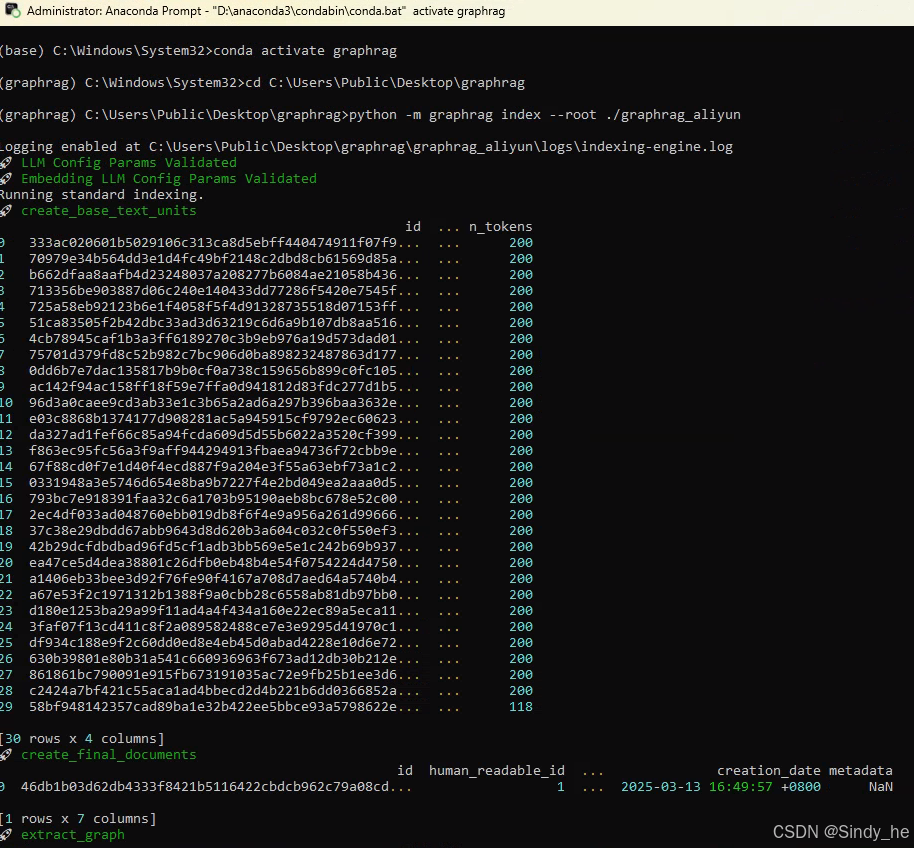
构建成功:
3. 多模式问答
支持全局/局部/DRIFT/基础四种查询方式:
# 全局推理(推荐复杂问题)
python -m graphrag query --method global --query "知识图谱定义"

# 本地语义搜索
python -m graphrag query --method local --query "知识图谱定义"

# DRIFT查询
python -m graphrag query --method drift --query "知识图谱定义"

# 基础查询(Naive RAG检索)
python -m graphrag query --method basic --query "知识图谱定义"
常见问题排查
-
400错误:检查
batch_size是否设置为10。 -
API密钥失效:确保
.env文件中GRAPHRAG_API_KEY已更新。 -
依赖冲突:使用纯净虚拟环境,避免包版本冲突。
结语
通过阿里云API部署GraphRAG 2.0.0,可大幅降低本地算力需求,适合中小企业快速构建知识中台。关注博主,获取更多大模型落地方案!
✍️ 原创声明:本文为CSDN独家内容,转载请注明出处。技术交流请留言或私信!

有“AI”的1024 = 2048,欢迎大家加入2048 AI社区
更多推荐
 11
11 0
0- 0


 已为社区贡献3条内容

所有评论(0)