配置conda国内镜像和恢复使用默认conda官方镜像
二、不想使用国内镜像,想恢复使用默认的 conda 官方镜像。频道重新添加到配置中,并设置频道优先级为。这会列出你当前使用的所有镜像源。如果你看到有国内镜像(例如。一、配置conda国内镜像。1. 查看当前配置的镜像源。下图为笔者当前配置的镜像源。,以便从官方源优先获取包。验证镜像源是否已经修改成功。官方源存在,并设置优先级。这应该只显示官方源,如。2. 移除国内镜像源。3. 添加官方镜像源。
·
一、配置conda国内镜像
conda config --add channels https://mirrors.tuna.tsinghua.edu.cn/anaconda/pkgs/free/
conda config --add channels https://mirrors.tuna.tsinghua.edu.cn/anaconda/pkgs/main/
conda config --set show_channel_urls yes
二、不想使用国内镜像,想恢复使用默认的 conda 官方镜像
1. 查看当前配置的镜像源
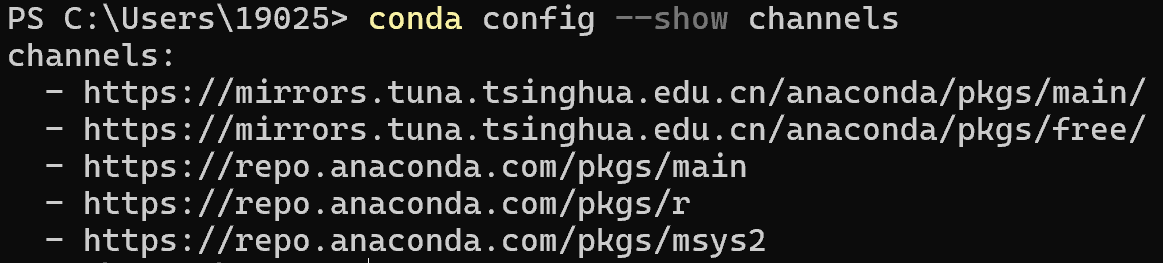
这会列出你当前使用的所有镜像源
conda config --show channels
下图为笔者当前配置的镜像源
2. 移除国内镜像源
如果你看到有国内镜像(例如 https://mirrors.tuna.tsinghua.edu.cn/anaconda/),你可以通过以下命令将其移除:
conda config --remove channels <国内镜像地址>
例如:
conda config --remove channels https://mirrors.tuna.tsinghua.edu.cn/anaconda/pkgs/main/
conda config --remove channels https://mirrors.tuna.tsinghua.edu.cn/anaconda/pkgs/free/
3. 添加官方镜像源
确保 defaults 官方源存在,并设置优先级
conda config --add channels defaults
conda config --set channel_priority flexible
这将把 defaults 频道重新添加到配置中,并设置频道优先级为 flexible,以便从官方源优先获取包。
3. 清理缓存
以确保新的配置生效
conda clean --all
4. 验证镜像源
验证镜像源是否已经修改成功
conda config --show channels这应该只显示官方源,如 https://repo.anaconda.com/pkgs/main 和 https://repo.anaconda.com/pkgs/r 等。

有“AI”的1024 = 2048,欢迎大家加入2048 AI社区
更多推荐

 7
7 0
0- 0


 已为社区贡献4条内容

所有评论(0)