树莓派5 yolov11 ncnn部署记录
·
1.部署NCNN
# 检查更新
sudo apt-get update
sudo apt-get upgrade
# 安装依赖
sudo apt-get install cmake wget
sudo apt-get install build-essential gcc g++
sudo apt-get install libprotobuf-dev protobuf-compiler
# 下载ncnn项目文件
git clone https://github.com/Tencent/ncnn.git
cd ncnn
git submodule update --init

# 编译ncnn
cmake -D NCNN_DISABLE_RTTI=OFF -D NCNN_BUILD_TOOLS=ON \
-D CMAKE_TOOLCHAIN_FILE=../toolchains/aarch64-linux-gnu.toolchain.cmake ..

make -j4 # make -j$(nproc)
make install
# 把文件移到/usr/local/目录
sudo mkdir /usr/local/lib/ncnn
sudo cp -r install/include/ncnn /usr/local/include/ncnn
sudo cp -r install/lib/libncnn.a /usr/local/lib/ncnn/libncnn.a

# 测试是否安装成功
cd ../python
python3 tests/benchmark.py
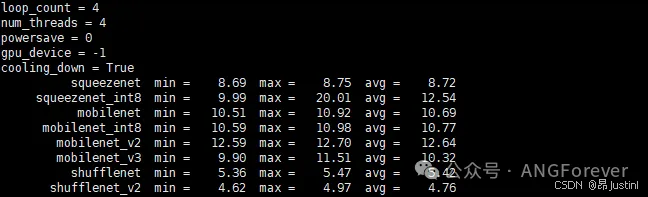
2.Yolov11模型转换&试运行
# 使用ultralytics库
yolo export model=base_yolo11s.pt format=ncnn
# 24.9.22 优化了参数显示 | 对内存占用更小
import cv2
import torch
from logger import logger
from picamera2 import Picamera2
from ultralytics import YOLO

from utils import random_color

model = YOLO("Vision/models/base_yolo11s_ncnn_model", task="detect")
logger.info("Pre-trained YOLOv11s Model loaded")

device = torch.device("cuda" if torch.cuda.is_available() else "cpu")
logger.info(f"Device using: {device}")


def Predict(model, img, classes=[], min_conf=0.5, device="cpu"):
    """
    Using Predict Model to predict objects in img.

    Input classes to choose which to output.

    eg. Predict(chosen_model, img_input, classes=[human], min_conf=0.5)
    """
    if classes:
        results = model.predict(
            img, classes=classes, conf=min_conf, device=device, stream=True
        )
    else:
        results = model.predict(img, conf=min_conf, device=device, stream=True)
    return results


def Predict_and_detect(
    model,
    img,
    classes=[],
    min_conf=0.5,
    rectangle_thickness=2,
    text_thickness=1,
    device="cpu",
):
    """
    Using Predict Model to predict objects in img and detect the objects out.

    Input classes to choose which to output.

    eg. Predict_and_detect(chosen_model, img, classes=[], conf=0.5, rectangle_thickness=2, text_thickness=1)
    """
    results = Predict(model, img, classes, min_conf=min_conf, device=device)
    for result in results:
        for box in result.boxes:
            left, top, right, bottom = (
                int(box.xyxy[0][0]),
                int(box.xyxy[0][1]),
                int(box.xyxy[0][2]),
                int(box.xyxy[0][3]),
            )
            confidence = box.conf.tolist()[0]
            label = int(box.cls[0])
            color = random_color(label)
            cv2.rectangle(
                img,
                (left, top),
                (right, bottom),
                color=color,
                thickness=rectangle_thickness,
                lineType=cv2.LINE_AA,
            )
            caption = f"{result.names[label]} {confidence:.2f}"
            w, h = cv2.getTextSize(caption, 0, 1, 2)[0]
            cv2.rectangle(
                img, (left - 3, top - 33), (left + w + 10, top), color, -1
            )
            cv2.putText(
                img,
                caption,
                (left, top - 5),
                0,
                1,
                (0, 0, 0),
                text_thickness,
                16,
            )
    return img, results


picam2 = Picamera2()
picam2.start()
while True:
    # read frame
    # ret, frame = camera.read()
    image = picam2.capture_array("main")
    image = cv2.cvtColor(image, cv2.COLOR_RGB2BGR)

    # Perform object detection on an image
    result_img, _ = Predict_and_detect(
        model, image, classes=[], min_conf=0.5, device=device
    )

    # Display results
    cv2.imshow("YOLOv11 Inference", result_img)
    key = cv2.waitKey(1)
    if key == 32:  # 空格
        break

picam2.close()
cv2.destroyAllWindows()

有“AI”的1024 = 2048,欢迎大家加入2048 AI社区
更多推荐

 5
5 0
0- 0


 已为社区贡献1条内容

所有评论(0)