018.自定义指纹chromium编译-修改UA,GPU,小版本
当初想到搞指纹浏览器,就是想绕过akamai的指纹风控。。其实自定义指纹写到这里,最初的目标早就实现了。之所以还在继续更新新内容,是因为你,集帅,给我点了个赞。最后是,想要成品的直接点击购买哦
·
自定义指纹chromium编译-修改UA,GPU,小版本
目标依旧保持不变:
- 目标1:启动chrome时,传入参数
--fingerprints=123123123(正整数),则指纹固定不变。当正整数更换,则获得一个新指纹。 - 目标2:启动chrome时,不传参数
--fingerprints,则每个访问请求的指纹全部随机生成。
注意的点
- 由于我接受的是int类型,所以
--fingerprints只能传整数,且最大值为2,147,483,647 - 这里我默认大家都看过我之前的博客,对修改源码的流程已经非常熟悉。
一、更改显卡(GPU)信息
打开 \third_party\blink\renderer\modules\webgl\webgl_rendering_context_base.cc
1.头部追加
#include "base/command_line.h"
2.找到这个case代码
case WebGLDebugRendererInfo::kUnmaskedRendererWebgl:
3.将原有的return替换掉
case WebGLDebugRendererInfo::kUnmaskedRendererWebgl:
      if (ExtensionEnabled(kWebGLDebugRendererInfoName)) {
        if (IdentifiabilityStudySettings::Get()->ShouldSampleType(
                blink::IdentifiableSurface::Type::kWebGLParameter)) {
          RecordIdentifiableGLParameterDigest(
              pname, IdentifiabilityBenignStringToken(
                         String(ContextGL()->GetString(GL_RENDERER))));
        }
        //return WebGLAny(script_state,
        //                String(ContextGL()->GetString(GL_RENDERER)));

        //这里
        base::CommandLine* base_command_line = base::CommandLine::ForCurrentProcess();
        int tmp;
        if (base_command_line->HasSwitch("fingerprints")) {
          std::istringstream(base_command_line->GetSwitchValueASCII("fingerprints")) >> tmp;
        }else{
          auto now = std::chrono::system_clock::now();
          std::time_t now_time_t = std::chrono::system_clock::to_time_t(now);
          tmp = static_cast<int>(now_time_t);
        }
        std::string rstr_1 = std::to_string(tmp % 9);
        std::string rstr_2 = std::to_string(tmp % 7);
        return WebGLAny(script_state, String("ANGLE (NVIDIA, NVIDIA GeForce RTX 40"+rstr_1+"0 Laptop GPU (0x000028A0) Direct3D11 vs_5_0 ps_5_"+rstr_2+", D3D11)"));

        }
      SynthesizeGLError(
          GL_INVALID_ENUM, "getParameter",
          "invalid parameter name, WEBGL_debug_renderer_info not enabled");
      return ScriptValue::CreateNull(script_state->GetIsolate());
二、更改userAgent
- 打开文件
/components/version_info/version_info_with_user_agent.cc
1.头部引用
#include <string>
#include <random>
#include "base/command_line.h"
2.找到这个函数
std::string GetProductNameAndVersionForReducedUserAgent(
    const std::string& build_version) {
  return base::StrCat(
      {"Chrome/", GetMajorVersionNumber(), ".0.", build_version, ".0"});
}
3.将这个函数替换掉
std::string GetProductNameAndVersionForReducedUserAgent(
    const std::string& build_version) {

  base::CommandLine* base_command_line = base::CommandLine::ForCurrentProcess();
  std::string tmp = "";
  if (base_command_line->HasSwitch("fingerprints")) {
    tmp = " BigTom/" + base_command_line->GetSwitchValueASCII("fingerprints");
  }

  return base::StrCat(
      //{"Chrome/", GetMajorVersionNumber(), ".0.", build_version, ".0"});
      {"Chrome/", GetMajorVersionNumber(), ".0.", build_version, ".0", tmp});
}
原理是在userAgent里加上了一串随机字符
三、更改内核小版本
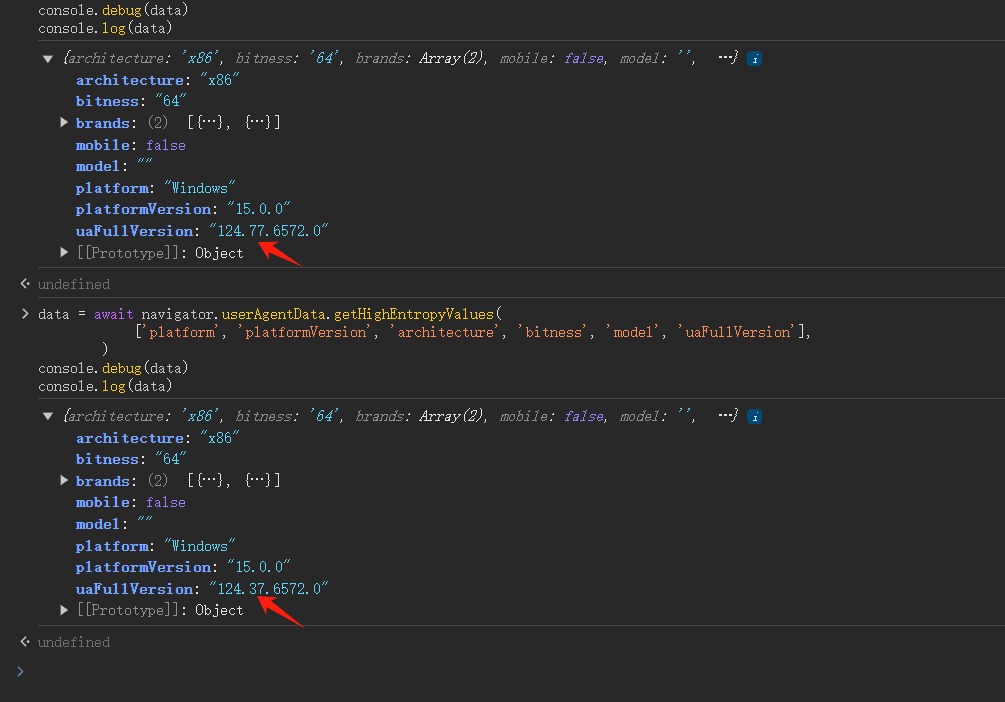
1.获取浏览器版本
- 原理是通过
navigator.userAgentData来获取。 - 将下面的代码粘贴至F12控制台,可显示浏览器版本
data = await navigator.userAgentData.getHighEntropyValues(
            ['platform', 'platformVersion', 'architecture', 'bitness', 'model', 'uaFullVersion'],
        )
console.debug(data)
console.log(data)
2.找到源码位置
- 打开
\third_party\blink\renderer\core\frame\navigator_ua.cc
ua_data->SetUAFullVersion(String::FromUTF8(metadata.full_version));
3.替换成
  //ua_data->SetUAFullVersion(String::FromUTF8(metadata.full_version));

  base::CommandLine* base_command_line = base::CommandLine::ForCurrentProcess();
  int randomNum;
  if (base_command_line->HasSwitch("fingerprints")) {
	int tmp;
    std::istringstream(base_command_line->GetSwitchValueASCII("fingerprints")) >> tmp;
    randomNum = tmp%99;
  }else{
    srand((int)time(NULL));
    randomNum = rand()%99;
  }
  ua_data->SetUAFullVersion("124." + String(std::to_string(randomNum % 99)) +".6572.0");
这样获取的版本里,小版本就随机了
四、感想
- 当初想到搞指纹浏览器,就是想绕过akamai的指纹风控。。其实自定义指纹写到这里,最初的目标早就实现了。
- 之所以还在继续更新新内容,是因为你,集帅,给我点了个赞。

有“AI”的1024 = 2048,欢迎大家加入2048 AI社区
更多推荐
 42
42 0
0- 0


 已为社区贡献13条内容

所有评论(0)