CentOS 7- 配置阿里镜像源
2、下载CentOS 7的repo文件。2、找到yum源的配置路径。更改配置文件(很重要)
·
下载源
1、安装wgetyum install -y wget
2、下载CentOS 7的repo文件wget -O /etc/yum.repos.d/CentOS-Base.repo http://mirrors.aliyun.com/repo/Centos-7.repo
或者
curl -o /etc/yum.repos.d/CentOS-Base.repo http://mirrors.aliyun.com/repo/Centos-7.repo
3、更新镜像源
清除缓存:yum clean all
生成缓存:yum makecache
更改配置文件(很重要)
1、备份CentOS 7系统自带yum源配置文件/etc/yum.repos.d/CentOS-Base.repo命令:
cp /etc/yum.repos.d/CentOS-Base.repo /etc/yum.repos.d/CentOS-Base.repo.backup
2、找到yum源的配置路径cd /etc/yum.repos.d
3、(可以省略该步骤)查看该目录下的所有文件目录:ls

4、打开CentOS-Base.repo文件:vim CentOS-Base.repo
或者
vi CentOS-Base.repo
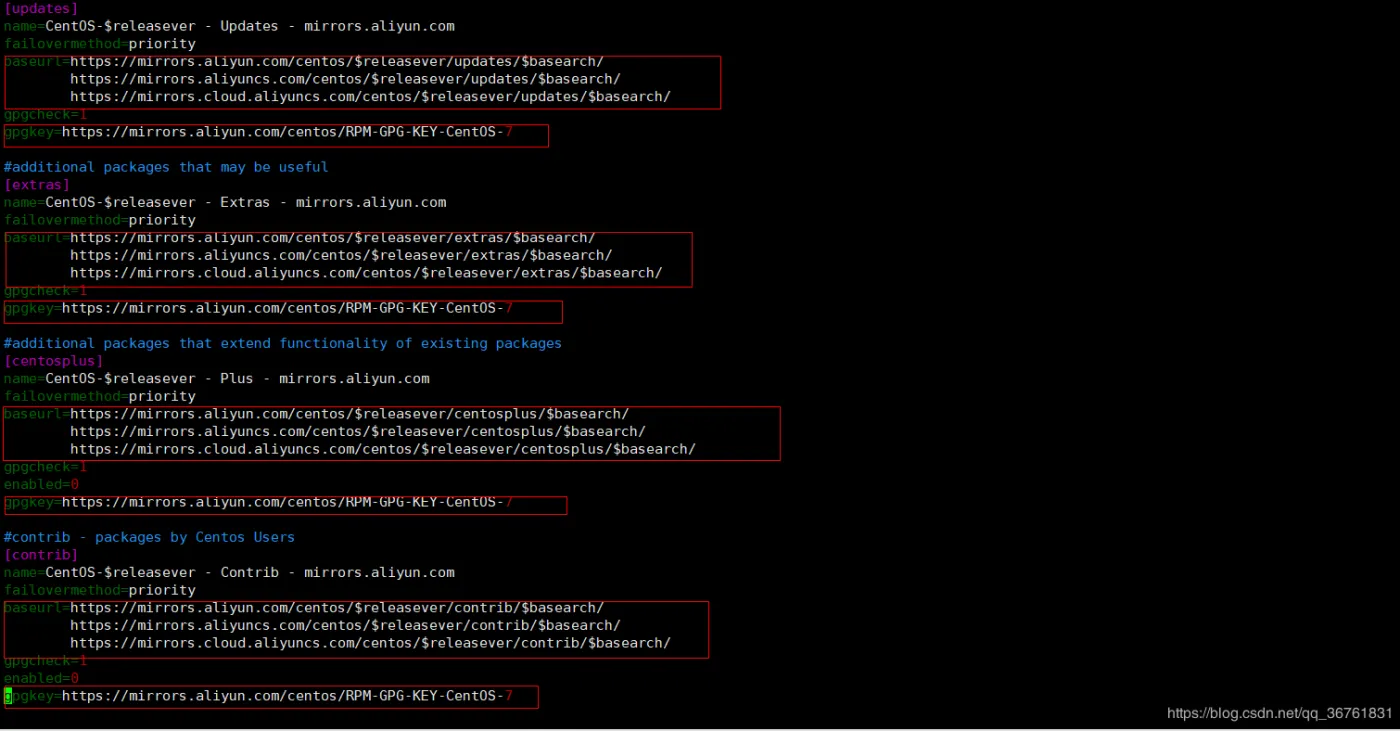
5、将文件中的所有http开头的地址更改为https(下图中只是列出部分内容,并不完善):
6、更新yum:yum update

有“AI”的1024 = 2048,欢迎大家加入2048 AI社区
更多推荐

 1
1 0
0- 0


 已为社区贡献2条内容

所有评论(0)