Error: ReferenceError: ReadableStream is not defined
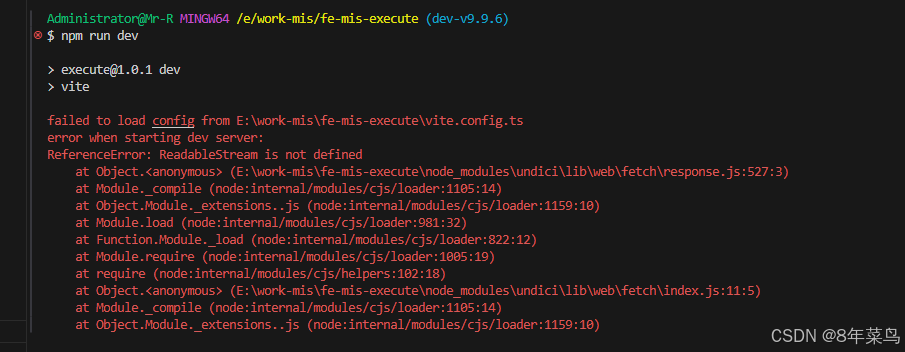
如图,记录下。
环境
"vue": "^3.2.47"
"element-plus": "^2.3.6"
"vite-plugin-qiankun": "^1.0.15"
"vite": "^4.3.9"
解决方式一:
有人这么说:(我这里并没有好用)
"vite-plugin-qiankun": "1.0.15" 这个版本已经用了一年多,今天突然打包时报错报错原因是引用了undici ,我发现是包里引用了cheerio库 "cheerio": "^1.0.0-rc.10" ,cheerio 3天前更新了最新版本1.0.0之后。就出现该问题
需要指定cheerio版本,在package.json 添加 resolutions 字段,指定 cheerio 的版本:
resolutions是和 dependencies同级的
"resolutions": {
"cheerio": "1.0.0-rc.12"
}
解决方式二:
有人这么说:(我不愿意,是不是有点没办法了?但是方法确实可以)
升级node版本 18+(我这里本身16.15.0)
解决方式二:
有人这么说:(我采用的)
删除 node_modules
删除 package-lock.json
执行 npm cache clean -f
执行 npm install
执行 npm i cheerio@1.0.0-rc.10
以上到此就算是解决了:Error: ReferenceError: ReadableStream is not defined
这时候或许会报警告:
Deprecation Warning: The legacy JS API is deprecated and will be removed in Dart Sass 2.0.0.
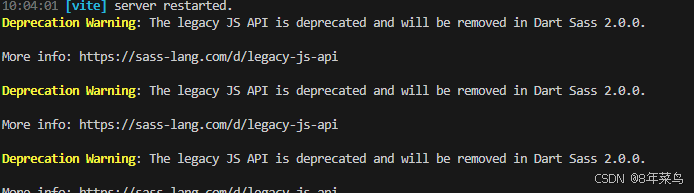
大致意思是:在vue3+vite项目中,使用低sass版本低于2.0.0的,会有上面这个警告
解决方式:(我用的是方法二)
方法一:
export default defineConfig(({ mode }) => {
  ``````
  return {
    ``````
    css: {
      preprocessorOptions: {
        scss: {
          api: 'modern-compiler' // or "modern"
        },
      },
    },
    ``````
  }
  ``````
})
方法二:
export default defineConfig(({ mode }) => {
  ``````
  return {
    ``````
    css: {
      preprocessorOptions: {
        scss: {
          silenceDeprecations: ['legacy-js-api'],
        },
      },
    },
    ``````
  }
  ``````
})
这个时候,基本解决了以上问题。如有其他错误欢迎探讨!!!
2026-04-02 补充
package.json中的修改:
{
  "name": "mis-quality",
  "private": true,
  "version": "25.07.3",
  "type": "module",
  "scripts": {
    "start": "npm run dev",
    "dev": "node -r ./scripts/node-web-streams-polyfill.cjs ./node_modules/vite/bin/vite.js",
    "build": "node -r ./scripts/node-web-streams-polyfill.cjs ./node_modules/vite/bin/vite.js build",
    "build:uat": "cross-env node -r ./scripts/node-web-streams-polyfill.cjs ./node_modules/vite/bin/vite.js build --mode uat",
    "build:uat2": "cross-env node -r ./scripts/node-web-streams-polyfill.cjs ./node_modules/vite/bin/vite.js build --mode uat2",
    "build:prod": "cross-env node -r ./scripts/node-web-streams-polyfill.cjs ./node_modules/vite/bin/vite.js build --mode production",
    "test": "node -r ./scripts/node-web-streams-polyfill.cjs ./node_modules/vitest/vitest.mjs",
    "coverage": "node -r ./scripts/node-web-streams-polyfill.cjs ./node_modules/vitest/vitest.mjs run --coverage",
    "serve": "node -r ./scripts/node-web-streams-polyfill.cjs ./node_modules/vite/bin/vite.js preview"
  },
  "dependencies": {
    "@codemirror/lang-javascript": "^6.2.2",
    "@codemirror/theme-one-dark": "^6.1.2",
    "@element-plus/icons-vue": "^2.1.0",
    "@types/sortablejs": "^1.15.8",
    "axios": "^1.4.0",
    "cheerio": "^1.0.0-rc.10",
    "codemirror": "^6.0.1",
    "element-plus": "^2.4.3",
    "mitt": "^3.0.1",
    "pinia": "^2.1.4",
    "pinia-plugin-persist": "^1.0.0",
    "sortablejs": "^1.15.3",
    "vue": "^3.2.47",
    "vue-codemirror": "^6.1.1",
    "vue-router": "^4.0.13",
    "vuedraggable": "^4.1.0"
  },
  "devDependencies": {
    "@types/node": "^20.2.5",
    "@vitejs/plugin-vue": "^4.1.0",
    "@vitest/coverage-v8": "^1.1.0",
    "c8": "^8.0.1",
    "formdata-node": "^4.4.1",
    "happy-dom": "^12.10.3",
    "node-domexception": "^1.0.0",
    "sass": "^1.63.2",
    "sass-loader": "^13.3.1",
    "typescript": "^5.0.2",
    "unplugin-auto-import": "^0.16.4",
    "unplugin-vue-components": "^0.25.1",
    "vd": "^0.8.2",
    "vite": "4.3.9",
    "vite-plugin-compression": "^0.5.1",
    "vite-plugin-qiankun": "^1.0.15",
    "vitest": "1.1.0",
    "vue-tsc": "^1.4.2",
    "web-streams-polyfill": "^4.2.0"
  }
}

有“AI”的1024 = 2048,欢迎大家加入2048 AI社区
更多推荐
 12
12 0
0- 0


 已为社区贡献1条内容

所有评论(0)