Mac M1 Homebrew 错误:No such file or directory
解决Homebrew查看当前源时,报错-bash: cd: /opt/homebrew/Library/Taps/homebrew/homebrew-core: No such file or directory的解决方式
·
问题场景
查看brew-core当前源时,执行如下命令
cd "$(brew --repo homebrew/core)" && git remote -v执行结果报错如下:

-bash: cd: /opt/homebrew/Library/Taps/homebrew/homebrew-core: No such file or directory
分析问题
进入/opt/homebrew/Library/Taps/homebrew路径查看如下:

原因:缺失homebrew-core模块,目前不清楚为什么会缺失这个模块,好像安装后一直使用也没影响。
解决问题
下载homebrew-core
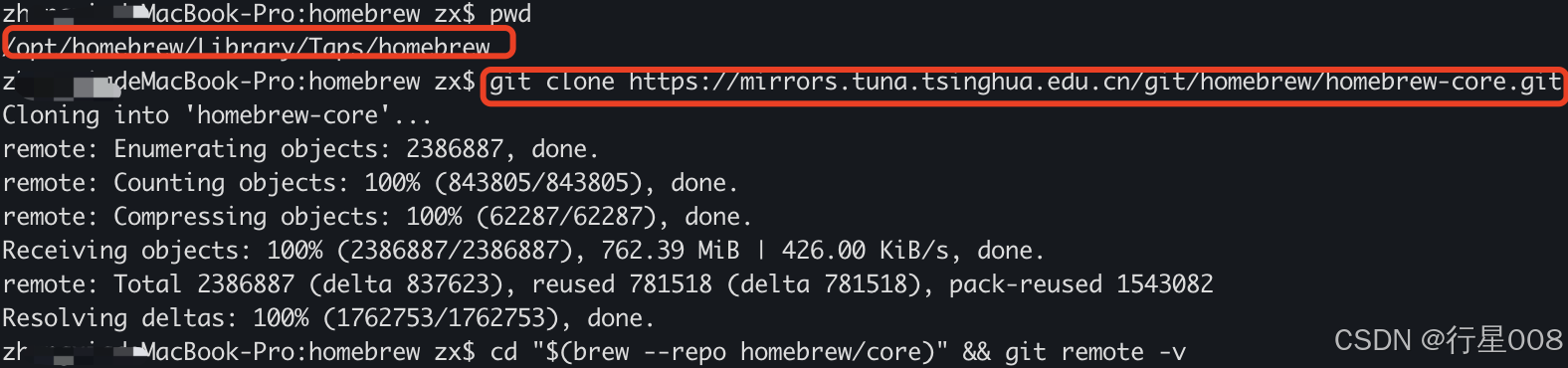
进入到/opt/homebrew/Library/Taps/homebrew目录下执行如下命令:
git clone https://mirrors.tuna.tsinghua.edu.cn/git/homebrew/homebrew-core.git执行结果如下:
验证结果
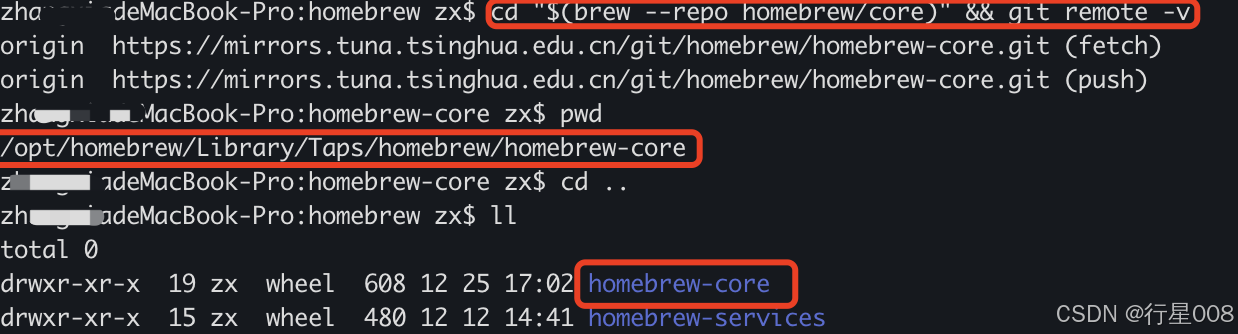
执行如下命令:
cd "$(brew --repo homebrew/core)" && git remote -v结果如下:
成功解决,喔喔喔喔

有“AI”的1024 = 2048,欢迎大家加入2048 AI社区
更多推荐


 15
15 0
0- 0


 已为社区贡献2条内容

所有评论(0)