maven下载依赖很慢如何解决(内含镜像配置)
·
通常有以下几点
1.未更换Maven镜像源,使用的远程仓库依然是国外的
2.更换了镜像源,但是未在IDEA中更换settings.xml的位置(即使用的依然是maven默认的settings.xml)
1.未更换Maven镜像源,使用的远程仓库依然是国外的
复制下列配置,覆盖原来的配置
<mirrors>

        <mirror>
          <id>aliyun</id>
          <mirrorOf>central</mirrorOf>
          <name>aliyun Maven</name>
          <url>http://maven.aliyun.com/nexus/content/groups/public/</url>
        </mirror>

        <mirror>
            <id>uk</id>
            <mirrorOf>central</mirrorOf>
            <name>Human Readable Name for this Mirror.</name>
            <url>http://uk.maven.org/maven2/</url>
        </mirror>

        <mirror>
            <id>CN</id>
            <name>OSChina Central</name>
            <url>http://maven.oschina.net/content/groups/public/</url>
            <mirrorOf>central</mirrorOf>
        </mirror>

        <mirror>
            <id>nexus</id>
            <name>internal nexus repository</name>
            <!-- <url>http://192.168.1.100:8081/nexus/content/groups/public/</url>-->
            <url>http://repo.maven.apache.org/maven2</url>
            <mirrorOf>central</mirrorOf>
        </mirror>

    </mirrors>
重启IDEA,再次下载你会发现速度起飞
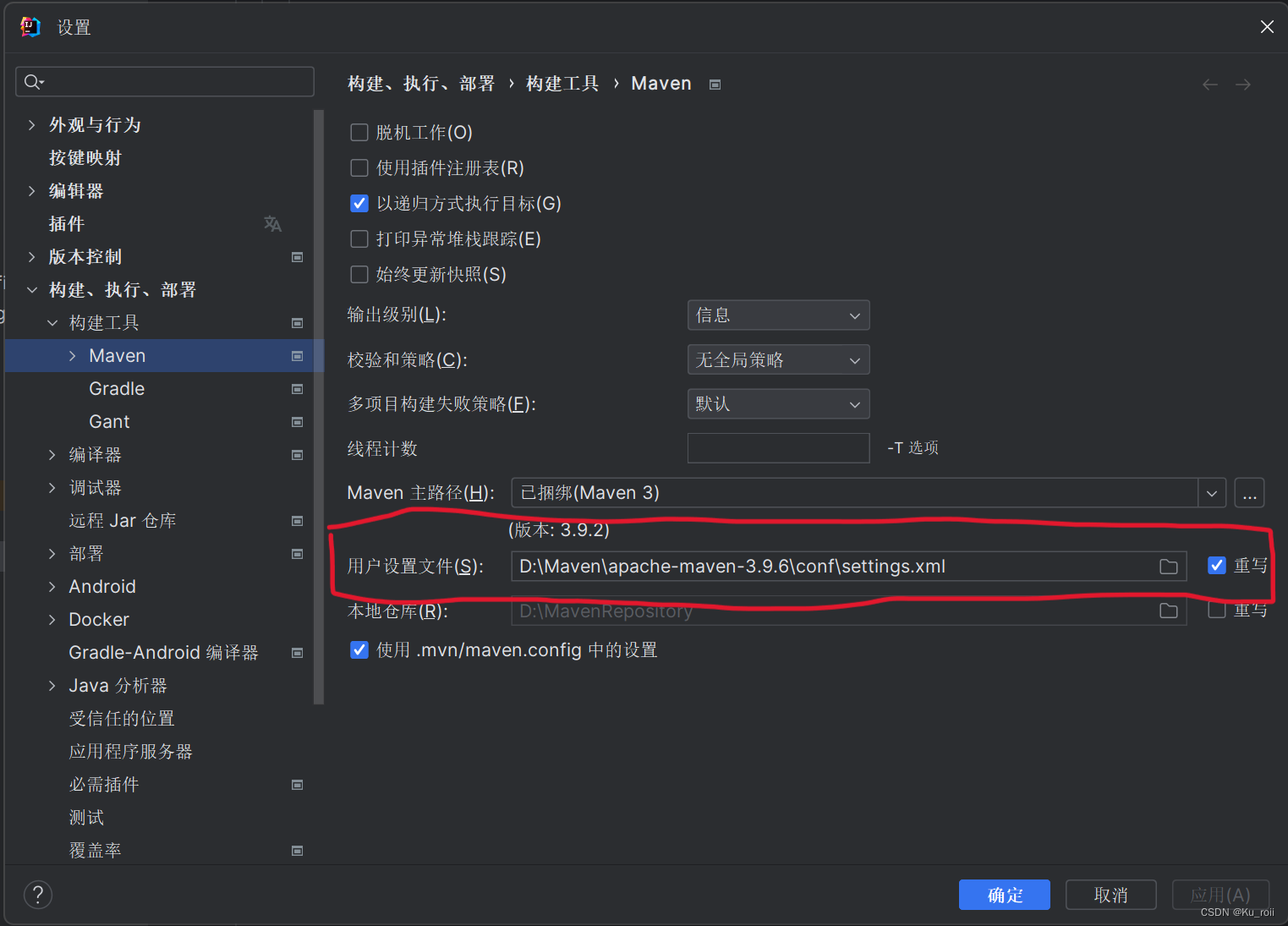
2.更换了镜像源,但是未在IDEA中更换settings.xml的位置(即使用的依然是maven默认的settings.xml)
在设置中搜索maven,如下
勾选用户设置文件最右边的重写,就可以选择自己的settings.xml

有“AI”的1024 = 2048,欢迎大家加入2048 AI社区
更多推荐

 10
10 0
0- 0


 已为社区贡献5条内容

所有评论(0)