android studio配置Http Proxy
·
1、问题描述:
Error:Unable to tunnel through proxy. Proxy returns “HTTP/1.1 400 Bad Request”
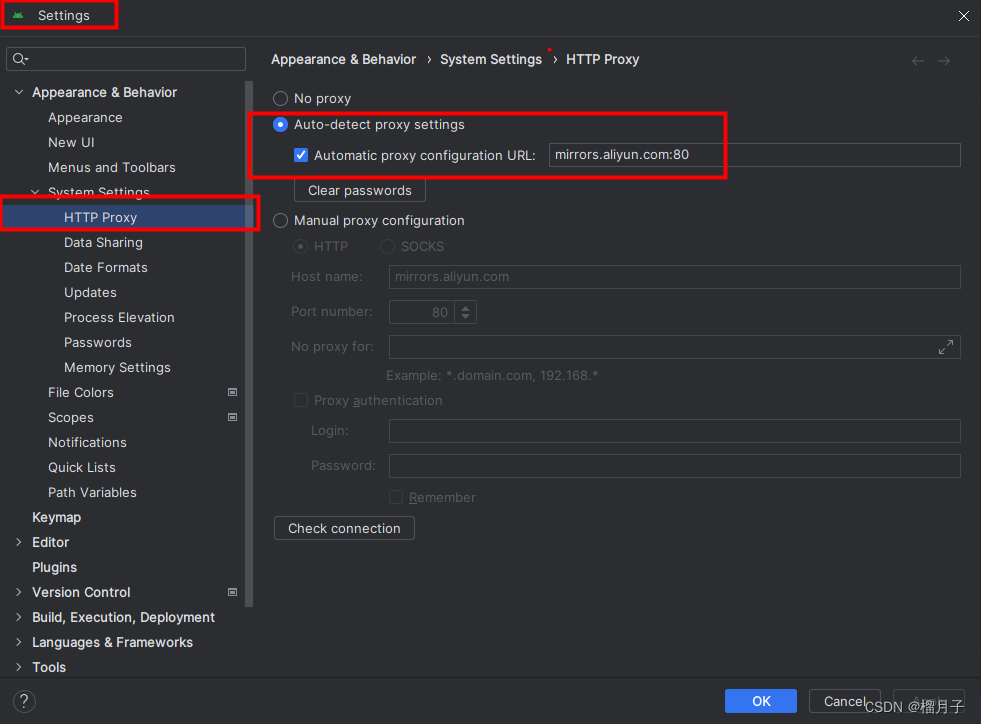
解决:HTTP Proxy设置
1.File→Settings…→System Settings → HTTP Proxy → Auto-detect proxy settings”;
2.勾选下方“Automatic proxy configuration URL”;
3.配置镜像地址:mirrors.aliyun.com:80;
4.applay
 备注:其他镜像站参考:
1.阿里云镜像站地址:mirrors.aliyun.com 端口:80
2.清华大学镜像站地址:mirrors.tuna.tsinghua.edu.cn 端口:80

有“AI”的1024 = 2048,欢迎大家加入2048 AI社区
更多推荐


 8
8 0
0- 0


 已为社区贡献1条内容

所有评论(0)