解决:Could not read package.json: This is related to npm not being able to find a file.
Could not read package.json,找不到package.json的路径,执行npm命令的路径不正确。cd:到正确目录下即可,再执行npm install 命令。
·
问题:
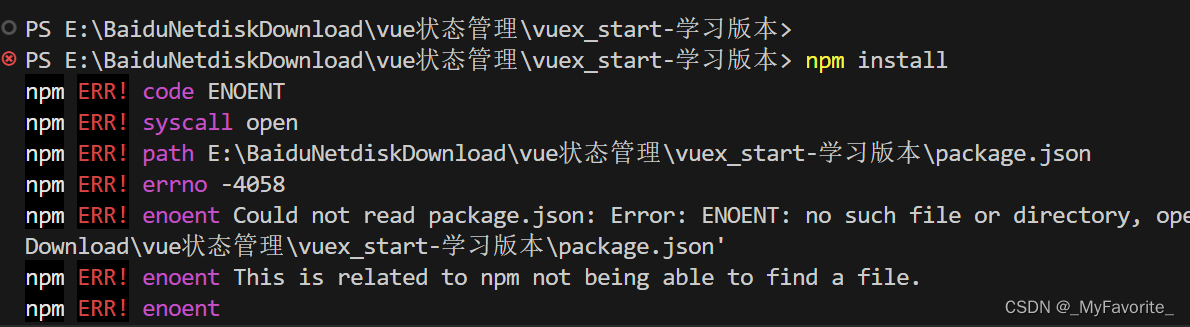
错误提示代码:
PS E:\BaiduNetdiskDownload\vue状态管理\vuex_start-学习版本> npm install
npm ERR! code ENOENT
npm ERR! syscall open
npm ERR! path E:\BaiduNetdiskDownload\vue状态管理\vuex_start-学习版本\package.json
npm ERR! errno -4058
npm ERR! enoent Could not read package.json: Error: ENOENT: no such file or directory, open 'E:\BaiduNetdiskDownload\vue状态管理\vuex_start-学习版本\package.json'
npm ERR! enoent This is related to npm not being able to find a file.
npm ERR! enoent

npm ERR! A complete log of this run can be found in: E:\config_tools\nodejs\node_cache\_logs\2024-05-03T12_43_16_453Z-debug-0.log
原因:
Could not read package.json,找不到package.json的路径,执行npm命令的路径不正确
解决:
cd:到正确目录下即可,再执行npm install 命令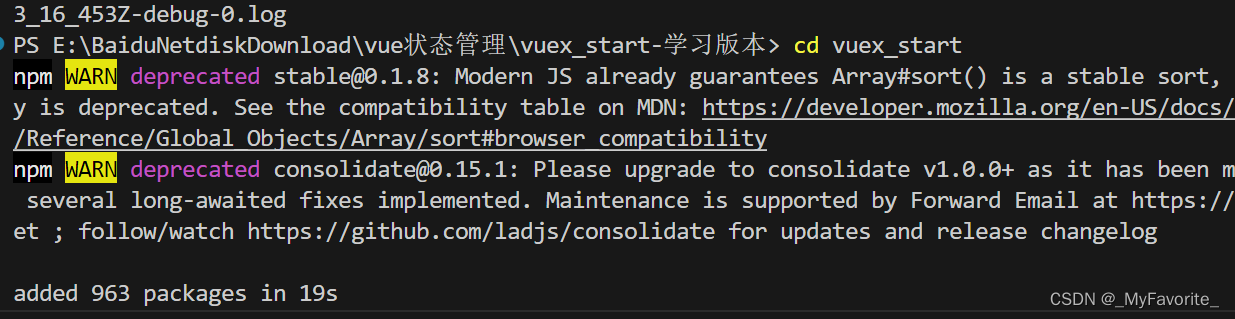

有“AI”的1024 = 2048,欢迎大家加入2048 AI社区
更多推荐
 13
13 0
0- 0


 已为社区贡献4条内容

所有评论(0)