工具使用——keil修改代码与背景配色
使用默认的配色,时间久了容易眼睛疼,所以自己更改了配色。
·
使用默认的配色,时间久了容易眼睛疼,所以自己更改了配色
1、手动更改
点击keil页面的configurations的Colors & Fonts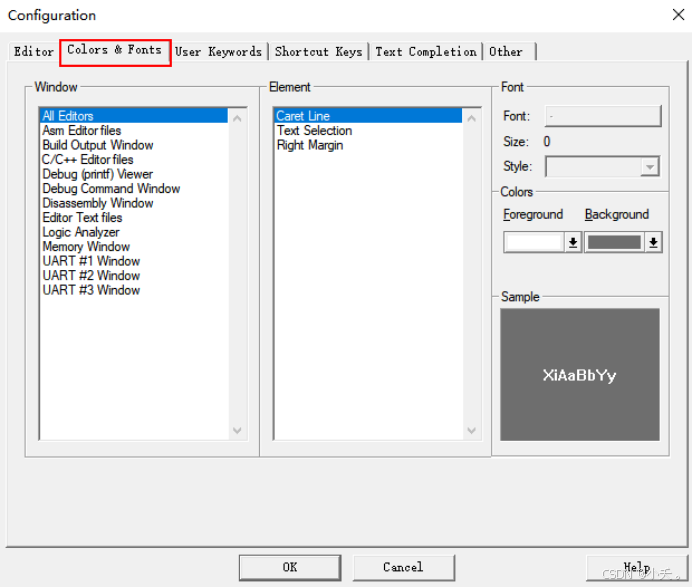
2、更改配置代码
文件位于 \Keil_v5\UV4
我是默认安装在c盘
找到其中global.prop
主要更改其中c语言和asm部分的代码样式
以下是我自己调整后的样式,可以根据自己的喜好进行更改
# Specification for text selection and caret line
selection.fore=#8080FF
selection.back=#FFFF00
caret.fore=#FFFFFF
caret.back=#6E6E6E

# Color for vertical edge
edge.colour=#404040

# C/C++ Editor files
template.cpp="#define","#define |";"#if","#if |\r\n\r\n#endif";\\
    "#include","#include ";"Header","// Header:\r\n// File Name: |\r\n// Author:\r\n// Date:\r\n";\\
    "continue","continue;";"do","do\r\n{\r\n\t// TODO: enter the block content here\r\n\t\r\n\t|\r\n} while ();\r\n";\\
    "enum","enum |\r\n{\r\n\t\r\n};\r\n";"for","for(|;;)\r\n{\r\n}";\\
    "fpointer_type","typedef int (* |F)();\r\n";"function","void function(|)\r\n{\r\n\r\n}\r\n";\\
    "if","if (|)";"ifelse","if (|)\r\n{\r\n}\r\nelse\r\n{\r\n}";\\
    "struct","struct | \r\n{\r\n\r\n};\r\n";"switch","switch (|)\r\n{\r\n\tcase:\r\n\t\tbreak;\r\n\tcase:\r\n\t\tbreak;\r\n\tdefault:\r\n\t\tbreak;\r\n}";\\
    "void","void | ();\r\n";"while","while (|)\r\n{\r\n}";\\

font.monospace.cpp=Courier New
font.acppropfontname.cpp=Courier New
style.cpp.32=font:Courier New,size:10,fore:#FFFFFF,back:#333333
style.cpp.4=font:Courier New,size:10,fore:#FCD93E,back:#333333
style.cpp.10=font:Courier New,size:10,fore:#DCDCAA,back:#333333
style.cpp.1=font:Courier New,size:10,fore:#6A9955,back:#333333
style.cpp.2=font:Courier New,size:10,fore:#6A9955,back:#333333
style.cpp.5=font:Courier New,size:10,fore:#C586C0,back:#333333
style.cpp.6=font:Courier New,size:10,fore:#CE9178,back:#333333,bold
style.cpp.11=font:Courier New,size:10,fore:#8ECBE7,back:#333333
style.cpp.9=font:Courier New,size:10,fore:#C57991,back:#333333
style.cpp.7=font:Courier New,size:10,fore:#CE9178,back:#333333
style.cpp.34=font:Courier New,size:10,fore:#DCDCAA,back:#626A79
style.cpp.35=font:Courier New,size:10,fore:#FF0000,back:#333333
style.cpp.16=font:Courier New,size:10,fore:#569CD6,back:#333333
style.cpp.12=font:Courier New,size:10,fore:#000000,back:#E0C0E0
style.cpp.86=font:Courier New,size:10,fore:#696969,back:#FFFFFF


# Asm Editor files
font.monospace.asm=Courier New
style.asm.32=font:Courier New,size:10,fore:#D4D4D4,back:#1E1E1E
style.asm.1=font:Courier New,size:10,fore:#6A9955,back:#1E1E1E
style.asm.2=font:Courier New,size:10,fore:#569CD6,back:#1E1E1E
style.asm.3=font:Courier New,size:10,fore:#C586C0,back:#1E1E1E
style.asm.4=font:Courier New,size:10,fore:#D4D4D4,back:#1E1E1E
style.asm.5=font:Courier New,size:10,fore:#D4D4D4,back:#1E1E1E
style.asm.6=font:Courier New,size:10,fore:#4EC9B0,back:#1E1E1E
style.asm.7=font:Courier New,size:10,fore:#C586C0,back:#1E1E1E
style.asm.9=font:Courier New,size:10,fore:#D7BA7D,back:#1E1E1E
style.asm.10=font:Courier New,size:10,fore:#9CDCFE,back:#1E1E1E
style.asm.11=font:Courier New,size:10,fore:#B5CEA8,back:#1E1E1E
style.asm.12=font:Courier New,size:10,fore:#CE9178,back:#1E1E1E
style.asm.8=font:Courier New,size:10,fore:#46AA03,back:#FFFFFF


# Editor Text files
font.monospace.txt=Consolas
style.txt.32=font:Verdana,size:10,fore:#D4D4D4,back:#1E1E1E

有“AI”的1024 = 2048,欢迎大家加入2048 AI社区
更多推荐


 6
6 0
0- 0


 已为社区贡献3条内容

所有评论(0)