Endnote调整多篇引用分隔符为分号
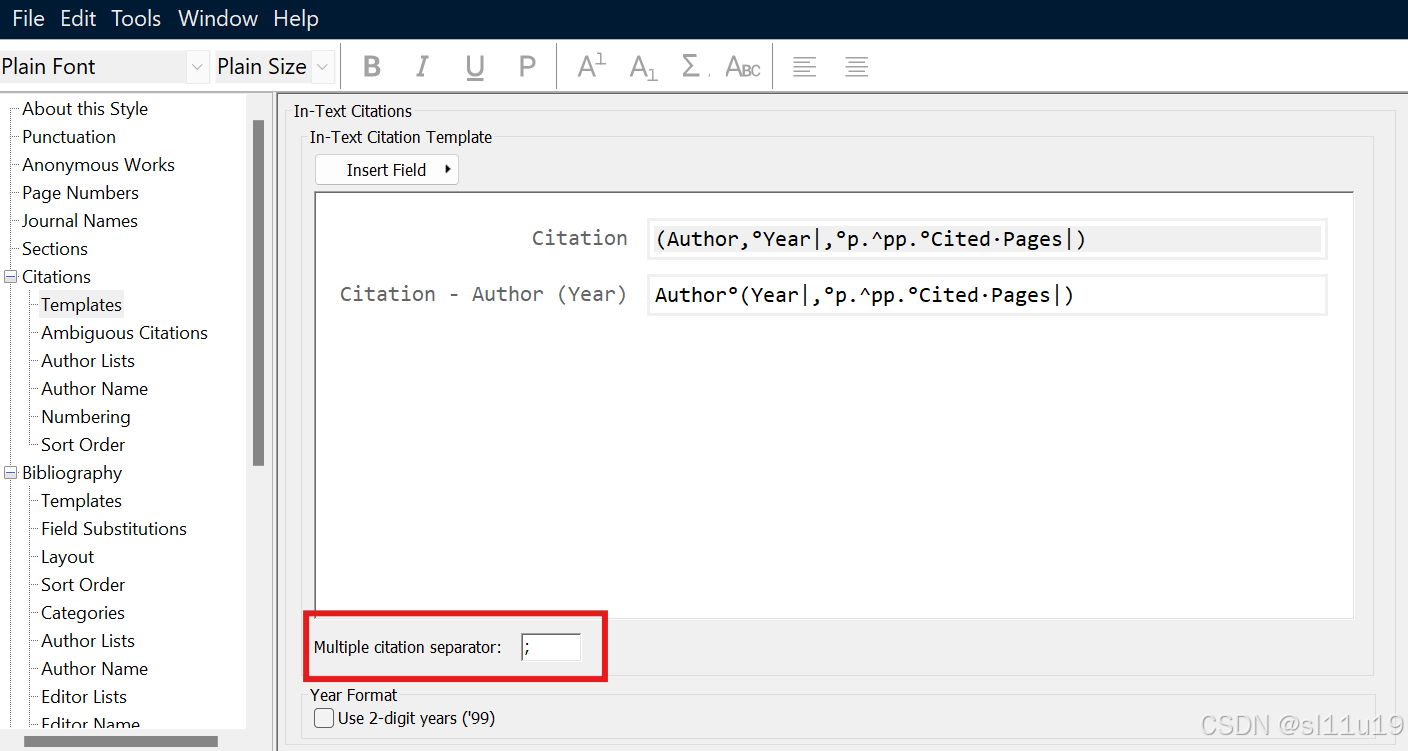
Tools - Output style - Edit "Havard" - 新窗口的左侧"Citations" - “Templates" - 下方看到Multiple citation separator - 将逗号修改为分号
·
有时候,默认的两篇文章的分隔符是逗号(,),但是格式要求是分号(;),这时候需要在endnote里面对citation的格式进行修改。
Endnote - 菜单栏Tools - Output style - Edit "Havard" - 新窗口的左侧"Citations" - “Templates" - 下方看到Multiple citation separator - 将逗号修改为分号(注意使用英文符号)- 保存
回到word文档 - 菜单栏endnote - update citations and bibliography

有“AI”的1024 = 2048,欢迎大家加入2048 AI社区
更多推荐
 6
6 0
0- 0


 已为社区贡献1条内容

所有评论(0)