PlantUML画复杂流程图
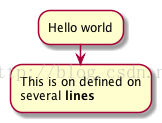
1.They are implicitly linked in their definition order.
@startuml
:Hello world;
:This is on defined on
several **lines**;
@enduml
basic diagram activity
Start/Stop
2.Conditional
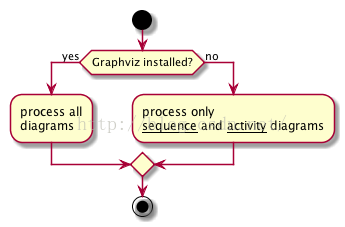
You can use if, then and else keywords to put tests if your diagram. Labels can be provided using parentheses.
@startuml

start

if (Graphviz installed?) then (yes)
  :process all\ndiagrams;
else (no)
  :process only
  __sequence__ and __activity__ diagrams;
endif

stop

@enduml
3.if then else example
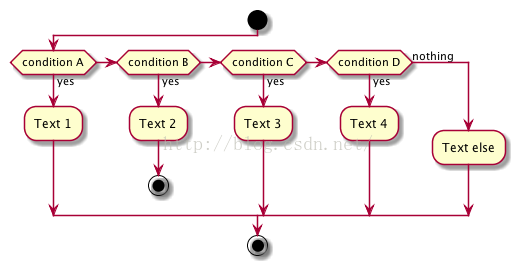
You can use the elseif keyword to have several tests :
@startuml
start
if (condition A) then (yes)
  :Text 1;
elseif (condition B) then (yes)
  :Text 2;
  stop
elseif (condition C) then (yes)
  :Text 3;
elseif (condition D) then (yes)
  :Text 4;
else (nothing)
  :Text else;
endif
stop
@enduml
4.several if test
Repeat loop
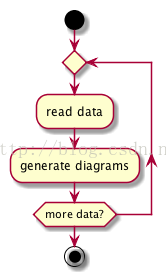
You can use repeat and repeatwhile keywords to have repeat loops.
@startuml

start

repeat
  :read data;
  :generate diagrams;
repeat while (more data?)

stop

@enduml
5.basic repeat while loop
While loop
You can use while and end while keywords to have repeat loops.
@startuml

start

while (data available?)
  :read data;
  :generate diagrams;
endwhile

stop

@enduml
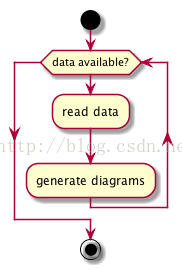
6.another while loop
It is possible to provide a label after the endwhile keyword, or using the is keyword.
@startuml
while (check filesize ?) is (not empty)
  :read file;
endwhile (empty)
:close file;
@enduml
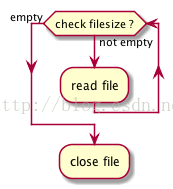
7.while loop with labels
Parallel processing
You can use fork, fork again and end fork keywords to denote parallel processing.
@startuml

start

if (multiprocessor?) then (yes)
  fork
    :Treatment 1;
  fork again
    :Treatment 2;
  end fork
else (monoproc)
  :Treatment 1;
  :Treatment 2;
endif

@enduml
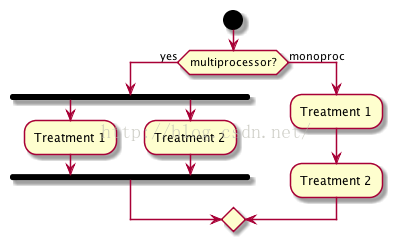
8.activity diagram with parallel processing
Notes
Text formatting can be done using creole wiki syntax.
A note can be floating, using floating keyword.
@startuml

start
:foo1;
floating note left: This is a note
:foo2;
note right
  This note is on several
  //lines// and can
  contain <b>HTML</b>
  ====
  * Calling the method ""foo()"" is prohibited
end note
stop

@enduml
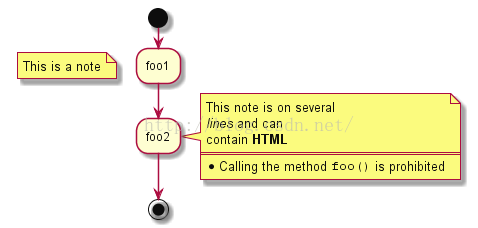
9.add notes on activity diagram
Colors
You can use specify a color for some activities.
@startuml

start
:starting progress;
#HotPink:reading configuration files
These files should edited at this point!;
#AAAAAA:ending of the process;

@enduml
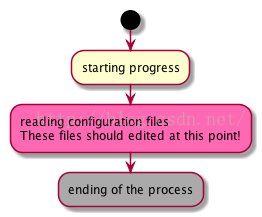
10.changing colors
Arrows
Using the -> notation, you can add texts to arrow, and change their color.
It’s also possible to have dotted, dashed, bold or hidden arrows.
@startuml
:foo1;
-> You can put text on arrows;
if (test) then
  -[#blue]->
  :foo2;
  -[#green,dashed]-> The text can
  also be on several lines
  and **very** long...;
  :foo3;
else
  -[#black,dotted]->
  :foo4;
endif
-[#gray,bold]->
:foo5;
@enduml
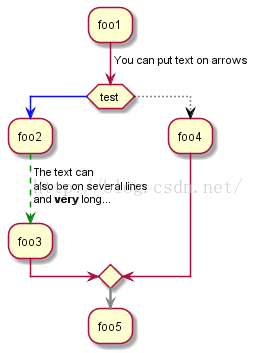
11.colored arrows
Grouping
You can group activity together by defining partition:
@startuml
start
partition Initialization {
    :read config file;
    :init internal variable;
}
partition Running {
    :wait for user interaction;
    :print information;
}

stop
@enduml
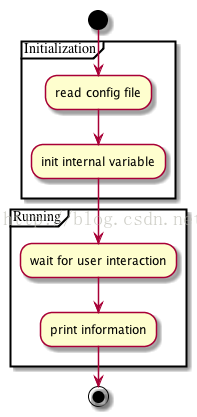
12.grouping and partitionning in activity diagram
Swimlanes
Using pipe |, you can define swimlanes.
It’s also possible to change swimlanes color.
@startuml
|Swimlane1|
start
:foo1;
|#AntiqueWhite|Swimlane2|
:foo2;
:foo3;
|Swimlane1|
:foo4;
|Swimlane2|
:foo5;
stop
@enduml
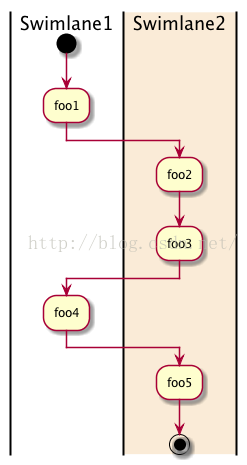
13.swimlanes
Detach
It’s possible to remove an arrow using the detach keyword.
@startuml
 :start;
 fork
   :foo1;
   :foo2;
 fork again
   :foo3;
   detach
 endfork
 if (foo4) then
   :foo5;
   detach
 endif
 :foo6;
 detach
 :foo7;
 stop
@enduml
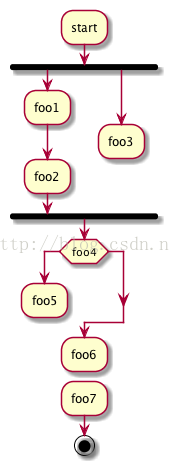
14.stop in activity diagrams
SDL
By changing the final ; separator, you can set different rendering for the activity:
|
<
/
]
}
@startuml
:Ready;
:next(o)|
:Receiving;
split
 :nak(i)<
 :ack(o)>
split again
 :ack(i)<
 :next(o)
 on several line|
 :i := i + 1]
 :ack(o)>
split again
 :err(i)<
 :nak(o)>
split again
 :foo/
split again
 :i > 5}
stop
end split
:finish;
@enduml
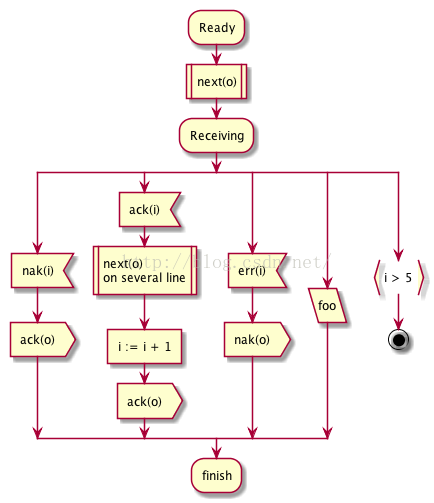
15.SDL example
Complete example
@startuml

start
:ClickServlet.handleRequest();
:new page;
if (Page.onSecurityCheck) then (true)
  :Page.onInit();
  if (isForward?) then (no)
    :Process controls;
    if (continue processing?) then (no)
      stop
    endif

    if (isPost?) then (yes)
      :Page.onPost();
    else (no)
      :Page.onGet();
    endif
    :Page.onRender();
  endif
else (false)
endif

if (do redirect?) then (yes)
  :redirect process;
else
  if (do forward?) then (yes)
    :Forward request;
  else (no)
    :Render page template;
  endif
endif

stop

@enduml
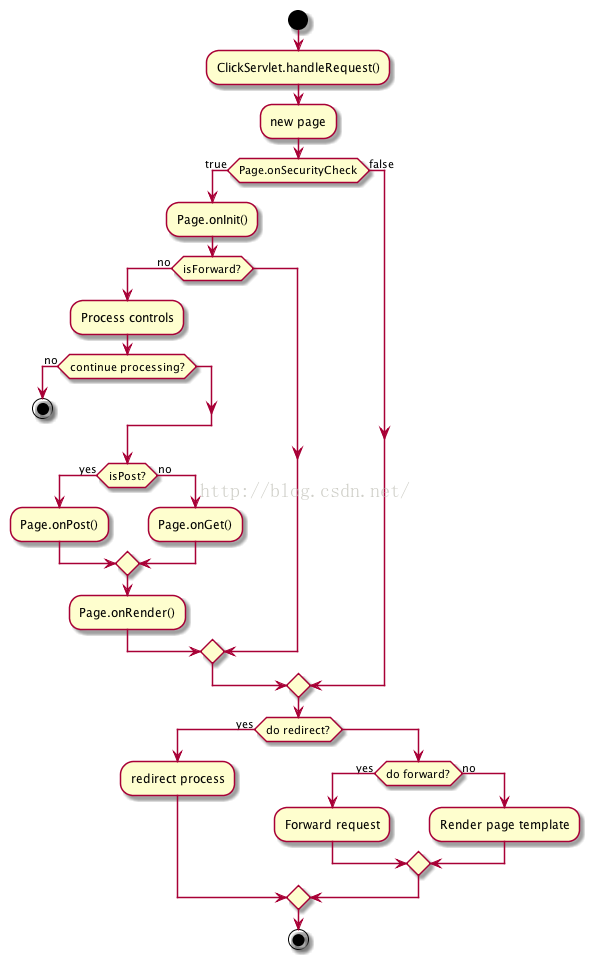
16.一个复杂流程图的例子
@startuml
start
:初始化;
:创建看门狗线程;
fork
    #00FF00:while(1);
    note right
    看门狗线程
    end note
    repeat
    if(>2min没喂狗) then (Y)
        #8EE5EE:取消点;
    endif
    :sleep(5);
    repeat while(1)
fork again
    #HotPink:while(1);
    note left
    a线程
    end note
    repeat
        if (注册标志==1) then (Y)
            :喂狗;
        else (N)
        endif
        :db;
        if(检测成功?) then (Y)
            #A020F0:获取;
            note left
            根据
            end note
            if(有d? && 未?) then (Y)
                :clear;
                note left
                clear共干了4件事
                ====
                 * 1.kill
                 * 2.set !!!
                 * 3.set global
                 * 4.stop
                 end note
                if(c_m成功?) then (Y)
                    :调m脚本;
                    note left
                    脚本在这里调用的
                    end note
                    if(调用成功?) then (Y)
                        #A020F0:修改DONE_SUCCESS;
                    else (N)
                        #A020F0:修改DONE_FAIL;
                    endif
                else (N)
                    #HotPink:goto while(1);
                    detach
                endif
            else (N)
            endif
            if(注册标志==0 && >60) then(Y)
                #8EE5EE:注册;
                :标志=1;
            else (N)
            endif
            :10min更新一次;
            note left
            1.保存master机器
            否则……
            2.实例的,
            所以去除……
            end note
            :10min运行一次;
        else (N)
            #A020F0:获取d;
            if(有d?) then (Y)
                if(未?) then (Y)
                    :"clear";
                    if(clear成功) then (Y)
                    else (N)
                        #HotPink:goto while(1);
                        detach
                    endif
                else (N)
                endif
                :重新;
                if("检测成功?") then (N)
                else (Y)
                    #HotPink:goto while(1);
                    detach
                endif
            else (N)
            endif
            if("可忽略err?") then (N)
                #8EE5EE:取消al;
                :标志=0;
                #0000FF:exit(0);
                stop
            else (Y)
            endif
        endif
        :sleep(1);
        #HotPink:goto while(1);


@enduml
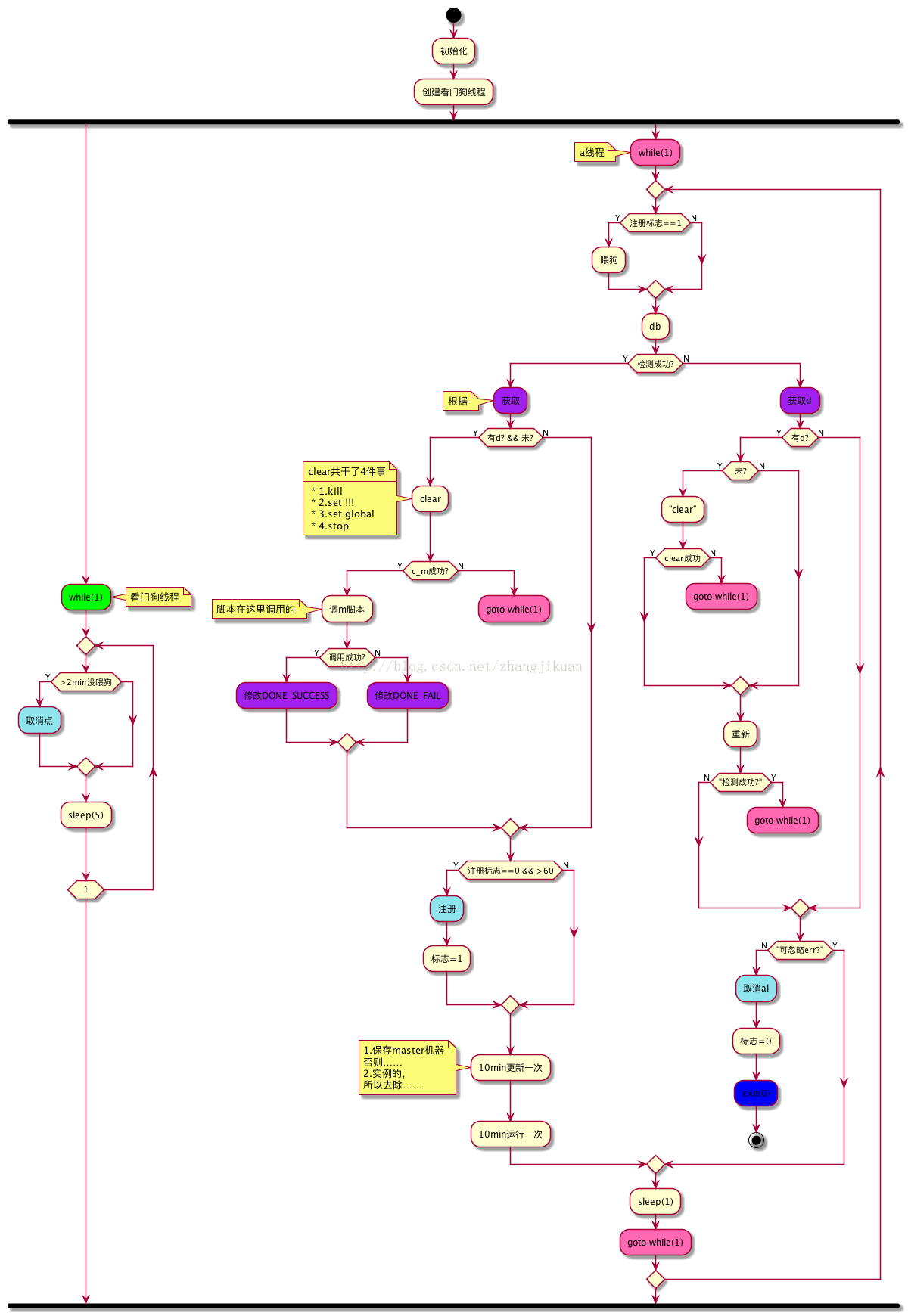

有“AI”的1024 = 2048,欢迎大家加入2048 AI社区
更多推荐



 24
24 0
0- 0


 已为社区贡献7条内容

所有评论(0)