Centos8报错:Cannot download repomd.xml: Cannot download repodata/repomd.xml: All mirrors were tried
3.查看是否删除成功,若没有显示.repo就删除成功了。yum makecache(生成 Yum 缓存)4.下载阿里可以正常使用的.repo文件。2.删除所有扩展名为.repo的文件。6.测试yum能否正常使用。或者wget命令的使用。安装curl命令的使用。两个命令任选其一执行。
·
报错信息如下:
cannot update repo 'appstream': Cannot prepare internal mirrorlist: Curl error (6): Couldn't resolve host name for http://mirrorlist.centos.org/
错误:为仓库 'baseos' 下载元数据失败 : Cannot download repomd.xml: Cannot download repodata/repomd.xml: All mirrors were triedInvalid configuration value: failovermethod=priority in /etc/yum.repos.d/CentOS-Base.repo; 配置:ID 为 "failovermethod" 的 OptionBinding 不存在
Invalid configuration value: failovermethod=priority in /etc/yum.repos.d/CentOS-Base.repo; 配置:ID 为 "failovermethod" 的 OptionBinding 不存在
Invalid configuration value: failovermethod=priority in /etc/yum.repos.d/CentOS-Base.repo; 配置:ID 为 "failovermethod" 的 OptionBinding 不存在
Invalid configuration value: failovermethod=priority in /etc/yum.repos.d/CentOS-Base.repo; 配置:ID 为 "failovermethod" 的 OptionBinding 不存在
Invalid configuration value: failovermethod=priority in /etc/yum.repos.d/CentOS-Base.repo; 配置:ID 为 "failovermethod" 的 OptionBinding 不存在
Repository extras is listed more than once in the configuratio解决方法
1.进入/etc/yum.repos.d/文件夹
cd /etc/yum.repos.d/2.删除所有扩展名为.repo的文件
rm *.repo -f3.查看是否删除成功,若没有显示.repo就删除成功了
ls
4.下载阿里可以正常使用的.repo文件
两个命令任选其一执行
安装curl命令的使用
curl -o /etc/yum.repos.d/CentOS-Base.repo http://mirrors.aliyun.com/repo/Centos-8.repo
或者wget命令的使用
wget -O /etc/yum.repos.d/CentOS-Base.repo http://mirrors.aliyun.com/repo/Centos-8.repo
5.运行yum makecache(生成 Yum 缓存)
yum makecache
6.测试yum能否正常使用
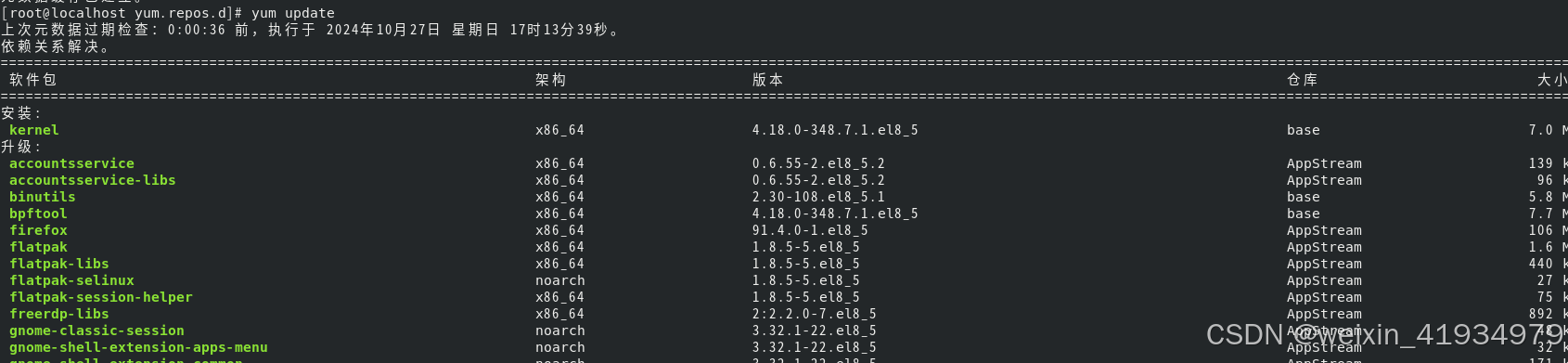
yum更新命令
yum update证明可以正常使用
Centos7 系统的网络问题、以及yum问题的解决 :https://blog.csdn.net/weixin_41934979/article/details/143099090
参考资料

有“AI”的1024 = 2048,欢迎大家加入2048 AI社区
更多推荐


 15
15 0
0- 0


 已为社区贡献3条内容

所有评论(0)