登录社区云,与社区用户共同成长
邀请您加入社区
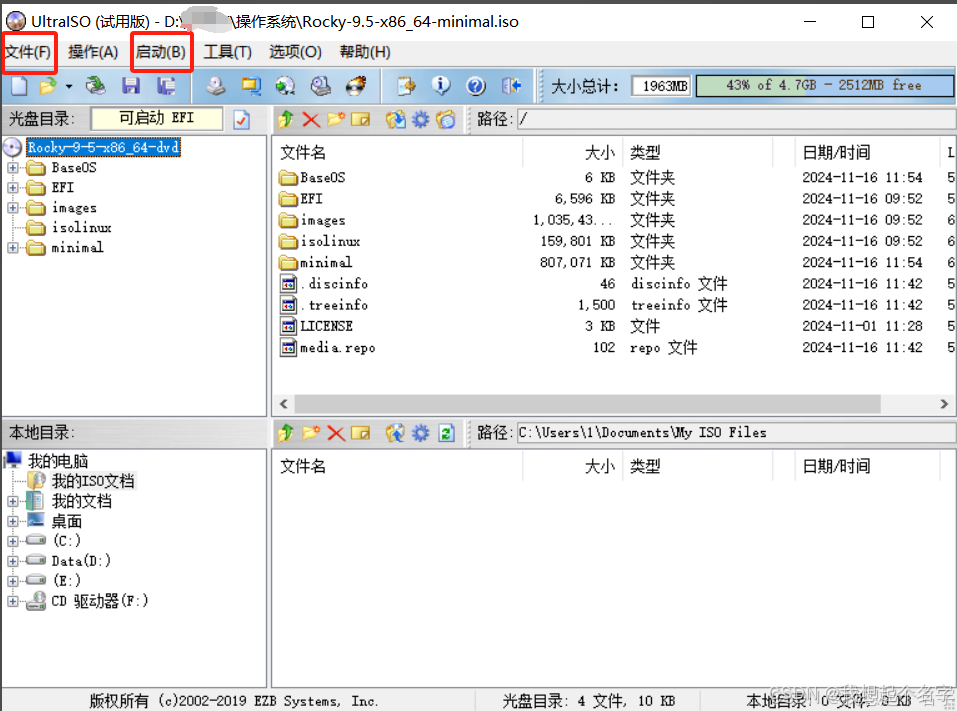
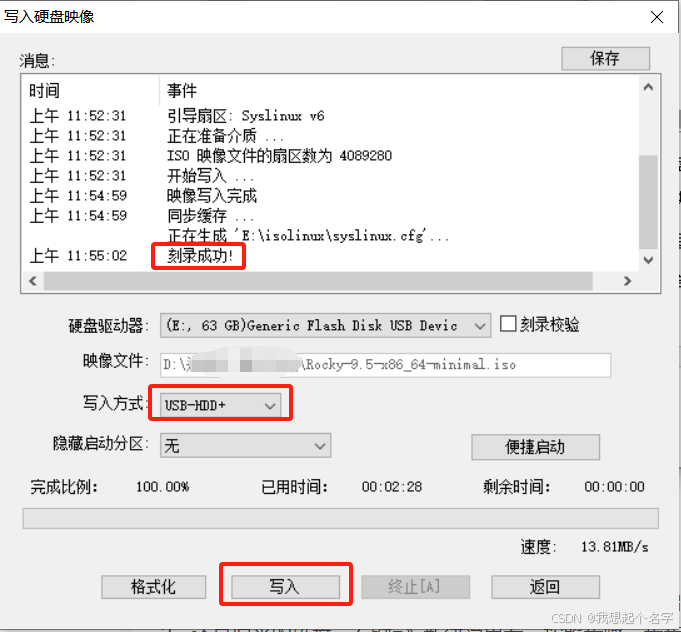
1.下载自己需要的镜像文件 2.下载软碟通(https://gitcode.com/open-source-toolkit/b837c/overview?utm_source=highlight_word_gitcode&word=UltraISO&null) 3.文件–>打开 选择对应镜像 启动–>写入硬盘映像 选择对应u盘 4.点击写入
有“AI”的1024 = 2048,欢迎大家加入2048 AI社区
更多推荐
打破 AI 搜索黑盒:恒韵通 GEO 自研监测 SaaS 的数据采集与量化算法揭秘
AI Agent入门学习(一)
参数校验 + 对话记忆。
英文Essay局部降AI怎么处理,助研君应急修改流程
扫一扫分享内容
为遵守国家网络实名制规定,未绑定将限制内容发布与互动





 已为社区贡献1条内容

所有评论(0)