cursor开发Springboot,cursor的配置
·
setting.json文件配置
{
    "window.commandCenter": true,
    "java.jdt.ls.java.home": "G:\\jdk-11.0.22+7",
    "java.configuration.runtimes": [
        {
            "name": "JavaSE-11",
            "path": "G:\\jdk-11.0.22+7",
            "default": true
        }
    ],
    // Maven配置(如果使用Maven)
    "java.configuration.maven.userSettings": "G:\\jdk11-maven\\setting\\settings.xml",
    "redhat.telemetry.enabled": true,
    "editor.fontSize": 15,
    "git.autofetch": true,
    "terminal.integrated.scrollback": 50000,
    "java.maven.downloadSources": true,
    "java.configuration.maven.globalSettings": "G:\\jdk11-maven\\setting\\settings.xml",
    "maven.executable.path": "G:\\apache-maven-3.9.7\\bin\\mvn",
    "maven.settingsFile": "G:\\jdk11-maven\\setting\\settings.xml",
    "java.import.maven.enabled": true,
    "editor.multiCursorModifier": "ctrlCmd",
    "AI.chatLanguage": "简体中文",
    "console": "integratedTerminal",
    "encoding": "utf-8",
    "stopOnEntity": false,
    // 编辑器通用配置
    "editor.formatOnSave": true,
    "editor.formatOnPaste": true,
    "editor.detectIndentation": false,
    "editor.tabSize": 4,
    // 其他Java特定编辑器配置
    "[java]": {
        "editor.suggest.snippetsPreventQuickSuggestions": false,
        "editor.suggestSelection": "first",
        "editor.formatOnSave": true,
        "editor.formatOnPaste": true,
        "editor.defaultFormatter": "redhat.java"
    },
    // Java导入顺序
    "java.completion.importOrder": [
        "java",
        "javax",
        "org",
        "com"
    ],
    // Java相关配置
    "java.configuration.updateBuildConfiguration": "automatic",
    "java.compile.nullAnalysis.mode": "automatic",
    "java.dependency.packagePresentation": "hierarchical",
    "java.format.settings.profile": "GoogleStyle",
    "java.format.settings.url": "",
    "maven.executable.preferMavenWrapper": true,
    "vue.server.hybridMode": false,
    "files.encoding": "utf8"
}
launch.json 添加上一个配置
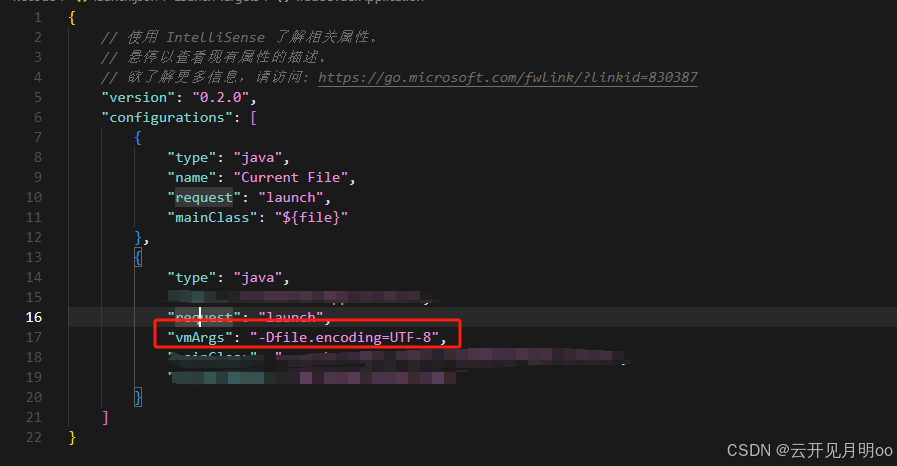
"vmArgs": "-Dfile.encoding=UTF-8",chcp 65001 配置终端字符集
还需要在插件市场安装Java和Springboot的插件
我是通过配置了以上内容之后更新完maven启动的项目

有“AI”的1024 = 2048,欢迎大家加入2048 AI社区
更多推荐
 4
4 0
0- 0


 已为社区贡献1条内容

所有评论(0)