matplotlib如何设置中文为宋体,英文为新罗马Times New Roman
论文附图通常需要将中文设置为宋体,英文设置为新罗马字体(Times New Roman)。但是这样设置后者会将前者覆盖,只会显示一种字体。以下是摸索出来的一种不太优雅的解决方案,但可以解决问题。(目前没探索到更优的方案)以下是一个简单的示例,可以作为一个代码模板使用。成功实现中文宋体,英文Times New Roman。
·
问题描述
论文附图通常需要将中文设置为宋体,英文设置为新罗马字体(Times New Roman)。matplotlib中可以这样设置字体:
plt.rcParams['font.sans-serif'] = ['SimSun']
plt.rcParams['font.sans-serif'] = ['Times New Roman']
但是这样设置后者会将前者覆盖,只会显示一种字体。以下是摸索出来的一种不太优雅的解决方案,但可以解决问题。(目前没探索到更优的方案)
解决方案
以下是一个简单的示例,可以作为一个代码模板使用。代码中展示了以下三种情况:
- 对于中文字符,正常直接使用引号括起来即可;
- 对于英文字符,传入参数
fontproperties='Times New Roman'即可; - 对于中英文混合字符,将英文字符的部分单独使用
$\mathrm{}$括起来。(若不写\mathrm{}则会是斜体的效果)
import matplotlib.pyplot as plt
from matplotlib import rcParams

# 首先配置字体信息
config = {
    "font.family": 'serif',
    "font.size": 12,
    "mathtext.fontset": 'stix',
    "font.serif": ['SimSun'],
}
rcParams.update(config)

x = [1, 2, 3]
y = [1, 2, 3]

# 将刻度显示设置为新罗马字体
plt.xticks(fontproperties='Times New Roman')
plt.yticks(fontproperties='Times New Roman')

# 中英文字符混合
plt.title('示意图$\mathrm{ABC}$', size=18)
# 仅包含中文字符
plt.xlabel('日期', size=14)
# 仅包含英文字符
plt.ylabel('y', fontproperties='Times New Roman', size=14)

plt.plot(x, y)
plt.show()
示例图
以上代码的运行结果如下所示: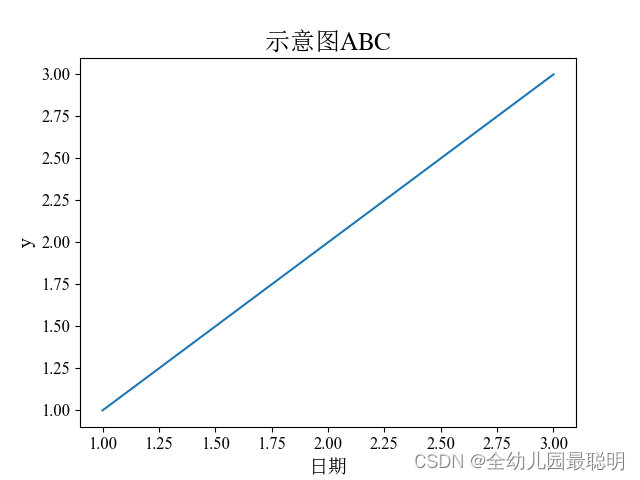
成功实现中文宋体,英文Times New Roman。

有“AI”的1024 = 2048,欢迎大家加入2048 AI社区
更多推荐

 33
33 0
0- 0


 已为社区贡献6条内容

所有评论(0)