【数字图像处理】编码解码jpeg和png图片(C语言实现)
摘要:在本篇文章中本人将简单阐述图片编码的原理与实现方法。同时通过 windows平台下 mingw编译的libjpeg,libpng, zlib 第三方库,然后实现两种图片的编码与解码。(一)写在前面前一段时间本人一直在进行Opencv有关的学习,可是在学完了一堆又一堆的函数之后,发现自己对于图像处理的知识其实本质上还是什么都不会。我相信真正图像处理一定不是仅仅调用几个函数就可以了事的,一...
摘要:在本篇文章中本人将简单阐述图片编码的原理与实现方法。同时
通过 windows平台下 mingw编译的libjpeg,libpng, zlib 第三方库,然后实现两种图片的编码与解码。
(一)写在前面
前一段时间本人一直在进行Opencv有关的学习,可是在学完了一堆又一堆的函数之后,发现自己对于图像处理的知识其实本质上还是什么都不会。我相信真正图像处理一定不是仅仅调用几个函数就可以了事的,一些东西如果不自己敲一遍恐怕永远也无法懂得其真正的原理。所以我打算从最底层自己敲出一个轻量级的图像处理库出来。可能一开始我的代码并不可靠效率可能也赶不上那些开源库的效率,但是我坚信这个轮子造的一定是有意义的。
截止目前为之,这个图像处理的库已经可以支持jpeg,png,bmp三种图片格式的编码和解码。同时对于一些图片的常见几何变化,灰度变换,颜色识别等功能都已经分别进行了实现。而且截止目前仍然具有跨平台的特性。稍作修改便可以运行在
X86_LINUX,ARN_LINUX,STM32
等平台上面。
下面的计划就是进一步的扩展界面显示的功能。比较凄惨的是找了半天也没有找到合适又简单的C语言跨平台图像库,这个再自己写又好像不太现实,所以决定开始导入QT作为图像显示的载体。
我目前已经将这个项目开源于github
LiteCV
(二)基础知识
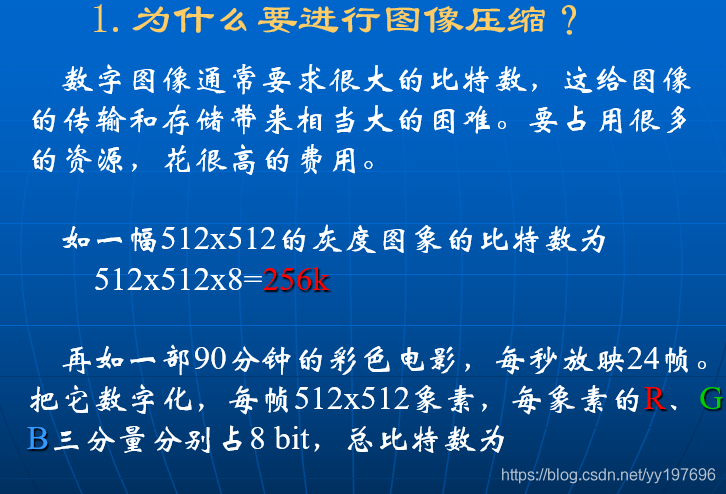
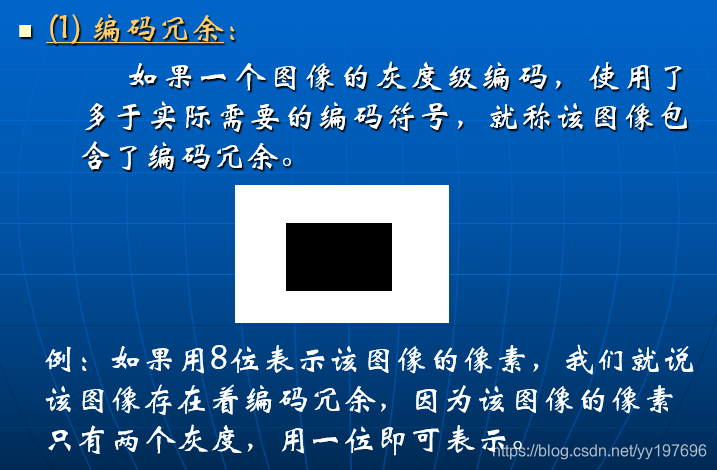
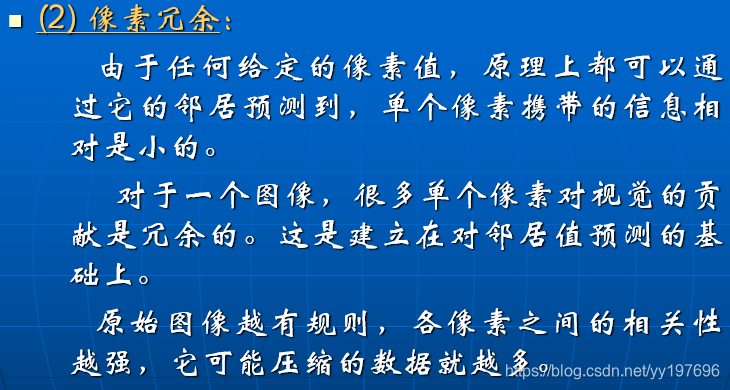
(1)图像的压缩与解码

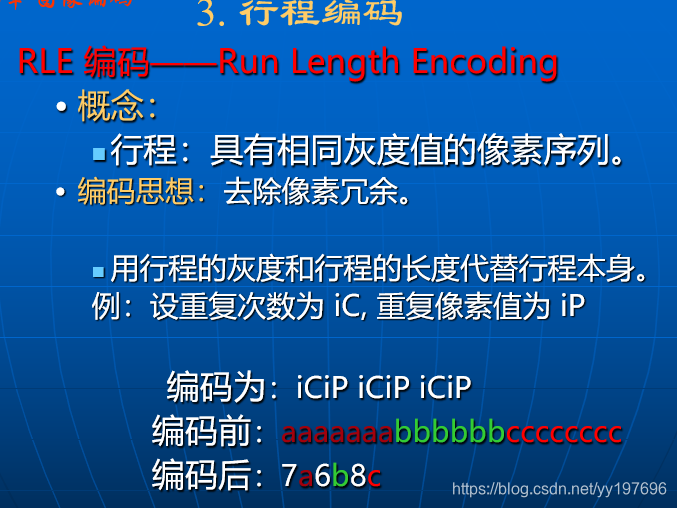
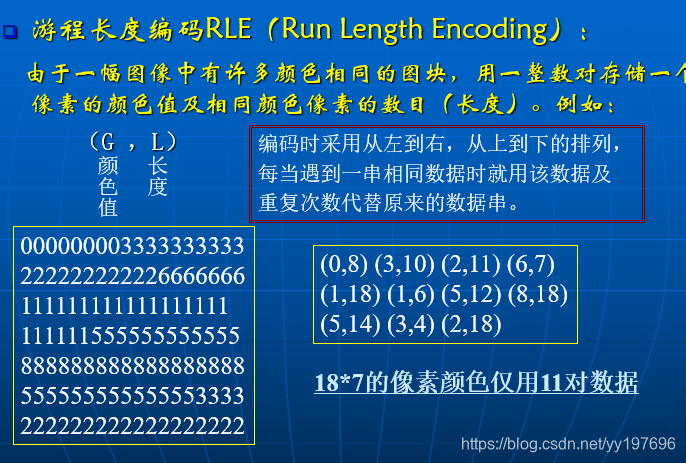
(2)常用的图像压缩方法

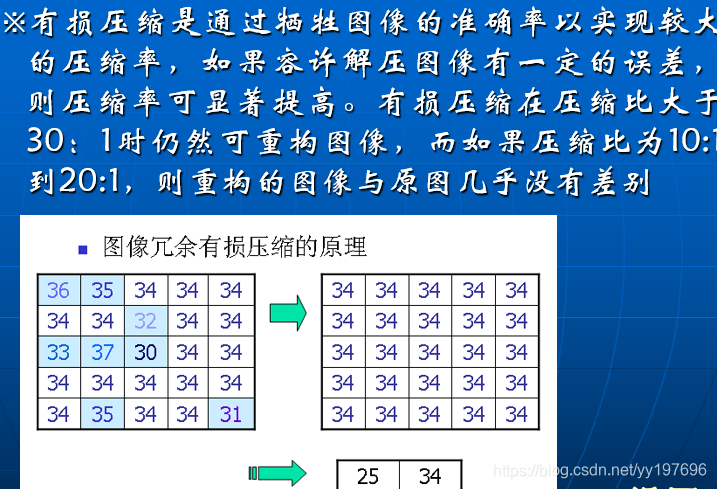
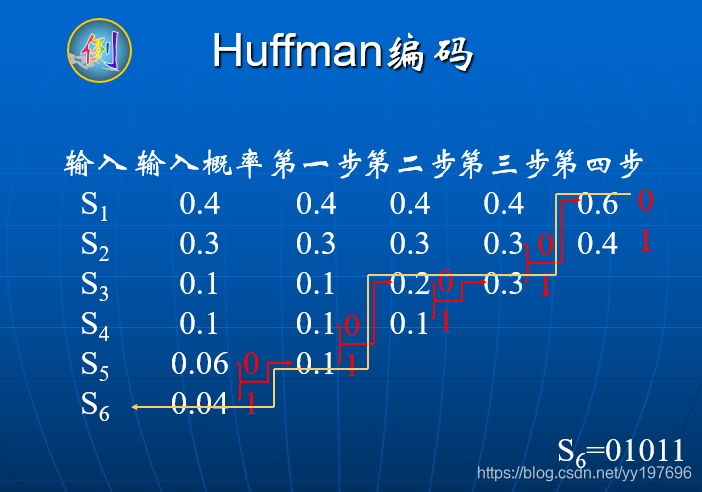
1.哈夫曼编码


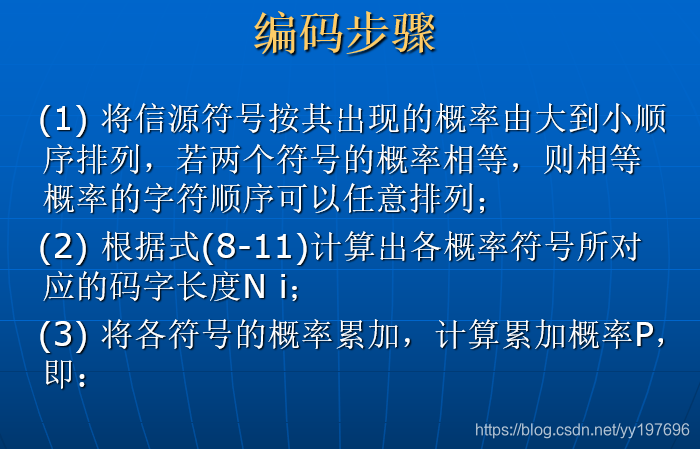
2.香农范诺编码

(2)静止图像压缩编码标准(JPEG)
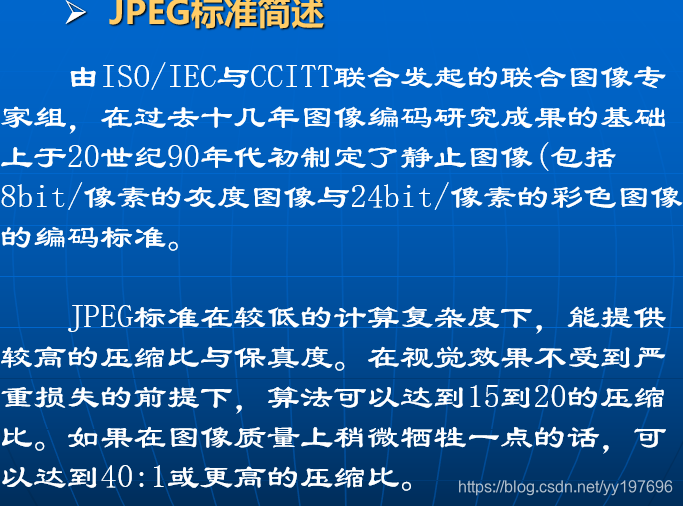
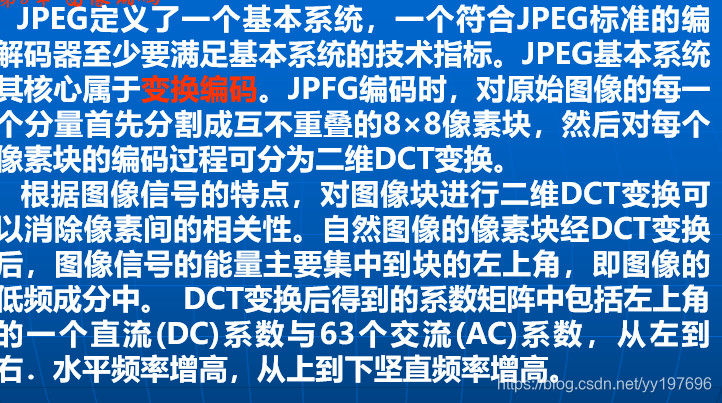
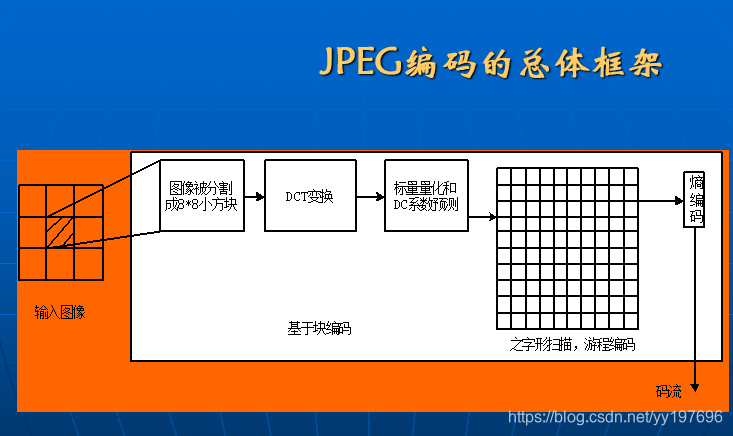
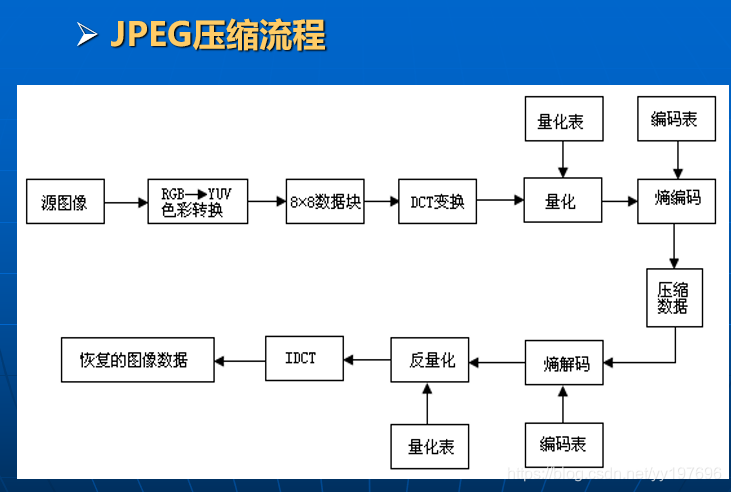

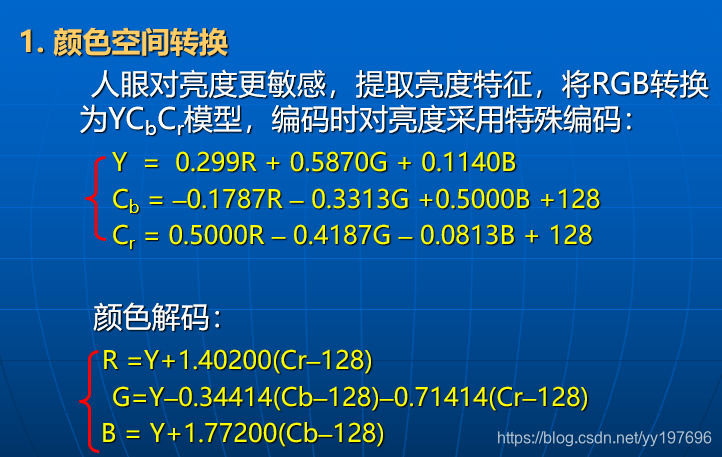
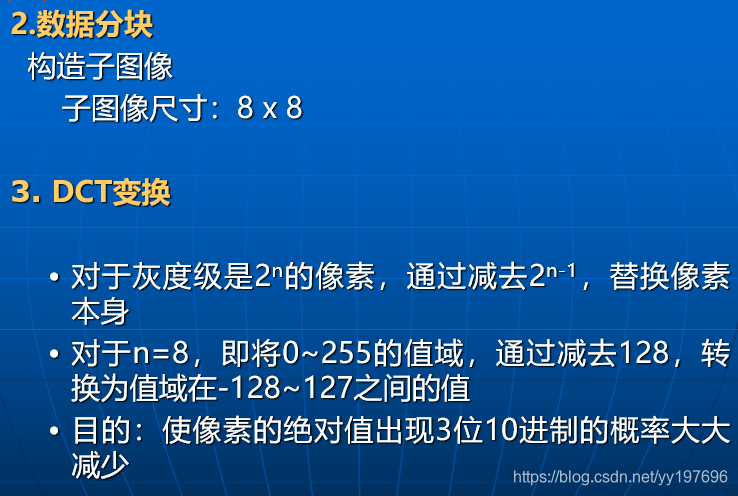
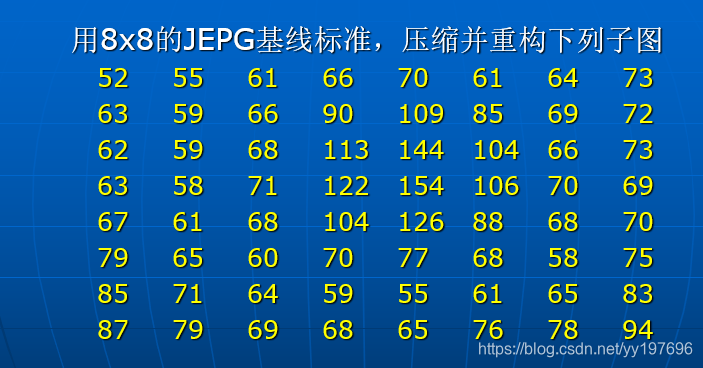
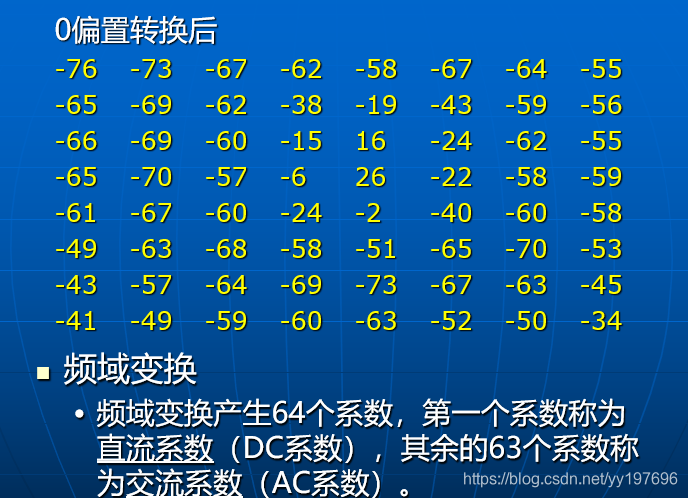
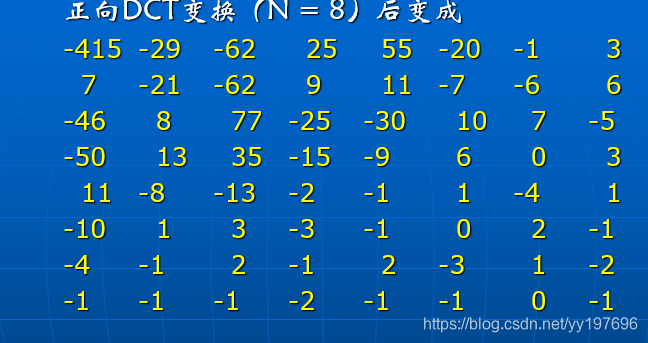
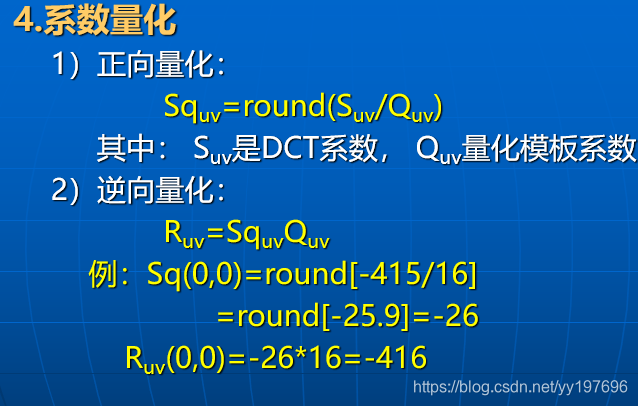
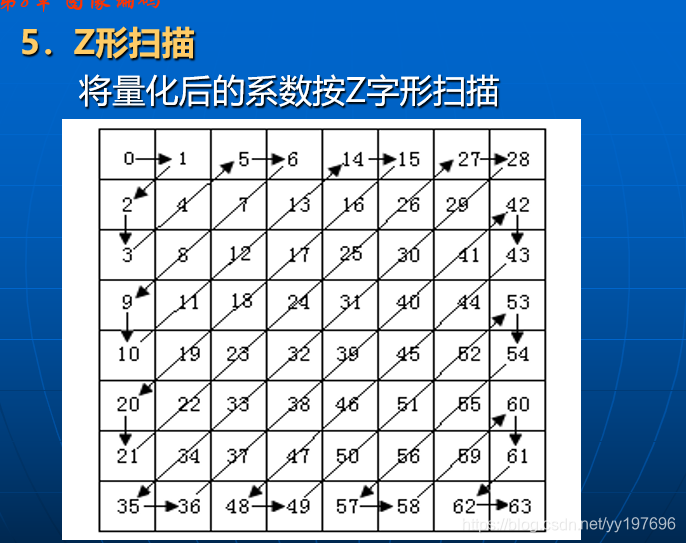
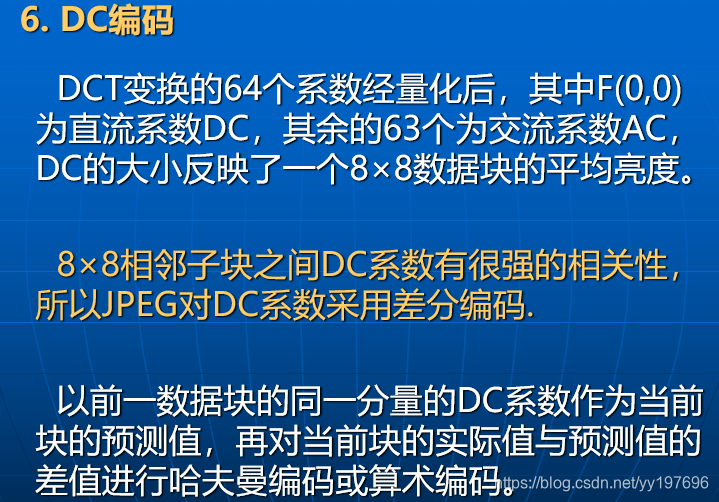
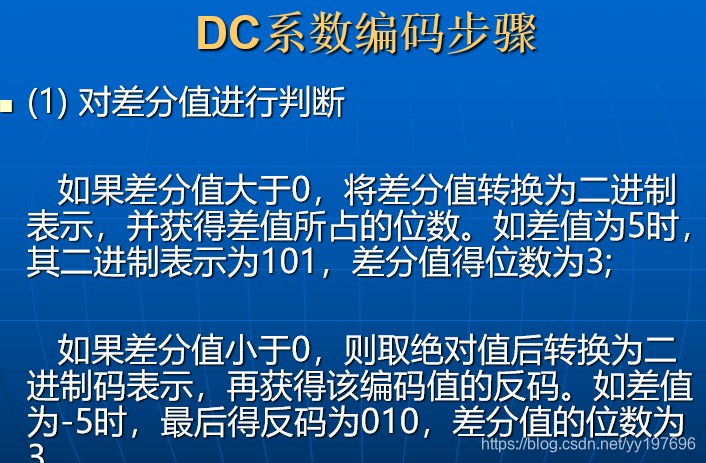
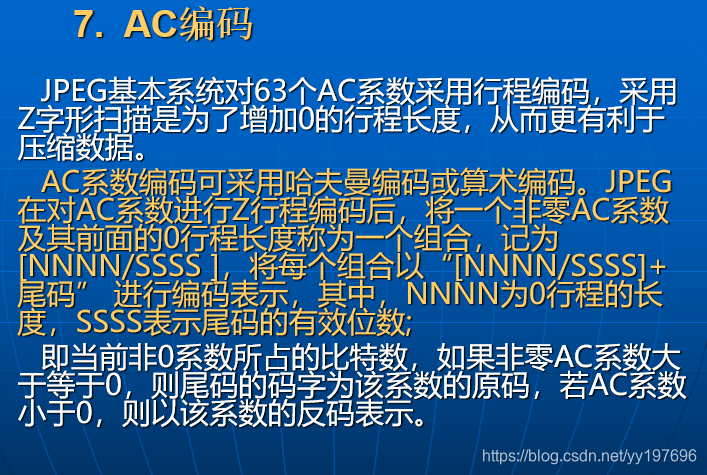
看了那么多PPT个人感觉还是没有完全搞明白JPEG是个什么东西,感觉主要就是往频域做了一步变化,然后就是一顿骚操作,看起开似乎要自己写是不可能了,确实有些复杂。那就只能调用库文件了,好在这几个库都是开源的跨平台的时候直接编译一下就好了。
关于库的编译我就不细说了,不像opencv编译的时候那么多坑,装一个cmake就可以轻松编译成功了。要是实在懒得去编译可以到我的gihub代码仓库里面找一下,是有那几个第三方库的源码和库文件的。
(三)软件实现
jpeg.c
/*
 * @Descripttion: 向licvcore 提供jpegJ读写接口
 * @version: V 2.0
 * @Author: Yueyang
 * @email: 1700695611@qq.com
 * @Date: 2020-11-10 22:18:19
 * @LastEditors: Yueyang
 * @LastEditTime: 2020-11-10 22:40:47
 */
#ifndef JPEG_C
#define JPEG_C


#ifdef USE_JPEG

#include "jconfig.h"
#include "jmorecfg.h"
#include <jpeglib.h>
#include <setjmp.h>
#include "cv.h"

/**
 * @name:
 * @msg: 将RGB数据编码并写JPG图片
 * @param
 *        char *filepath        图片路径
 *        JSAMPLE *image_buffer RGB数据指针
 *        int quality           图片质量
 *        int image_width      图片高度
 *        int image_height       图片宽度
 * @return 0 (right) or -1(something wrong)
 */
BYTE Write_Jpeg(BYTE *filepath,JSAMPLE *image_buffer, LONG quality,LONG image_width,LONG image_height)
{
  struct jpeg_compress_struct cinfo;
  struct jpeg_error_mgr jerr;
  FILE *outfile;
  JSAMPROW row_pointer[1];
  int row_stride;

  cinfo.err = jpeg_std_error(&jerr);
  /* Now we can initialize the JPEG compression object. */
  jpeg_create_compress(&cinfo);

  if ((outfile = fopen(filepath, "wb")) == NULL) {
    LILOG("can't open");
    return -1;
  }
  jpeg_stdio_dest(&cinfo, outfile);
  cinfo.image_width = image_width;
  cinfo.image_height = image_height;
  cinfo.input_components = 3;
  cinfo.in_color_space = JCS_RGB;
  jpeg_set_defaults(&cinfo);
  jpeg_set_quality(&cinfo, quality, TRUE);
  jpeg_start_compress(&cinfo, TRUE);
  row_stride = (image_width * 3 + 3) & ~3;
  int i=0,j=0;
  for(i=0;i<image_height;i++)
    for(j=0;j<image_width;j++)
    {
      BYTE temp=image_buffer[3*image_width*i+3*j];
      image_buffer[3*image_width*i+3*j]=image_buffer[3*image_width*i+3*j+2];
      image_buffer[3*image_width*i+3*j+2]=temp;
    }
  while (cinfo.next_scanline < cinfo.image_height) {
    row_pointer[0] = &image_buffer[(cinfo.image_height-cinfo.next_scanline) * row_stride];
    (void)jpeg_write_scanlines(&cinfo, row_pointer, 1);
  }
  jpeg_finish_compress(&cinfo);
  fclose(outfile);
  jpeg_destroy_compress(&cinfo);
}

struct my_error_mgr {
  struct jpeg_error_mgr pub;

  jmp_buf setjmp_buffer;
};

typedef struct my_error_mgr *my_error_ptr;

METHODDEF(void)
my_error_exit(j_common_ptr cinfo)
{
  my_error_ptr myerr = (my_error_ptr)cinfo->err;
  (*cinfo->err->output_message) (cinfo);
  longjmp(myerr->setjmp_buffer, 1);
}


/**
 * @name: Read_Jpeg
 * @msg: 读取一个JPG图片
 * @param char* filepath 图片路径
 *        LONG* wdith    返回图片的宽度
 *        LONG* height   返回图片的高度
 * @return 数据指针
 */
BYTE* Read_Jpeg(char* filepath,LONG* width,LONG* height)
{
  BYTE *imgData;
  struct jpeg_decompress_struct cinfo;
  struct my_error_mgr jerr;
  FILE *infile;
  JSAMPARRAY buffer;
  int row_stride;
  if ((infile = fopen(filepath, "rb")) == NULL) {
    LILOG("can't open");
  }
  cinfo.err = jpeg_std_error(&jerr.pub);
  jerr.pub.error_exit = my_error_exit;
  if (setjmp(jerr.setjmp_buffer)) {
    LILOG("ERROR");
    jpeg_destroy_decompress(&cinfo);
    fclose(infile);
  }
  jpeg_create_decompress(&cinfo);
  jpeg_stdio_src(&cinfo, infile);
  jpeg_read_header(&cinfo, TRUE);
  jpeg_start_decompress(&cinfo);
  row_stride = (cinfo.output_width * 3 );
  imgData=(BYTE*)malloc(cinfo.output_height*cinfo.output_width*3);
  buffer =malloc(row_stride*1);
  while (cinfo.output_scanline < cinfo.output_height) {
     jpeg_read_scanlines(&cinfo, (JSAMPARRAY)&buffer,1);
      char *p = (char*)buffer;
      for (int x = 0; x <cinfo.output_width; x++)
      {
          *(imgData+(cinfo.output_height-cinfo.output_scanline)*row_stride+3*x+2) = *p++;
          *(imgData+(cinfo.output_height-cinfo.output_scanline)*row_stride+3*x+1) = *p++;
          *(imgData+(cinfo.output_height-cinfo.output_scanline)*row_stride+3*x+0) = *p++;
      }
  }
  *width=cinfo.output_width;
  *height=cinfo.output_height;
  free(buffer);
  (void)jpeg_finish_decompress(&cinfo);
  jpeg_destroy_decompress(&cinfo);
  fclose(infile);
  return imgData;
}

#endif //USE_JPEG


#endif // !JPE_CG
png.c
/*
 * @Descripttion: 向licvcore 提供png读写接口
 * @version: V 2.0
 * @Author: Yueyang
 * @email: 1700695611@qq.com
 * @Date: 2020-11-10 22:18:19
 * @LastEditors: Yueyang
 * @LastEditTime: 2020-11-10 22:41:48
 */

#ifndef LI_PNG_C
#define LI_PNG_C


#ifdef USE_PNG

#include "png.h"
#include "cv.h"
#define PNG_BYTES_TO_CHECK	8
#define HAVE_ALPHA			1
#define NOT_HAVE_ALPHA		0

typedef struct _pic_data pic_data;
struct _pic_data {
	int width, height; 	//长宽
	int bit_depth; 	   	//位深度
	int alpha_flag;		//是否有透明通道
	unsigned char *rgba;//实际rgb数据
};

BYTE check_is_png(FILE **fp, const char *filename) //检查是否png文件
{
	char checkheader[PNG_BYTES_TO_CHECK]; //查询是否png头
	*fp = fopen(filename, "rb");
	if (*fp == NULL) {
		LILOG("open failed ...1\n");
		return -1;
	}
	if (fread(checkheader, 1, PNG_BYTES_TO_CHECK, *fp) != PNG_BYTES_TO_CHECK) //读取png文件长度错误直接退出
		return 0;
	return png_sig_cmp(checkheader, 0, PNG_BYTES_TO_CHECK); //0正确, 非0错误
}

/**
 * @name: Read_Png
 * @msg: 读取一个png图片
 * @param char* filepath  图片路径
 *        LONG* wdith     返回图片的宽度
 *        LONG* height    返回图片的高度
 *        BYTE* withalpha 是否带有alpha通道
 * @return 数据指针 注:一定返回一个24位的数据指针
 */
BYTE* Read_Png(BYTE *filename,LONG* width,LONG* height) //取出png文件中的rgb数据
{
  pic_data *out =(pic_data*)malloc(sizeof(pic_data));
	png_structp png_ptr; //png文件句柄
	png_infop	info_ptr;//png图像信息句柄
	int ret;
	FILE *fp;
	if (check_is_png(&fp, filename) != 0) {
		LILOG("file is not png ...\n");
		return NULL;
	}
	png_ptr  = png_create_read_struct(PNG_LIBPNG_VER_STRING, NULL, NULL, NULL);
	info_ptr = png_create_info_struct(png_ptr);
	setjmp(png_jmpbuf(png_ptr));
	rewind(fp);
	png_init_io(png_ptr, fp);
	png_read_png(png_ptr, info_ptr, PNG_TRANSFORM_EXPAND, 0); //读取文件信息
	int channels, color_type;
	channels 	= png_get_channels(png_ptr, info_ptr); //通道数量
	color_type 	= png_get_color_type(png_ptr, info_ptr);//颜色类型
	out->bit_depth = png_get_bit_depth(png_ptr, info_ptr);//位深度
	out->width 	 = png_get_image_width(png_ptr, info_ptr);//宽
	out->height  = png_get_image_height(png_ptr, info_ptr);//高
	*width=out->width;
  *height=out->height;
	if(color_type == PNG_COLOR_TYPE_PALETTE)
		png_set_palette_to_rgb(png_ptr);//要求转换索引颜色到RGB
	if(color_type == PNG_COLOR_TYPE_GRAY && out->bit_depth < 8)
		png_set_expand_gray_1_2_4_to_8(png_ptr);//要求位深度强制8bit
	if(out->bit_depth == 16)
		png_set_strip_16(png_ptr);//要求位深度强制8bit
	if(png_get_valid(png_ptr,info_ptr,PNG_INFO_tRNS))
		png_set_tRNS_to_alpha(png_ptr);
	if(color_type == PNG_COLOR_TYPE_GRAY || color_type == PNG_COLOR_TYPE_GRAY_ALPHA)
		png_set_gray_to_rgb(png_ptr);//灰度必须转换成RG

	int i, j, k;
	int size, pos = 0;
	int temp;

	png_bytepp row_pointers; //实际存储rgb数据的buf
	row_pointers = png_get_rows(png_ptr, info_ptr); //也可以分别每一行获取png_get_rowbytes();
	size = out->width * out->height; //申请内存先计算空间
	if (channels == 4 || color_type == PNG_COLOR_TYPE_RGB_ALPHA) { //判断是24位还是32位
		out->alpha_flag = HAVE_ALPHA; //记录是否有透明通道
		size *= (sizeof(unsigned char) * 4); //size = out->width * out->height * channel
		out->rgba = (png_bytep)malloc(size);
		if (NULL == out->rgba) {
			LILOG("malloc rgba faile ...\n");
			png_destroy_read_struct(&png_ptr, &info_ptr, 0);
			fclose(fp);
			return NULL;
		}
		//从row_pointers里读出实际的rgb数据
		for (i = out->height-1; i >0; i --) {
			for (j = 0; j < 4 * out->width; j += 4) {
				out->rgba[pos++] = row_pointers[i][j+2];
				out->rgba[pos++] = row_pointers[i][j+1];
				out->rgba[pos++] = row_pointers[i][j+0];
        out->rgba[pos++] = row_pointers[i][j+3];
			}
		}
	}
  else if (channels == 3 || color_type == PNG_COLOR_TYPE_RGB) { //判断颜色深度是24位还是32位
    out->alpha_flag = NOT_HAVE_ALPHA;
		size *= (sizeof(unsigned char) * 4);
		out->rgba = (png_bytep)malloc(size);
		if (NULL == out->rgba) {
			LILOG("malloc rgba faile ...\n");
			png_destroy_read_struct(&png_ptr, &info_ptr, 0);
			fclose(fp);
			return NULL;
		}
		//从row_pointers里读出实际的rgb数据
		temp = (3 * out->width);
		for (i = 0; i < out->height; i ++) {
			for (j = 0; j < temp; j += 3) {
				out->rgba[pos++] = row_pointers[i][j+2];
				out->rgba[pos++] = row_pointers[i][j+1];
				out->rgba[pos++] = row_pointers[i][j+0];
        pos++;
			}
		}
	} else return NULL;
	//6:销毁内存
	png_destroy_read_struct(&png_ptr, &info_ptr, 0);
	fclose(fp);
	//此时, 我们的out->rgba里面已经存储有实际的rgb数据了
	//处理完成以后free(out->rgba)
	return out->rgba;
}


/**
 * @name: Write_Png
 * @msg:  写一个png图片
 * @param BYTE*  png_file_name 文件名称
 *        BYTE*  pixels        数据指针
 *        int    width         图像宽度
 *        int    height        图像高度
 *        int    withalpha     是否带有alpha通道
 * @return 0成功 -1失败
 */
BYTE Write_Png(BYTE* png_file_name, BYTE*  pixels , LONG width, LONG height)
{
  pic_data *out=malloc(sizeof(pic_data));
  out->bit_depth=8;
  out->rgba=pixels;
  out->alpha_flag=HAVE_ALPHA;
  out->height=height;
  out->width=width;

	png_structp png_ptr;
	png_infop 	info_ptr;
	png_byte color_type;
	png_bytep * row_pointers;
	FILE *fp = fopen(png_file_name, "wb");
	if (NULL == fp) {
		LILOG("open failed ...2");
		return -1;
	}
	//1: 初始化libpng结构体
	png_ptr	= png_create_write_struct(PNG_LIBPNG_VER_STRING, 0, 0, 0);
	if (!png_ptr) {
		LILOG("png_create_write_struct failed ...");
		return -1;
	}
	//2: 初始化png_infop结构体 ,
	//此结构体包含了图像的各种信息如尺寸,像素位深, 颜色类型等等
	info_ptr = png_create_info_struct(png_ptr);
	if (!info_ptr) {
		LILOG("png_create_info_struct failed ...\n");
		return -1;
	}
	//3: 设置错误返回点
	if (setjmp(png_jmpbuf(png_ptr))) {
		LILOG("error during init_io ...\n");
		return -1;
	}
	//4:绑定文件IO到Png结构体
	png_init_io(png_ptr, fp);
	if (setjmp(png_jmpbuf(png_ptr))) {
		LILOG("error during init_io ...\n");
		return -1;
	}
	if (out->alpha_flag == HAVE_ALPHA) color_type = PNG_COLOR_TYPE_RGB_ALPHA;
	else color_type = PNG_COLOR_TYPE_RGB;
	//5:设置以及写入头部信息到Png文件
	png_set_IHDR(png_ptr, info_ptr, out->width, out->height, out->bit_depth,
	color_type, PNG_INTERLACE_NONE, PNG_COMPRESSION_TYPE_BASE, PNG_FILTER_TYPE_BASE);
	png_write_info(png_ptr, info_ptr);
	if (setjmp(png_jmpbuf(png_ptr))) {
		LILOG("error during init_io ...\n");
		return -1;
	}
	int channels, temp;
	int i, j, pos = 0;
	if (out->alpha_flag == HAVE_ALPHA) {
		channels = 4;
		temp = (4 * out->width);
	} else {
		channels = 3;
		temp = (3 * out->width);
	}
	row_pointers = (png_bytep*)malloc(out->height * sizeof(png_bytep));
	for (i = out->height-1; i >=0; i--) {
		row_pointers[i] = (png_bytep)malloc(temp* sizeof(unsigned char));
		for (j = 0; j < temp; j += channels) {
			if (channels == 4) {
				row_pointers[i][j+2] = out->rgba[pos++];
				row_pointers[i][j+1] = out->rgba[pos++];
				row_pointers[i][j+0] = out->rgba[pos++];
				row_pointers[i][j+3] = out->rgba[pos++];
			} else {
				row_pointers[i][j+2] = out->rgba[pos++];
				row_pointers[i][j+1] = out->rgba[pos++];
				row_pointers[i][j+0] = out->rgba[pos++];
			}
		}
	}
	png_write_image(png_ptr, (png_bytepp)row_pointers);
	if (setjmp(png_jmpbuf(png_ptr))) {
		return -1;
	}
	//7: 写入尾部信息
	png_write_end(png_ptr, NULL);
	//8:释放内存 ,销毁png结构体
	for (i = 0; i < out->height; i ++)
		free(row_pointers[i]);
	free(row_pointers);
	png_destroy_write_struct(&png_ptr, &info_ptr);
	fclose(fp);
	return 0;
}


#endif //USE_PNG


#endif // !LI_PAINTER_C
(四)效果展示
/*
 * @Descripttion: 底层图片IO测试
 * @version: V 2.0
 * @Author: Yueyang
 * @email: 1700695611@qq.com
 * @Date: 2020-10-26 19:35:49
 * @LastEditors: Yueyang
 * @LastEditTime: 2020-11-04 15:50:21
 */

#include <stdio.h>
#include <stdlib.h>
#include <string.h>
#include <malloc.h>
#include "bmp.h"
#include "cv.h"
#include "li_image.h"
int main()
{
     //加载保存销毁图片
     Li_Image* out=Li_Load_Image("./picture/whu_rgb888.bmp",LI_BMP_888);
     Li_Save_Image("./picture/1.bmp",out);
     Li_Destroy_Image(out);

     Li_Image* out3=Li_Load_Image("./picture/whu_gray.bmp",LI_BMP_8);
     Li_Save_Image("./picture/2.bmp",out3);
     Li_Destroy_Image(out3);

     Li_Image* out4=Li_Load_Image("./picture/whu_rgba.bmp",LI_BMP_32);
     Li_Save_Image("./picture/3.bmp",out4);
     Li_Destroy_Image(out4);

     Li_Image* out1=Li_Load_Image("./picture/whu_png.png",LI_PNG);
     Li_Save_Image("./picture/1.png",out1);
     Li_Destroy_Image(out1);

     Li_Image* out2=Li_Load_Image("./picture/whu_jpg.jpg",LI_JPEG);
     Li_Save_Image("./picture/1.jpg",out2);
     Li_Destroy_Image(out2);


     //创建图片并操作像素
     BYTE* ptr=NULL;
     Li_Image* out7 =Li_Create_Image(300,300,LI_DEP_24U,LI_BMP_888);
     ptr=out7->at(out7,10,10);
     if(ptr!=NULL){
          memset(ptr,0xFF,1);
          memset(ptr+1,0,1);
          memset(ptr+2,0,1);
     }
     Li_Save_Image("./picture/1.bmp",out3);
     Li_Destroy_Image(out7);

     Li_Image* out8 =Li_Load_Image("./picture/whu_jpg.jpg",LI_JPEG);
     ptr=out8->at(out8,10,10);
     if(ptr!=NULL){
          memset(ptr,0xFF,1);
          memset(ptr+1,0,1);
          memset(ptr+2,0,1);
     }
     Li_Save_Image("./picture/2.jpg",out8);
     Li_Destroy_Image(out8);

     Li_Image* out5 =Li_Load_Image("./picture/whu_png.png",LI_PNG);
     ptr=out5->at(out5,10,10);
     if(ptr!=NULL){
          memset(ptr,0xFF,1);
          memset(ptr+1,0,1);
          memset(ptr+2,0,1);
     }
     Li_Save_Image("./picture/2.png",out5);

     Li_Image* out6=Li_Copy_Image(out5);
     Li_Save_Image("./picture/3.png",out6);


     LILOG("over");
     return 0;
}

左边是png图片读取为BMP同时显示,右边是JPEG经过高倍压缩再解压后的图片。

有“AI”的1024 = 2048,欢迎大家加入2048 AI社区
更多推荐


 16
16 0
0- 0


 已为社区贡献7条内容

所有评论(0)