解决问题:微服务内部通信-如FeignClient互相调用报`401`错误_v1.0.1
·
| 文件名称 | 版本号 | 作者 | 版本 | |
|---|---|---|---|---|
解决问题:微服务内部通信-如FeignClient互相调用报401错误 | v1.0.1 | 学生宫布 | 8416837 | SpringBoot 2.2.6 SpringCloud Hoxton.SR4 |
说明
启用OAuth2.0了
由于启用了OAuth2.0系统,微服务之间通信如FeignClient通信时需要鉴权。因此需要通信时拦截请求并附加令牌信息,有了令牌及相应权限便可以畅行无阻。
报错全称
Servlet.service() for servlet [dispatcherServlet] in context with path []
threw exception [Request processing failed; nested exception is feign.FeignException$Unauthorized: [401]
during [POST] to [http://abc-system/logininfor?username=admin&status=Success&message=%E7%99%BB%E5%BD%95%E6%88%90%E5%8A%9F]
代码
	remoteLogService.saveLogininfor(username, Constants.LOGIN_SUCCESS, "登录成功")
	...
	@PostMapping("/logininfor")
    R<Boolean> saveLogininfor(@RequestParam("username") String username, @RequestParam("status") String status,@RequestParam("message") String message);
疑似产生的原因
请求模板资源的行为没有被授权
弯路、坑
分析
1)使用客户端工具调用这个接口:
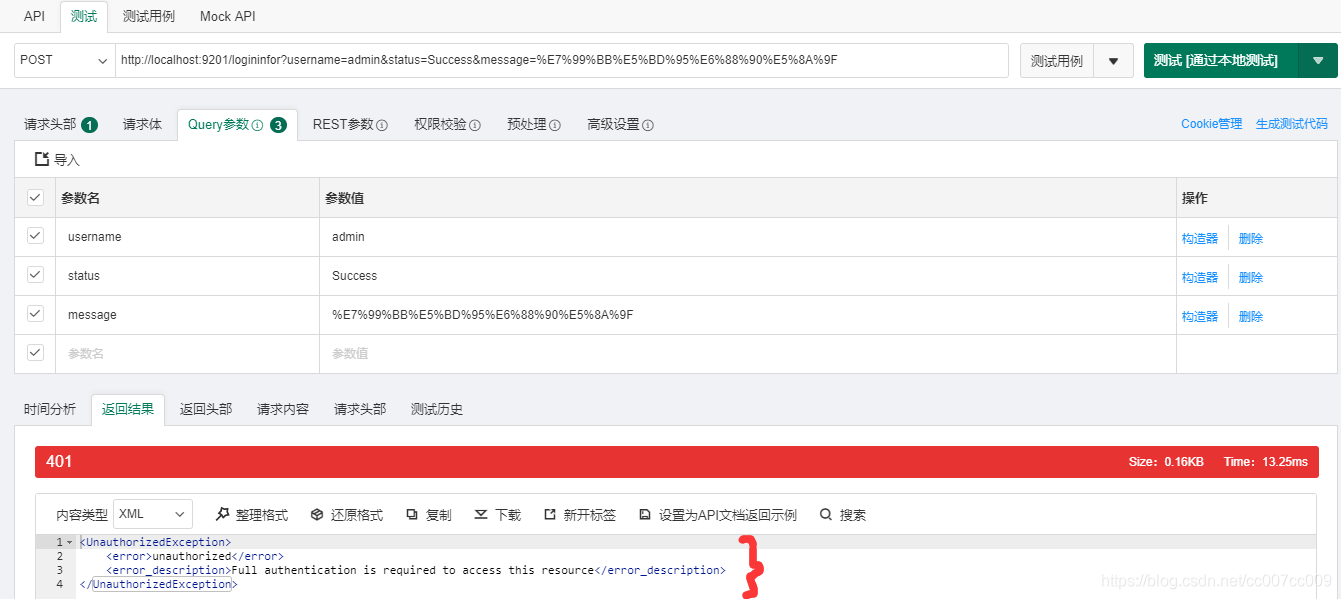
↑报同样的错误。
2)在请求头增加Token(Token获取见教程),调用成功了:
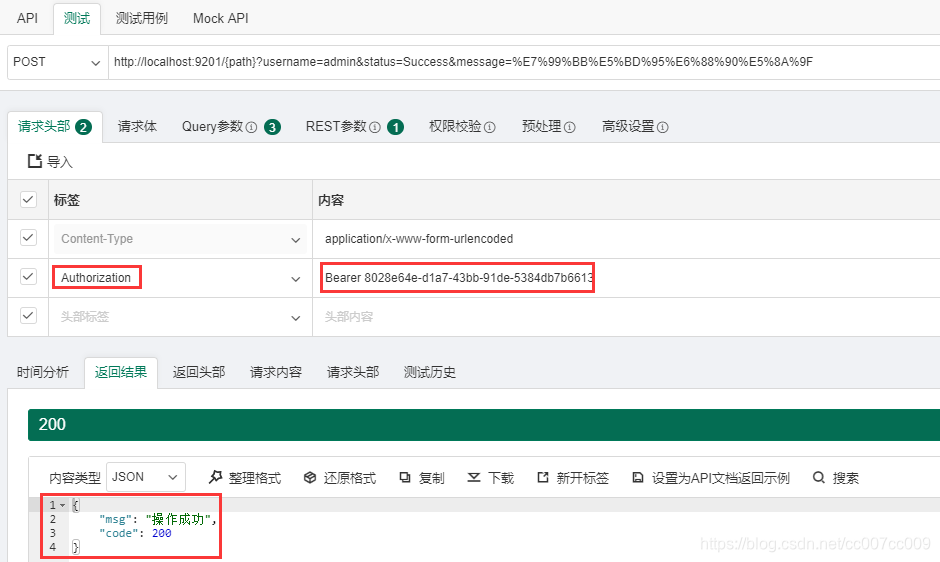
试验一下,乱填一个Token值,调用结果,报401错误:
2020-06-26 14:21:53.309 ERROR 20980 --- [nio-9201-exec-9] o.a.c.c.C.[Tomcat].[localhost]           : Exception Processing ErrorPage[errorCode=0, location=/error]

org.springframework.web.client.HttpClientErrorException$Unauthorized: 401 : [no body]
3)说明,当前微服务内部通信需请求头携带Token,但是这个操作应该是底层自动完成的呀。找一下,果然,在类OAuth2FeignRequestInterceptor.java找到了授权配置:
@Component
public class OAuth2FeignRequestInterceptor implements RequestInterceptor {
    @Override
    public void apply(RequestTemplate requestTemplate) {
        SecurityContext securityContext = SecurityContextHolder.getContext();
        Authentication authentication = securityContext.getAuthentication();
        if (authentication != null && authentication.getDetails() instanceof OAuth2AuthenticationDetails) {
            OAuth2AuthenticationDetails dateils = (OAuth2AuthenticationDetails) authentication.getDetails();
            requestTemplate.header(HttpHeaders.AUTHORIZATION,
                    String.format("%s %s", SecurityConstants.BEARER_TOKEN_TYPE, dateils.getTokenValue()));
        }
    }
}
↑但是这个请求拦截器,为什么没有生效?
4)打上断点,Debugger调试一下:

再次登录,不出所料,Debugger没有进入这段代码。也就是说:添加请求头拦截器没有起效!
难道必须显式将拦截器配置到FeignClient吗?
解决方案
1)写新的拦截器,Java代码:
package com.ruoyi.common.core.utils.security;

import feign.RequestInterceptor;
import feign.RequestTemplate;
import org.springframework.context.annotation.Configuration;
import org.springframework.http.HttpHeaders;
import org.springframework.web.context.request.RequestContextHolder;
import org.springframework.web.context.request.ServletRequestAttributes;

import javax.servlet.http.HttpServletRequest;

/**
 * 功能:增加请求头 - 请求拦截器
 *
 * @author: 学生宫布
 * @mail: 8416837@qq.com
 * @date: 2020/6/26 14:53
 */
@Configuration
public class FeignConfig implements RequestInterceptor {

    @Override
    public void apply(RequestTemplate requestTemplate) {

        ServletRequestAttributes attributes = (ServletRequestAttributes) RequestContextHolder.getRequestAttributes();
        HttpServletRequest request = attributes.getRequest();
        String token = request.getHeader(HttpHeaders.AUTHORIZATION);
        requestTemplate.header(HttpHeaders.AUTHORIZATION, token);

    }

}
2)有两种方式:二选一
.1)将拦截器显式配置给@FeignClient:
在注解新增configuration = FeignConfig.class
@FeignClient(其它配置省略, configuration = FeignConfig.class)
.2)运用注解将配置注入到全局,代码:
// 自动加载类
@Import({ FeignConfig.class })
关于
若交流技术,请联系qq:8416837

有“AI”的1024 = 2048,欢迎大家加入2048 AI社区
更多推荐

 2
2 0
0- 0


 已为社区贡献2条内容

所有评论(0)