Mybatis实用操作
本文主要记录基于注解的开发方式一、查询一:参数为集合类型时的查询需求:求id为1和2所对应的price之和表数据如下(表名为lb_option):在Navicat中直接运行sql语句:select sum(price) from lb_option where id in (1,2)结果正确:同样的操作在项目中用mybatis执行格式如下:@Select({"<script>","se
目录
一:在控制台打印sql语句
yml文件配置:
1.1、配置mapper接口所在包日志级别为debug
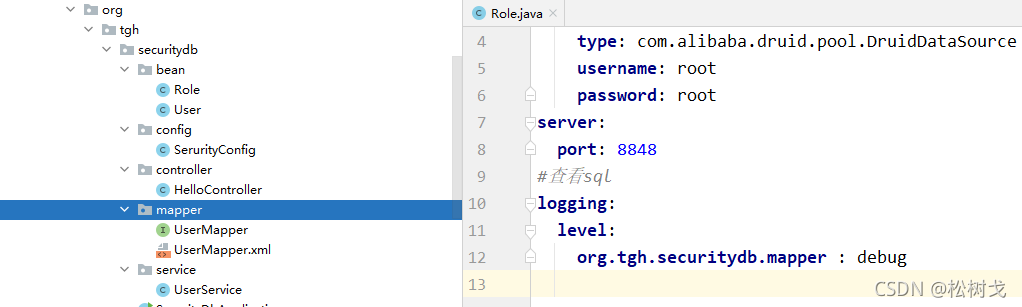
效果:
1.2、配置mybatis的log-impl属性

#查看sql
mybatis:
  configuration:
    log-impl: org.apache.ibatis.logging.stdout.StdOutImpl
效果: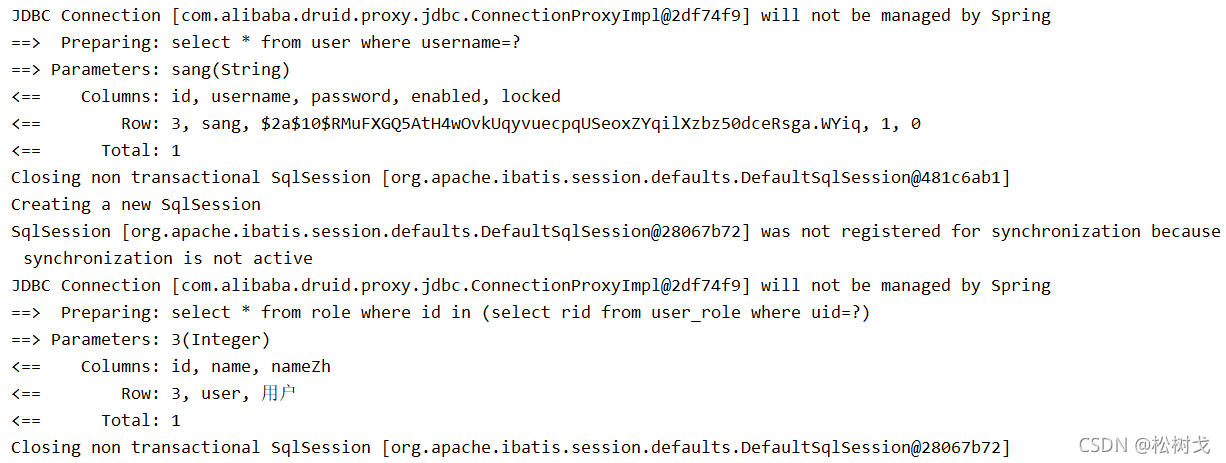
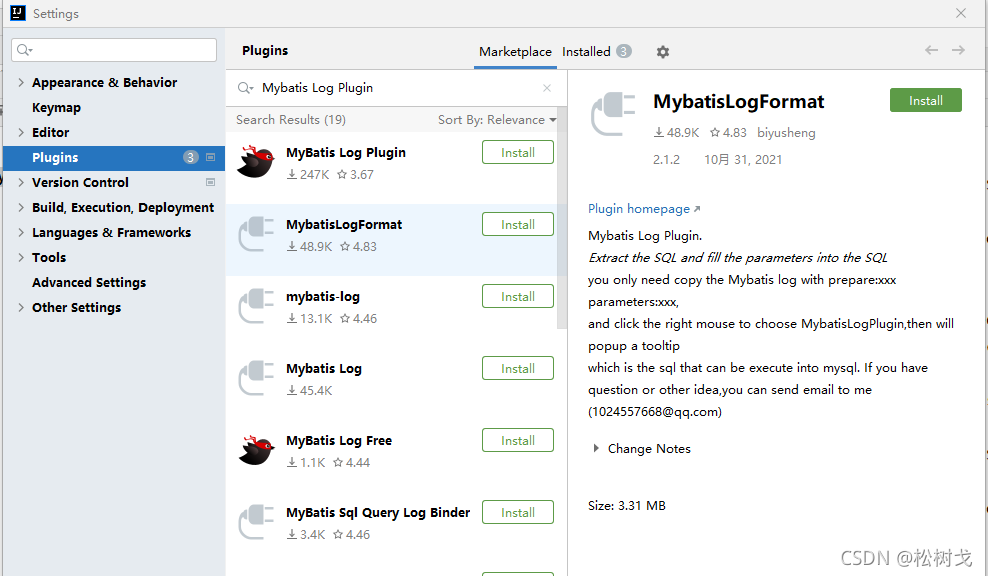
1.3、基于借助第三方插件
File --> Settings --> Plugins 搜索Mybatis Log Plugin
二:数据库增删改查
2.1、基于xml方式
配置环境
设置xml文件目录
默认情况下mapper.xml在resource目录下书写,这样一来在mapper文件与mapper.xml文件跳转比较繁琐。以下推荐一些优化方式:
一:安装Free MyBatis plugin插件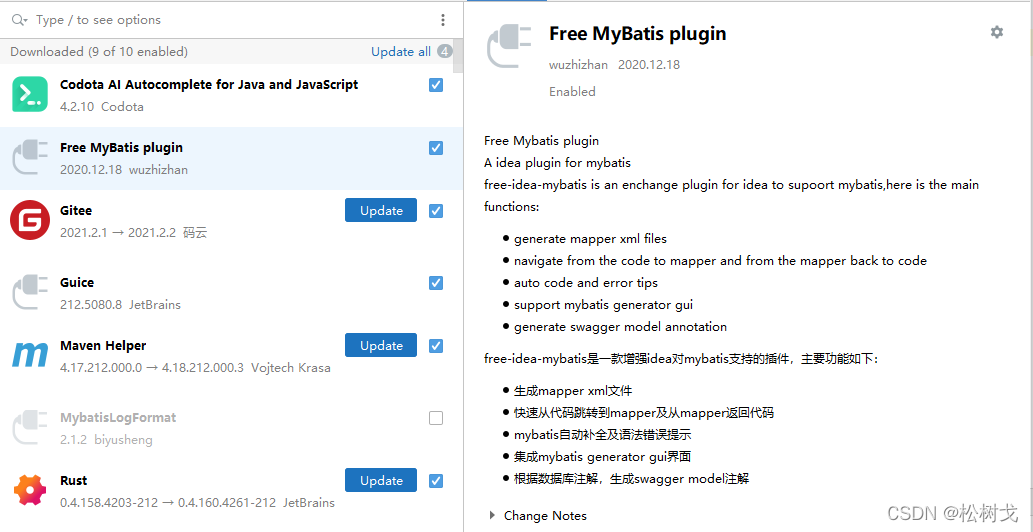
安好后打开某一个mapper,会发现方法前面都会有绿色的箭头,点击可以实现在mapper与mapper.xml文件之间快速跳转。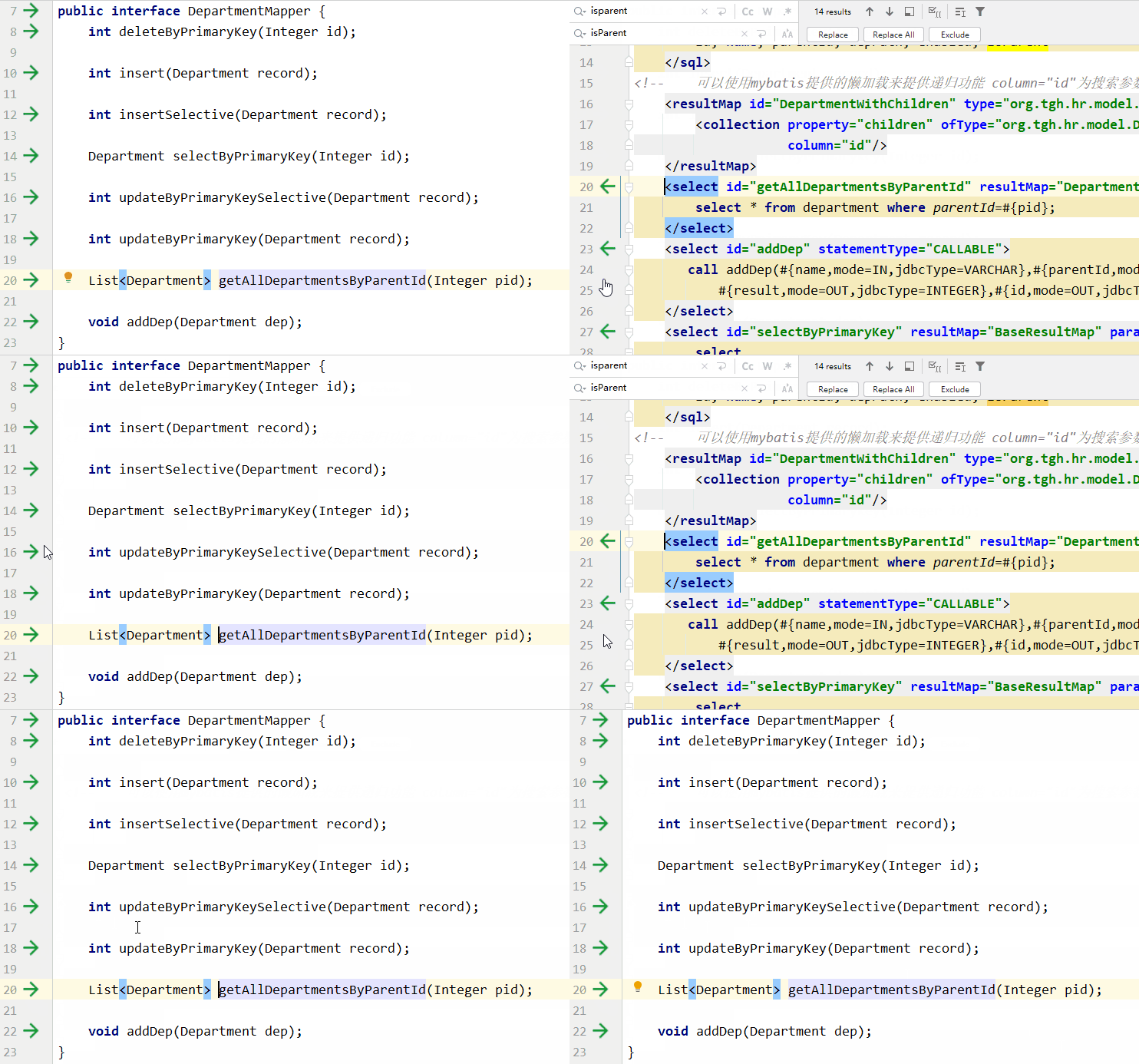
二:将mapper与mapper.xml放在java目录下边的同一个文件夹内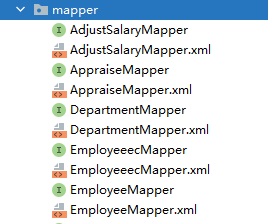
因为默认情况下maven不会打包src/main/java文件夹中的xml文件,需要在pom文件中进行额外配置:
    <build>
        <resources>
            <resource>
                <directory>src/main/resources</directory>
            </resource>
            <resource>
                <directory>src/main/java</directory>
                <includes>
                    <include>**/*.xml</include>
                </includes>
            </resource>
        </resources>
    </build>
设置mapper.xml模板
在开发过程中需要频繁生成mapper.xml文件,可用模板简化初始过程
File->Settings->Editor->File and Code Templates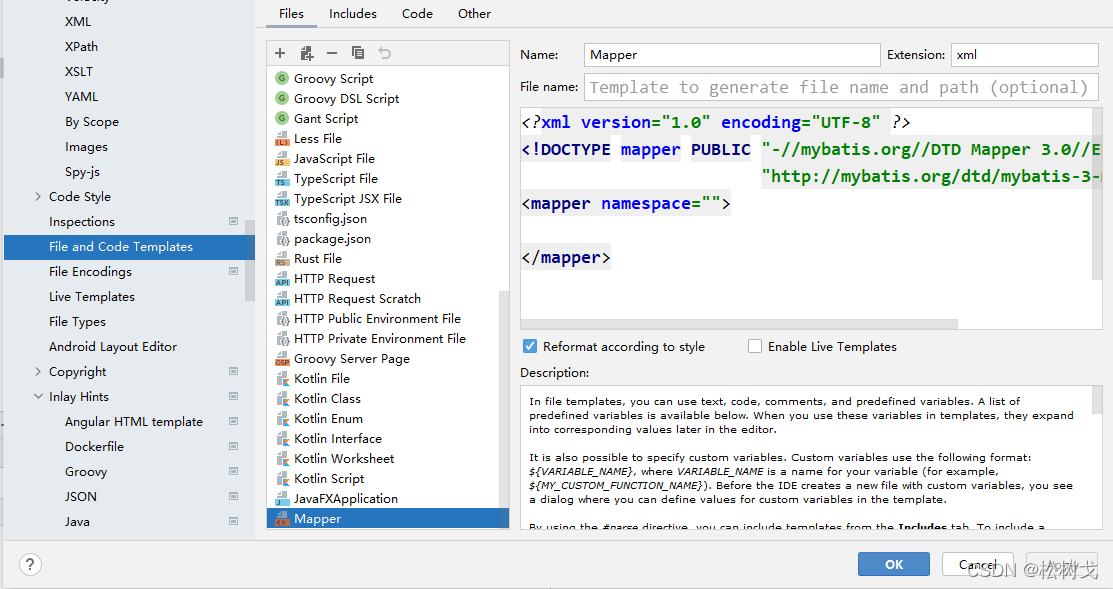
内容为:
<?xml version="1.0" encoding="UTF-8" ?>
<!DOCTYPE mapper PUBLIC "-//mybatis.org//DTD Mapper 3.0//EN"
                        "http://mybatis.org/dtd/mybatis-3-mapper.dtd" >
<mapper namespace="">

</mapper>
2.1.1、增加
①:获取自增长主键
xml设置:
<insert id="insertSelective" parameterType="org.tgh.hr.model.Department" useGeneratedKeys="true" keyProperty="id">
...
</insert>
useGeneratedKeys="true"代表主键自增keyProperty="id"代表javaBean中的主键字段
service中获取主键值:此处直接在控制台输出供演示
        int i = departmentMapper.insertSelective(dep);
        System.out.println("id字段为:"+dep.getId());
测试方法:
@SpringBootTest
public class DepartmentTest {
    @Autowired
    DepartmentService departmentService;
    @Test
    public void show() {
        Department department = new Department();
        department.setName("外发组");
        department.setParentId(105);
        departmentService.addDep(department);
    }
}
查看数据库:
查看控制台:
2.2、基于注解方式:
2.2.1、增加
一:获取新增数据的主键值
Service层:
    @Override
    public Integer insertReturnId(Appointment appointment) {
        int save = appointmentMapper.save(appointment);
        return appointment.getId();
    }
Dao层:
    @Insert({
            "insert into lb_appointment (patient_id, doctor_id, time, expenses, status)",
            "values(#{patientId},#{doctorId},#{time},#{expenses},#{status})"
    })
    @Options(useGeneratedKeys = true, keyProperty = "id", keyColumn = "id")
    int save(Appointment appointment);
重点是
@Options(useGeneratedKeys = true, keyProperty = "id", keyColumn = "id")
- useGeneratedKeys = true:设置主键自增
- keyProperty = “id”:实例对象中主键名称为id (本实例为Appointment)
- keyColumn = “id”:数据库中对应的字段为id (本实例为 lb_appointment)
2.2.4、查询
一:参数为集合类型时的查询
需求:求id为1和2所对应的price之和
表数据如下(表名为lb_option):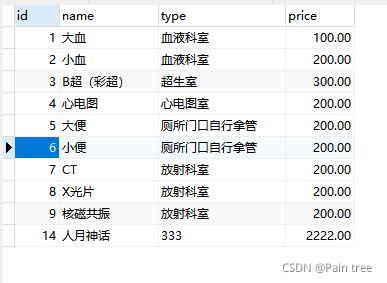
在Navicat中直接运行sql语句:
select sum(price) from lb_option where id in (1,2)
结果正确: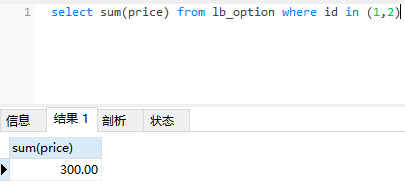
同样的操作在项目中用mybatis执行
格式如下:
    @Select({
            "<script>",
            "select sum(price) from lb_option where id in",
            "<foreach collection='ids' item='id' open='(' separator=',' close=')'>",
            "#{id}",
            "</foreach>",
            "</script>"
    })
    BigDecimal getTotalPrice(@Param("ids") List<Integer> ids);
注意参数ids为集合类型。
三:使用MyBatis Generator自动生成
3.1 测试环境
MySQL: 5.7
MyBatis Generator:1.3.2
Maven:3.5.4
IDEA: 2021.3
3.2 配置步骤
第一步: 在pom文件中引入坐标(plugins标签中的插件是为了方便在maven中使用)
<dependencies>

   		<dependency>
            <groupId>org.mybatis.generator</groupId>
            <artifactId>mybatis-generator-core</artifactId>
            <version>1.3.2</version>
        </dependency>
</dependencies>
    <build>
        <plugins>
            <!--mybatis-generator-maven-plugin-->
            <plugin>
                <groupId>org.mybatis.generator</groupId>
                <artifactId>mybatis-generator-maven-plugin</artifactId>
                <version>1.3.2</version>
                <configuration>
                    <verbose>true</verbose>
                    <overwrite>true</overwrite>
                </configuration>
            </plugin>
        </plugins>
    </build>
第二步: 在resources目录下新建generatorConfig.xml文件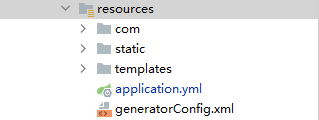
<?xml version="1.0" encoding="UTF-8"?>
<!DOCTYPE generatorConfiguration
PUBLIC "-//mybatis.org//DTD MyBatis Generator Configuration 1.0//EN"
"http://mybatis.org/dtd/mybatis-generator-config_1_0.dtd">
<generatorConfiguration>
<classPathEntry location="libs/mysql-connector-java-5.1.43.jar" />
<context id="test" targetRuntime="MyBatis3">
<plugin type="org.mybatis.generator.plugins.EqualsHashCodePlugin"></plugin>
<plugin type="org.mybatis.generator.plugins.SerializablePlugin"></plugin>
<plugin type="org.mybatis.generator.plugins.ToStringPlugin"></plugin>
<commentGenerator>
<!-- 这个元素用来去除指定生成的注释中是否包含生成的日期 false:表示保护 -->
<!-- 如果生成日期,会造成即使修改一个字段,整个实体类所有属性都会发生变化,不利于版本控制,所以设置为true -->
<property name="suppressDate" value="true" />
<!-- 是否去除自动生成的注释 true:是 : false:否 -->
<property name="suppressAllComments" value="true" />
</commentGenerator>
<!--数据库链接URL,用户名、密码 -->
<jdbcConnection driverClass="com.mysql.jdbc.Driver"
connectionURL="jdbc:mysql://localhost:3306/hospital"
userId="root"
password="root">
</jdbcConnection>
<javaTypeResolver>
<!-- This property is used to specify whether MyBatis Generator should
force the use of java.math.BigDecimal for DECIMAL and NUMERIC fields, -->
<property name="forceBigDecimals" value="false" />
</javaTypeResolver>
<!-- 指定javaBean的生成策略 文件夹自己定义-->
<javaModelGenerator targetPackage="com.tgh.hospitalproject.entity"
targetProject=".\src\main\java">
<property name="enableSubPackages" value="true" />
<property name="trimStrings" value="true" />
</javaModelGenerator>
<!-- sqlMapGenerator:sql映射生成策略: -->
<sqlMapGenerator targetPackage="com.tgh.hospitalproject.mapper"
targetProject=".\src\main\resources">
<property name="enableSubPackages" value="true" />
</sqlMapGenerator>
<!-- javaClientGenerator:指定mapper接口所在的位置 -->
<javaClientGenerator type="XMLMAPPER" targetPackage="com.tgh.hospitalproject.mapper"
targetProject=".\src\main\java">
<property name="enableSubPackages" value="true" />
</javaClientGenerator>
<!-- 指定要逆向分析哪些表:根据表要创建javaBean -->
<!-- <table tableName="account" domainObjectName="Account"></table>-->
<table tableName="lb_appointment" domainObjectName="Appointment" enableCountByExample="false" enableUpdateByExample="false" enableDeleteByExample="false"
enableSelectByExample="false" selectByExampleQueryId="false"/>
<table tableName="lb_doctor" domainObjectName="Doctor" enableCountByExample="false" enableUpdateByExample="false" enableDeleteByExample="false"
enableSelectByExample="false" selectByExampleQueryId="false"/>
<table tableName="lb_drugs" domainObjectName="Drugs" enableCountByExample="false" enableUpdateByExample="false" enableDeleteByExample="false"
enableSelectByExample="false" selectByExampleQueryId="false"/>
<table tableName="lb_hospitalization" domainObjectName="Hospitalization" enableCountByExample="false" enableUpdateByExample="false" enableDeleteByExample="false"
enableSelectByExample="false" selectByExampleQueryId="false"/>
<table tableName="lb_illness" domainObjectName="Illness" enableCountByExample="false" enableUpdateByExample="false" enableDeleteByExample="false"
enableSelectByExample="false" selectByExampleQueryId="false"/>
<table tableName="lb_medicalhistory" domainObjectName="Medicalhistory" enableCountByExample="false" enableUpdateByExample="false" enableDeleteByExample="false"
enableSelectByExample="false" selectByExampleQueryId="false"/>
<table tableName="lb_option" domainObjectName="Option" enableCountByExample="false" enableUpdateByExample="false" enableDeleteByExample="false"
enableSelectByExample="false" selectByExampleQueryId="false"/>
<table tableName="lb_patient" domainObjectName="Patient" enableCountByExample="false" enableUpdateByExample="false" enableDeleteByExample="false"
enableSelectByExample="false" selectByExampleQueryId="false"/>
<table tableName="lb_seek" domainObjectName="Seek" enableCountByExample="false" enableUpdateByExample="false" enableDeleteByExample="false"
enableSelectByExample="false" selectByExampleQueryId="false"/>
<table tableName="lb_user" domainObjectName="User" enableCountByExample="false" enableUpdateByExample="false" enableDeleteByExample="false"
enableSelectByExample="false" selectByExampleQueryId="false"/>
<!--<!– 要生成哪些表 –>-->
<!--<table tableName="t_user" domainObjectName="user"-->
<!--enableCountByExample="false" enableUpdateByExample="false"-->
<!--enableDeleteByExample="false" enableSelectByExample="false"-->
<!--selectByExampleQueryId="false"></table>-->
</context>
</generatorConfiguration>
关注点:
1:jdbcConnection标签内部填写 数据库相关配置
2:javaModelGenerator标签内部填写 javaBean的生成目录、策略
3:qlMapGenerator标签定义 sql映射生成策略
4:javaClientGenerator:标签指定 mapper接口所在的位置
5:table标签内指定由哪张表 生成javaBean(本测用到了10张表)
第三步:
在maven中运行mybatis-generator:generate,就会依据第二步进行的配置生成entity、mapper、xml文件。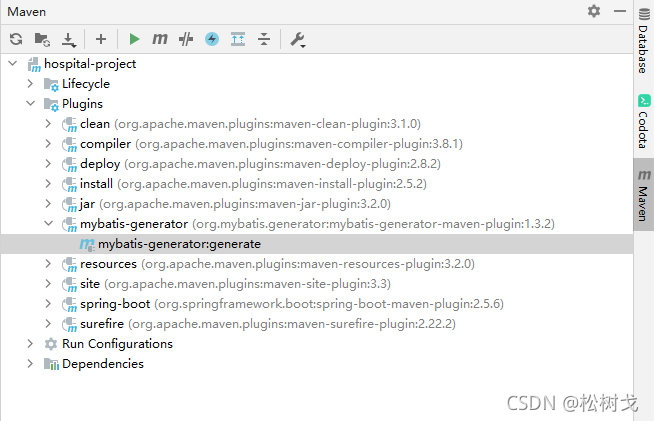
接下来可以选择进行基于xml方式的mybatis开发,也可以选择进行基于注解方式的mybatis开发。

有“AI”的1024 = 2048,欢迎大家加入2048 AI社区
更多推荐
 0
0 0
0- 0


 已为社区贡献3条内容

所有评论(0)