使用BeautifulSoup的soup.find()时出现错误AttributeError NoneType object has no attribute
报错:AttributeError: 'NoneType' object has no attribute1.问题2.原因及分析2.1原因2.2分析我琢磨着可能是因为class值中的最后那个“空格”有问题。所以我就将我代码中的class值中的空格去掉了。3.总结就是你使用的find没有找到你需要的那个标签。问题的原因之一可能就是我上面所说的,然后动动脑筋,这里改改,那里改改,兴许就能像我这样把问题
·
报错:AttributeError: 'NoneType' object has no attribute
1.问题
使用BeautifulSoup的soup.find(“div”,class_="***")时出现错误AttributeError: ‘NoneType’ object has no attribute,如图
2.原因及分析
2.1原因
我使用的soup.find()没有找到这个class为"ArticlePicBox Aid43 "的div
2.2分析
首先,查看你自己代码
soup.find("div",class_="ArticlePicBox Aid43 ").find("img")
中class的值,我代码中写的是"ArticlePicBox Aid43 "(注意,最后有一个空格)。
然后,查看网页中的class为"ArticlePicBox Aid43 "的div的实际class值,如图: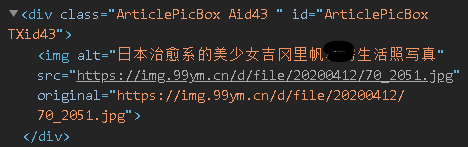
我们发现网页中的div的class也为"ArticlePicBox Aid43 "(注意,最后也有一个空格)。
那么,我们代码中的class值是从网页中复制粘贴过来的,按理说应该不存在不一样的情况,所以为什么会出错呢?
我琢磨着可能是因为class值中的最后那个“空格”有问题。所以我就将我代码中的class值中的空格去掉了。
原来:
现在:
然后我运行一下发现:
问题解决了。
3.总结
当你使用
soup.find("div",class_="ArticlePicBox Aid43")
时,如果class的值含有一些特殊的字符,如:空格,点 等,然后出现了
AttributeError: 'NoneType' object has no attribute
这个错误,你在保证代码没错误的情况下,你只需要记住一点:
就是你使用的find没有找到你需要的那个标签。问题的原因之一可能就是我上面所说的,然后动动脑筋,这里改改,那里改改,兴许就能像我这样把问题给改没了呢!

有“AI”的1024 = 2048,欢迎大家加入2048 AI社区
更多推荐


 3
3 0
0- 0


 已为社区贡献5条内容

所有评论(0)