powerdesigner显示comment
做数据库设计的时候,本人习惯用powerdesigner,奈何英语不太好,希望在面板上查看的时候,能显示出来中文的注释,这样更能一目了然,花了点心思,终于把这个功能实现了,图片如下:其实并不难,只是powerdesigner用得功能太少,所以有些东西不熟.新安装的powerdesigner在新建表的时候.连comment这一列都没有.先要把comment这一列调出来:随便点一个表格,弹出属性对话框
做数据库设计的时候,本人习惯用powerdesigner,奈何英语不太好,希望在面板上查看的时候,能显示出来中文的注释,这样更能一目了然,花了点心思,终于把这个功能实现了,图片如下:
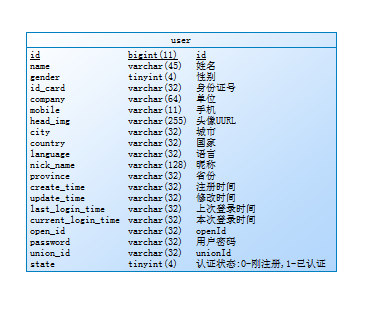
其实并不难,只是powerdesigner用得功能太少,所以有些东西不熟.
新安装的powerdesigner在新建表的时候.连comment这一列都没有.先要把comment这一列调出来:
随便点一个表格,弹出属性对话框,点击望远镜图标右边相邻的图标:
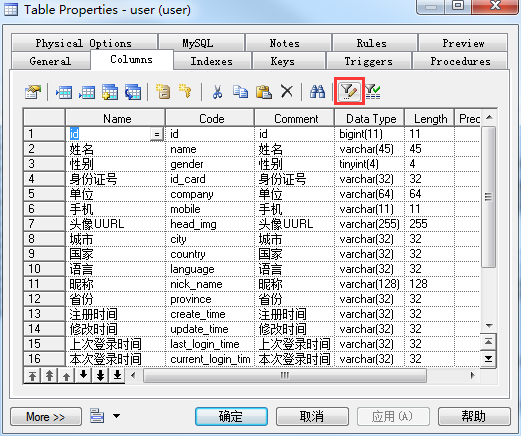
如图红框中所示,弹出的对话框中在列表中勾选comment,点击确定,才会有上图中的comment列显示出来.
comment调出来以后再来设置参数显示.点击菜单Tools => Display Perferences (如果是汉化版,也有可能是汉字: 工具 => 显示参数选择)弹出的对话框如下图:
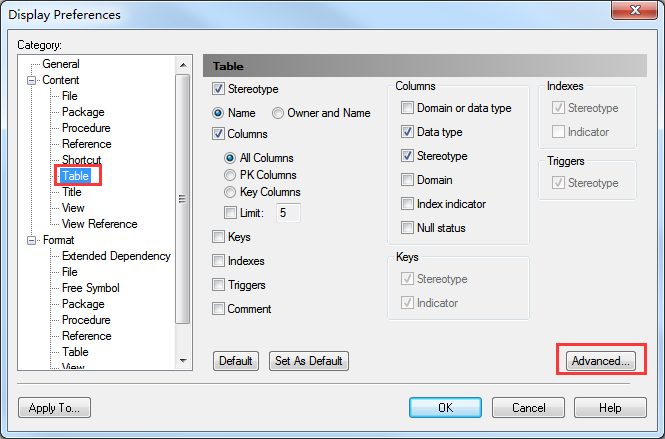
选择Conten下的Table选项,在选项的右下角,点击Advanced…,会再次弹出一个对话框:
上图中有两个弹框,先点击columns 然后点击list columns 右边的图标,会弹出List of Attributes Selection ,将Code勾选,然后点击确定关闭,这样就会看到表格面板上多了一列,但是还是英语…
接下来运行一下vb脚本就可以了, 打开菜单中的Tools => Execute Commands => Edit/Run Script… 然后将下面的代码粘贴进去,然后点run:
1 2 3 4 5 6 7 8 9 10 11 12 13 14 15 16 17 18 19 20 21 22 23 24 25 26 27 28 29 30 31 32 33 34 35 36 37 38 39 40 41 42 43 44 45 46 47 48 49 50 |
Option   Explicit
ValidationMode   =   True
InteractiveMode   =   im_Batch
Dim blankStr
blankStr   =   Space(1)
Dim   mdl   '   the   current   model

'   get   the   current   active   model
Set   mdl   =   ActiveModel
If   (mdl   Is   Nothing)   Then
      MsgBox   "There   is   no   current   Model "
ElseIf   Not   mdl.IsKindOf(PdPDM.cls_Model)   Then
      MsgBox   "The   current   model   is   not   an   Physical   Data   model. "
Else
      ProcessFolder   mdl
End   If

Private   sub   ProcessFolder(folder)
On Error Resume Next
      Dim   Tab   'running     table
      for   each   Tab   in   folder.tables
            if   not   tab.isShortcut   then
                  tab.name   =   tab.comment
                  Dim   col   '   running   column
                  for   each   col   in   tab.columns
                  if col.comment = "" or replace(col.comment," ", "")="" Then
                        col.name = blankStr
                        blankStr = blankStr & Space(1)
                  else
                        col.name = col.comment
                  end if
                  next
            end   if
      next

      Dim   view   'running   view
      for   each   view   in   folder.Views
            if   not   view.isShortcut   then
                  view.name   =   view.comment
            end   if
      next

      '   go   into   the   sub-packages
      Dim   f   '   running   folder
      For   Each   f   In   folder.Packages
            if   not   f.IsShortcut   then
                  ProcessFolder   f
            end   if
      Next
      end   sub
|
大功告成:

有“AI”的1024 = 2048,欢迎大家加入2048 AI社区
更多推荐

 1
1 0
0- 0


 已为社区贡献5条内容

所有评论(0)