org.springframework.beans.factory.BeanCreationException异常分析和总结
今天在搭建ssm项目时出现了以下错误
org.springframework.beans.factory.BeanCreationException: Error creating bean with name ‘itemsController’: Injection of autowired dependencies failed;
nested exception is org.springframework.beans.factory.BeanCreationException: Could not autowire field: private it.hema.service.ItemService
it.hema.controller.ItemsController.itemService; nested exception is org.springframework.beans.factory.BeanCreationException: Error creating bean with
name ‘itemServiceImp’: Injection of autowired dependencies failed; nested exception is org.springframework.beans.factory.BeanCreationException: Could
not autowire field: private cn.itcast.ssm.mapper.ItemsMapper it.hema.service.ItemServiceImp.itemsMpapper; nested exception is
org.springframework.beans.factory.NoSuchBeanDefinitionException: No qualifying bean of type [cn.itcast.ssm.mapper.ItemsMapper] found for dependency:
expected at least 1 bean which qualifies as autowire candidate for this dependency. Dependency annotations:
{@org.springframework.beans.factory.annotation.Autowired(required=true)}
搜索文章中的关键字眼 和重要句子
1.BeanCreationException
2. Error creating bean with
name ‘itemServiceImp’: Injection of autowired dependencies failed; nested exception is org.springframework.beans.factory.BeanCreationException: Could
not autowire field: private cn.itcast.ssm.mapper.ItemsMapper
上面的总体意思是说注入失败,那是哪里注入失败呢,是在imterServiceImp这里
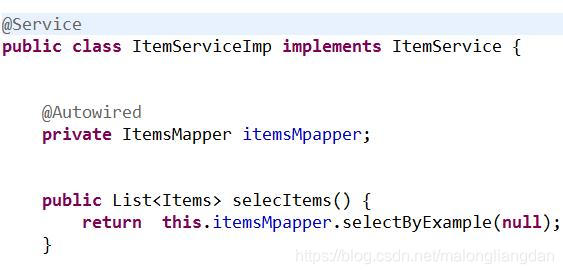
此时应该要知道是在itemsMapper这里注入出错,这个是一个动态代理接口,没有实现类
那么我们就应该考虑的是它所在的xml文件是否出错了,它存在两个文件一个是在applicationContext.xml文件里面 另外一个实在ItemMapper.xml文件里面

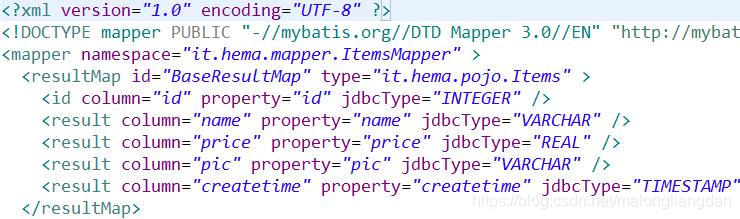
首先检查applicationContext.xml里面Mapper配置是否正确,其次检查itemmapper的namespace是否正确,结果发现applicationContext.xml里面配置出错了
**<property name="basePackage" value="it.hema.dao"/>**
把这句改成:
**<property name="basePackage" value="it.hema.mapper"/>**
运行正常!!
总结以下会出现以上状况的原因:
1.可能是注解没有比如:@service,@Controller等
2.检查xml文件,比如applicationContext.xml,xxxMapper.xml文件里面的namespace等
配置是否齐全了
3.检查监听器是否开启了
4.最好把<context:component-scan base-package=“it.hema.service”/>这句放在这里面applicationContext.xml
以上都没有问题的话就写一个测试类测试applicationContext是否能被正常加载
测试方法 如果正常那么大致上就能运行了!!
以上只是针对自己出现问题的见解,大家也可以跟着这个思路试一哈!!!

有“AI”的1024 = 2048,欢迎大家加入2048 AI社区
更多推荐

 0
 0
- 0


 已为社区贡献1条内容

所有评论(0)