getBoundingClientRect函数获取视图位置的坑
·
最近在做一个功能,把新手引导的提示定位在申请的上方,申请的位置是会根据前面功能的不展示而向前移动的,所以位置是不固定的,因此新手引导的位置要根据申请元素的位置来定位。
我使用了getBoundingClientRect函数来获取申请dom元素距离视图的距离。
    getTypeHighLightDom(item) {
        const dom = document.querySelector(item.selector);
        let domLocal;
        dom && (domLocal = dom.getBoundingClientRect());

        return (
            <div
                key={item.selector}
                style={{
                    position: 'absolute',
                    top: domLocal.y - parseInt(domWidth) * 0,
                    left: domLocal.x - parseInt(domWidth) * 0.6,
                    width: parseInt(domLocal.width) * 1.8 + 'px'
                }}
            >
                <img style={{width: '120%'}} src={item.pic} alt=""/>
            </div>
        )
    }
结果在chrome和高版本的浏览器中显示是正常的,但是在一些低版本的手机自带的浏览器以及低版本的safari中显示就错位了,一开始的猜想应该是因为浏览器的版本没有获取到dom元素或者是元素的距离。
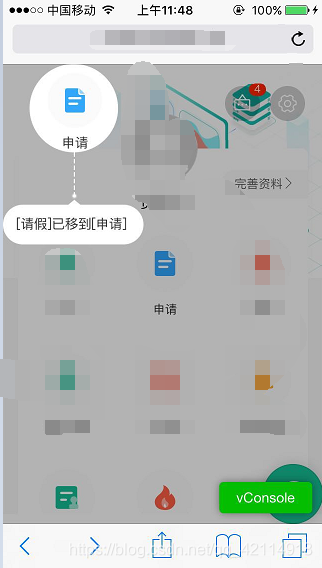
然后在控制台打印如下:
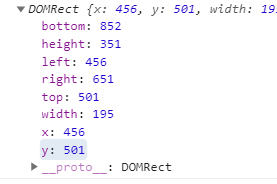
设置的元素的样式的top和left不起作用,跟getBoundingClientRect函数的x.y属性有关,所以在IE和Idge中打印属性,发现没有此属性,也查阅了资料发现
IE和Idge浏览器不支持x、y属性
IE9版本以下的浏览器不支持width、height属性。
当然还有一些其他浏览器的不兼容,各位在开发时可以判断一下。
然后我改进代码如下,在手机上就显示正常了。
    getTypeHighLightDom(item) {
        const dom = document.querySelector(item.selector);
        let domLocal;
        //在IE和Edge中getBoundingClientRect函数返回的对象无x、y属性,使用left和top代替
        dom && (domLocal = dom.getBoundingClientRect());
        //IE低版本无width和height 属性,使用right和left来计算
        let domWidth = domLocal.right - domLocal.left;

        return (
            <div
                key={item.selector}
                style={{
                    position: 'absolute',
                    top: domLocal.top - parseInt(domWidth) * 0,
                    left: domLocal.left - parseInt(domWidth) * 0.6,
                    width: parseInt(domWidth) * 1.8 + 'px'
                }}
            >
                <img style={{width: '120%'}} src={item.pic} alt=""/>
            </div>
        )
    }


有“AI”的1024 = 2048,欢迎大家加入2048 AI社区
更多推荐

 2
2 0
0- 0


 已为社区贡献1条内容

所有评论(0)