C++多线程pthread和thread
多线程
多线程是多任务处理的一种特殊形式,多任务处理允许让电脑同时运行两个或两个以上的程序。一般情况下,两种类型的多任务处理:基于进程和基于线程。
- 基于进程的多任务处理是程序的并发执行。
- 基于线程的多任务处理是同一程序的片段的并发执行。
多线程程序包含可以同时运行的两个或多个部分。这样的程序中的每个部分称为一个线程,每个线程定义了一个单独的执行路径。
Linux 操作系统,我们要使用 POSIX 编写多线程 C++ 程序。POSIX Threads 或 Pthreads 提供的 API 可在多种类 Unix POSIX 系统上可用,比如 FreeBSD、NetBSD、GNU/Linux、Mac OS X 和 Solaris。
创建线程
下面的程序,我们可以用它来创建一个 POSIX 线程:
#include <pthread.h>
pthread_create (thread, attr, start_routine, arg) 在这里,pthread_create 创建一个新的线程,并让它可执行。下面是关于参数的说明:
| 参数 | 描述 |
|---|---|
| thread | 指向线程标识符指针。 |
| attr | 一个不透明的属性对象,可以被用来设置线程属性。您可以指定线程属性对象,也可以使用默认值 NULL。 |
| start_routine | 线程运行函数起始地址,一旦线程被创建就会执行。 |
| arg | 运行函数的参数。它必须通过把引用作为指针强制转换为 void 类型进行传递。如果没有传递参数,则使用 NULL。 |
创建线程成功时,函数返回 0,若返回值不为 0 则说明创建线程失败。
例子1
使用 pthread_create() 函数创建了 5 个线程,每个线程输出"Hello Runoob!"
#include <iostream>
#include <pthread.h>
using namespace std;
#define NUM 5

void* hello(void* args){
    cout << "hello runoob!" << endl;
    return 0;
}

int main(){
    pthread_t tids[NUM];
    for(int i = 0; i < NUM; ++i){
        int ret = pthread_create(&tids[i], NULL, hello, NULL);
        if(ret != 0){
            cout << "pthread_create error:error_code = " << ret << endl;
        }
    }
    pthread_exit(NULL);
}
使用 -lpthread 库编译下面的程序:

例子2
使用 pthread_create() 函数创建了 5 个线程,并接收传入的参数。每个线程打印一个 "Hello Runoob!" 消息,并输出接收的参数,然后调用 pthread_exit() 终止线程。
#include <iostream>
#include <cstdlib>
#include <pthread.h>
using namespace std;
#define NUM 5
void *hello( void* threadid ){
    int tid = *( (int *)threadid );
    cout << "hello runoob! thread id: " << tid << endl;
    pthread_exit(NULL);
}

int main(int argc, const char** argv) {
    pthread_t threads[NUM];
    int index[NUM];
    int rc;
    int i;
    for(i = 0; i < NUM; i++){
        cout << "main(): creat thread successed: " << i << endl;
        index[i]  = i;
        rc = pthread_create( &threads[i], NULL, hello, (void *)&(index[i]) );
        if(rc){
            cout << "Error: creat thread failed: " << rc << endl;
            exit(-1);
        }
    }

    pthread_exit(NULL);
    return 0;
}
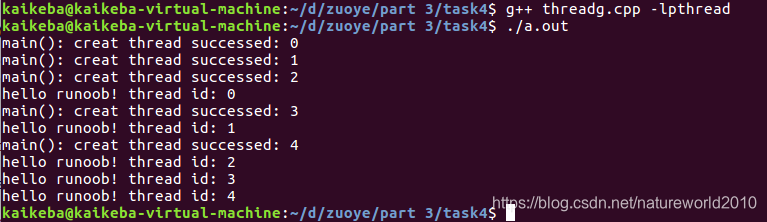
运行结果
向线程传递参数
这个实例演示了如何通过结构传递多个参数。您可以在线程回调中传递任意的数据类型,因为它指向 void,如下面的实例所示:
例子3
#include <iostream>
#include <cstdlib>
#include <pthread.h>
using namespace std;

#define NUM 5

struct data{
    int id;
    char *message;
};

void *hello( void *threadarg ){
    struct data* mydata;
    mydata = (struct data*) threadarg;
    cout << "Thread ID:" << mydata->message << endl;
    pthread_exit(NULL);
}

int main(){
    pthread_t threads[NUM];
    struct data td[NUM];
    int rc;
    int i;
    for( i = 0; i < NUM; i++ ){
        cout << "main(): creating thread: " << i << endl;
        td[i].id = i;
        td[i].message = ( char* ) "This is message";
        rc = pthread_create( &threads[i], NULL, hello, (void *)&td[i] );
    }
    if( rc ){
        cout << "Error: unable to create thread: " << rc << endl;
        exit(-1);
    }
    pthread_exit(NULL);
}
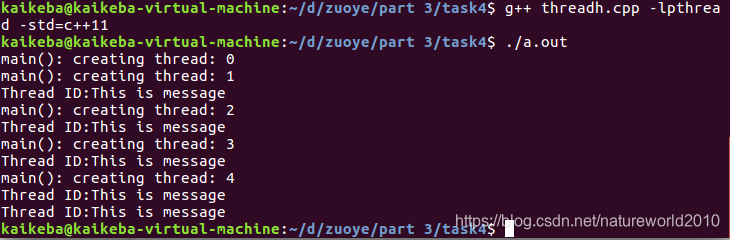
结果
连接和分离线程
我们可以使用以下两个函数来连接或分离线程:
pthread_join (threadid, status)
pthread_detach (threadid)
pthread_join() 子程序阻碍调用程序,直到指定的 threadid 线程终止为止。当创建一个线程时,它的某个属性会定义它是否是可连接的(joinable)或可分离的(detached)。只有创建时定义为可连接的线程才可以被连接。如果线程创建时被定义为可分离的,则它永远也不能被连接。
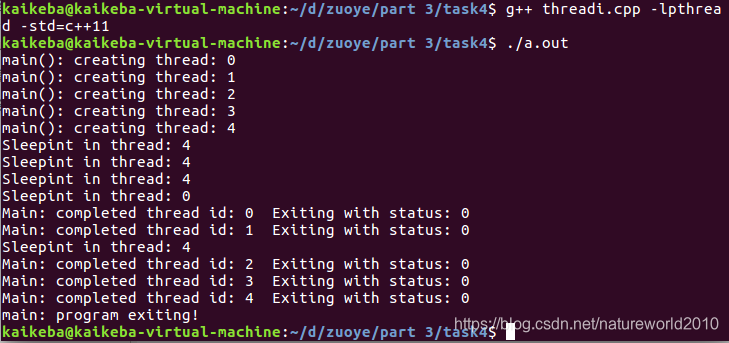
这个实例演示了如何使用 pthread_join() 函数来等待线程的完成。
#include <iostream>
#include <cstdlib>
#include <pthread.h>
#include <unistd.h>

using namespace std;
#define NUM 5

void *wait( void *t ){
    int i;
    long tid;
    tid = (long)t;
    int x = *( (int *)t );
    sleep(1);
    cout << "Sleepint in thread: " <<  x << endl;
    pthread_exit(NULL);
}

int main(){
    int rc;
    int i;
    pthread_t threads[NUM];
    pthread_attr_t attr;
    void *status;
    pthread_attr_init( &attr );
    pthread_attr_setdetachstate( &attr, PTHREAD_CREATE_JOINABLE );
    for( i = 0; i < NUM; i++ ){
        cout << "main(): creating thread: " << i << endl;
        rc = pthread_create( &threads[i], NULL, wait, (void *)&i );
        if(rc){
            cout << "Error: can't creat thread: " << i << endl;
            exit(-1);
        }
    }
    pthread_attr_destroy(&attr);
    for( i = 0; i < NUM; i++ ){
        rc = pthread_join( threads[i], &status );
        if( rc ){
            cout << "Error: can't to join: " << rc << endl;
            exit( -1 );
        }
        cout << "Main: completed thread id: " << i;
        cout << "  Exiting with status: " << status << endl;
    }
    cout << "main: program exiting! " << endl;
    pthread_exit(NULL);
}
运行结果
C++11 thread的使用
C++11中加入了<thread>头文件,此头文件主要声明了std::thread线程类。C++11的标准类std::thread对线程进行了封装,定义了C++11标准中的一些表示线程的类、用于互斥访问的类与方法等。应用C++11中的std::thread便于多线程程序的移值。
std::thread类成员函数:
(1)、get_id:获取线程ID,返回一个类型为std::thread::id的对象。
(2)、joinable:检查线程是否可被join。检查thread对象是否标识一个活动(active)的可行性线程。缺省构造的thread对象、已经完成join的thread对象、已经detach的thread对象都不是joinable。
(3)、join:调用该函数会阻塞当前线程。阻塞调用者(caller)所在的线程直至被join的std::thread对象标识的线程执行结束。
(4)、detach:将当前线程对象所代表的执行实例与该线程对象分离,使得线程的执行可以单独进行。一旦线程执行完毕,它所分配的资源将会被释放。
(5)、native_handle:该函数返回与std::thread具体实现相关的线程句柄。native_handle_type是连接thread类和操作系统SDK API之间的桥梁,如在Linux g++(libstdc++)里,native_handle_type其实就是pthread里面的pthread_t类型,当thread类的功能不能满足我们的要求的时候(比如改变某个线程的优先级),可以通过thread类实例的native_handle()返回值作为参数来调用相关的pthread函数达到目录。This member function is only present in class thread if the library implementation supports it. If present, it returns a value used to access implementation-specific information associated to the thread.
(6)、swap:交换两个线程对象所代表的底层句柄。
(7)、operator=:moves the thread object
(8)、hardware_concurrency:静态成员函数,返回当前计算机最大的硬件并发线程数目。基本上可以视为处理器的核心数目。
另外,std::thread::id表示线程ID,定义了在运行时操作系统内唯一能够标识该线程的标识符,同时其值还能指示所标识的线程的状态。Values of this type are returned by thread::get_id and this_thread::get_id to identify threads.
有时候我们需要在线程执行代码里面对当前调用者线程进行操作,针对这种情况,C++11里面专门定义了一个命名空间this_thread,此命名空间也声明在<thread>头文件中,其中包括get_id()函数用来获取当前调用者线程的ID;yield()函数可以用来将调用者线程跳出运行状态,重新交给操作系统进行调度,即当前线程放弃执行,操作系统调度另一线程继续执行;sleep_until()函数是将线程休眠至某个指定的时刻(time point),该线程才被重新唤醒;sleep_for()函数是将线程休眠某个指定的时间片(time span),该线程才被重新唤醒,不过由于线程调度等原因,实际休眠实际可能比sleep_duration所表示的时间片更长。
(9)mutex和std::lock_guard的使用
头文件是#include <mutex>,mutex是用来保证线程同步的,防止不同的线程同时操作同一个共享数据。
但使用lock_guard则相对安全,它是基于作用域的,能够自解锁,当该对象创建时,它会像m.lock()一样获得互斥锁,当生命周期结束时,它会自动析构(unlock),不会因为某个线程异常退出而影响其他线程。mutex和lock_guard的使用例子
#include <iostream>
#include <thread>
#include <mutex>
#include <stdlib.h>

int cnt = 20;
std::mutex m;
void t1(){
    while (cnt > 0)
    {
        std::lock_guard<std::mutex> lockGuard(m);
       // std::m.lock();
        if (cnt > 0)
        {
            //sleep(1);
            --cnt;
            std::cout << cnt << std::endl;
        }
       // std::m.unlock();
    }
}

void t2(){
    while (cnt > 0)
    {
        std::lock_guard<std::mutex> lockGuard(m);
        // std::m.lock();
        if (cnt > 0)
        {
            --cnt;
            std::cout << cnt << std::endl;
        }
        // std::m.unlock();
    }
}

int main(void)
{
	std::thread th1(t1);
	std::thread th2(t2);
	th1.join();    //等待t1退出
	th2.join();    //等待t2退出
	std::cout << "here is the main()" << std::endl;
	return 0;

}
thread使用的例子
#include <iostream>
#include <thread>
using namespace  std;
thread::id main_thread_id = this_thread::get_id();

void hello(){
    cout << "hello concurrent world\n";
    if( main_thread_id == this_thread::get_id() ){
        cout << "This is the main thread!\n";
    }else{
        cout << "This is not the main thread!\n";
    }
}

void pause( int n ){
    this_thread::sleep_for( chrono::seconds(n) );
    cout << "Pause " << n << " seconds ended\n";
}

int main(){
    thread t(hello);
    cout << t.hardware_concurrency() << endl;
    cout << "Native_hadle " << t.native_handle() << endl;
    t.join();
    thread a(hello);
    a.detach();
    thread threads[5];

    cout << "Spawning 5 threads...\n";
    for( int i = 0; i < 5; ++i ){
        threads[i] = thread( pause, i + 1 );
    }
    cout << "Done spawning threads. Now waiting for them to join:\n";
    for(auto &thread : threads){
        thread.join();
    }
    cout << "All threads joined!\n";
}
原文链接:
https://www.runoob.com/cplusplus/cpp-multithreading.html
https://blog.csdn.net/sevenjoin/article/details/82187127

有“AI”的1024 = 2048,欢迎大家加入2048 AI社区
更多推荐



 8
8 0
0- 0


 已为社区贡献1条内容

所有评论(0)