Qt——QMessageBox类详解
QMessageBox类提供了一个模式对话框,用于通知用户或询问用户问题并接收答案。我们先来看下QMessageBox::information函数的使用:其原型:[static] int QMessageBox::information(QWidget *parent, const QString &title, const QString &text, int button0,
QMessageBox类提供了一个模式对话框,用于通知用户或询问用户问题并接收答案。
我们先来看下QMessageBox::information函数的使用:
其原型:
[static] int QMessageBox::information(QWidget *parent, const QString &title, const QString &text, int button0, int button1 = 0, int button2 = 0)parent是父组件指针,title标题,text是文本文字,button0、1和 2是三个按钮,按钮参数没定义的话,默认就只有一个按钮。最多支持三个按钮。例如:
void MainWindow::on_pushButton_clicked(bool checked)
{
    QString pbtn_name;
    int k;
    pbtn_name=ui->pushButton->metaObject()->className();   //获取按钮对象的名字

    k=QMessageBox::information(this,"title","hello!"+pbtn_name,QMessageBox::Ok,QMessageBox::Cancel,QMessageBox::Yes);  //ok,cancle,yes三个按钮
    if(k==QMessageBox::Cancel)                                               //判断返回的按钮参数
    QMessageBox::information(this,"pramater return","Cancle!");
    else if(k==QMessageBox::Ok)
    QMessageBox::information(this,"pramater return","OK!");
    else if(k==QMessageBox::Yes)
    QMessageBox::information(this,"pramater return","YES!");

}
这段代码是pushbutton按钮的槽函数,如果单击pushbutton按钮,将弹出一个提示框,用了一个metaObject函数来返回classname,也就是pussbutton,三个按钮被按下,将判断是哪个按钮被按下,然后再弹出一个对话框告诉我们是哪个按钮被按下。
运行截图:
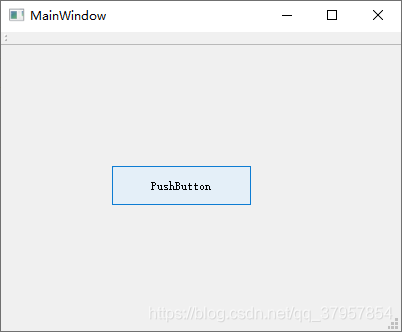
按钮按下:
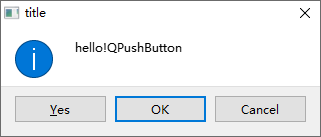
单击ok: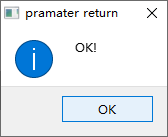
[static] int QMessageBox::information(QWidget *parent, const QString &title, const QString &text, const QString &button0Text, const QString &button1Text = QString(), const QString &button2Text = QString(), int defaultButtonNumber = 0, int escapeButtonNumber = -1)这是一个重载函数,显示带有给定标题和文本以及一个、两个或三个按钮的信息消息框,返回已单击按钮的索引(0、1、 2)。
button0Text是第一个按钮的文本,是可选的。如果未提供button0Text,将使用“确定”(翻译) buttn1Text是第二个按钮,同上。defaultButtonNumber是默认按钮的索引,比如设为0,那么焦点将默认在第一个按钮,escapeButtonNumber是escape按钮的索引,按esc与单击此按钮相同,它默认为-1,可修改,消息框是应用程序模式对话框。
例子:
void MainWindow::on_pushButton_clicked(bool checked)
{
    QString pbtn_name;
    int k;
    pbtn_name=ui->pushButton->metaObject()->className();   //获取按钮对象的名字

    k=QMessageBox::information(this,"title","hello!"+pbtn_name,"确定","取消","好的",0,1);  //ok,cancle,yes三个按钮
    if(k==0)                                               //判断返回的按钮参数
    QMessageBox::information(this,"pramater return","确定!");
    else if(k==1)
    QMessageBox::information(this,"pramater return","取消!");
    else if(k==2)
    QMessageBox::information(this,"pramater return","好的!");

}
运行截图:
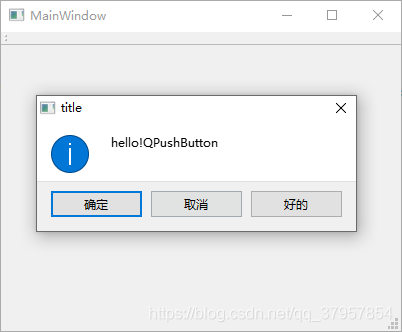
可以看到,笔者设定的默认按钮的索引为0,所以消息框弹出时焦点默认在 确定 按钮上,escape按钮的索引设定为1,则按下esc键与按下 取消 按键的情况是一样的。
好的,information函数的我们了解的足够多了,QMessageBox类里还有几个和它一样用法的函数:
[static] int QMessageBox::question(QWidget *parent, const QString &title, const QString &text, int button0, int button1 = 0, int button2 = 0)

[static] int QMessageBox::question(QWidget *parent, const QString &title, const QString &text, const QString &button0Text, const QString &button1Text = QString(), const QString &button2Text = QString(), int defaultButtonNumber = 0, int escapeButtonNumber = -1)

[static] int QMessageBox::warning(QWidget *parent, const QString &title, const QString &text, int button0, int button1, int button2 = 0)

[static] int QMessageBox::warning(QWidget *parent, const QString &title, const QString &text, const QString &button0Text, const QString &button1Text = QString(), const QString &button2Text = QString(), int defaultButtonNumber = 0, int escapeButtonNumber = -1)

[static] int QMessageBox::critical(QWidget *parent, const QString &title, const QString &text, int button0, int button1, int button2 = 0)

[static] int QMessageBox::critical(QWidget *parent, const QString &title, const QString &text, const QString &button0Text, const QString &button1Text = QString(), const QString &button2Text = QString(), int defaultButtonNumber = 0, int escapeButtonNumber = -1)
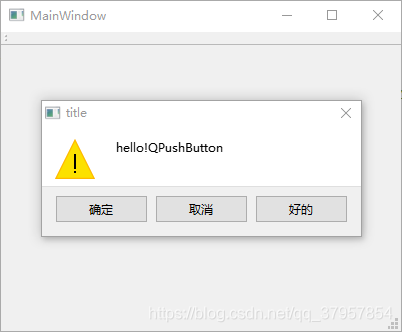
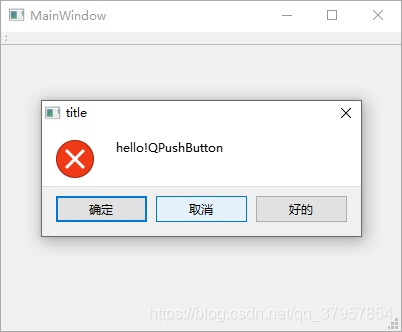
运行截图:
warning函数:
critical函数:

有“AI”的1024 = 2048,欢迎大家加入2048 AI社区
更多推荐
 4
4 0
0- 0


 已为社区贡献3条内容

所有评论(0)