JDBC数据库访问与DAO设计模式
JDBC数据库访问与DAO设计模式实验预习内容JDBC常用的类对象与接口有哪些?它们的功能如何?答:Driver接口:通过Class.forName()装载特定厂商提供的数据库驱动程序;DriverManager类:管理驱动程序,通过getConnection()方法建立与数据库的连接。Connection对象:代表与数据库的连接,不同的数据库驱动程序和连接的URL都不相同Statement对象:
JDBC数据库访问与DAO设计模式
实验预习内容
- JDBC常用的类对象与接口有哪些?它们的功能如何?
答:Driver接口:通过Class.forName()装载特定厂商提供的数据库驱动程序;
DriverManager类:管理驱动程序,通过getConnection()方法建立与数据库的连接。
Connection对象:代表与数据库的连接,不同的数据库驱动程序和连接的URL都不相同
Statement对象:提供在基层连接上运行SQL语句并访问结果。
ResultSet对象:提供对查询结果集的行访问的方法,并且可以访问结果的不同字段。
(1)Statement执行一般的SQL语句,包括插入、删除、更新、查询等。
(2)PreparedStatement称为准备语句,它是将SQL语句中的某些参数暂不指定,而等到执行时再统一指定。
(3)CallableStatement用于执行数据库的存储过程。 - 使用数据源访问数据库的基本思想是什么?这样做有什么好处?
答:事先建立若干连接对象,存放在数据库连接池中,供数据访问组件共享。应用程序在启动时只需创建少量的连接对象,不需要为每个HTTP请求都创建一个连接对象,大大降低请求的响应时间。 - 什么是DAO?DAO设计模式有什么好处?
答:DAO(Data Access Object):数据访问对象。将数据访问方法(通常使用JDBC技术)封装在DAO类中,提高应用程序的灵活性和可复用性。实现业务逻辑和数据访问逻辑分离,使应用维护变得更简单。
实验内容与步骤(我这里用的SQL,你如果想更改为MySQL,可以修改连接部分并加载MySQL的驱动就可以啦)
- 使用传统JDBC方法与Model 1模型通过JSP页面访问数据库。
【步骤1】在MySQL数据库test中创建books表,其结构如下: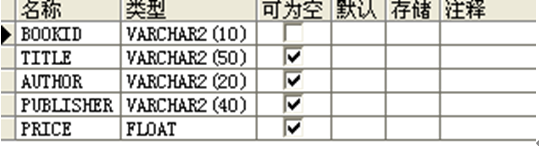
向books表中插入几条记录,如下:
注意:需要将数据库的JDBC驱动程序安装到Web应用程序的WEB-INF\lib目录中。
【步骤2】创建模型:编写名称为BookBean.java的JavaBean用于封装图书的信息;编写BookDAO.java,采用传统JDBC方法创建数据库连接,对图书信息进行查询。
【步骤3】创建兼具视图与控制器功能的JSP页面:编写displayBooks.jsp页面,使用jsp:useBean动作调用BookDAO查询所有图书的信息,以表格的形式显示所有图书的书号、书名、作者、价格和出版社名称。
package com.example.exp05;

import java.io.Serializable;

@SuppressWarnings("serial")
public class BookBean implements Serializable{

    private String bookid;
    private String title;
    private String author;
    private String publisher;
    private float price;


    public BookBean(String bookid,String title,String author,String publisher,float price)
    {
        this.bookid=bookid;
        this.title=title;
        this.author=author;
        this.publisher=publisher;
        this.price=price;
    }

    public BookBean() {

    }

    public String getBookid() {
        return bookid;
    }
    public void setBookid(String bookid) {
        this.bookid = bookid;
    }
    public String getTitle() {
        return title;
    }
    public void setTitle(String title) {
        this.title = title;
    }
    public String getAuthor() {
        return author;
    }
    public void setAuthor(String author) {
        this.author = author;
    }
    public String getPublisher() {
        return publisher;
    }
    public void setPublisher(String publisher) {
        this.publisher = publisher;
    }
    public float getPrice() {
        return price;
    }
    public void setPrice(float price) {
        this.price = price;
    }
}
package com.example.exp05;

import java.sql.*;

public class BookDAO {
    private static Connection con;
    public BookDAO() {
        try {
            Class.forName("com.microsoft.sqlserver.jdbc.SQLServerDriver");
            String url = "jdbc:sqlserver://localhost:1433;DatabaseName=test";
            con = DriverManager.getConnection(url, "sa", "123456");
        } catch (Exception e) {
            e.printStackTrace();
        }
    }
    public ResultSet result() throws SQLException {
        Statement stmt = con.createStatement();
        String sql = "select * from books";
        ResultSet rs = stmt.executeQuery(sql);
        return rs;
    }

    public static String bookId(int i) throws SQLException {

        Statement stmt = con.createStatement();
        String sql = "select * from books";
        ResultSet rs = stmt.executeQuery(sql);
        BookBean book = new BookBean();
        String result = "";
        try {
            int rowCount = 0;
            while (rs.next()) {
                rowCount++;
                if (rowCount == i) {
                    book.setBookid(rs.getString(1));
                    result = book.getBookid();
                    System.out.print(result);
                    break;
                }

            }
        } catch (Exception e) {
        }
        return result;

    }
}
<%@ page import="java.sql.ResultSet" %>
<%--
  Created by IntelliJ IDEA.
  User: The Last SundayTime
  Date: 2021/5/13
  Time: 21:00
  To change this template use File | Settings | File Templates.
--%>
<%@ page contentType="text/html;charset=UTF-8" %>
<jsp:useBean id="book" class="com.example.exp05.BookDAO" scope="session"/>
<html>
<head>
    <title>displayBooks</title>
<style>
    td{
        text-align: center;
    }
</style>
</head>
<body>
<table width="500" height="256" border="1" align="center">
    <tr>
        <th scope="col">bookid</th>
        <th scope="col">title</th>
        <th scope="col">author</th>
        <th scope="col">publisher</th>
        <th scope="col">price</th>
    </tr>
    <%!int i=1;%>
    <%
        try
        {
            ResultSet rs=book.result();
            while(rs.next()){%>
    <tr>
        <td><%=rs.getString(1)   %> </td>
        <td><%=rs.getString(2)   %></td>
        <td><%=rs.getString(3)   %></td>
        <td><%=rs.getString(4)   %></td>
        <td><%=rs.getString(5)   %></td>
    </tr>

    <% i++; }
        rs.close();
    }catch(Exception e)
    {   } %>
</table>
</body>
</html>
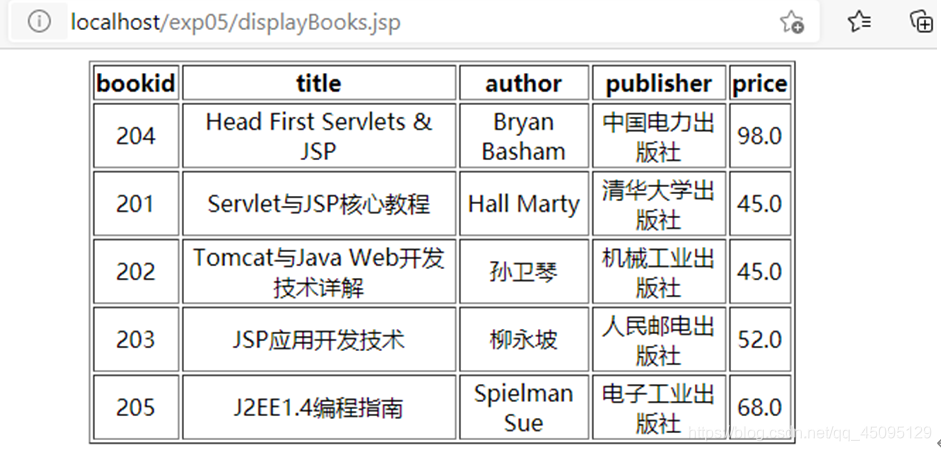
2. 基于实验内容1创建的数据库表和模型,采用MVC设计模式,通过数据源和DAO对象访问数据库。其中JavaBeans实现模型与数据库访问与操作,Servlet实现控制器,JSP页面实现视图。
• 模型包括2个JavaBean:BookBean用于存放图书信息,BookDAO用于访问数据库。
• 控制器包括2个Servlet:BookQueryServlet根据请求参数查询图书信息、BookInsertServlet用来向数据库中插入一条图书信息。
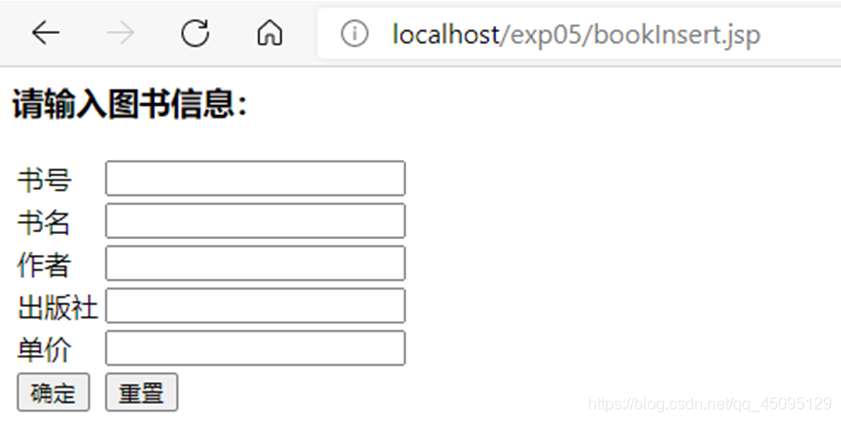
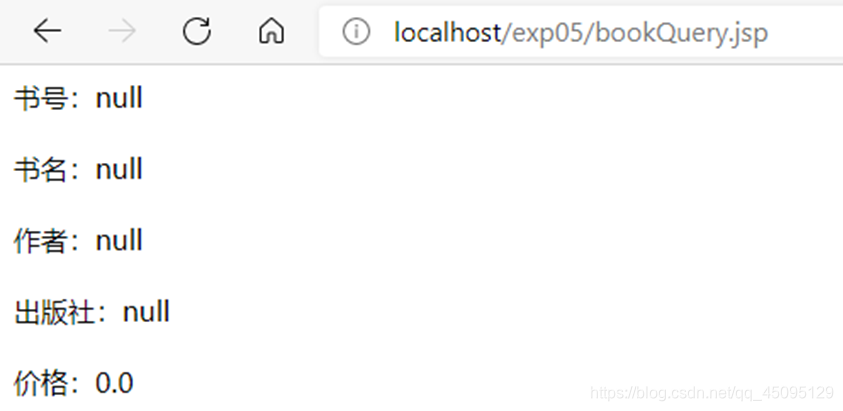
• 视图包括4个JSP页面:bookQuery.jsp显示图书查询表单的页面、bookInsert.jsp显示收集图书信息表单的页面、display.jsp显示查询结果页面、errorPage.jsp显示查询错误页面。
package com.example.exp05;
import java.sql.*;
public class BookDAO1 {
    private static  Connection con;
    public static void main(String args[]) throws SQLException, ClassNotFoundException
    {
        Class.forName("com.microsoft.sqlserver.jdbc.SQLServerDriver");
        String url = "jdbc:sqlserver://localhost:1433;DatabaseName=test";
        con = DriverManager.getConnection(url, "sa", "123456");
        //BookBean book=new BookBean("303","34","34","55",45);
        //System.out.println(insertBook(book));

    }
    public BookDAO1() throws ClassNotFoundException, SQLException {
        Class.forName("com.microsoft.sqlserver.jdbc.SQLServerDriver");
        String url = "jdbc:sqlserver://localhost:1433;DatabaseName=test";
        con = DriverManager.getConnection(url, "sa", "123456");
    }
    public  BookBean searchBook(String bookid) throws SQLException, ClassNotFoundException
    {
        BookBean bookbean=new BookBean();
        Statement st=con.createStatement();
        String sql="select * from book where bookid="+bookid;
        ResultSet rs=st.executeQuery(sql);
        if(rs.next())
        {
            bookbean.setBookid(rs.getString(1));
            bookbean.setTitle(rs.getString(2));
            bookbean.setAuthor(rs.getString(3));
            bookbean.setPublisher(rs.getString(4));
            bookbean.setPrice(rs.getFloat(5));
        }else
        {
            return null;
        }
        return bookbean;

    }
    public boolean insertBook(BookBean book) throws SQLException
    {
        Statement st=con.createStatement();
        String sql="insert into book values('"+book.getBookid()+"','"+book.getTitle()+"','"+book.getAuthor()+"','"+book.getPublisher()+"',"+book.getPrice()+")";
        boolean rs=st.execute(sql);
        if(!rs)
        {
            return true;
        }
        return false;
    }

}
package com.example.exp05;

import javax.servlet.*;
import javax.servlet.http.*;
import javax.servlet.annotation.*;
import java.io.IOException;
import java.sql.SQLException;

/**
 * Servlet implementation class BookQueryServlet
 */
@WebServlet("/BookQueryServlet")
public class BookQueryServlet extends HttpServlet {
    private static final long serialVersionUID = 1L;
    /**
     * @see HttpServlet#doGet(HttpServletRequest request, HttpServletResponse response)
     */
    protected void doGet(HttpServletRequest request, HttpServletResponse response) throws ServletException, IOException {
        // TODO Auto-generated method stub
        response.setCharacterEncoding("utf-8");
        String bookid = request.getParameter("bookid");
        try {
            BookDAO1 bookdao = new BookDAO1();
            BookBean book = bookdao.searchBook(bookid);
            if(book!=null){
                request.getSession().setAttribute("book", book);
                RequestDispatcher view = request.getRequestDispatcher("jsp/display.jsp");
                view.forward(request, response);
            }else{
                RequestDispatcher view = request.getRequestDispatcher("jsp/errorPage.jsp");
                view.forward(request, response);
            }
        } catch (ClassNotFoundException e) {
            // TODO 自动生成的 catch 块
            e.printStackTrace();
        } catch (SQLException e) {
            // TODO 自动生成的 catch 块
            e.printStackTrace();
        }

    }

    /**
     * @see HttpServlet#doPost(HttpServletRequest request, HttpServletResponse response)
     */
    protected void doPost(HttpServletRequest request, HttpServletResponse response) throws ServletException, IOException {
        // TODO Auto-generated method stub
        doGet(request, response);
    }

}
package com.example.exp05;

import javax.servlet.*;
import javax.servlet.http.*;
import javax.servlet.annotation.*;
import java.io.IOException;
import java.sql.SQLException;

/**
 * Servlet implementation class BookInsertServlet
 */
@WebServlet("/BookInsertServlet")
public class BookInsertServlet extends HttpServlet {
    private static final long serialVersionUID = 1L;

    /**
     * @see HttpServlet#doGet(HttpServletRequest request, HttpServletResponse response)
     */
    protected void doGet(HttpServletRequest request, HttpServletResponse response) throws ServletException, IOException {
        // TODO Auto-generated method stub
        response.setCharacterEncoding("utf-8");

        BookBean book = new BookBean(
                request.getParameter("bookid"),request.getParameter("title"),
                request.getParameter("author"),request.getParameter("publisher"),
                Float.parseFloat(request.getParameter("price"))
        );

        try {
            BookDAO1 bookdao = new BookDAO1();
            if(bookdao.insertBook(book)){
                RequestDispatcher view = request.getRequestDispatcher("jsp/display.jsp");
                view.forward(request, response);
            }else{
                RequestDispatcher view = request.getRequestDispatcher("jsp/errorPage.jsp");
                view.forward(request, response);
            }
            //request.setAttribute("result",message);
        } catch (SQLException | ClassNotFoundException e) {
            // TODO 自动生成的 catch 块
            e.printStackTrace();
        }

    }

    /**
     * @see HttpServlet#doPost(HttpServletRequest request, HttpServletResponse response)
     */
    protected void doPost(HttpServletRequest request, HttpServletResponse response) throws ServletException, IOException {
        // TODO Auto-generated method stub
        doGet(request, response);
    }

}
<%--
  Created by IntelliJ IDEA.
  User: The Last SundayTime
  Date: 2021/5/14
  Time: 0:00
  To change this template use File | Settings | File Templates.
--%>
<%@ page contentType="text/html;charset=UTF-8" language="java" %>
<jsp:useBean id="book" class="com.example.exp05.BookBean" scope="session"/>
<jsp:setProperty name="book" property="*"/>
<html>
<head>
    <title>bookQuery</title>
</head>
<body>
书号:<jsp:getProperty name="book" property="bookid"/><br><br>
书名:<jsp:getProperty name="book" property="title"/><br><br>
作者:<jsp:getProperty name="book" property="author"/><br><br>
出版社:<jsp:getProperty name="book" property="publisher"/><br><br>
价格:<jsp:getProperty name="book" property="price"/><br><br>
</body>
</html>
<%--
  Created by IntelliJ IDEA.
  User: The Last SundayTime
  Date: 2021/5/14
  Time: 0:00
  To change this template use File | Settings | File Templates.
--%>
<%@ page contentType="text/html;charset=UTF-8" language="java" %>
<jsp:useBean id="book" class="com.example.exp05.BookBean" scope="session"/>
<html>
<head>
    <title>bookInsert</title>
</head>
<body>
<h3>请输入图书信息:</h3>
<form action="BookInsertServlet" method="post">
    <table>
        <tr><td>书号</td> <td><input type="text" name="bookid" ></td></tr>
        <tr><td>书名</td><td><input type="text" name="title"></td></tr>
        <tr><td>作者</td><td><input type="text" name="author" ></td></tr>
        <tr><td>出版社</td><td><input type="text" name="publisher" ></td></tr>
        <tr><td>单价</td><td><input type="text" name="price" ></td></tr>
        <tr><td><input type="submit" value="确定" ></td>
            <td><input type="reset" value="重置" ></td>
        </tr>
    </table>
</form>
</body>
</html>
<%--
  Created by IntelliJ IDEA.
  User: The Last SundayTime
  Date: 2021/5/14
  Time: 0:01
  To change this template use File | Settings | File Templates.
--%>
<%@ page contentType="text/html;charset=UTF-8" language="java" %>

<html>
<head>
    <title>display</title>
</head>
<body>
<form action="BookQueryServlet" method="post">
    请输入书号:<input type="text" name="bookid">
    <input type="submit" value="查询">
</form>
</body>
</html>
<%--
  Created by IntelliJ IDEA.
  User: The Last SundayTime
  Date: 2021/5/14
  Time: 0:01
  To change this template use File | Settings | File Templates.
--%>
<%@ page contentType="text/html;charset=UTF-8" language="java" %>
<html>
<head>
    <title>errorPage</title>
</head>
<body>
对不起,您查的图书不存在!
</body>
</html>


3. DAO设计模式练习。
【步骤1】:使用root用户登录MySQL的test数据库,创建customer表,包括custName、email、phone等字段,设计CustomerBean传输对象,使其实现java.io.Serializable接口。
【步骤2】:创建CustomerDAO类实现数据库访问逻辑,通过该类可以获得一个连接对象,对数据库进行查询、插入、修改和删除操作,最后关闭指定的对象。
【步骤3】:创建insertCustomer.jsp页面,通过一个表单录入向数据库中插入的数据。
【步骤4】:创建InsertCustomerServlet.java控制器,调用CustomerDAO对象和传输对象,将数据插入到数据库中。
【步骤5】:创建showCustmer.jsp,显示所有客户的信息,每一条客户信息后面增加修改和删除超链接,编写ActionServlet.java控制器,调用DAO和传输对象实现对客户信息的删除和修改功能。
package com.example.exp05;

import java.io.Serializable;

@SuppressWarnings("serial")
public class CustomerBean implements Serializable {

    private  String custName;
    private String email;
    private String phone;
    public CustomerBean() {}
    public CustomerBean(String custName,String email,String phone)
    {
        this.custName=custName;
        this.email=email;
        this.phone=phone;
    }
    public String getCustName() {
        return custName;
    }
    public void setCustName(String custName) {
        this.custName = custName;
    }
    public String getEmail() {
        return email;
    }
    public void setEmail(String email) {
        this.email = email;
    }
    public String getPhone() {
        return phone;
    }
    public void setPhone(String phone) {
        this.phone = phone;
    }
}
package com.example.exp05;

import java.sql.Connection;
import java.sql.DriverManager;
import java.sql.SQLException;
import java.sql.Statement;


public class CustomerDAO {
    private Connection con;
    public CustomerDAO()
    {
        try {
            Class.forName("com.mysql.jdbc.Driver");
            String url="jdbc:mysql://localhost:3306/test";
            con=DriverManager.getConnection(url,"root","123456");
        }
        catch(Exception e)
        {

        }
    }
    public boolean insertCustomer(CustomerBean customer) throws SQLException
    {
        Statement st=con.createStatement();
        String sql="insert into customer values('"+customer.getCustName()+"','"+customer.getEmail()+"','"
                +customer.getPhone()+"')";
        boolean rs=st.execute(sql);
        if(!rs)
        {
            return true;
        }
        return false;
    }

}
<%--
  Created by IntelliJ IDEA.
  User: The Last SundayTime
  Date: 2021/5/14
  Time: 0:35
  To change this template use File | Settings | File Templates.
--%>
<%@ page contentType="text/html;charset=UTF-8" language="java" %>
<html>
<head>
    <title>insertCustomer</title>
</head>
<body>
<h3>请输入顾客信息:</h3>
<form action = "InsertCustomerServlet" method = "post">
    <table>
        <tr><td>姓名</td> <td><input type="text" name="custName" ></td></tr>
        <tr><td>邮箱</td><td><input type="text" name="email"></td></tr>
        <tr><td>电话</td><td><input type="text" name="phone" ></td></tr>
        <tr><td><input type="submit" value="确定" ></td>
            <td><input type="reset" value="重置" ></td>
        </tr>
    </table>
</form>
</body>
</html>
package com.example.exp05;

import java.io.IOException;
import java.sql.SQLException;

import javax.servlet.RequestDispatcher;
import javax.servlet.ServletException;
import javax.servlet.annotation.WebServlet;
import javax.servlet.http.HttpServlet;
import javax.servlet.http.HttpServletRequest;
import javax.servlet.http.HttpServletResponse;

/**
 * Servlet implementation class InsertCustomerServlet
 */
@WebServlet("/InsertCustomerServlet")
public class InsertCustomerServlet extends HttpServlet {
    private static final long serialVersionUID = 1L;

    /**
     * @see HttpServlet#HttpServlet()
     */
    public InsertCustomerServlet() {
        super();
        // TODO Auto-generated constructor stub
    }

    /**
     * @see HttpServlet#doGet(HttpServletRequest request, HttpServletResponse response)
     */
    protected void doGet(HttpServletRequest request, HttpServletResponse response) throws ServletException, IOException {
        // TODO Auto-generated method stub
        response.setCharacterEncoding("utf-8");
        request.setCharacterEncoding("utf-8");

        CustomerBean  customer = new CustomerBean(
                request.getParameter("custName"),request.getParameter("email"),
                request.getParameter("phone"));


        try {
            CustomerDAO customerdao = new CustomerDAO();
            if(customerdao.insertCustomer(customer)){
                RequestDispatcher view = request.getRequestDispatcher("jsp/showCustomer.jsp");
                view.forward(request, response);
                //request.setAttribute("result",message);
            }
        } catch (SQLException e) {
            // TODO 自动生成的 catch 块
            e.printStackTrace();
        }
    }

    /**
     * @see HttpServlet#doPost(HttpServletRequest request, HttpServletResponse response)
     */
    protected void doPost(HttpServletRequest request, HttpServletResponse response) throws ServletException, IOException {
        // TODO Auto-generated method stub
        doGet(request, response);
    }

}
<%--
  Created by IntelliJ IDEA.
  User: The Last SundayTime
  Date: 2021/5/14
  Time: 0:38
  To change this template use File | Settings | File Templates.
--%>
<%@ page contentType="text/html;charset=UTF-8" language="java" %>
<jsp:useBean id="customer" class="com.example.exp05.CustomerBean" scope="session"/>
<jsp:setProperty name="customer" property="*"/>
<html>
<head>
    <title>showCustomer</title>
</head>
<body>
姓名:<jsp:getProperty name="customer" property="custName"/><br><br>
邮箱:<jsp:getProperty name="customer" property="email"/><br><br>
电话:<jsp:getProperty name="customer" property="phone"/><br><br>
</body>
</html>
思考题
- 总结并归纳传统JDBC方法访问数据库的步骤。
答:(1)加载驱动程序。
(2)建立连接对象。
(3)创建语句对象。
(4)执行SQL语句并处理结果。
(5)关闭建立的对象。 - 总结并归纳使用数据源访问数据库的步骤。
答:在DataSource中事先建立数据库连接,将这些连接保存在连接池中,当java程序访问数据库时,就从连接池中取出空闲状态的连接,当我们的程序访问结束时,再把这些数据库连接放回连接池,从而提高访问数据库的效率。

有“AI”的1024 = 2048,欢迎大家加入2048 AI社区
更多推荐
 3
3 0
0- 0


 已为社区贡献1条内容

所有评论(0)