Java使用poi操作文件时出现问题如何解决
Java使用poi操作文件的介绍以及可能出现的问题(各种问题超详细,带示例源码),文章包含了poi处理Excel的示例代码Java使用poi操作文件时出现问题如何解决。poi如何操作excel
Java使用poi操作文件时出现问题如何解决(各种问题超详细,带示例源码)。poi如何操作excel
Java poi介绍及报错解决
什么是poi
Apache POI 是用Java编写的免费开源的跨平台的 Java API,Apache POI提供API给Java对Microsoft Office格式档案读和写的功能。POI为“Poor Obfuscation Implementation”的首字母缩写,意为“简洁版的模糊实现”。
其中使用最多的就是使用POI操作Excel文件。
poi常用的包
HSSF - 提供读写Microsoft Excel XLS格式档案的功能。
XSSF - 提供读写Microsoft Excel OOXML XLSX格式档案的功能。
HWPF - 提供读写Microsoft Word DOC格式档案的功能。
HSLF - 提供读写Microsoft PowerPoint格式档案的功能。
HDGF - 提供读Microsoft Visio格式档案的功能。
HPBF - 提供读Microsoft Publisher格式档案的功能。
HSMF - 提供读Microsoft Outlook格式档案的功能。

1. POI读取excel文件异常:
OfficeXmlFileException
Exception in thread "main" org.apache.poi.poifs.filesystem.OfficeXmlFileException: The supplied data appears to be in the Office 2007+ XML. You are calling the part of POI that deals with OLE2 Office Documents. You need to call a different part of POI to process this data (eg XSSF instead of HSSF)
原因是HSSFWorkbook只能处理扩展名为.xls的文件,也就是excel2007以前的文件。
文件中的数据是用Office2007+XML保存的,而现在却调用OLE2 Office文档处理,应该使用POI不同的部分来处理这些数据,比如使用XSSF来代替HSSF
        File file = new File("D:\\testData\\" + "ExcelData.xlsx");
        if (!file.exists()) {
            file.createNewFile();
        }
        FileInputStream inputStream = new FileInputStream(file);
        // 创建Excel文件薄
        //HSSFWorkbook workbook = new HSSFWorkbook(inputStream); //2003
        XSSFWorkbook workbook = new XSSFWorkbook(inputStream);  //2007
        // 创建工作表sheeet
        XSSFSheet sheet = workbook.getSheetAt(SheetIndex);
2. POI读取excel文件异常:
UnsupportedFileFormatException
java.lang.ClassNotFoundException: org.apache.poi.UnsupportedFileFormatException
在程序运行XSSFWorkbook workbook = new XSSFWorkbook(inputStream); //到这句出错,我查阅之后原来是有些jar包版本不一致而导致出现了这些问题
解决方法:
1.首先下载 poi-3.17 的jar包,并导入项目
poi3.7jar包下载
链接:https://pan.baidu.com/s/1TkrhyIS8fobjdGxktvwbVw
提取码:zmpf
idea中导入jar包:快捷键Ctrl+Shift+Alt+S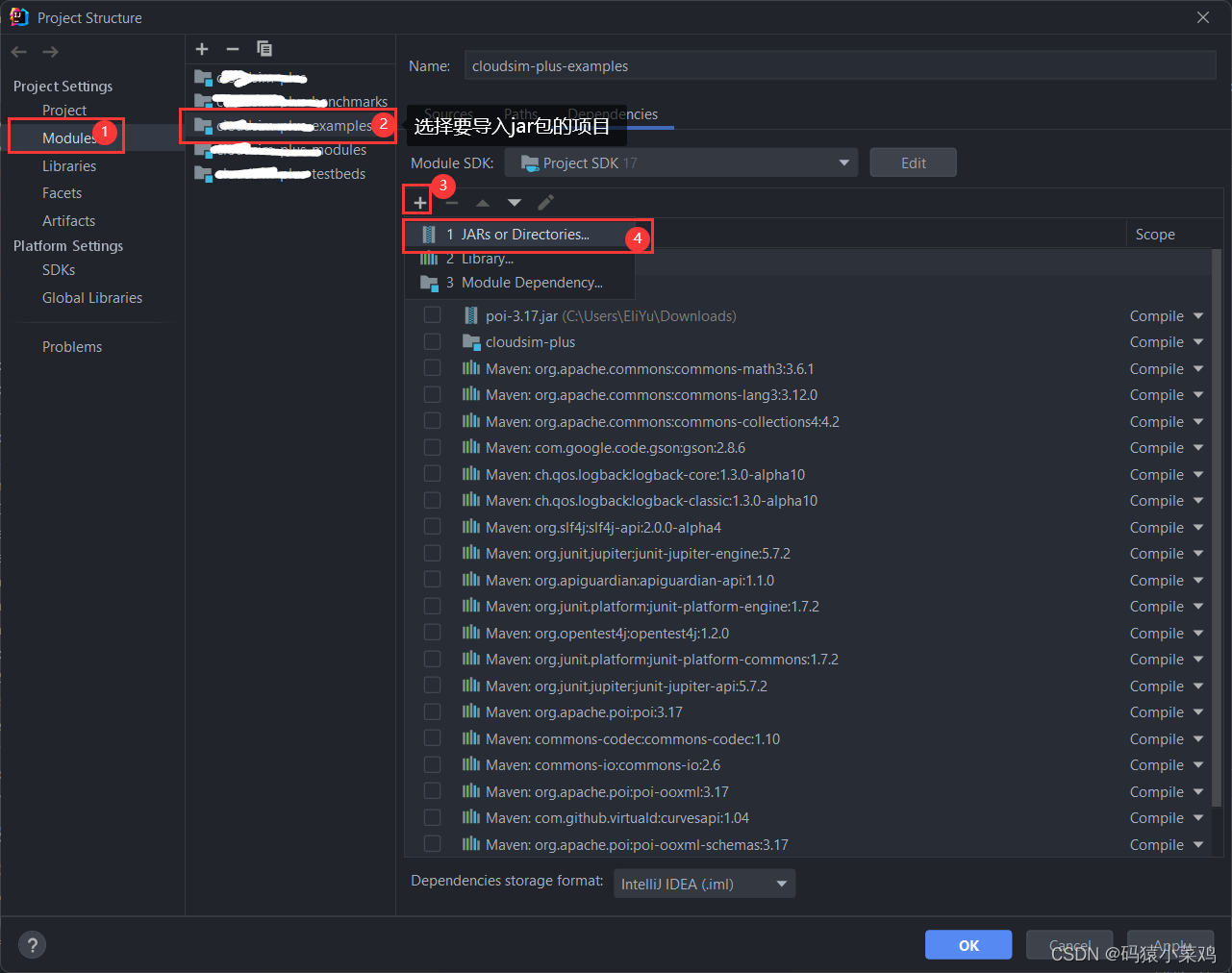
2. maven项目可以在pom.xml里面导入依赖,并刷新maven
        <!-- 数据导出到xlsx -->
        <dependency>
            <groupId>org.apache.xmlbeans</groupId>
            <artifactId>xmlbeans</artifactId>
            <version>2.6.0</version>
        </dependency>
        <!--POi——xls(2003)-->
        <dependency>
            <groupId>org.apache.poi</groupId>
            <artifactId>poi</artifactId>
            <version>3.17</version>
        </dependency>
        <!--POi——xlsx(2007)-->
        <dependency>
            <groupId>org.apache.poi</groupId>
            <artifactId>poi-ooxml</artifactId>
            <version>3.17</version>
        </dependency>
        <!-- https://mvnrepository.com/artifact/org.apache.poi/poi-ooxml-schemas -->
        <dependency>
            <groupId>org.apache.poi</groupId>
            <artifactId>poi-ooxml-schemas</artifactId>
            <version>3.17</version>
        </dependency>
- 如果不是maven项目,需要将下载的jar包导入
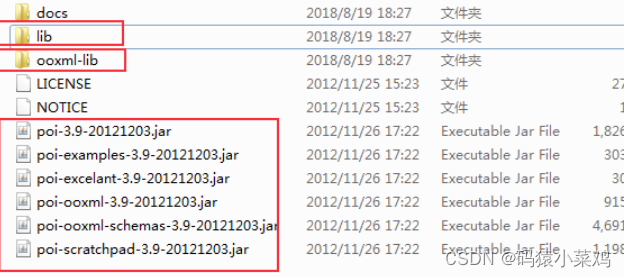
个人总结:① 如果是是2013版及之前的,创建工作簿的时候使 用: HSSFWorkbook workbook = new HSSFWorkbook();相应的之后在创建表格,行,单元格时使用:HSSFSheet sheet 、HSSFRow row、HSSFCell cell② 如果是是2017版,创建工作簿的时候使用: XSSFWorkbook workbook = new XSSFWorkbook(); 相应的之后在创建表格,行,单元格时使用:Sheet sheet、Row row、Cell cell。
3. POI创建excel无法打开以及空文件错误
Exception in thread "main" org.apache.poi.EmptyFileException: The supplied file was empty (zero byte
可能需要刷新一下maven
4. sheet.getRow(0)获取的row为null:
有的时候,获取excel的某一行,如果行为空时,可能会报错Cannot invoke "org.apache.poi.xssf.usermodel.XSSFRow.getCell(int)" because "row" is null
原因是new SXSSFWorkbook(new XSSFWorkbook(inputStream))的时候,SXSSFWorkbook对象内部会维护一个HashMap(反编译后的名称为_xFromSxHash);
当使用workBok.getSheetAt(0)的时候,其实是从_xFromSxHash中获取新创建的Sheet对象;从而导致sheet.getRow(0)获取的row为null。
解决方法:
        XSSFRow row = sheet.getRow(rowid);
        if(row == null){ //当row为空时,创建row
            row = sheet.createRow(rowid);
        }
        XSSFCell cell = row.getCell(comid);
        if(cell == null){//当Cell为空时,用row创建Cell
            cell = row.createCell(comid);
        }
        cell.setCellValue(value);
5. poi 操作 Excel 实例:
   public static void dataToExcel(int SheetIndex,int rowIndex,char comChar, double value) throws IOException {
        rowIndex -= 1;
        int comid = comChar-'A'; //将列转化为列的number

        File file = new File("D:\\testData\\" + "picturedata.xlsx");
        if (!file1.exists()) {
            System.out.println("您所查找的文件不存在");
            file1.createNewFile();
        }
        FileInputStream inputStream = new FileInputStream(file);

        // 创建Excel文件薄
        XSSFWorkbook workbook = new XSSFWorkbook(inputStream);

        // 创建工作表sheeet
        XSSFSheet sheet = workbook.getSheetAt(SheetIndex);

        // 获取行
        XSSFRow row = sheet.getRow(rowIndex);    //获取指定行
        XSSFRow lastrow = sheet.getLastRowNum(); //获取最后一行
        if(row == null){ //行为空时创建Row,避免出现sheet.getRow(0)获取的row为null的错误
            row = sheet.createRow(rowIndex);
        }

        //获取单元格
        XSSFCell cell = row.getCell(comid);
        if(cell == null){ //行为cell时创建Row,避免出现获取的cell为null的错误
            cell = row.createCell(comid);
        }

        //设置数据
        cell.setCellValue(value);

		//开始写入文件
        FileOutputStream stream = FileUtils.openOutputStream(file);
        workbook.write(stream);

        //关闭文件流
        stream.close();
    }
👉原文链接
如果大家在使用poi时还遇到其他的问题,欢迎在评论区留言,我会尽量帮大家分析并找到解决方法

有“AI”的1024 = 2048,欢迎大家加入2048 AI社区
更多推荐


 3
3 0
0- 0


 已为社区贡献4条内容

所有评论(0)