手机应用开发之如何利用蓝牙与HC-05通信?
本文通过AndroidStudio开发手机应用软件,实现蓝牙连接功能,并且能发送消息给HC-05蓝牙,也能接收HC-05回传的消息。
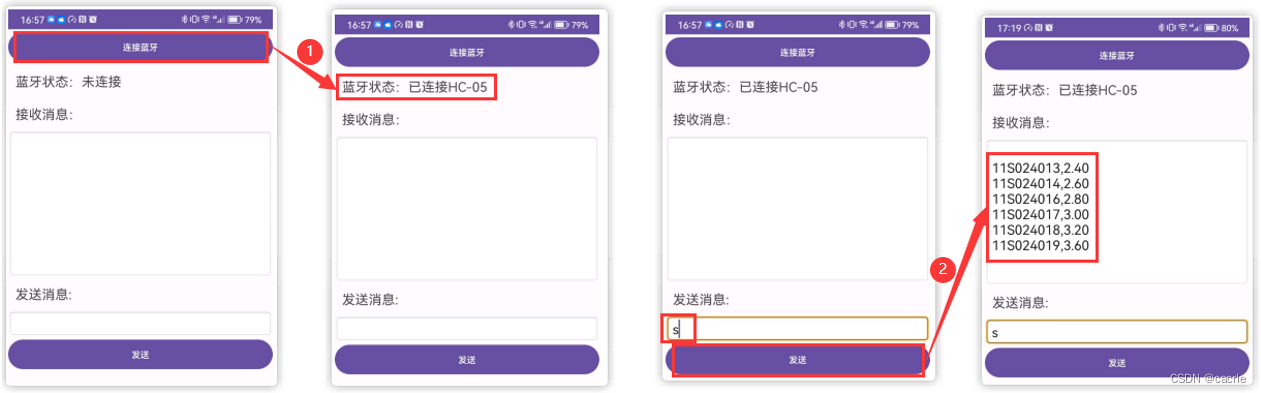
0.引言
本文通过AndroidStudio开发手机应用软件,实现蓝牙连接功能,并且能发送消息给HC-05蓝牙,也能接收HC-05回传的消息。本文在【AndroidStudio如何进行手机应用开发?】一文的基础上,进行了一次总结性应用,以下阐述工程建立过程,最终给出应用展示。
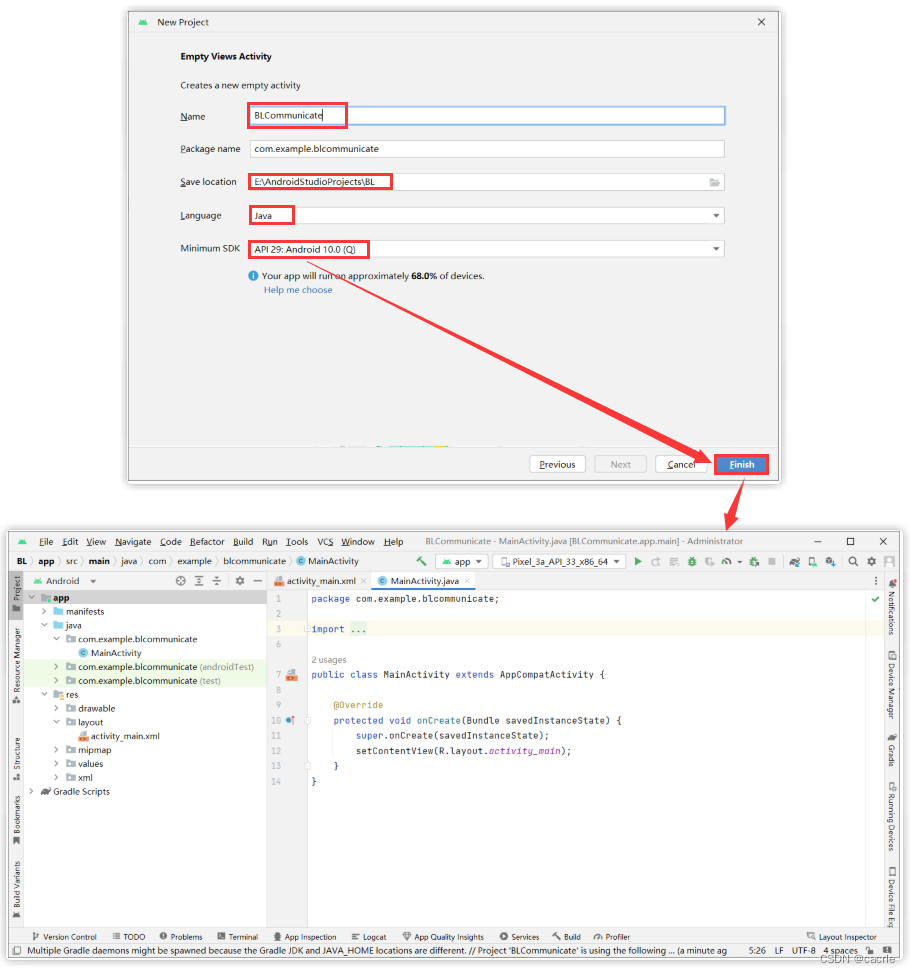
1.创建工程
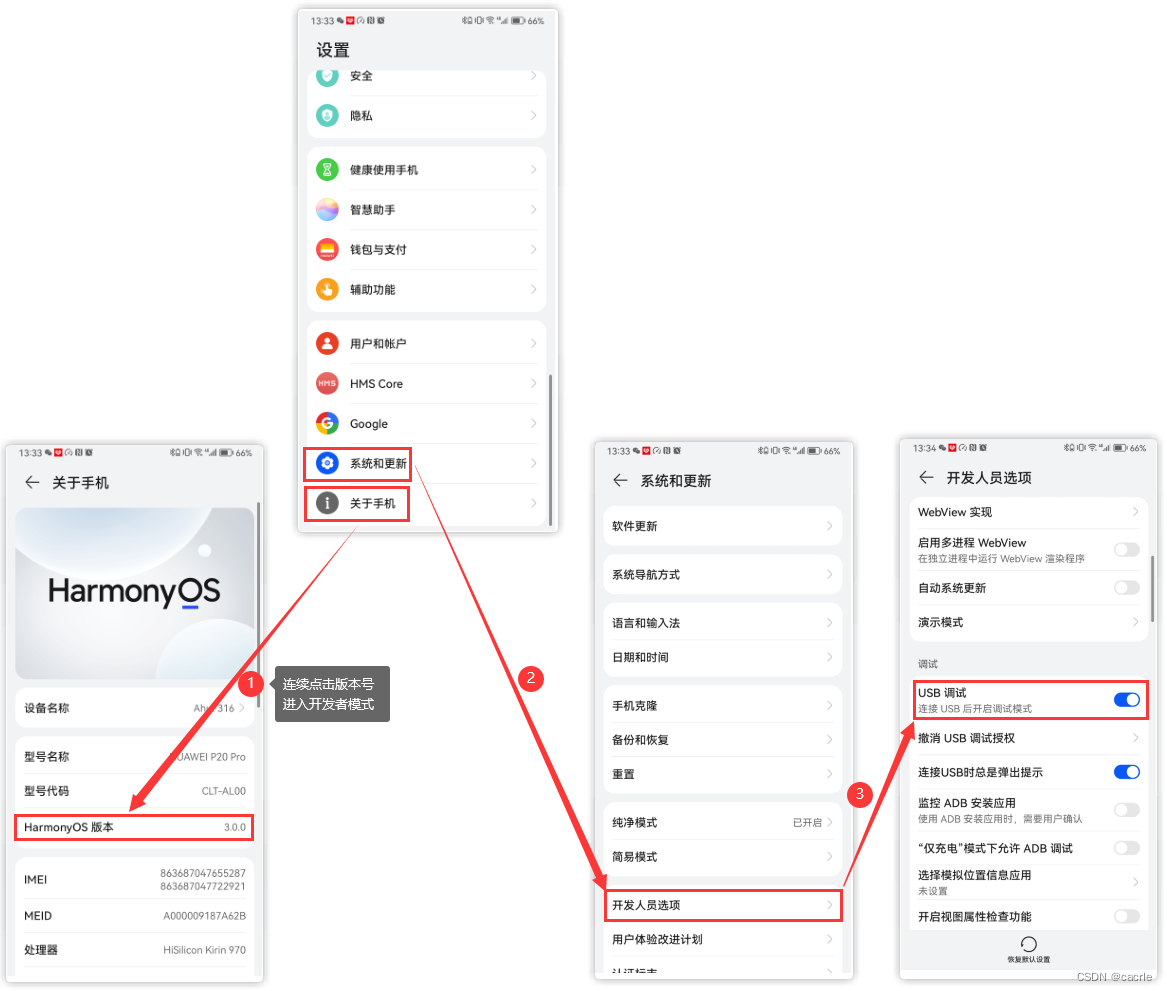
2.准备真机调试
(1)手机打开允许USB调试
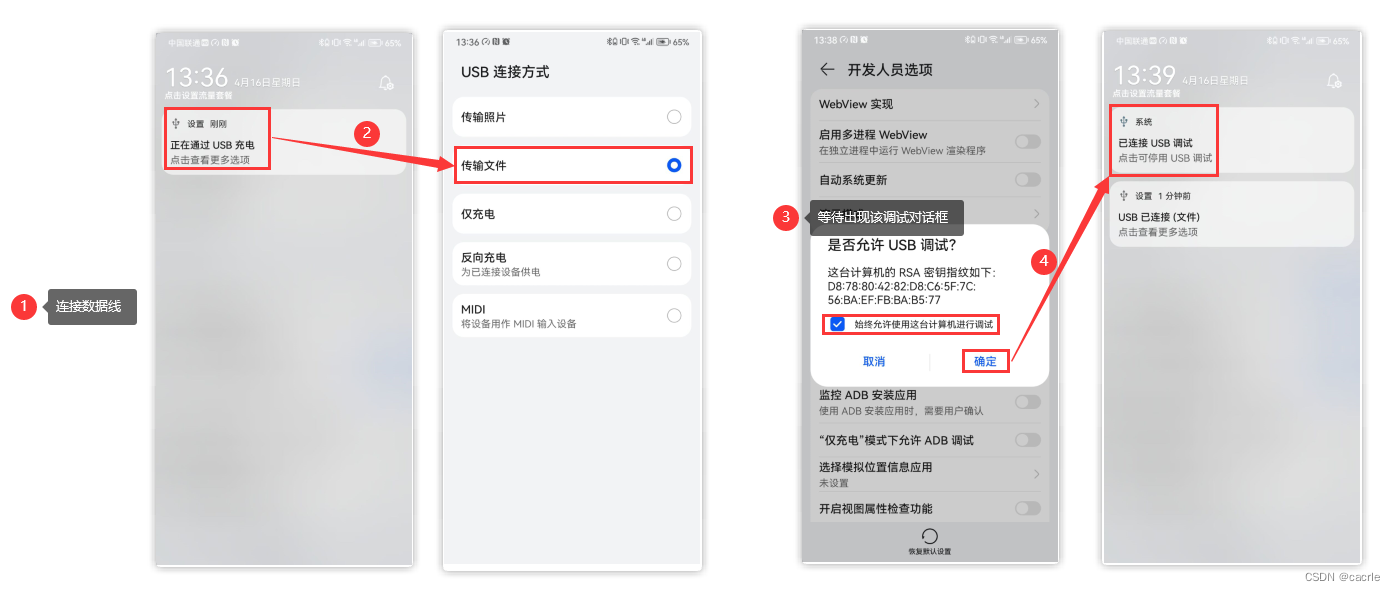
(2)数据线连接手机和电脑
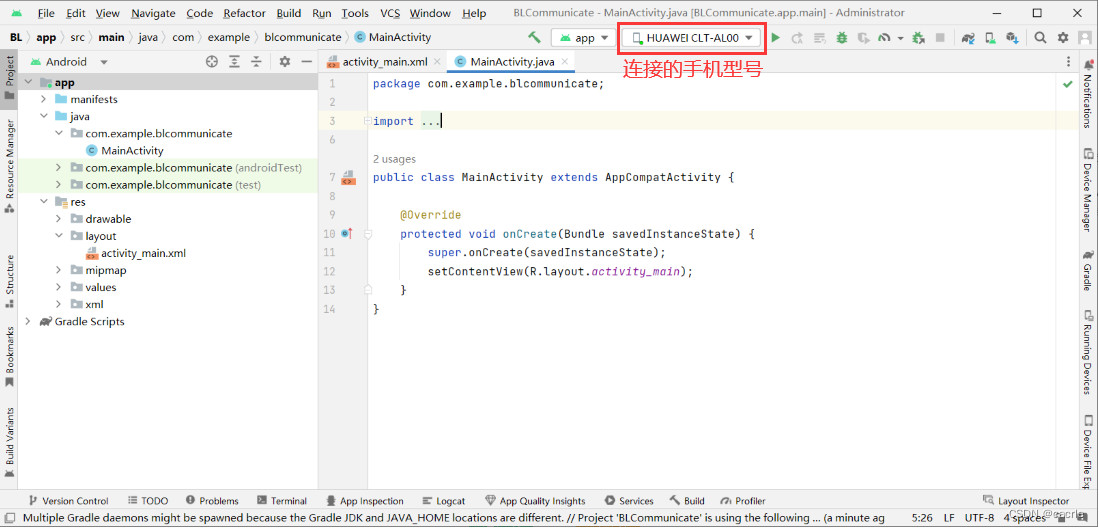
(3)Android Studio显示手机设备
3.应用布局
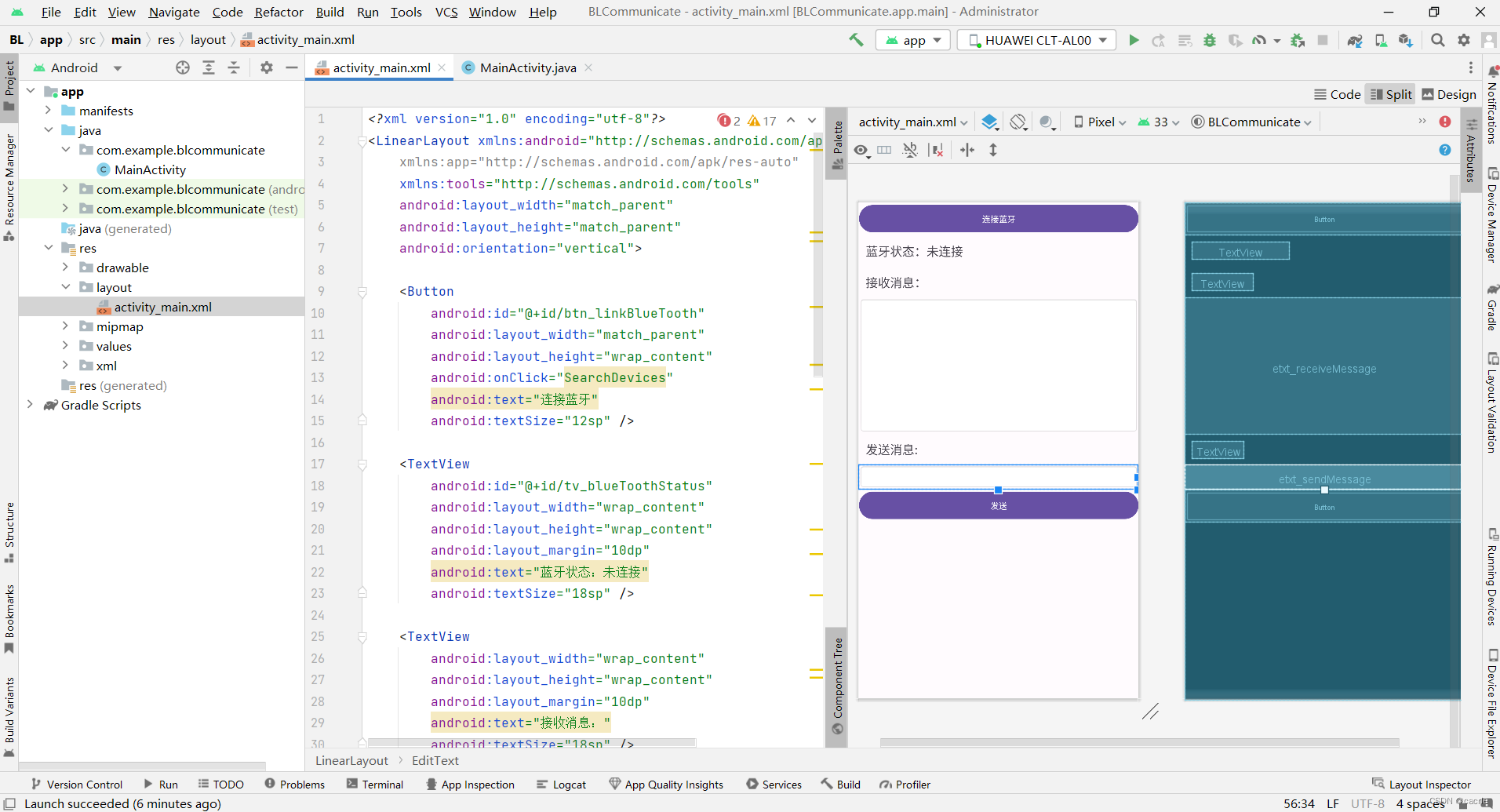
activity_main.xml
<?xml version="1.0" encoding="utf-8"?>
<LinearLayout xmlns:android="http://schemas.android.com/apk/res/android"
    xmlns:app="http://schemas.android.com/apk/res-auto"
    xmlns:tools="http://schemas.android.com/tools"
    android:layout_width="match_parent"
    android:layout_height="match_parent"
    android:orientation="vertical">

    <Button
        android:id="@+id/btn_linkBlueTooth"
        android:layout_width="match_parent"
        android:layout_height="wrap_content"
        android:onClick="linkBlueTooth"
        android:text="连接蓝牙"
        android:textSize="12sp" />

    <TextView
        android:id="@+id/tv_blueToothStatus"
        android:layout_width="wrap_content"
        android:layout_height="wrap_content"
        android:layout_margin="10dp"
        android:text="蓝牙状态:未连接"
        android:textSize="18sp" />

    <TextView
        android:layout_width="wrap_content"
        android:layout_height="wrap_content"
        android:layout_margin="10dp"
        android:text="接收消息:"
        android:textSize="18sp" />

    <EditText
        android:id="@+id/etxt_receiveMessage"
        android:layout_width="match_parent"
        android:layout_height="200dp"
        android:background="@android:drawable/editbox_background"
        android:gravity="top"
        android:scrollbars="vertical"
        android:singleLine="false"
        android:focusable="false"
        android:editable="false"
        android:text=""
        android:textSize="18sp" />

    <TextView
        android:layout_width="wrap_content"
        android:layout_height="wrap_content"
        android:layout_margin="10dp"
        android:text="发送消息:"
        android:textSize="18sp" />

    <EditText
        android:id="@+id/etxt_sendMessage"
        android:layout_width="match_parent"
        android:layout_height="wrap_content"
        android:background="@android:drawable/editbox_background"
        android:text=""
        android:textSize="18sp"
        tools:ignore="SpeakableTextPresentCheck" />

    <Button
        android:id="@+id/btn_send"
        android:layout_width="match_parent"
        android:layout_height="wrap_content"
        android:onClick="send"
        android:text="发送"
        android:textSize="12sp" />
</LinearLayout>
4.代码编写
(1)添加蓝牙权限
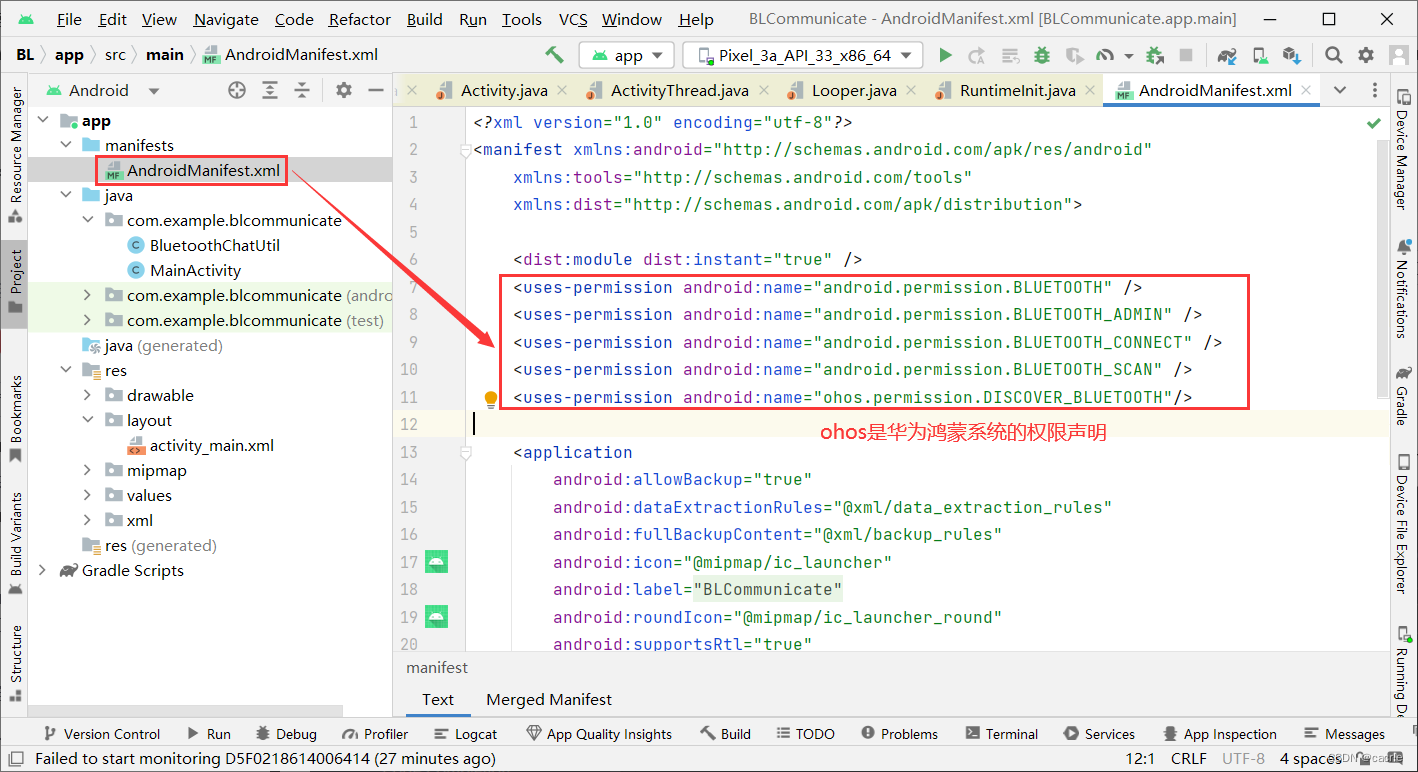
<uses-permission android:name="android.permission.BLUETOOTH" />
<uses-permission android:name="android.permission.BLUETOOTH_ADMIN" />
<uses-permission android:name="android.permission.BLUETOOTH_CONNECT" />
<uses-permission android:name="android.permission.BLUETOOTH_SCAN" />
<uses-permission android:name="ohos.permission.DISCOVER_BLUETOOTH"/>
(2)BluetoothChatUtil.java
package com.example.blcommunicate;


import android.bluetooth.BluetoothAdapter;
import android.bluetooth.BluetoothDevice;
import android.bluetooth.BluetoothServerSocket;
import android.bluetooth.BluetoothSocket;
import android.content.Context;
import android.os.Bundle;
import android.os.Handler;
import android.os.Message;
import android.util.Log;

import java.io.ByteArrayInputStream;
import java.io.DataInputStream;
import java.io.IOException;
import java.io.InputStream;
import java.io.OutputStream;
import java.util.UUID;

/**
 *该类的工作:建立和管理蓝牙连接。
 *共有三个线程。mAcceptThread线程用来监听socket连接(服务端使用).
 *mConnectThread线程用来连接serversocket(客户端使用)。
 *mConnectedThread线程用来处理socket发送、接收数据。(客户端和服务端共用)
 */
public class BluetoothChatUtil {
    private static final String TAG = "BluetoothChatClient";
    private static final boolean D = true;

    // 服务名 SDP
    private static final String SERVICE_NAME = "BluetoothChat";
    // uuid SDP
    private static final UUID SERVICE_UUID = UUID.fromString("00001101-0000-1000-8000-00805F9B34FB");
    // 蓝牙适配器
    private final BluetoothAdapter mAdapter;
    private Handler mHandler;
    private AcceptThread mAcceptThread;

    private ConnectThread mConnectThread;
    private ConnectedThread mConnectedThread;

    private int mState;
    private static BluetoothChatUtil mBluetoothChatUtil;
    private BluetoothDevice mConnectedBluetoothDevice;
    //常数,指示当前的连接状态
    public static final int STATE_NONE = 0;       // 当前没有可用的连接
    public static final int STATE_LISTEN = 1;     // 现在侦听传入的连接
    public static final int STATE_CONNECTING = 2; // 现在开始连接
    public static final int STATE_CONNECTED = 3;  // 现在连接到远程设备
    public static final int STATAE_CONNECT_FAILURE = 4; //连接失败
    public static final int MESSAGE_DISCONNECTED = 5;   //断开连接
    public static final int STATE_CHANGE = 6; //连接状态改变
    public static final int MESSAGE_READ = 7;
    public static final int MESSAGE_WRITE = 8;

    public static final String DEVICE_NAME = "device_name";
    public static final String READ_MSG = "read_msg";

    /**
     * 构造函数。准备一个新的bluetoothchat会话。
     * @param context
     */
    private BluetoothChatUtil(Context context) {
        mAdapter = BluetoothAdapter.getDefaultAdapter();
        mState = STATE_NONE;
    }

    public static BluetoothChatUtil getInstance(Context c) {
        if (null == mBluetoothChatUtil) {
            mBluetoothChatUtil = new BluetoothChatUtil(c);
        }
        return mBluetoothChatUtil;
    }

    public void registerHandler(Handler handler) {
        mHandler = handler;
    }

    public void unregisterHandler() {
        mHandler = null;
    }

    /**
     * 设置当前状态的聊天连接
     * @param state  整数定义当前连接状态
     */
    private synchronized void setState(int state) {
        if (D) Log.d(TAG, "setState() " + mState + " -> " + state);
        mState = state;
        // 给新状态的处理程序,界面活性可以更新
        mHandler.obtainMessage(STATE_CHANGE, state, -1).sendToTarget();
    }

    /**
     * 返回当前的连接状态。 */
    public synchronized int getState() {
        return mState;
    }

    public BluetoothDevice getConnectedDevice() {
        return mConnectedBluetoothDevice;
    }

    /**
     * 开始聊天服务。特别acceptthread开始
     * 开始服务器模式。 */
    public synchronized void startListen() {
        if (D) Log.d(TAG, "start");
        // 取消任何线程正在运行的连接
        if (mConnectedThread != null) {
            mConnectedThread.cancel();
            mConnectedThread = null;
        }
        // 启动线程来监听一个bluetoothserversocket
        if (mAcceptThread == null) {
            mAcceptThread = new AcceptThread();
            mAcceptThread.start();
        }
        setState(STATE_LISTEN);
    }

    /**
     * 开始connectthread启动连接到远程设备。
     * @param device 连接的蓝牙设备
     */
    public synchronized void connect(BluetoothDevice device) {
        if (D) Log.d(TAG, "connect to: " + device);
        // 取消任何线程试图建立连接
        if (mState == STATE_CONNECTING) {
            if (mConnectThread != null) {
                mConnectThread.cancel();
                mConnectThread = null;
            }
        }
        // 取消任何线程正在运行的连接
        if (mConnectedThread != null) {
            mConnectedThread.cancel();
            mConnectedThread = null;
        }
        //启动线程连接到远程设备
        mConnectThread = new ConnectThread(device);
        mConnectThread.start();
        setState(STATE_CONNECTING);
    }

    /**
     * 开始ConnectedThread开始管理一个蓝牙连接,传输、接收数据.
     * @param socket socket连接
     * @param device 已连接的蓝牙设备
     */
    public synchronized void connected(BluetoothSocket socket, BluetoothDevice device) {
        if (D) Log.d(TAG, "connected");
        //取消任何线程正在运行的连接
        if (mConnectedThread != null) {
            mConnectedThread.cancel();
            mConnectedThread = null;
        }
        // 启动线程管理连接和传输
        mConnectedThread = new ConnectedThread(socket);
        mConnectedThread.start();
        //把连接设备的名字传到 ui Activity
        mConnectedBluetoothDevice = device;
        Message msg = mHandler.obtainMessage(STATE_CONNECTED);
        Bundle bundle = new Bundle();
        bundle.putString(DEVICE_NAME, device.getName());
        msg.setData(bundle);
        mHandler.sendMessage(msg);
        setState(STATE_CONNECTED);
    }

    /**
     * 停止所有的线程
     */
    public synchronized void disconnect() {
        if (D) Log.d(TAG, "disconnect");
        if (mConnectThread != null) {mConnectThread.cancel(); mConnectThread = null;}
        if (mConnectedThread != null) {mConnectedThread.cancel(); mConnectedThread = null;}
        if (mAcceptThread != null) {mAcceptThread.cancel(); mAcceptThread = null;}
        setState(STATE_NONE);
    }

    /**
     * Write to the ConnectedThread in an unsynchronized manner
     * @param out The bytes to write
     * @see ConnectedThread#write(byte[])
     */
    public void write(byte[] out) {
        //创建临时对象
        ConnectedThread r;
        // 同步副本的connectedthread
        synchronized (this) {
            if (mState != STATE_CONNECTED) return;
            r = mConnectedThread;
        }
        // 执行写同步
        r.write(out);
    }


    /**
     * Indicate that the connection attempt failed and notify the UI Activity.
     */
    private void connectionFailed() {
        // 发送失败的信息带回活动
        Message msg = mHandler.obtainMessage(STATAE_CONNECT_FAILURE);
        mHandler.sendMessage(msg);
        mConnectedBluetoothDevice = null;
        setState(STATE_NONE);
    }

    /**
     * Indicate that the connection was lost and notify the UI Activity.
     */
    public void connectionLost() {
        // 发送失败的信息带回Activity
        Message msg = mHandler.obtainMessage(MESSAGE_DISCONNECTED);
        mHandler.sendMessage(msg);
        mConnectedBluetoothDevice = null;
        setState(STATE_NONE);
    }

    /**
     *本线程 侦听传入的连接。
     *它运行直到连接被接受(或取消)。
     */
    private class AcceptThread extends Thread {
        // 本地服务器套接字
        private final BluetoothServerSocket mServerSocket;
        public AcceptThread() {
            BluetoothServerSocket tmp = null;
            // 创建一个新的侦听服务器套接字
            try {
                tmp = mAdapter.listenUsingRfcommWithServiceRecord(
                        SERVICE_NAME, SERVICE_UUID);
                //tmp = mAdapter.listenUsingInsecureRfcommWithServiceRecord(SERVICE_NAME, SERVICE_UUID);
            } catch (IOException e) {
                Log.e(TAG, "listen() failed", e);
            }
            mServerSocket = tmp;
        }

        public void run() {
            if (D) Log.d(TAG, "BEGIN mAcceptThread" + this);
            setName("AcceptThread");
            BluetoothSocket socket = null;
            // 循环,直到连接成功
            while (mState != STATE_CONNECTED) {
                try {
                    // 这是一个阻塞调用 返回成功的连接
                    // mServerSocket.close()在另一个线程中调用,可以中止该阻塞
                    socket = mServerSocket.accept();
                } catch (IOException e) {
                    Log.e(TAG, "accept() failed", e);
                    break;
                }
                // 如果连接被接受
                if (socket != null) {
                    synchronized (BluetoothChatUtil.this) {
                        switch (mState) {
                            case STATE_LISTEN:
                            case STATE_CONNECTING:
                                // 正常情况。启动ConnectedThread。
                                connected(socket, socket.getRemoteDevice());
                                break;
                            case STATE_NONE:
                            case STATE_CONNECTED:
                                // 没有准备或已连接。新连接终止。
                                try {
                                    socket.close();
                                } catch (IOException e) {
                                    Log.e(TAG, "Could not close unwanted socket", e);
                                }
                                break;
                        }
                    }
                }
            }
            if (D) Log.i(TAG, "END mAcceptThread");
        }

        public void cancel() {
            if (D) Log.d(TAG, "cancel " + this);
            try {
                mServerSocket.close();
            } catch (IOException e) {
                Log.e(TAG, "close() of server failed", e);
            }
        }
    }


    /**
     * 本线程用来连接设备
     *
     */
    private class ConnectThread extends Thread {
        private BluetoothSocket mmSocket;
        private final BluetoothDevice mmDevice;
        public ConnectThread(BluetoothDevice device) {
            mmDevice = device;
            BluetoothSocket tmp = null;
            // 得到一个bluetoothsocket
            try {
                mmSocket = device.createRfcommSocketToServiceRecord
                        (SERVICE_UUID);
            } catch (IOException e) {
                Log.e(TAG, "create() failed", e);
                mmSocket = null;
            }
        }

        public void run() {
            Log.i(TAG, "BEGIN mConnectThread");
            try {
                // socket 连接,该调用会阻塞,直到连接成功或失败
                mmSocket.connect();
            } catch (IOException e) {
                Log.e(TAG, "IOException");
                connectionFailed();
                try {//关闭这个socket
                    mmSocket.close();
                } catch (IOException e2) {
                    e2.printStackTrace();
                }
                return;
            }
            // 启动连接线程
            connected(mmSocket, mmDevice);
        }

        public void cancel() {
            try {
                mmSocket.close();
            } catch (IOException e) {
                Log.e(TAG, "close() of connect socket failed", e);
            }
        }
    }

    /**
     * 本线程server 和client共用.
     * 它处理所有传入和传出的数据。
     */
    private class ConnectedThread extends Thread {
        private final BluetoothSocket mmSocket;
        private final InputStream mmInStream;
        private final OutputStream mmOutStream;

        public ConnectedThread(BluetoothSocket socket) {
            Log.d(TAG, "create ConnectedThread");
            mmSocket = socket;
            InputStream tmpIn = null;
            OutputStream tmpOut = null;
            // 获得bluetoothsocket输入输出流
            try {
                tmpIn = socket.getInputStream();
                tmpOut = socket.getOutputStream();
            } catch (IOException e) {
                Log.e(TAG, "没有创建临时sockets", e);
            }
            mmInStream = tmpIn;
            mmOutStream = tmpOut;
        }

        public void run() {
            // 监听输入流
            while (true) {
                try {
                    byte[] buffer = new byte[512];
                    // 读取输入流
                    int bytes = mmInStream.read(buffer);
                    // 发送获得的字节的ui activity
                    Message msg = mHandler.obtainMessage(MESSAGE_READ);
                    Bundle bundle = new Bundle();
                    bundle.putByteArray(READ_MSG, buffer);
                    msg.setData(bundle);
                    mHandler.sendMessage(msg);
                } catch (IOException e) {
                    Log.e(TAG, "disconnected", e);
                    connectionLost();
                    break;
                }
            }
        }

        /**
         * 向外发送。
         * @param buffer  发送的数据
         */
        public void write(byte[] buffer) {
            try {
                mmOutStream.write(buffer);
                // 分享发送的信息到Activity
                mHandler.obtainMessage(MESSAGE_WRITE, -1, -1, buffer)
                        .sendToTarget();
            } catch (IOException e) {
                Log.e(TAG, "Exception during write", e);
            }
        }

        public void cancel() {
            try {
                mmSocket.close();
            } catch (IOException e) {
                Log.e(TAG, "close() of connect socket failed", e);
            }
        }
    }

    public static int ByteArrayToInt(byte b[]) throws Exception {
        ByteArrayInputStream buf = new ByteArrayInputStream(b);
        DataInputStream dis = new DataInputStream(buf);
        return dis.readInt();
    }
}
(3)MainActivity.java
package com.example.blcommunicate;

import androidx.annotation.RequiresApi;
import androidx.appcompat.app.AppCompatActivity;
import androidx.core.app.ActivityCompat;

import android.Manifest;
import android.annotation.SuppressLint;
import android.bluetooth.BluetoothAdapter;
import android.bluetooth.BluetoothDevice;
import android.content.IntentFilter;
import android.content.pm.PackageManager;
import android.os.Build;
import android.os.Bundle;
import android.os.Environment;
import android.os.Handler;
import android.os.Message;
import android.text.method.ScrollingMovementMethod;
import android.util.Log;
import android.view.View;
import android.widget.AdapterView;
import android.widget.ArrayAdapter;
import android.widget.Button;
import android.widget.EditText;
import android.widget.ListView;
import android.widget.TextView;
import android.widget.Toast;

import java.io.File;
import java.io.IOException;
import java.text.SimpleDateFormat;
import java.util.ArrayList;
import java.util.Date;
import java.util.Set;

public class MainActivity extends AppCompatActivity {
    TextView tv_blueToothStatus;
    Button btn_linkBlueTooth;
    Button btn_send;
    EditText etxt_receiveMessage;
    EditText etxt_sendMessage;
    private BluetoothAdapter bluetoothAdapter;
    BluetoothChatUtil mBlthChatUtil;
    boolean readOver = true;
    String strGet = "";

    @Override
    protected void onCreate(Bundle savedInstanceState) {
        super.onCreate(savedInstanceState);
        setContentView(R.layout.activity_main);

        tv_blueToothStatus = (TextView) findViewById(R.id.tv_blueToothStatus);
        btn_linkBlueTooth = (Button) findViewById(R.id.btn_linkBlueTooth);
        btn_send = (Button) findViewById(R.id.btn_send);
        etxt_receiveMessage = (EditText) findViewById(R.id.etxt_receiveMessage);
        etxt_sendMessage = (EditText) findViewById(R.id.etxt_sendMessage);

        if (isSupported()) {
            Toast.makeText(this, "设备支持蓝牙", Toast.LENGTH_SHORT).show();
        } else {
            Toast.makeText(this, "设备不支持蓝牙", Toast.LENGTH_SHORT).show();
        }

        if (bluetoothAdapter.isEnabled()) {
            //已经打开蓝牙,判断Android版本是否需要添加权限,解决:无法发现蓝牙设备的问题
            Toast.makeText(this, "蓝牙已打开", Toast.LENGTH_SHORT).show();
            getPermission();
        } else {
            //开启蓝牙
            if (ActivityCompat.checkSelfPermission(this, Manifest.permission.BLUETOOTH_CONNECT) != PackageManager.PERMISSION_GRANTED) {
                return;
            }
            bluetoothAdapter.enable();
            //关闭蓝牙:bluetoothAdapter.disable();
        }
    }

    /**
     * 连接蓝牙
     * @param view
     */
    public void linkBlueTooth(View view) {
        etxt_receiveMessage.setText("");
        mBlthChatUtil = BluetoothChatUtil.getInstance(this);
        mBlthChatUtil.registerHandler(mHandler);
        Set<BluetoothDevice> pairedDevices = bluetoothAdapter.getBondedDevices();
        if(pairedDevices.size() > 0){
            //如果有配对的设备
            for(BluetoothDevice device : pairedDevices){
                //通过array adapter在列表中添加设备名称和地址
                if(device.getName().equals("HC-05")){
                    if (bluetoothAdapter.isDiscovering()) {
                        //取消搜索
                        bluetoothAdapter.cancelDiscovery();
                    }
                    if (mBlthChatUtil.getState() == BluetoothChatUtil.STATE_CONNECTED) {
                        showToast("蓝牙已连接");
                    }else {
                        mBlthChatUtil.connect(device);
                        if (mBlthChatUtil.getState() == BluetoothChatUtil.STATE_CONNECTED) {
                            showToast("蓝牙连接成功");
                        }

                    }
                    break;
                }
            }
        }else{
            showToast("暂无已配对设备");
        }
    }

    /**
     * 发送
     * @param view
     */
    public void send(View view) {
        byte[] buffer2 =etxt_sendMessage.getText().toString().getBytes();
        mBlthChatUtil.write(buffer2);
    }

    /**
     * 判断是否设备是否支持蓝牙
     * @return 是否支持
     */
    private boolean isSupported() {
        //初始化
        bluetoothAdapter = BluetoothAdapter.getDefaultAdapter();
        if (bluetoothAdapter == null) {
            return false;
        } else {
            return true;
        }
    }

    /**
     * 获取权限
     */
    @SuppressLint("WrongConstant")
    private void getPermission() {
        if (Build.VERSION.SDK_INT > Build.VERSION_CODES.M) {
            int permissionCheck = 0;
            permissionCheck = this.checkSelfPermission(Manifest.permission.ACCESS_FINE_LOCATION);
            permissionCheck += this.checkSelfPermission(Manifest.permission.ACCESS_COARSE_LOCATION);

            if (permissionCheck != PackageManager.PERMISSION_GRANTED) {
                int ACCESS_LOCATION = 1;// 自定义常量,任意整型
                //未获得权限
                this.requestPermissions( // 请求授权
                        new String[]{Manifest.permission.ACCESS_FINE_LOCATION,
                                Manifest.permission.ACCESS_COARSE_LOCATION},
                        ACCESS_LOCATION);
            }
        }
    }

    /**
     * 显示消息
     * @param str
     */
    private void showToast(String str) {
        Toast.makeText(this, str, Toast.LENGTH_SHORT).show();
    }

    /**
     * 消息句柄
     */
    private Handler mHandler = new Handler(){
        @RequiresApi(api = Build.VERSION_CODES.R)
        @SuppressLint("HandlerLeak")
        public void handleMessage(Message msg) {
            String deviceName = msg.getData().getString(BluetoothChatUtil.DEVICE_NAME);
            switch(msg.what){
                case BluetoothChatUtil.STATE_CONNECTED:
                    showToast("连接成功");
                    tv_blueToothStatus.setText("蓝牙状态:已连接HC-05");
                    break;
                case BluetoothChatUtil.STATAE_CONNECT_FAILURE:
                    showToast("连接失败");
                    break;
                case BluetoothChatUtil.STATE_CHANGE:
                   showToast("正在连接设备..");
                    break;
                case BluetoothChatUtil.MESSAGE_DISCONNECTED:
                    showToast("与设备断开连接");
                    break;
                //读到另一方传送的消息
                case BluetoothChatUtil.MESSAGE_READ:{
//                    showToast("接收消息成功");
                    byte[] buf;
                    String str;
                    buf = msg.getData().getByteArray(BluetoothChatUtil.READ_MSG);
                    str = new String(buf,0,buf.length);

                    //根据HC-05传来的消息进行相应的处理后显示
                    if(readOver){
                        strGet=str.trim();
                        if(strGet.length()<9){
                            readOver=false;
                            return;
                        }
                    }
                    else{
                        strGet+=str.trim();
                        readOver=true;
                    }
                    etxt_receiveMessage.setText(etxt_receiveMessage.getText()+"\n"+strGet);
                    break;
                }

                case BluetoothChatUtil.MESSAGE_WRITE:{
//                    showToast("发送消息成功");
                    break;
                }
                default:
                    break;
            }
        };
    };
}
注1:
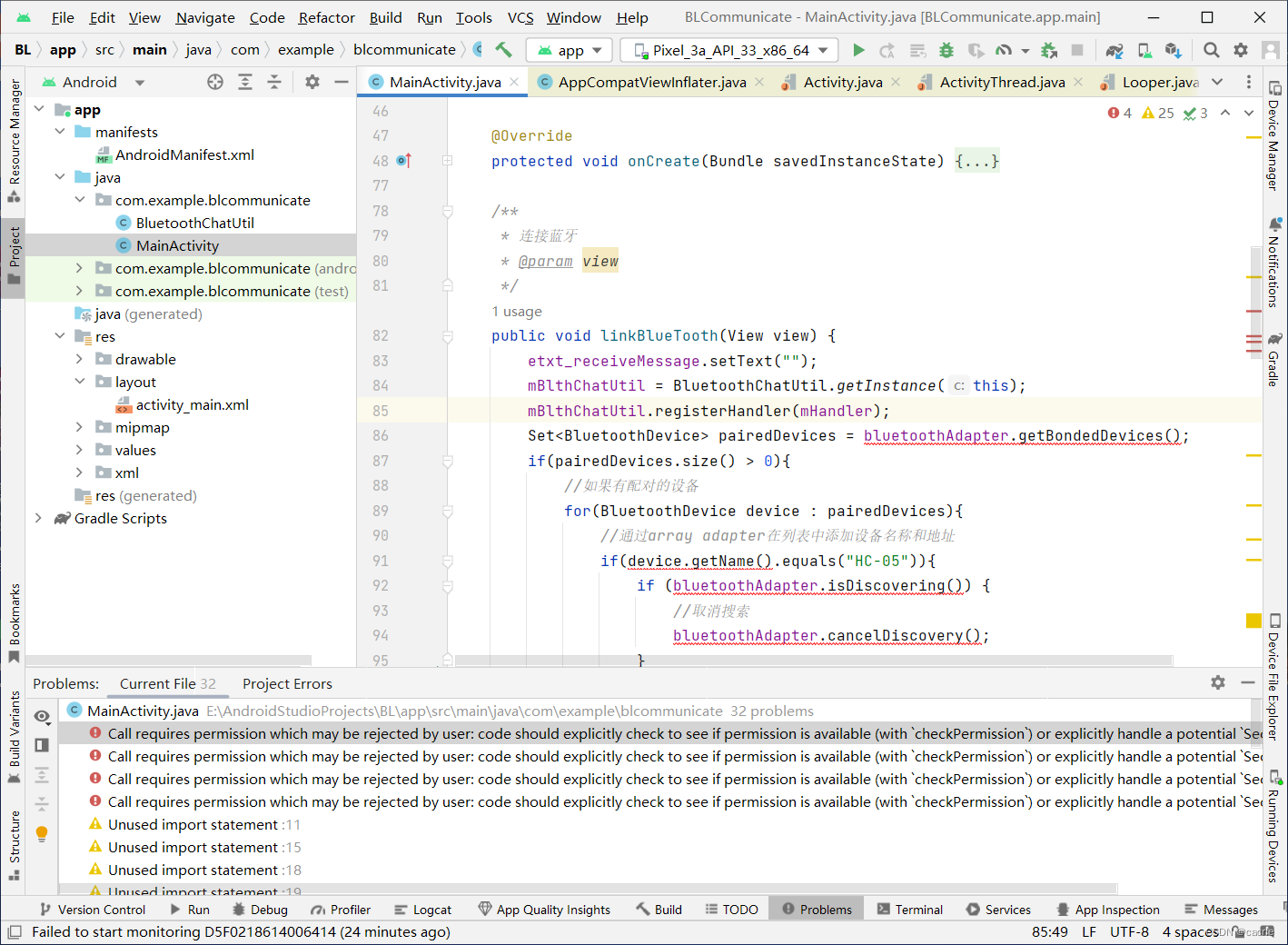
代码在笔者编译环境中会出现红色的权限检查报错提示,该错误不影响程序运行。
注2:
本工程的代码文件参见:手机应用开发之如何利用蓝牙与HC-05通信?-工程代码;
代码移植方法参见:AndroidStudio如何进行代码移植?。
5.功能演示
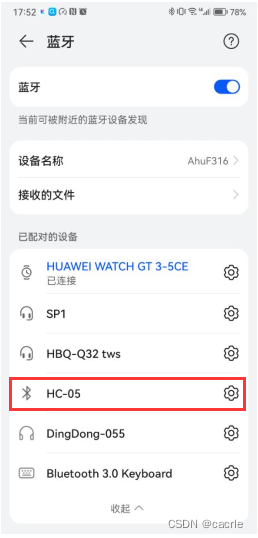
(1)手机配对HC-05蓝牙
(2)软件功能演示
参考资料:
[1] cacrle. AndroidStudio如何进行手机应用开发?; 2023-04-16 [accessed 2023-04-16].
[2] cacrle. AndroidStudio如何进行代码移植?; 2023-04-16 [accessed 2023-04-16].
[3] suda哇. Android Studio如何进行真机调试; 2020-05-24 [accessed 2023-04-16].
[4] 金胖. Android蓝牙扫描/连接/收发数据; 2019-03-26 [accessed 2023-04-16].
[5] 考研兔萌酱. android蓝牙传输信息,Android 蓝牙(BLE)连接,发送,接收消息; 2021-05-26 [accessed 2023-04-16].
[6] van久. Android-蓝牙通信; 2019-07-01 [accessed 2023-04-16].
[7] 停止的猪头. 编程回忆之Android回忆(蓝牙BluetoothAdapter的搜索和连接); 2014-02-27 [accessed 2023-04-16].
[8] Panner_pan. 蓝牙开发(二)扫描设备; 2018-09-11 [accessed 2023-04-16].
[9] MirkoWu. Android 低功耗蓝牙(BLE)开发(3)-- BluetoothDevice详解; 2016-12-24 [accessed 2023-04-16].
[10] 杨枝甘卢. 安卓开发实现蓝牙通信——两设备相互发消息; 2021-12-13 [accessed 2023-04-16].

有“AI”的1024 = 2048,欢迎大家加入2048 AI社区
更多推荐



 14
14 0
0- 0


 已为社区贡献16条内容

所有评论(0)