OSError: [Errno 22] Invalid argument: ‘\u202aC:/Users/Chengguo/Desktop/py_study/‘ 报这类的错误
运行以下代码import ostestfile="C:/Users/Chengguo/Desktop/py_study/yolo_v3/yolov3-detect/data/images/test.txt"img_index=open(testfile).read()报错runfile('C:/Users/Chengguo/Desktop/py_study/yolo_v3/yolov3-detec
·
运行以下代码
import os

testfile="C:/Users/Chengguo/Desktop/py_study/yolo_v3/yolov3-detect/data/images/test.txt"
img_index=open(testfile).read()
报错
runfile('C:/Users/Chengguo/Desktop/py_study/yolo_v3/yolov3-detect/data/images/collect_test.py', wdir='C:/Users/Chengguo/Desktop/py_study/yolo_v3/yolov3-detect/data/images')
Traceback (most recent call last):

  File "<ipython-input-119-0b499f0c21d4>", line 1, in <module>
    runfile('C:/Users/Chengguo/Desktop/py_study/yolo_v3/yolov3-detect/data/images/collect_test.py', wdir='C:/Users/Chengguo/Desktop/py_study/yolo_v3/yolov3-detect/data/images')

  File "C:\ProgramData\Anaconda3\lib\site-packages\spyder_kernels\customize\spydercustomize.py", line 827, in runfile
    execfile(filename, namespace)

  File "C:\ProgramData\Anaconda3\lib\site-packages\spyder_kernels\customize\spydercustomize.py", line 110, in execfile
    exec(compile(f.read(), filename, 'exec'), namespace)

  File "C:/Users/Chengguo/Desktop/py_study/yolo_v3/yolov3-detect/data/images/collect_test.py", line 8, in <module>
    img_index=open(testfile).read()

OSError: [Errno 22] Invalid argument: '\u202aC:/Users/Chengguo/Desktop/py_study/yolo_v3/yolov3-detect/data/images/test.txt'
解决方法
1.这个报错我觉得可以算是一个编译器的bug,不能理解
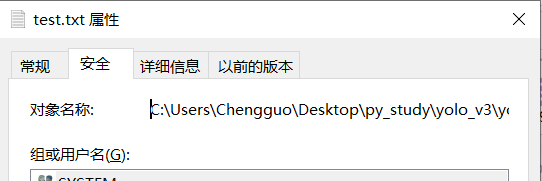
2.我猜你的路径是直接从window系统的文件信息那里复制过来的,如果直接运行会报错误SyntaxError: (unicode error) 'unicodeescape' codec can't decode bytes,这是因为路径里面存在反斜杆,然后把反斜杆改完之后以为已经没问题了,在运行就报了上面那个错误,别问我怎么知道,因为我也是这样!!!
SyntaxError: (unicode error) 'unicodeescape' codec can't decode bytes in position 12-13: truncated \UXXXXXXXX escape
关键
3.把open函数读取的路径删除,自己重新手打一遍路径,你没有看错,手打路径,先打个字母C,然后冒号,然后正斜杠,然后打Users,然后一个个吧路径打完在运行就OK了!!!
4.上面的方法麻烦了,其实只需要把光标点到C:/前面,然后点一下删除键就是(这里你会神奇的发现C:/前面的引号没有给删除掉,也就是删除了一个寂寞),删完就没问题了
温馨提示:特别要注意中文空格和英文空格

有“AI”的1024 = 2048,欢迎大家加入2048 AI社区
更多推荐


 25
25 0
0- 0


 已为社区贡献7条内容

所有评论(0)