Matlab使用杂谈3-Fourier函数实现傅里叶变换
Matlab使用杂谈3-Fourier函数实现傅里叶变换
傅里叶变换
傅里叶展开式(Fourier expansion)是指用三角级数表示的形式,即一个函数的傅里叶级数在它收敛于此函数本身时的一种称呼。傅立叶变换,表示能将满足一定条件的某个函数表示成三角函数(正弦和/或余弦函数)或者它们的积分的线性组合
来源百度百科
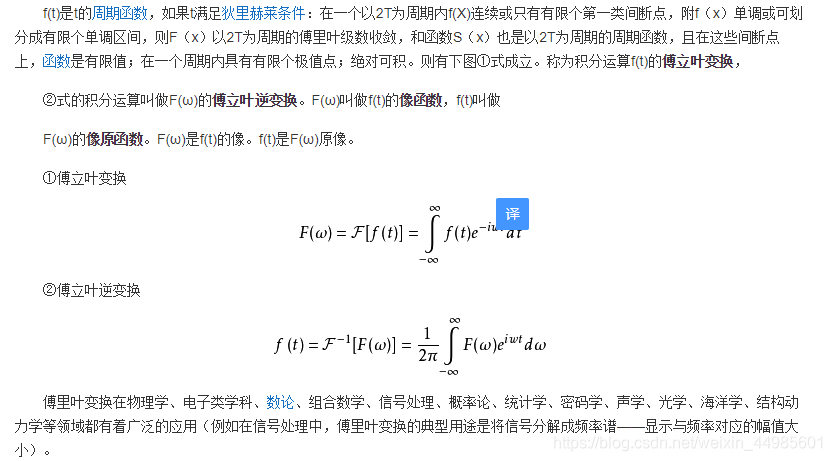
Matlab中的Fourier函数
Matlab中关于Fourier使用的讲解
语法:
fourier(f)
fourier(f,transVar)
fourier(f,var,transVar)
f-输入,可以是表达式、函数、向量或矩阵等
var-变量,一般为时间变量或空间变量,如果不设置该变量,一般使用函数中的符号变量作为默认值
transVar-转换变量,可以是符号变量,表达式,向量或矩阵,该变量通常称为“频率变量”,默认情况下,傅立叶使用w,如果w是f的自变量,则傅立叶使用v。
The Fourier transform of the expression f = f(x) with respect to the variable x at the point w is
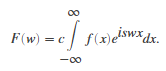
c and s are parameters of the Fourier transform. The fourier function uses c = 1, s = –1.
Fourier使用实例
普通用法
clear;clc
%% Fourier函数的使用
%-----------基本使用------------%
% 一般默认w为变换变量,x为待变换变量
syms t x
f=exp(-t^2-x^2);
f1=fourier(f)
% 指定转换变量
syms y
f2=fourier(f,y)
% 指定待变换变量和变换变量
f3=fourier(f,t,y)
运行输出结果为: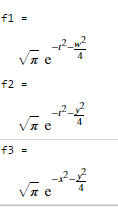
参数变换
The Fourier transform of the expression f = f(x) with respect to the variable x at the point w is
c and s are parameters of the Fourier transform. The fourier function uses c = 1, s = –1.
%------傅里叶变换参数的变换------%
% 傅里叶中c默认为1,s默认为-1
% 使用sympref改变其参数
sympref('FourierParameters',[2 1]);
fourier(f)
% 在使用完后记得恢复默认,否则影响下次使用
sympref('FourierParameters','default');
运行结果为: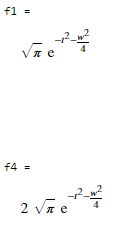
向量输入
%------------向量输入------------%
syms a b c d w x y z
M=[exp(x) 1;sin(y) i*z];
vars=[w x;y z];
transVars=[a b; c d];
fourier(M,vars,transVars);
运行结果为: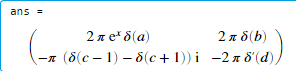
傅里叶变换无结果
%---------傅里叶变换不存在--------%
syms f(t) w
fourier(f,t,w)
运行结果为:
傅里叶逆变换
利用ifourier进行变换,语法基本与fourier一致
ifourier(F,w,t)
ans = f(t)

有“AI”的1024 = 2048,欢迎大家加入2048 AI社区
更多推荐

 8
8 0
0- 0


 已为社区贡献3条内容

所有评论(0)