LaTeX写作之各类报错总结
最近使用overleaf,vscode对论文进行排版,遇到了一些报错,因此总结一些经验和技巧,记录下来,供自己日后查阅。
最近使用overleaf,vscode对论文进行排版,遇到了一些报错,因此总结一些经验和技巧,记录下来,供自己日后查阅。
1. overleaf无法实现反向搜索
在使用overleaf的过程中,发现双击PDF的某一行无法跳转到tex文件的源代码处,同时发现每次编译时PDF加载很慢。
原因:选择浏览器作为PDF阅读器。
解决方法:点击menu,选择overleaf作为PDF阅读器。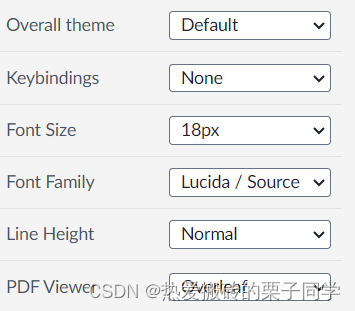
2. 编辑表格
2.1 将论文里面的表格转换为Latex格式的在线工具
latex-tables可以通过上传多种类型的文件,同时轻松实现单元格元素的居中对齐,加边界线,合并单元格等操作,从而实现把表格转换为tex代码。
2.2 双栏模式
2.2.1 表格跨栏时,长度过长,超出了双栏宽度怎么办?
参考LaTeX之双栏模板表格布局(单双栏满宽+不满宽)
解决办法:使用\resizebox{1.0\linewidth}{!}命令(需要配合\usepackage{graphicx}同时使用),该命令可以使表格宽度缩小至LaTeX论文单行宽度,大的文字会变小,小的文字会变大。
\documentclass[twocolumn]{article}
\usepackage{booktabs}% 专业表格线
\usepackage{multirow}% 多行合并单元格
\usepackage{graphicx}
\usepackage{array}      % 支持列格式调整
\usepackage{tabularx}
\usepackage{caption}% 控制标题样式
\usepackage{siunitx}    % 对齐数字列
\usepackage{ragged2e}
\usepackage{longtable}
\usepackage{colortbl}


\begin{document}
\begin{table*}
\caption{A Table Demo}
\label{tab_demo}
\resizebox{1.0\linewidth}{!}{
\begin{tabular}{ccccccccccccc}
\hline
Animal & Weight & Color & Weight & Color & Weight & Color & Weight & Color & Weight & Color & Weight & Color\\
\hline
Dog  & 20.1 & White  & 18.0 & Gray  & 30.5 & Black & 25.2 & White & 25.2 & White & 25.2 & White\\
Cat  & 10.2 & Yellow & 11.2 & Black & 11.5 & White & 12.5 & White & 12.5 & White & 12.5 & White\\
Fox  & 15.5 & Gold   & 15.6 & Gold  & 16.5 & Gold  & 17.0 & Gold  & 16.5 & Gold  & 17.0 & Gold\\
Duck & 2.4  & White  & 3.0  & White & 4.0  & White & 3.8  & White & 4.0  & White & 3.8  & White\\
\hline
\end{tabular}
}
\end{table*}
3. 编译错误
3.1 编译表格时报错
- LaTeX Error: Environment tblr undefined.
解决方法:在文档开始处,\documentclass后面加上\usepackage{tabularray}
又出现了新的错误:LaTeX Error: File `tabularray.sty’ not found.
经查阅,这个帖子提供了问题出现的原因和解决方法(The package tabularray doesn’t seem to work on Overleaf)。
解决方法:把texlive的版本换成2022版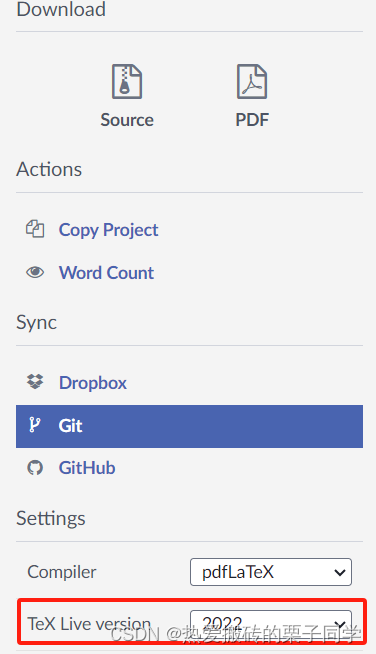
3.2 undefined control sequence
- 使用\captionsetup{font={small,stretch=1.25}, justification=justified}命令时出现undefined control sequence错误,
解决办法:在文档开始处,加上\usepackage{caption}命令。
\usepackage{caption}
3.3 使用\usepackage{apacite}报错
因为期刊要求参考文献是APA格式,所以我使用\usepackage{apacite},在文中使用\cite{}引用参考文献,出现编译错误,
User
Extra \endgroup.
\@cite ...#3\fi \NAT@@close \else #1\fi \endgroup
解决方案:使用apalike包
\usepackage{babel}
\usepackage{apelike}

\bibliographystyle{apalike}
3.4 报错“I found no \citation commands”
前提:已经引用\usepackage{cite}和\usepackage{iopams}
出现错误:
I found no \citation commands
出现错误的原因:在整个tex文件中没有引用参考文献,\cite{cite_key}
3.5 .bbl文件报错:.bbl: Error: LaTeX Error: Something’s wrong–perhaps a missing \item.
出现错误:
LaTeX Error: Something's wrong--perhaps a missing \item.
解决方案:删除原有的.log .aux .bbl .blg文件
3.6 .bbl文件报错:Missing $ inserted. _ LaTeX Extra }, or forgotten $.
使用iopart.cls时,出现错误: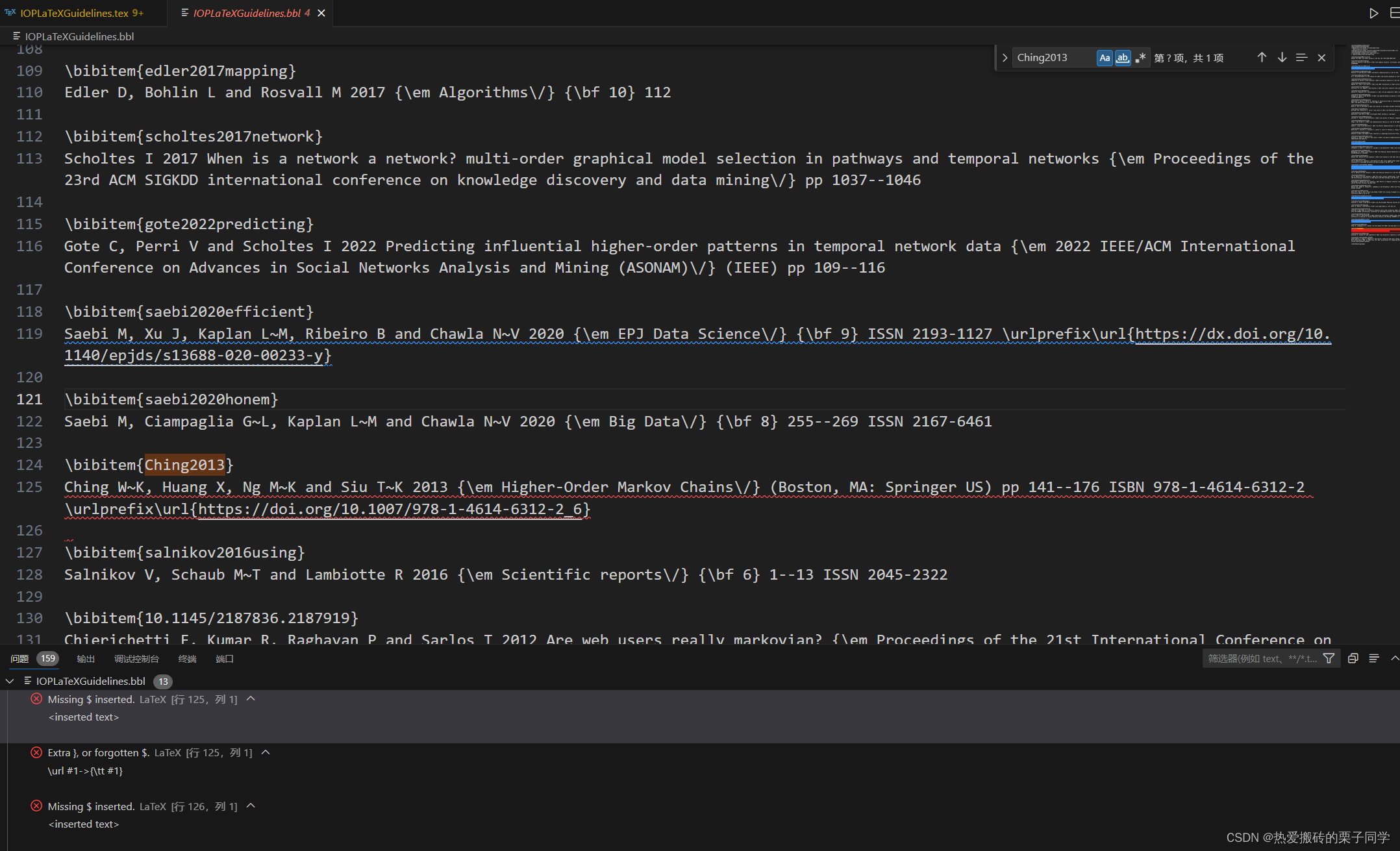
对应的.bib文件中的内容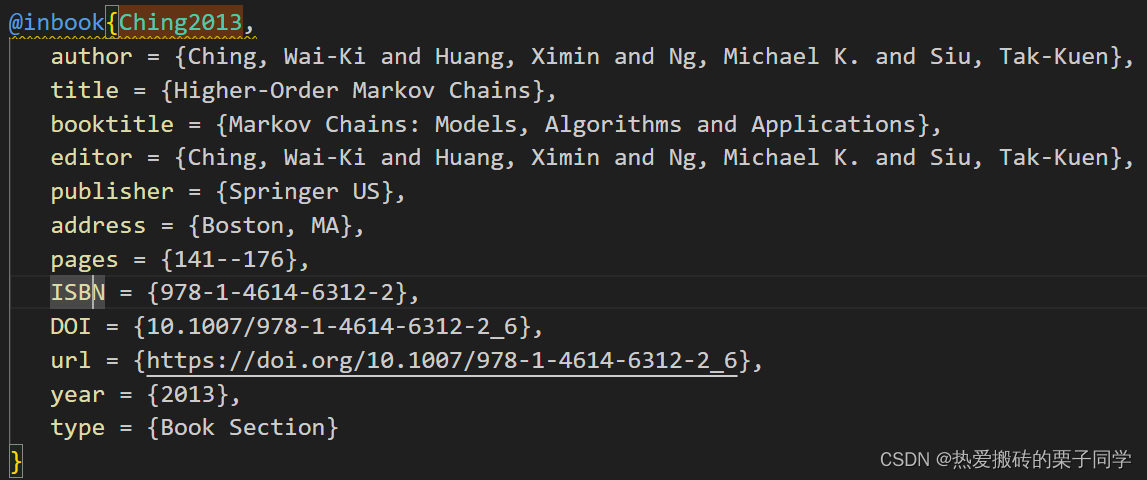
出现错误的原因:url和DOI字段中有下划线(_),需要转义该下划线。
解决方案:把_改为{\_}
@Inbook{Ching2013,
author="Ching, Wai-Ki
and Huang, Ximin
and Ng, Michael K.
and Siu, Tak-Kuen",
title="Higher-Order Markov Chains",
bookTitle="Markov Chains: Models, Algorithms and Applications",
year="2013",
publisher="Springer US",
address="Boston, MA",
pages="141--176",
isbn="978-1-4614-6312-2",
doi="10.1007/978-1-4614-6312-2{\_}6",
url="https://doi.org/10.1007/978-1-4614-6312-2{\_}6"
}
4. 如何使连续的参考文献能够中间用破折号连起来?比如[6,7,8,9]变成[6-9]?
在tex文件开始,加上
\usepackage[numbers,sort&compress]{natbib}
5. 在使用浏览器预览PDF的前提下,如何实现正向+反向搜索?
5.1 正向搜索
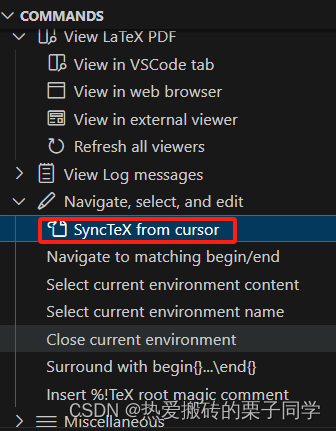
5.2 反向搜索
Ctrl+左键:由PDF定位到源代码
6. 文字处理
6.1 斜体
S\emph{k}DM
7. 数学公式编辑
7.1 行内公式
行内公式统一使用$xxxx$来表示。如$k \ge 2$。
7.2 行间公式
7.2.1 单行编号
\begin{equation}\label{equation1}
{p_{real}}\left( {\phi _{}^k} \right) = \frac{{{W_{real}}({v_i}|{v_{i - k}},...,{v_{i - 1}})}}{{\sum\limits_j {{W_{real}}({v_j}|{v_{i - k}},...,{v_{i - 1}})} }},
\end{equation}
编译结果为: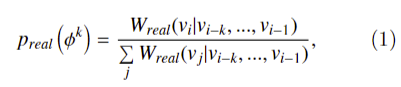
8. 算法表格编辑
8.1 算法表格过长,需要跨页
在\begin{document}前加上如下面所示的代码
\usepackage{algorithm,algpseudocode,float}
\usepackage{lipsum}

\makeatletter
\newenvironment{breakablealgorithm}
  {% \begin{breakablealgorithm}
   \begin{center}
     \refstepcounter{algorithm}% New algorithm
     \hrule height.8pt depth0pt \kern2pt% \@fs@pre for \@fs@ruled
     \renewcommand{\caption}[2][\relax]{% Make a new \caption
       {\raggedright\textbf{\ALG@name~\thealgorithm} ##2\par}%
       \ifx\relax##1\relax % #1 is \relax
         \addcontentsline{loa}{algorithm}{\protect\numberline{\thealgorithm}##2}%
       \else % #1 is not \relax
         \addcontentsline{loa}{algorithm}{\protect\numberline{\thealgorithm}##1}%
       \fi
       \kern2pt\hrule\kern2pt
     }
  }{% \end{breakablealgorithm}
     \kern2pt\hrule\relax% \@fs@post for \@fs@ruled
   \end{center}
  }
\makeatother
然后把算法细节放在\begin{breakablealgorithm}和\end{breakablealgorithm}之间。我使用的爱思唯尔的模板还遇到了使用\textbf{} 命令无法使字体加粗的问题,经查阅资料,引入了\usepackage{lmodern} 。
\begin{breakablealgorithm}%[H]
	\caption{your algorithm}%算法标题
	\begin{algorithmic}[1]%一行一个标行号
	\State \textbf{Given} : Fixed taxi ID $t$, trip request set $P$, distance matrix $D$
	\State \textbf{Given} : tolerance factor $\Delta$, weight matrix $W$
	\State \Return {$\mathcal{U}$}
	\end{algorithmic}
\end{breakablealgorithm}
8.2 取消Input行编号
使用\Statex 命令
\begin{algorithm}
\caption{2333}\label{233}
\begin{algorithmic}[1]
\Statex \textbf{Input:} The sequential dataset \( S \) % No line number for Input
\State \textbf{Output:} 23333
\end{algorithmic}
\end{algorithm}

8.3 某行过长需要在指定位置实现换行
第一行需要保持行号,使用\State命令。后面的行不需要有行号,使用\Statex命令。注意每一行都需要保持在公式环境中,因此需要$.....$,其中的文本需要\text{...}命令单独标注。除第一行外,其余行需要加入\quad 、\qquad 等空格进行占位,以保持对齐。
\State $num\_deps \gets \sum(\text{len}(tars) \text{ for } tars \text{ in }$
\Statex $\qquad \qquad \qquad \qquad \qquad dependencies.\text{values()}$

9. 生成带超链接的引用(默认跳转到目标位置)
- 生成带超链接的引用,需加载 hyperref 包(现代 LaTeX 文档通常默认包含)。
\usepackage{hyperref}  % 必须加载
...
如图~\ref{fig:example} 所示。  % 输出如 "图1",点击可跳转
- 如果想生成不带超链接的普通引用(仅显示标签编号,不可跳转),
适用场景:
避免重复超链接(如已在正文中通过其他方式跳转)。
需要打印时去除颜色/边框(超链接在打印稿中可能显得冗余)。
\usepackage{hyperref}
...
如图~\ref*{fig:example} 所示。  % 输出 "图1",但无超链接
参考教程
[1] https://tex.stackexchange.com/questions/194084/apacite-not-working-in-tex
[2] https://tex.stackexchange.com/questions/350907/error-latex-error-somethings-wrong-perhaps-a-missing-item
[3] https://tex.stackexchange.com/questions/18045/problem-with-compiling-bibtex-no-citation-commands-error
[4] latex中同一处引用多篇文献
[5] Latex写论文中,算法过长,需要分页显示的方法
[6] LaTeX伪代码(algorithm)跨页展示
[7] 关于latex中算法伪代码排版(一)-----某行过长自动换行/特定行去掉行号基于[algorithmicx]

有“AI”的1024 = 2048,欢迎大家加入2048 AI社区
更多推荐

 6
6 0
0- 0


 已为社区贡献2条内容

所有评论(0)