LAMMPS中的GCMC(巨正则蒙特卡洛)
谈谈LAMMPS中的GCMC(巨正则蒙特卡洛)记录学习心得(2020.2.21)疫情期间,还是在家专心科研,养成好习惯,继续记录。Example :fix ID group-ID gcmc N X M type seed T mu displace keyword valuesN:每N步进行一次MC操作,每次操作进行 X 次的交换和 M 次的移动和旋转;type: 原子type;See...
关注 M r . m a t e r i a l , \color{Violet} \rm Mr.material\ , Mr.material , 更 \color{red}{更} 更 多 \color{blue}{多} 多 精 \color{orange}{精} 精 彩 \color{green}{彩} 彩!
主要专栏内容包括:
†《LAMMPS小技巧》: ‾ \textbf{ \underline{\dag《LAMMPS小技巧》:}} †《LAMMPS小技巧》: 主要介绍采用分子动力学( L a m m p s Lammps Lammps)模拟相关安装教程、原理以及模拟小技巧(难度: ★ \bigstar ★)
††《LAMMPS实例教程—In文件详解》: ‾ \textbf{ \underline{\dag\dag《LAMMPS实例教程—In文件详解》:}} ††《LAMMPS实例教程—In文件详解》: 主要介绍采用分子动力学( L a m m p s Lammps Lammps)模拟相关物理过程模拟。(包含:热导率计算、定压比热容计算,难度: ★ \bigstar ★ ★ \bigstar ★ ★ \bigstar ★)
†††《Lammps编程技巧及后处理程序技巧》: ‾ \textbf{ \underline{\dag\dag\dag《Lammps编程技巧及后处理程序技巧》:}} †††《Lammps编程技巧及后处理程序技巧》: 主要介绍针对分子模拟的动力学过程(轨迹文件)进行后相关的处理分析(需要一定编程能力。难度: ★ \bigstar ★ ★ \bigstar ★ ★ \bigstar ★ ★ \bigstar ★ ★ \bigstar ★)。
††††《分子动力学后处理集成函数—Matlab》: ‾ \textbf{ \underline{\dag\dag\dag\dag《分子动力学后处理集成函数—Matlab》:}} ††††《分子动力学后处理集成函数—Matlab》: 主要介绍针对后处理过程中指定函数,进行包装,方便使用者直接调用(需要一定编程能力,难度: ★ \bigstar ★ ★ \bigstar ★ ★ \bigstar ★ ★ \bigstar ★)。
†††††《SCI论文绘图—Python绘图常用模板及技巧》: ‾ \textbf{ \underline{\dag\dag\dag\dag\dag《SCI论文绘图—Python绘图常用模板及技巧》:}} †††††《SCI论文绘图—Python绘图常用模板及技巧》: 主要介绍针对处理后的数据可视化,并提供对应的绘图模板(需要一定编程能力,难度: ★ \bigstar ★ ★ \bigstar ★ ★ \bigstar ★ ★ \bigstar ★)。
††††††《分子模拟—Ovito渲染案例教程》: ‾ \textbf{ \underline{\dag\dag\dag\dag\dag\dag《分子模拟—Ovito渲染案例教程》:}} ††††††《分子模拟—Ovito渲染案例教程》: 主要采用 O v i t o \rm Ovito Ovito软件,对 L a m m p s \rm Lammps Lammps 生成的轨迹文件进行渲染(难度: ★ \bigstar ★ ★ \bigstar ★)。
专栏说明(订阅后可浏览对应专栏全部博文): ‾ \color{red}{\textbf{ \underline{专栏说明(订阅后可浏览对应专栏全部博文):}}} 专栏说明(订阅后可浏览对应专栏全部博文):
注意: \color{red} 注意: 注意:如需只订阅某个单独博文,请联系博主邮箱咨询。 l a m m p s _ m a t e r i a l s @ 163. c o m \rm lammps\_materials@163.com lammps_materials@163.com
♠ \spadesuit ♠ † \dag † 开源后处理集成程序:请关注专栏《LAMMPS后处理——MATLAB子函数合集整理》
♠ \spadesuit ♠ † \dag † † \dag † 需要付费定制后处理程序请邮件联系: l a m m p s _ m a t e r i a l s @ 163. c o m \rm lammps\_materials@163.com lammps_materials@163.com
谈谈LAMMPS中的GCMC(巨正则蒙特卡洛)
Example :fix ID group-ID gcmc N X M type seed T mu displace keyword values
N:每N步进行一次MC操作,每次操作进行 X 次的交换和 M 次的移动和旋转;
type: 原子type;
Seed:随机数种子;
T:温度;
Mu:化学势;
Displace:最大平移距离;(提前设置一个量,防止移动太远)
Keyword : {:分子模板 ;:MC移动的区域 ;:分子最大旋转角度 ;: 气体压力(与体系耦合的大气体浴); <full_energy>:Metropolis比较的时候,计算full energy判断 (复杂体系);<intra_energy>:需要交掉的分子内势能(rigid or shake, …dont worry…) ; :新加入分子的group ; <overlap_cutoff>: overlap拒接受的最大距离}。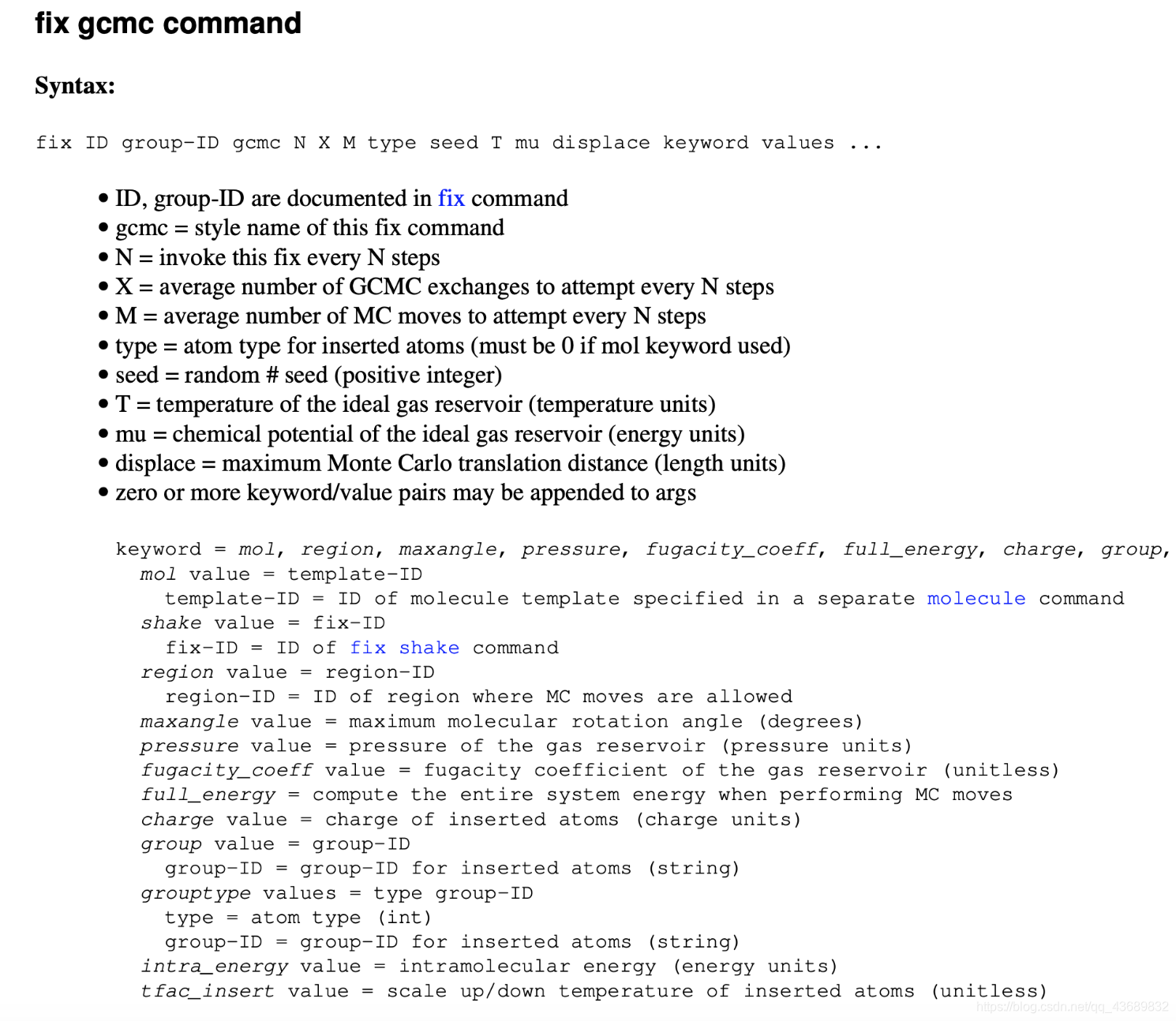
上面是简单的命令介绍,打开LAMMPS的EXAMPLE看看里面有几个case可以学习。
# GCMC for LJ simple fluid, no dynamics
# T = 2.0
# rho ~ 0.5
# p ~ 1.5
# mu_ex ~ 0.0
# comparable to Frenkel and Smit GCMC Case Study, Figure 5.8

# variables modifiable using -var command line switch

variable        mu index -1.25
variable        temp index 2.0
variable	disp index 1.0
variable        lbox index 5.0

# global model settings

units           lj
atom_style      atomic
pair_style      lj/cut 3.0
pair_modify	tail no # turn of to avoid triggering full_energy

# box

region		box block 0 ${lbox} 0 ${lbox} 0 ${lbox}
create_box	1 box

# lj parameters

pair_coeff	* * 1.0 1.0
mass		* 1.0

# we recommend setting up a dedicated group for gcmc

group		gcmcgroup type 1

# gcmc

fix              mygcmc gcmcgroup gcmc 1 100 100 1 29494 ${temp} ${mu} ${disp}

# atom count

variable 	    type1 atom "type==1"
group 		     type1 dynamic gcmcgroup var type1  ## 设置动态group 粒子数可以变化
variable        n1 equal count(type1)   ###统计粒子数

# averaging

variable	   rho equal density
variable	   p equal press
variable	   nugget equal 1.0e-8
variable      lambda equal 1.0
variable     	muex equal ${mu}-${temp}*ln(density*${lambda}+${nugget})
fix 		        ave all ave/time 10 100 1000 v_rho v_p v_muex v_n1 ave one file rho_vs_p.dat
variable	    rhoav equal f_ave[1]
variable	    pav equal f_ave[2]
variable	    muexav equal f_ave[3]
variable	    n1av equal f_ave[4]

# output

variable	tacc equal f_mygcmc[2]/(f_mygcmc[1]+${nugget})
variable	iacc equal f_mygcmc[4]/(f_mygcmc[3]+${nugget})
variable	dacc equal f_mygcmc[6]/(f_mygcmc[5]+${nugget})
### particle number is not a contant
compute_modify  thermo_temp dynamic yes
thermo_style    custom step temp press pe ke density atoms v_iacc v_dacc v_tacc v_rhoav v_pav v_muexav v_n1av
thermo          1000

run             10000

有“AI”的1024 = 2048,欢迎大家加入2048 AI社区
更多推荐
 3
3 0
0- 0


 已为社区贡献5条内容

所有评论(0)