使用js实现幸运大转盘源代码
·
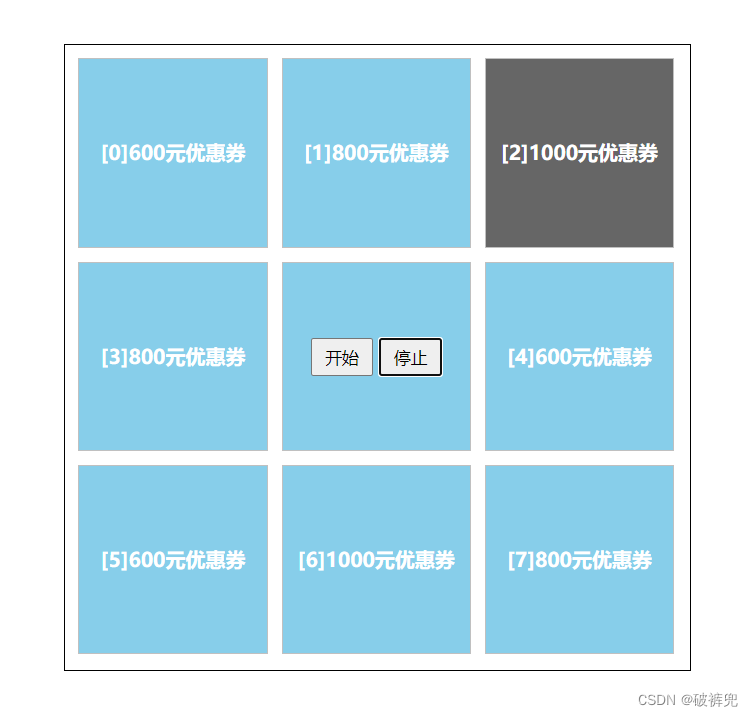
代码如下:
<!DOCTYPE html>
<html lang="en">
<head>
    <meta charset="UTF-8">
    <meta http-equiv="X-UA-Compatible" content="IE=edge">
    <meta name="viewport" content="width=device-width, initial-scale=1.0">
    <title>转盘抽奖</title>
    <link type="text/css" rel="stylesheet" href="css/dzp.css" />
</head>
<body>
    <div id="box">
        <div class="yhq zp">[0]600元优惠券</div>
        <div class="yhq zp">[1]800元优惠券</div>
        <div class="yhq zp">[2]1000元优惠券</div>
        <div class="yhq zp">[3]800元优惠券</div>
        <div class="yhq">
            <input type="button" value="开始" id="start" />
            <input type="button" value="停止" id="stop" />
        </div>
        <div class="yhq zp">[4]600元优惠券</div>
        <div class="yhq zp">[5]600元优惠券</div>
        <div class="yhq zp">[6]1000元优惠券</div>
        <div class="yhq zp">[7]800元优惠券</div>
    </div>

    <script type="text/javascript" src="js/dzp.js"></script>
</body>
</html>
css样式:
*{
    margin: 0;
    padding: 0;
}
#box{
    border: 1px black solid;
    height: 500px;
    width: 500px;
    margin: 50px auto;
}
#box .yhq{
    border: 1px silver solid;
    height: 150px;
    line-height: 150px;
    width: 150px;
    float: left;
    margin-left: 11px;
    margin-top: 11px;
    text-align: center;
    font-weight: bold;
    background-color: #87CEEA;
    color: white;
}
#box .yhq input{
    height: 30px;
    width: 50px;
}
js逻辑代码:
/**
 * 页面加载事件
 */
window.onload=function(){
    //开始按钮绑定点击事件
    startBtnFn();
    //停止按钮绑定点击事件
    stopBtnFn();
}

//定时器变量
var dsq;
//定义变量控制当前显示第几个
var num = 0;

/**
 * 开始按钮绑定点击事件
 */
function startBtnFn(){
    document.getElementById("start").onclick=function(){

        dsq = window.setInterval(function(){
            //获取八个待转区域   arr[0,1,2,3,4,5,6,7]
            var arr = document.getElementsByClassName("zp");

            //指定旋转顺序下标的数组
            //循环下标   0 1 2 3 4 5 6 7
            var order = [0,1,2,4,7,6,5,3];//旋转的下标
            //遍历数组,实现下标是指定顺序的区域变背景颜色
            for(var i=0; i<arr.length; i++){
                //默认改为蓝色
                arr[i].style.backgroundColor="#87CEEA";
            }
            //设置指定num位置的区域变色
            arr[order[num]].style.backgroundColor="#666666";

            num++;
            if(num == 8){
                num = 0;
            }
        },500)
    }
}

/**
 * 停止按钮绑定点击事件
 */
function stopBtnFn(){
    document.getElementById("stop").onclick=function(){
        window.clearInterval(dsq);
    }
}


有“AI”的1024 = 2048,欢迎大家加入2048 AI社区
更多推荐
 4
4 0
0- 0


 已为社区贡献1条内容

所有评论(0)