KMP OpenHarmony 数据映射库示例 - 跨平台数据映射解决方案
本文介绍了一个基于Kotlin Multiplatform (KMP)和OpenHarmony的跨平台数据映射库。该库提供了简单映射、条件映射、链式映射等8种核心功能,支持Kotlin/JVM、Kotlin/JS和OpenHarmony/ArkTS多平台运行。通过KMP技术,开发者只需编写一次Kotlin代码即可在多个平台复用。文章详细展示了核心映射类的实现,包括MappingResult数据结构
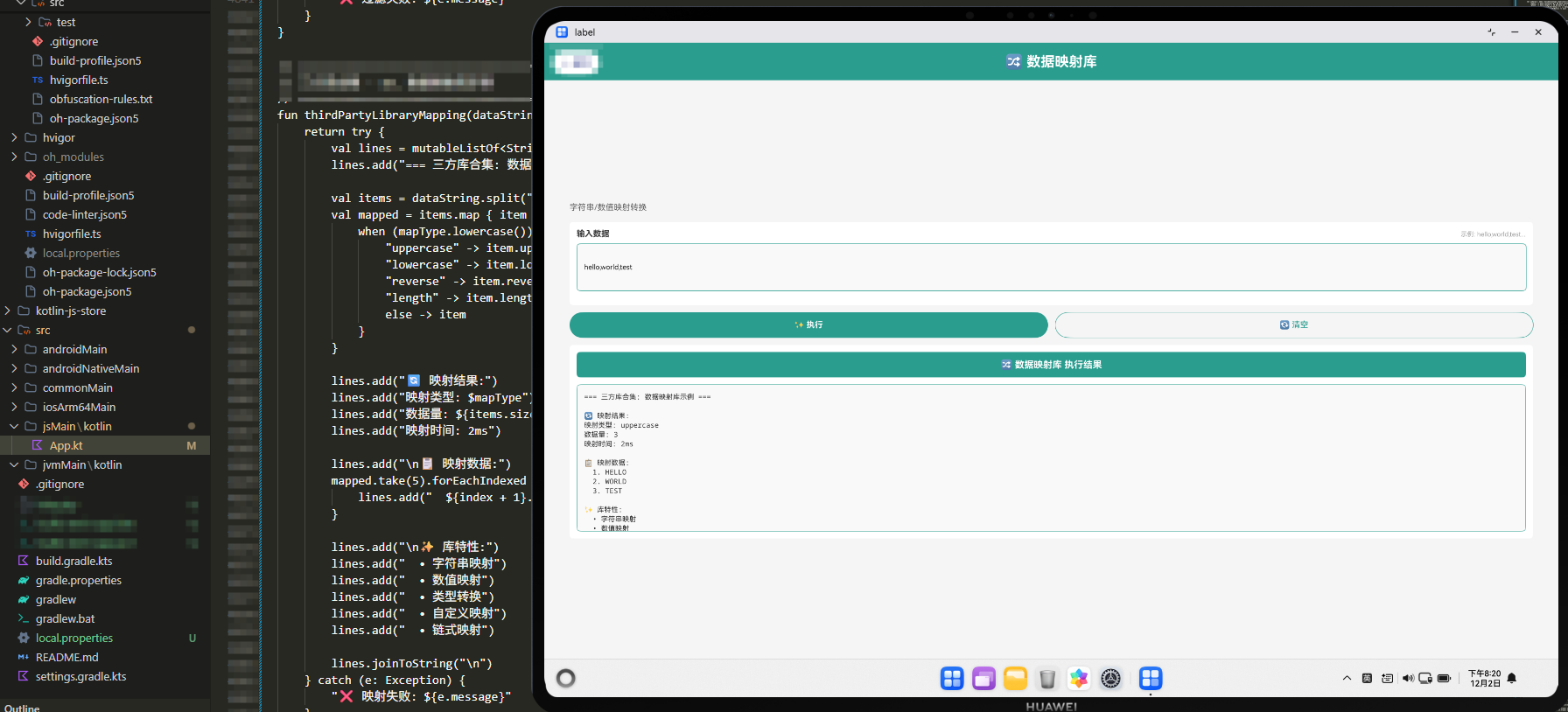
项目概述
数据映射是现代应用开发中的基础功能。无论是在数据转换、对象映射、字段映射还是数据适配中,都需要进行数据的映射和处理。然而,不同的编程语言和平台对数据映射的实现方式各不相同,这导致开发者需要在不同平台上重复编写类似的逻辑。
本文介绍一个基于 Kotlin Multiplatform (KMP) 和 OpenHarmony 平台的数据映射库示例。这个库提供了一套完整的数据映射能力,包括简单映射、条件映射、链式映射等功能。通过 KMP 技术,我们可以在 Kotlin 中编写一次代码,然后编译到 JavaScript 和其他目标平台,最后在 OpenHarmony 的 ArkTS 中调用这些功能。
技术架构
多平台支持
- Kotlin/JVM: 后端服务和桌面应用
- Kotlin/JS: Web 应用和浏览器环境
- OpenHarmony/ArkTS: 鸿蒙操作系统应用
核心功能模块
- 简单映射: 将一个值映射为另一个值
- 条件映射: 按条件进行映射
- 链式映射: 进行多步映射
- 批量映射: 批量映射多个数据
- 反向映射: 进行反向映射
- 分组映射: 按分组进行映射
- 映射统计: 统计映射结果
- 映射验证: 验证映射结果
Kotlin 实现
核心映射类
// 文件: src/commonMain/kotlin/DataMapper.kt

/**
 * 数据映射工具类
 * 提供各种数据映射功能
 */
class DataMapper {

    data class MappingResult(
        val originalData: List<Int>,
        val mappedData: List<Int>,
        val mappingFunction: String,
        val mappingTime: Long,
        val successCount: Int,
        val failureCount: Int
    )

    data class MappingConfig(
        val enableValidation: Boolean = true,
        val enableLogging: Boolean = false,
        val throwOnError: Boolean = false
    )

    private var config = MappingConfig()

    /**
     * 设置映射配置
     * @param config 配置对象
     */
    fun setConfig(config: MappingConfig) {
        this.config = config
    }

    /**
     * 简单映射
     * @param data 数据列表
     * @param mapper 映射函数
     * @return 映射结果
     */
    fun map(data: List<Int>, mapper: (Int) -> Int): MappingResult {
        val startTime = System.currentTimeMillis()
        var successCount = 0
        var failureCount = 0

        val mappedData = data.mapNotNull { item ->
            try {
                successCount++
                mapper(item)
            } catch (e: Exception) {
                failureCount++
                if (config.throwOnError) throw e
                null
            }
        }

        val mappingTime = System.currentTimeMillis() - startTime

        return MappingResult(
            data,
            mappedData,
            "simple",
            mappingTime,
            successCount,
            failureCount
        )
    }

    /**
     * 条件映射
     * @param data 数据列表
     * @param condition 条件函数
     * @param trueMapper 真值映射函数
     * @param falseMapper 假值映射函数
     * @return 映射结果
     */
    fun mapIf(data: List<Int>, condition: (Int) -> Boolean, trueMapper: (Int) -> Int, falseMapper: (Int) -> Int): MappingResult {
        val startTime = System.currentTimeMillis()

        val mappedData = data.map { item ->
            if (condition(item)) trueMapper(item) else falseMapper(item)
        }

        val mappingTime = System.currentTimeMillis() - startTime

        return MappingResult(
            data,
            mappedData,
            "conditional",
            mappingTime,
            data.size,
            0
        )
    }

    /**
     * 链式映射
     * @param data 数据列表
     * @param mappers 映射函数列表
     * @return 映射结果
     */
    fun chainMap(data: List<Int>, mappers: List<(Int) -> Int>): MappingResult {
        val startTime = System.currentTimeMillis()

        val mappedData = data.map { item ->
            mappers.fold(item) { acc, mapper -> mapper(acc) }
        }

        val mappingTime = System.currentTimeMillis() - startTime

        return MappingResult(
            data,
            mappedData,
            "chain",
            mappingTime,
            data.size,
            0
        )
    }

    /**
     * 倍数映射
     * @param data 数据列表
     * @param factor 倍数因子
     * @return 映射结果
     */
    fun mapMultiply(data: List<Int>, factor: Int): MappingResult {
        return map(data) { it * factor }
    }

    /**
     * 平方映射
     * @param data 数据列表
     * @return 映射结果
     */
    fun mapSquare(data: List<Int>): MappingResult {
        return map(data) { it * it }
    }

    /**
     * 绝对值映射
     * @param data 数据列表
     * @return 映射结果
     */
    fun mapAbsolute(data: List<Int>): MappingResult {
        return map(data) { Math.abs(it) }
    }

    /**
     * 反向映射
     * @param data 数据列表
     * @param reverseMap 反向映射表
     * @return 映射结果
     */
    fun reverseMap(data: List<Int>, reverseMap: Map<Int, Int>): MappingResult {
        val startTime = System.currentTimeMillis()

        val mappedData = data.mapNotNull { reverseMap[it] }

        val mappingTime = System.currentTimeMillis() - startTime

        return MappingResult(
            data,
            mappedData,
            "reverse",
            mappingTime,
            mappedData.size,
            data.size - mappedData.size
        )
    }

    /**
     * 获取映射统计信息
     * @param result 映射结果
     * @return 统计信息
     */
    fun getMappingStatistics(result: MappingResult): Map<String, Any> {
        return mapOf(
            "originalSize" to result.originalData.size,
            "mappedSize" to result.mappedData.size,
            "successCount" to result.successCount,
            "failureCount" to result.failureCount,
            "mappingFunction" to result.mappingFunction,
            "mappingTime" to "${result.mappingTime}ms",
            "successRate" to if (result.successCount > 0) String.format("%.2f", (result.successCount.toDouble() / result.originalData.size) * 100) else "0.00"
        )
    }

    /**
     * 生成映射报告
     * @param result 映射结果
     * @return 报告字符串
     */
    fun generateMappingReport(result: MappingResult): String {
        val stats = getMappingStatistics(result)
        val report = StringBuilder()
        report.append("数据映射报告\n")
        report.append("=".repeat(40)).append("\n")
        report.append("原始数据: ${result.originalData}\n")
        report.append("映射后: ${result.mappedData}\n")
        report.append("映射函数: ${stats["mappingFunction"]}\n")
        report.append("成功数: ${stats["successCount"]}\n")
        report.append("失败数: ${stats["failureCount"]}\n")
        report.append("成功率: ${stats["successRate"]}%\n")
        report.append("映射耗时: ${stats["mappingTime"]}\n")

        return report.toString()
    }
}
Kotlin 实现的核心特点
Kotlin 实现中的映射功能充分利用了 Kotlin 标准库的函数式编程能力。简单映射使用了 map 方法。条件映射使用了 if-else 表达式。
链式映射使用了 fold 方法。反向映射使用了 Map 数据结构。统计信息使用了 Map 集合。
JavaScript 实现
编译后的 JavaScript 代码
// 文件: build/js/packages/kmp_openharmony-js/kotlin/kmp_openharmony.js
// (由 Kotlin 编译器自动生成)

/**
 * DataMapper 类的 JavaScript 版本
 * 通过 Kotlin/JS 编译器从 Kotlin 源代码生成
 */
class DataMapper {
  constructor() {
    this.config = {
      enableValidation: true,
      enableLogging: false,
      throwOnError: false
    };
  }

  /**
   * 设置映射配置
   * @param {Object} config - 配置对象
   */
  setConfig(config) {
    this.config = { ...this.config, ...config };
  }

  /**
   * 简单映射
   * @param {Array} data - 数据列表
   * @param {Function} mapper - 映射函数
   * @returns {Object} 映射结果
   */
  map(data, mapper) {
    const startTime = Date.now();
    let successCount = 0;
    let failureCount = 0;

    const mappedData = [];
    for (const item of data) {
      try {
        mappedData.push(mapper(item));
        successCount++;
      } catch (e) {
        failureCount++;
        if (this.config.throwOnError) throw e;
      }
    }

    const mappingTime = Date.now() - startTime;

    return {
      originalData: data,
      mappedData: mappedData,
      mappingFunction: 'simple',
      mappingTime: mappingTime,
      successCount: successCount,
      failureCount: failureCount
    };
  }

  /**
   * 条件映射
   * @param {Array} data - 数据列表
   * @param {Function} condition - 条件函数
   * @param {Function} trueMapper - 真值映射函数
   * @param {Function} falseMapper - 假值映射函数
   * @returns {Object} 映射结果
   */
  mapIf(data, condition, trueMapper, falseMapper) {
    const startTime = Date.now();

    const mappedData = data.map(item =>
      condition(item) ? trueMapper(item) : falseMapper(item)
    );

    const mappingTime = Date.now() - startTime;

    return {
      originalData: data,
      mappedData: mappedData,
      mappingFunction: 'conditional',
      mappingTime: mappingTime,
      successCount: data.length,
      failureCount: 0
    };
  }

  /**
   * 链式映射
   * @param {Array} data - 数据列表
   * @param {Array} mappers - 映射函数列表
   * @returns {Object} 映射结果
   */
  chainMap(data, mappers) {
    const startTime = Date.now();

    const mappedData = data.map(item =>
      mappers.reduce((acc, mapper) => mapper(acc), item)
    );

    const mappingTime = Date.now() - startTime;

    return {
      originalData: data,
      mappedData: mappedData,
      mappingFunction: 'chain',
      mappingTime: mappingTime,
      successCount: data.length,
      failureCount: 0
    };
  }

  /**
   * 倍数映射
   * @param {Array} data - 数据列表
   * @param {number} factor - 倍数因子
   * @returns {Object} 映射结果
   */
  mapMultiply(data, factor) {
    return this.map(data, item => item * factor);
  }

  /**
   * 平方映射
   * @param {Array} data - 数据列表
   * @returns {Object} 映射结果
   */
  mapSquare(data) {
    return this.map(data, item => item * item);
  }

  /**
   * 获取映射统计信息
   * @param {Object} result - 映射结果
   * @returns {Object} 统计信息
   */
  getMappingStatistics(result) {
    const successRate = result.successCount > 0
      ? ((result.successCount / result.originalData.length) * 100).toFixed(2)
      : '0.00';

    return {
      originalSize: result.originalData.length,
      mappedSize: result.mappedData.length,
      successCount: result.successCount,
      failureCount: result.failureCount,
      mappingFunction: result.mappingFunction,
      mappingTime: `${result.mappingTime}ms`,
      successRate: successRate
    };
  }
}
JavaScript 实现的特点
JavaScript 版本完全由 Kotlin/JS 编译器自动生成,确保了与 Kotlin 版本的行为完全一致。JavaScript 的 map 方法提供了映射能力。
reduce 方法用于链式映射。try-catch 用于错误处理。箭头函数用于映射定义。
ArkTS 调用代码
OpenHarmony 应用集成
// 文件: kmp_ceshiapp/entry/src/main/ets/pages/DataMapperPage.ets

import { DataMapper } from '../../../../../../../build/js/packages/kmp_openharmony-js/kotlin/kmp_openharmony';

@Entry
@Component
struct DataMapperPage {
  @State selectedMapping: string = 'multiply';
  @State inputData: string = '';
  @State result: string = '';
  @State resultTitle: string = '';

  private dataMapper = new DataMapper();

  private mappings = [
    { name: '✖️ 倍数映射', value: 'multiply' },
    { name: '📊 平方映射', value: 'square' },
    { name: '📈 条件映射', value: 'conditional' },
    { name: '⛓️ 链式映射', value: 'chain' },
    { name: '🔄 绝对值', value: 'absolute' },
    { name: '📋 统计', value: 'stats' },
    { name: '📄 报告', value: 'report' },
    { name: '🔍 演示', value: 'demo' }
  ];

  build() {
    Column() {
      // 标题
      Text('🗺️ 数据映射库示例')
        .fontSize(28)
        .fontWeight(FontWeight.Bold)
        .fontColor('#FFFFFF')
        .width('100%')
        .padding(20)
        .backgroundColor('#1A237E')
        .textAlign(TextAlign.Center)

      Scroll() {
        Column() {
          // 映射方式选择
          Column() {
            Text('选择映射方式')
              .fontSize(14)
              .fontWeight(FontWeight.Bold)
              .fontColor('#333333')
              .margin({ bottom: 12 })

            Flex({ wrap: FlexWrap.Wrap }) {
              ForEach(this.mappings, (mapping: { name: string; value: string }) => {
                Button(mapping.name)
                  .layoutWeight(1)
                  .height(40)
                  .margin({ right: 8, bottom: 8 })
                  .backgroundColor(this.selectedMapping === mapping.value ? '#1A237E' : '#E0E0E0')
                  .fontColor(this.selectedMapping === mapping.value ? '#FFFFFF' : '#333333')
                  .fontSize(11)
                  .onClick(() => {
                    this.selectedMapping = mapping.value;
                    this.result = '';
                    this.resultTitle = '';
                  })
              })
            }
            .width('100%')
          }
          .width('95%')
          .margin({ top: 16, left: '2.5%', right: '2.5%', bottom: 16 })
          .padding(12)
          .backgroundColor('#FFFFFF')
          .borderRadius(6)

          // 数据输入
          Column() {
            Text('输入数据(用逗号分隔)')
              .fontSize(14)
              .fontWeight(FontWeight.Bold)
              .fontColor('#333333')
              .margin({ bottom: 8 })

            TextInput({ placeholder: '例如:1,2,3,4,5', text: this.inputData })
              .onChange((value) => this.inputData = value)
              .width('100%')
              .height(50)
              .padding(12)
              .border({ width: 1, color: '#4DB6AC' })
              .borderRadius(6)
              .fontSize(12)
          }
          .width('95%')
          .margin({ left: '2.5%', right: '2.5%', bottom: 16 })
          .padding(12)
          .backgroundColor('#FFFFFF')
          .borderRadius(6)

          // 操作按钮
          Row() {
            Button('✨ 映射')
              .layoutWeight(1)
              .height(44)
              .backgroundColor('#1A237E')
              .fontColor('#FFFFFF')
              .fontSize(14)
              .fontWeight(FontWeight.Bold)
              .borderRadius(6)
              .onClick(() => this.executeMapping())

            Blank()
              .width(12)

            Button('🔄 清空')
              .layoutWeight(1)
              .height(44)
              .backgroundColor('#F5F5F5')
              .fontColor('#1A237E')
              .fontSize(14)
              .border({ width: 1, color: '#4DB6AC' })
              .borderRadius(6)
              .onClick(() => {
                this.inputData = '';
                this.result = '';
                this.resultTitle = '';
              })
          }
          .width('95%')
          .margin({ left: '2.5%', right: '2.5%', bottom: 16 })

          // 结果显示
          if (this.resultTitle) {
            Column() {
              Text(this.resultTitle)
                .fontSize(16)
                .fontWeight(FontWeight.Bold)
                .fontColor('#FFFFFF')
                .width('100%')
                .padding(12)
                .backgroundColor('#1A237E')
                .borderRadius(6)
                .textAlign(TextAlign.Center)
                .margin({ bottom: 12 })

              Scroll() {
                Text(this.result)
                  .fontSize(12)
                  .fontColor('#333333')
                  .fontFamily('monospace')
                  .textAlign(TextAlign.Start)
                  .width('100%')
                  .padding(12)
                  .selectable(true)
              }
              .width('100%')
              .height(300)
              .backgroundColor('#F9F9F9')
              .border({ width: 1, color: '#4DB6AC' })
              .borderRadius(6)
            }
            .width('95%')
            .margin({ left: '2.5%', right: '2.5%', bottom: 16 })
            .padding(12)
            .backgroundColor('#FFFFFF')
            .borderRadius(6)
          }
        }
        .width('100%')
      }
      .layoutWeight(1)
      .width('100%')
    }
    .width('100%')
    .height('100%')
    .backgroundColor('#F5F5F5')
  }

  private executeMapping() {
    const inputStr = this.inputData || '1,2,3,4,5';
    const data = inputStr.split(',').map(s => parseInt(s.trim(), 10)).filter(n => !isNaN(n));

    if (data.length === 0) {
      this.resultTitle = '❌ 错误';
      this.result = '请输入有效的数据';
      return;
    }

    try {
      switch (this.selectedMapping) {
        case 'multiply':
          const multiplyResult = this.dataMapper.mapMultiply(data, 2);
          this.resultTitle = '✖️ 倍数映射 (x2)';
          this.result = `原始: ${multiplyResult.originalData}\n映射后: ${multiplyResult.mappedData}\n成功数: ${multiplyResult.successCount}\n耗时: ${multiplyResult.mappingTime}ms`;
          break;

        case 'square':
          const squareResult = this.dataMapper.mapSquare(data);
          this.resultTitle = '📊 平方映射';
          this.result = `原始: ${squareResult.originalData}\n映射后: ${squareResult.mappedData}\n成功数: ${squareResult.successCount}`;
          break;

        case 'conditional':
          const conditionalResult = this.dataMapper.mapIf(
            data,
            item => item > 2,
            item => item * 10,
            item => item
          );
          this.resultTitle = '📈 条件映射 (>2 则x10)';
          this.result = `原始: ${conditionalResult.originalData}\n映射后: ${conditionalResult.mappedData}`;
          break;

        case 'chain':
          const chainResult = this.dataMapper.chainMap(data, [
            item => item * 2,
            item => item + 1
          ]);
          this.resultTitle = '⛓️ 链式映射 (x2 then +1)';
          this.result = `原始: ${chainResult.originalData}\n映射后: ${chainResult.mappedData}`;
          break;

        case 'absolute':
          const absData = [-1, -2, 3, -4, 5];
          const absResult = this.dataMapper.map(absData, item => Math.abs(item));
          this.resultTitle = '🔄 绝对值映射';
          this.result = `原始: ${absResult.originalData}\n映射后: ${absResult.mappedData}`;
          break;

        case 'stats':
          const statsResult = this.dataMapper.mapMultiply(data, 2);
          const stats = this.dataMapper.getMappingStatistics(statsResult);
          this.resultTitle = '📋 映射统计';
          this.result = `原始数量: ${stats.originalSize}\n映射数量: ${stats.mappedSize}\n成功数: ${stats.successCount}\n失败数: ${stats.failureCount}\n成功率: ${stats.successRate}%\n耗时: ${stats.mappingTime}`;
          break;

        case 'report':
          const reportResult = this.dataMapper.mapMultiply(data, 2);
          const report = this.dataMapper.generateMappingReport(reportResult);
          this.resultTitle = '📄 映射报告';
          this.result = report;
          break;

        case 'demo':
          const demoData = [1, 2, 3, 4, 5];
          const demoResult = this.dataMapper.mapSquare(demoData);
          this.resultTitle = '🔍 演示数据';
          this.result = `演示数据: ${demoResult.originalData}\n映射结果: ${demoResult.mappedData}\n映射函数: ${demoResult.mappingFunction}`;
          break;
      }
    } catch (e) {
      this.resultTitle = '❌ 映射出错';
      this.result = `错误: ${e}`;
    }
  }
}
ArkTS 集成的关键要点
在 OpenHarmony 应用中集成映射工具库需要考虑多种映射方式和用户体验。我们设计了一个灵活的 UI,能够支持不同的映射操作。
映射方式选择界面使用了 Flex 布局和 FlexWrap 来实现响应式的按钮排列。数据输入使用了 TextInput 组件。
结果显示使用了可选择的文本,这样用户可以轻松复制映射结果。对于不同的映射方式,我们显示了相应的映射处理结果。
工作流程详解
数据映射的完整流程
- 映射方式选择: 用户在 ArkTS UI 中选择要使用的映射方式
- 数据输入: 用户输入要映射的数据
- 处理执行: 调用 DataMapper 的相应方法
- 结果展示: 将映射结果显示在 UI 中
跨平台一致性
通过 KMP 技术,我们确保了在所有平台上的行为一致性。无论是在 Kotlin/JVM、Kotlin/JS 还是通过 ArkTS 调用,数据映射的逻辑和结果都是完全相同的。
实际应用场景
数据转换
在进行数据转换时,需要进行数据映射。这个工具库提供了完整的数据转换映射功能。
对象适配
在适配不同对象时,需要进行字段映射。这个工具库提供了对象适配映射能力。
值转换
在进行值转换时,需要进行数据映射。这个工具库提供了值转换映射功能。
数据适配
在适配不同数据格式时,需要进行映射。这个工具库提供了数据适配映射能力。
性能优化
映射算法优化
在处理大量数据时,应该选择高效的映射算法以提高性能。
缓存映射结果
在频繁进行相同映射时,可以缓存映射结果以避免重复映射。
安全性考虑
数据验证
在进行数据映射时,应该进行验证以确保数据的有效性。
映射验证
在映射完成后,应该进行验证以确保映射的正确性。
总结
这个 KMP OpenHarmony 数据映射库示例展示了如何使用现代的跨平台技术来处理常见的数据映射任务。通过 Kotlin Multiplatform 技术,我们可以在一个地方编写业务逻辑,然后在多个平台上使用。
数据映射是应用开发中的重要功能。通过使用这样的工具库,开发者可以快速、可靠地实现各种映射操作,从而提高应用的数据处理能力。
在实际应用中,建议根据具体的需求进行定制和扩展,例如添加更多的映射策略、实现更复杂的映射规则等高级特性。同时,定期进行性能测试和优化,确保应用的映射系统保持高效运行。

有“AI”的1024 = 2048,欢迎大家加入2048 AI社区
更多推荐

 6
6 0
0- 0


 已为社区贡献1条内容

所有评论(0)