技术面没过,竟然是因为我没用过Pytest框架?
--cov-fail-under=MIN, Fail if the total coverage is less than MIN.如果测试覆盖率低于MIN,则认为失败Console Result
01 概述
pytest是一个非常成熟的全功能的Python测试框架,主要特点有以下几点:
-
简单灵活,容易上手,文档丰富;
-
支持参数化,可以细粒度地控制要测试的测试用例;
-
能够支持简单的单元测试和复杂的功能测试,还可以用来做selenium/appnium等自动化测试、接口自动化测试(pytest+requests);
-
pytest具有很多第三方插件,并且可以自定义扩展,比较好用的如pytest-selenium(集成selenium)、pytest-html(完美html测试报告生成)、pytest-rerunfailures(失败case重复执行)、pytest-xdist(多CPU分发)等;
-
测试用例的skip和xfail处理;
-
可以很好的和CI工具结合,例如jenkins
02 使用介绍
安装:pip install pytest
1、示例代码
编写规则:编写pytest测试样例非常简单,只需要按照下面的规则:
-
测试文件以test_开头(以_test结尾也可以)
-
测试类以Test开头,并且不能带有 init 方法
-
测试函数以test_开头
-
断言使用基本的assert即可
pytest1.py
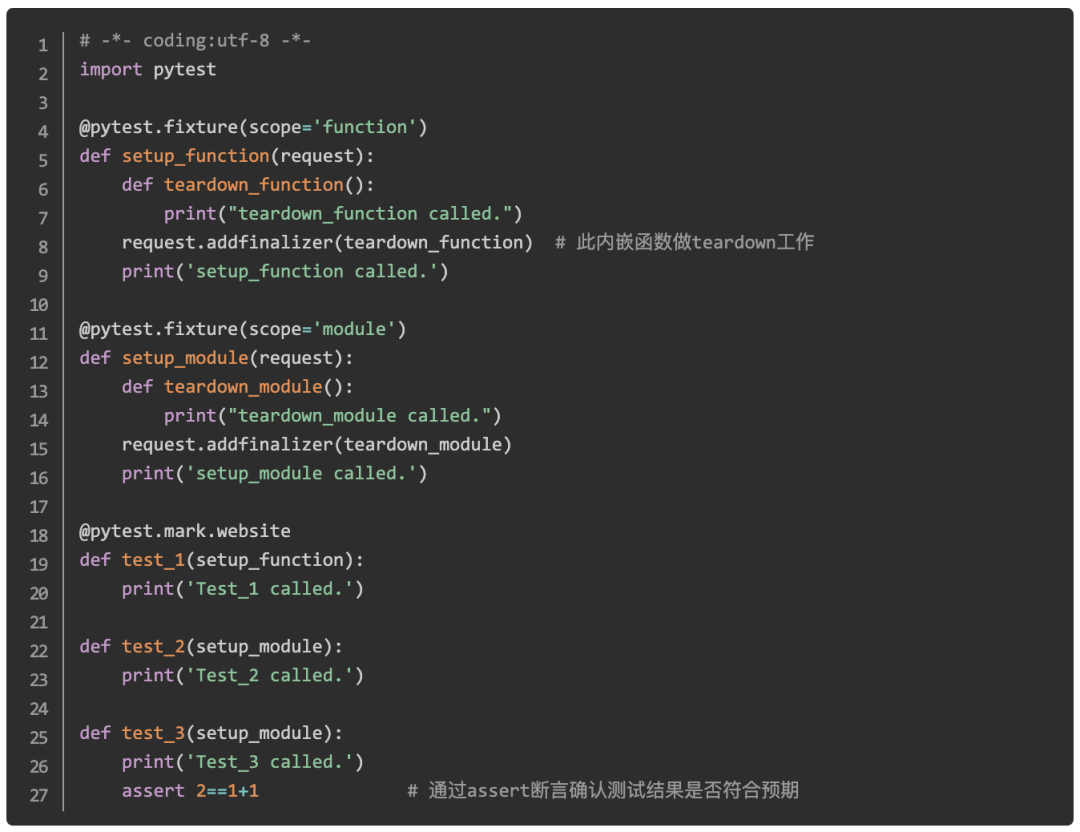
fixture的scope参数
scope参数有四种,默认为function
-
function:每个test都运行,默认是function的scope
-
class:每个class的所有test只运行一次
-
module:每个module的所有test只运行一次
-
session:每个session只运行一次
setup和teardown操作
-
setup,在测试函数或类之前执行,完成准备工作,例如数据库链接、测试数据、打开文件等
-
teardown,在测试函数或类之后执行,完成收尾工作,例如断开数据库链接、回收内存资源等
备注:
也可以通过在fixture函数中通过yield实现setup和teardown功能
2、测试结果
如何执行
-
pytest # run all tests below current dir
-
pytest test_mod.py # run tests in module file test_mod.py
-
pytest somepath # run all tests below somepath like ./tests/
-
pytest -k stringexpr # only run tests with names that match the
# the "string expression", e.g. "MyClass and not method"
# will select TestMyClass.test_something
# but not TestMyClass.test_method_simple -
pytest test_mod.py::test_func # only run tests that match the "node ID",
# e.g "test_mod.py::test_func" will be selected
# only run test_func in test_mod.py
通过pytest.mark对test方法分类执行
通过@pytest.mark控制需要执行哪些feature的test,例如在执行test前增加修饰@pytest.mark.website
-
通过 -m "website" 执行有website标记的test方法
-
$ pytest -v -m "website" pytest1.py -
============================================================================== test session starts ===============================================================================platform linux2 -- Python 2.7.14, pytest-3.0.0, py-1.5.2, pluggy-0.3.1 -- /home/kevin/soft/anaconda2/bin/python -
cachedir: .cacheUsing --randomly-seed=1522925202rootdir: /home/kevin/learn/python-web/tox/case2, inifile:plugins: randomly-1.0.0, mock-1.2, cov-2.0.0collected 3 items -
pytest1.py::test_1 PASSED -
============================================================================= pytest-warning summary =============================================================================WC1 None pytest_funcarg__cov: declaring fixtures using "pytest_funcarg__" prefix is deprecated and scheduled to be removed in pytest 4.0. Please remove the prefix and use the @pytest.fixture decorator instead.=============================================================================== 2 tests deselected ========================================================================================================================================== 1 passed, 2 deselected, 1 pytest-warnings in 0.00 seconds ============================================================
通过 -m "not website" 执行没有website标记的test方法
-
$ pytest -v -m "not website" pytest1.py -
============================================================================== test session starts ===============================================================================platform linux2 -- Python 2.7.14, pytest-3.0.0, py-1.5.2, pluggy-0.3.1 -- /home/kevin/soft/anaconda2/bin/python -
cachedir: .cacheUsing -
--randomly-seed=1522925192rootdir: /home/kevin/learn/python-web/tox/case2, inifile:plugins: randomly-1.0.0, mock-1.2, cov-2.0.0collected 3 items -
pytest1.py::test_3 PASSED -
pytest1.py::test_2 PASSED============================================================================= pytest-warning summary =============================================================================WC1 None pytest_funcarg__cov: declaring fixtures using "pytest_funcarg__" prefix is deprecated and scheduled to be removed in pytest 4.0. Please remove the prefix and use the @pytest.fixture decorator instead.=============================================================================== 1 tests deselected ========================================================================================================================================== 2 passed, 1 deselected, 1 pytest-warnings in 0.00 seconds ============================================================
-
-v 用于显示每个测试函数的执行结果
-
-q 只显示整体测试结果
-
-s 用于显示测试函数中print()函数输出
-
-x, --exitfirst, exit instantly on first error or failed test
-
-h 帮助
Case 1
-
$ pytest -v pytest1.py -
============================================================================== test session starts =============================================================================== -
platform linux2 -- Python 2.7.14, pytest-3.0.0, py-1.5.2, pluggy-0.3.1 -- /home/kevin/soft/anaconda2/bin/python -
cachedir: .cache -
Using --randomly-seed=1522920341 -
rootdir: /home/kevin/learn/python-web/tox/case2, inifile: -
plugins: randomly-1.0.0, mock-1.2, cov-2.0.0 -
collected 3 items -
pytest1.py::test_1 PASSED -
pytest1.py::test_3 PASSED -
pytest1.py::test_2PASSED -
============================================================================= pytest-warning summary =============================================================================WC1 None pytest_funcarg__cov: declaring fixtures using "pytest_funcarg__" prefix is deprecated and scheduled to be removed in pytest 4.0. Please remove the prefix and use the @pytest.fixture decorator instead.================================================================== 3 passed, 1 pytest-warnings in 0.01 seconds ===================================================================
-
$ pytest -s pytest1.py -
============================================================================== test session starts =============================================================================== -
platform linux2 -- Python 2.7.14, pytest-3.0.0, py-1.5.2, pluggy-0.3.1 -
Using --randomly-seed=1522920508 -
rootdir: /home/kevin/learn/python-web/tox/case2, inifile: -
plugins: randomly-1.0.0, mock-1.2, cov-2.0.0 -
collected 3 items -
pytest1.py setup_function called.Test_1 -
called..teardown_function called.setup_module called.Test_2 called..Test_3 called..teardown_module called.============================================================================= pytest-warning summary =============================================================================WC1 None pytest_funcarg__cov: declaring fixtures using "pytest_funcarg__" prefix is deprecated and scheduled to be removed in pytest 4.0. Please remove the prefix and use the @pytest.fixture decorator instead.================================================================== 3 passed, 1 pytest-warnings in 0.01 seconds ===================================================================
测试报告
安装与样例
-
pip install pytest-cov # 计算pytest覆盖率,支持输出多种格式的测试报告 -
pytest --cov-report = html --cov = ./ test_code_target_dir
Console参数介绍
-
--cov=[path], measure coverage for filesystem path (multi-allowed)
指定被测试对象,用于计算测试覆盖率
-
--cov-report=type, type of report to generate: term, term-missing, annotate, html, xml (multi-allowed)
测试报告的类型
-
--cov-config=path, config file for coverage, default: .coveragerc, coverage
配置文件
-
--no-cov-on-fail, do not report coverage if test run fails, default: False
如果测试失败,不生成测试报告
-
--cov-fail-under=MIN, Fail if the total coverage is less than MIN.
如果测试覆盖率低于MIN,则认为失败
Console Result
-
---------------------------------------------------------------- coverage: platform linux2, python 2.7.14-final-0 ---------------------------------------------------------------- -
Name Stmts Miss Cover -
-------------------------------- -
pytest1.py 18 0 100%
Html Result
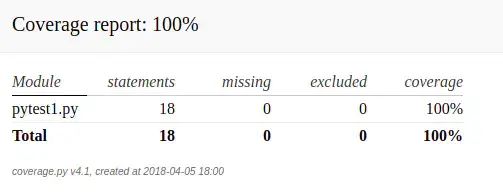
测试顺序随机
pip install pytest-randomly分布式测试
pip install pytest-xdist出错立即返回
pip install pytest-instafail感谢每一个认真阅读我文章的人,礼尚往来总是要有的,虽然不是什么很值钱的东西,如果你用得到的话可以直接拿走:

这些资料,对于【软件测试】的朋友来说应该是最全面最完整的备战仓库,这个仓库也陪伴上万个测试工程师们走过最艰难的路程,希望也能帮助到你!有需要的小伙伴可以点击下方小卡片领取


有“AI”的1024 = 2048,欢迎大家加入2048 AI社区
更多推荐

 11
11 0
0- 0


 已为社区贡献28条内容

所有评论(0)