getBoundingClientRect().top与offsetTop的区别
返回当前元素相对于 offsetParent(position为非static且距离自己最近的祖先元素) 节点顶部边界的偏移像素值。当监听的是window的滚动条时,元素的getBoundingClientRect().top会原来越小,而offsetTop一直不变。楼层导航,懒加载,返回顶部按钮等等,只要涉及scroll事件,都无法避免的要去计算某个元素距离视窗顶部的距离。且这个距离不随滚动条滚
·
getBoundingClientRect():指元素(宽高必须设置具体数值)距离可视区域顶部的距离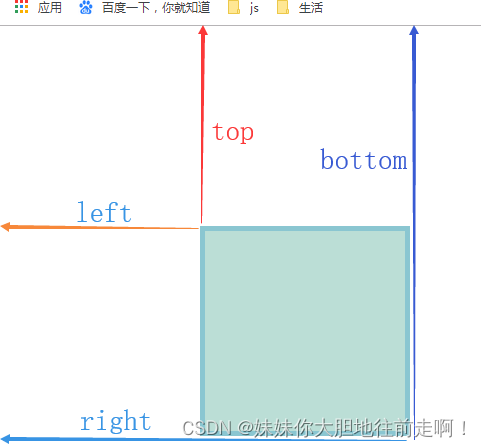
offsetTop:返回当前元素相对于 offsetParent(position为非static且距离自己最近的祖先元素,若祖宗都不符合条件,offsetParent为body) 节点顶部边界的偏移像素值。
且这个距离不随滚动条滚动变化,也就是说这个距离开始是多少就是多少,是个恒定值(包括滚动条卷起的部分)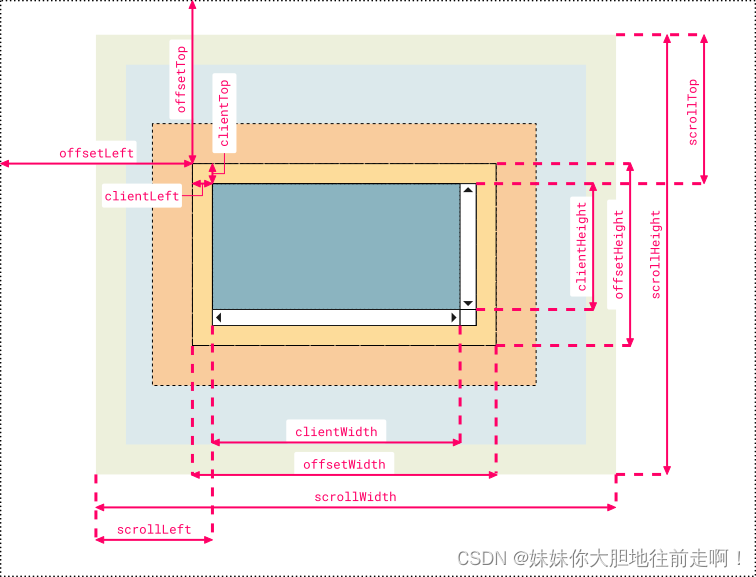
总结!!
当监听的是window的滚动条时,元素的getBoundingClientRect().top会原来越小,而offsetTop一直不变
实例:获取元素距离视窗顶部的可变距离
楼层导航,懒加载,返回顶部按钮等等,只要涉及scroll事件,都无法避免的要去计算某个元素距离视窗顶部的距离
1、监听window的滚动条
window.onscroll = function () {
    可变距离 = document.querySelector('元素').getBoundingClientRect().top
};
2、可以获取元素的offsrtTop减去滚动条距离(前提是得保证元素的offsetParent为html元素或者body):
var offsetTop = document.querySelector('元素').offsetTop;
window.onscroll = function () {
    可变距离 = offsetTop - document.documentElement.scrollTop;
};
**将页面滚动到目标元素:**
第一种写法:
scrollToElement() {
   const element = this.$refs.targetElement;
   if (element) {
     // 获取元素距离页面顶部的高度
     const rect = element.getBoundingClientRect();
     const scrollTop = window.pageYOffset || document.documentElement.scrollTop;
     const offsetTop = rect.top + scrollTop;

     // 滚动到指定位置
     window.scrollTo({
       top: offsetTop,
       behavior: 'smooth' // 平滑滚动
     });
   } else {
     console.error('Element not found');
   }
 }
第二种写法:
methods: {
  scrollToElement() {
    const element = this.$refs.targetElement;
    if (element) {
      element.scrollIntoView({ behavior: 'smooth' });
    } else {
      console.error('Element not found');
    }
  }
}

有“AI”的1024 = 2048,欢迎大家加入2048 AI社区
更多推荐



 2
2 0
0- 0


 已为社区贡献1条内容

所有评论(0)